Android Performance

RenderThread Workflow in Android hwui

Word count: 3.1kReading time: 19 min
2015/08/12
loading

Preface

This article serves as a set of learning notes documenting the basic workflow of RenderThread in hwui as introduced in Android 5.0. Since these are notes, some details might not be exhaustive. Instead, I aim to walk through the general flow and highlight the key stages of its operation for future reference when debugging.

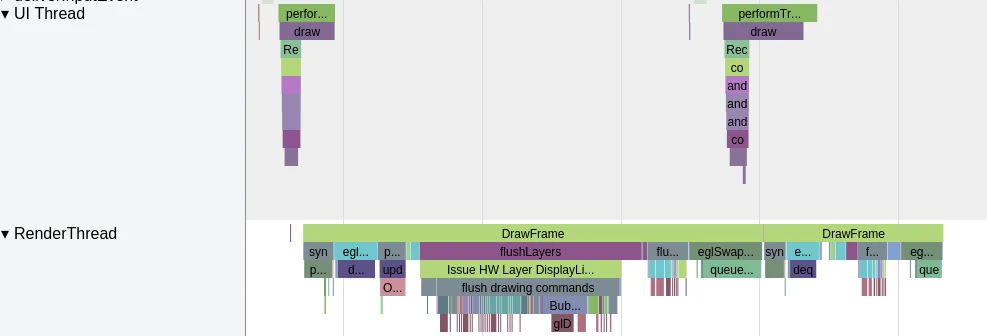
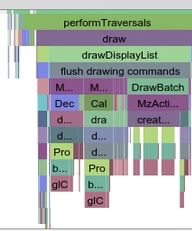
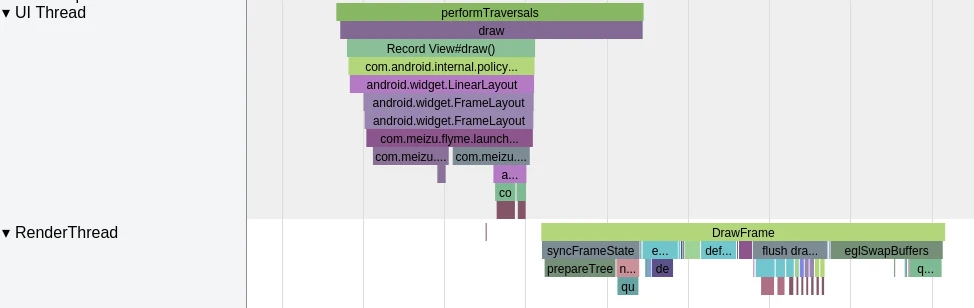
The image below shows a Systrace capture of the first Draw operation by the RenderThread during an application startup. We can trace the RenderThread workflow by observing the sequence of events in this trace. If you are familiar with the application startup process, you know that the entire interface is only displayed on the phone after the first drawFrame is completed. Before this, the user sees the application’s StartingWindow.
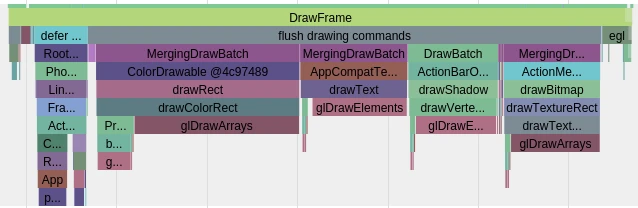
RenderThread Draw first frame

Starting from the Java Layer

Every frame of an application begins its calculation and rendering upon receiving a VSYNC signal. This process originates from the Choreographer class. However, for the sake of brevity, let’s look directly at the call chain involved in rendering a single frame:
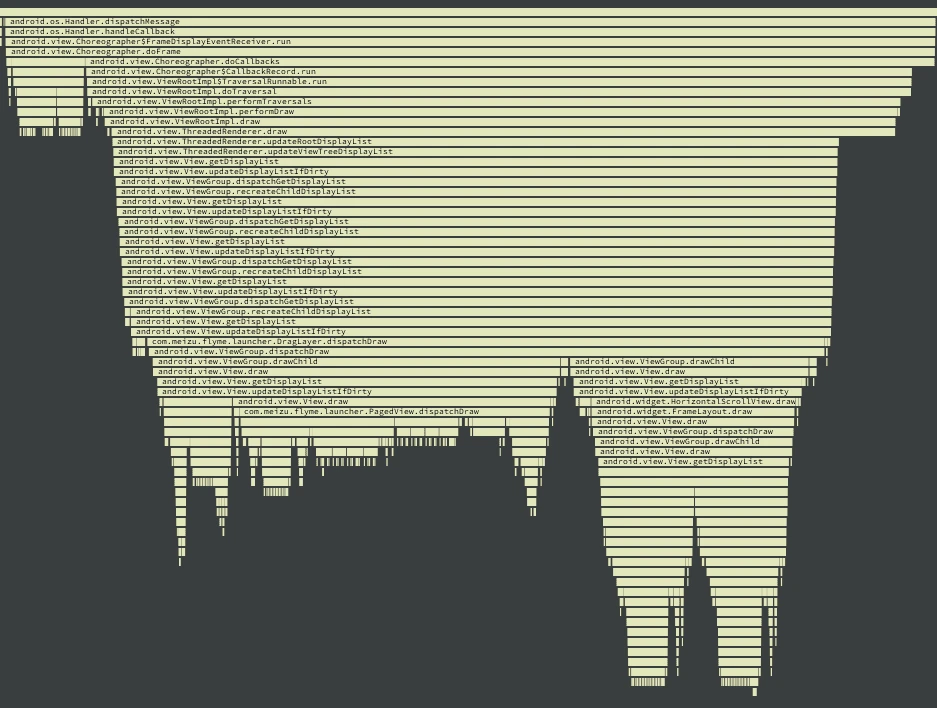
Rendering Call Chain

The drawFrame method in Choreographer calls the performTraversals method in ViewRootImpl, which eventually leads to performDraw(). This then calls draw(boolean fullRedrawNeeded), a private method in ViewRootImpl (distinct from the standard draw method we usually override).

1
2
3
4
5
6
7
8
9
10
11
12
13
14
15
if (mAttachInfo.mHardwareRenderer != null && mAttachInfo.mHardwareRenderer.isEnabled()) {
mIsAnimating = false;
boolean invalidateRoot = false;
if (mHardwareYOffset != yOffset || mHardwareXOffset != xOffset) {
mHardwareYOffset = yOffset;
mHardwareXOffset = xOffset;
mAttachInfo.mHardwareRenderer.invalidateRoot();
}
mResizeAlpha = resizeAlpha;

dirty.setEmpty();

mBlockResizeBuffer = false;
mAttachInfo.mHardwareRenderer.draw(mView, mAttachInfo, this);
}

If the hardware rendering path is taken, mHardwareRenderer.draw is called. Here, mHardwareRenderer refers to ThreadedRenderer, whose draw function is as follows:

1
2
3
4
5
6
7
8
9
10
11
12
13
14
15
16
17
18
19
20
21
22
23
24
25
26
27
28
29
30
31
32
33
34
35
36
37
38
39
@Override
void draw(View view, AttachInfo attachInfo, HardwareDrawCallbacks callbacks) {
attachInfo.mIgnoreDirtyState = true;
long frameTimeNanos = mChoreographer.getFrameTimeNanos();
attachInfo.mDrawingTime = frameTimeNanos / TimeUtils.NANOS_PER_MS;

long recordDuration = 0;
if (mProfilingEnabled) {
recordDuration = System.nanoTime();
}

updateRootDisplayList(view, callbacks);

if (mProfilingEnabled) {
recordDuration = System.nanoTime() - recordDuration;
}

attachInfo.mIgnoreDirtyState = false;

// register animating rendernodes which started animating prior to renderer
// creation, which is typical for animators started prior to first draw
if (attachInfo.mPendingAnimatingRenderNodes != null) {
final int count = attachInfo.mPendingAnimatingRenderNodes.size();
for (int i = 0; i < count; i++) {
registerAnimatingRenderNode(
attachInfo.mPendingAnimatingRenderNodes.get(i));
}
attachInfo.mPendingAnimatingRenderNodes.clear();
// We don't need this anymore as subsequent calls to
// ViewRootImpl#attachRenderNodeAnimator will go directly to us.
attachInfo.mPendingAnimatingRenderNodes = null;
}

int syncResult = nSyncAndDrawFrame(mNativeProxy, frameTimeNanos,
recordDuration, view.getResources().getDisplayMetrics().density);
if ((syncResult & SYNC_INVALIDATE_REQUIRED) != 0) {
attachInfo.mViewRootImpl.invalidate();
}
}

In this function, updateRootDisplayList(view, callbacks) performs the getDisplayList operation. This is followed by a crucial step:

1
2
int syncResult = nSyncAndDrawFrame(mNativeProxy, frameTimeNanos,
recordDuration, view.getResources().getDisplayMetrics().density);

As we can see, this is a blocking operation. The Java layer waits for the Native layer to complete and return a result before proceeding.

The Native Layer

The Native code is located in android_view_ThreadedRenderer.cpp. The implementation is as follows:

1
2
3
4
5
static int android_view_ThreadedRenderer_syncAndDrawFrame(JNIEnv* env, jobject clazz,
jlong proxyPtr, jlong frameTimeNanos, jlong recordDuration, jfloat density) {
RenderProxy* proxy = reinterpret_cast<RenderProxy*>(proxyPtr);
return proxy->syncAndDrawFrame(frameTimeNanos, recordDuration, density);
}

The RenderProxy implementation can be found in frameworks/base/libs/hwui/renderthread/RenderProxy.cpp:

1
2
3
4
5
int RenderProxy::syncAndDrawFrame(nsecs_t frameTimeNanos, nsecs_t recordDurationNanos,
float density) {
mDrawFrameTask.setDensity(density);
return mDrawFrameTask.drawFrame(frameTimeNanos, recordDurationNanos);
}

Here, mDrawFrameTask is a DrawFrameTask object, located in frameworks/base/libs/hwui/renderthread/DrawFrameTask.cpp. Its drawFrame code is:

1
2
3
4
5
6
7
8
9
10
11
12
int DrawFrameTask::drawFrame(nsecs_t frameTimeNanos, nsecs_t recordDurationNanos) {
mSyncResult = kSync_OK;
mFrameTimeNanos = frameTimeNanos;
mRecordDurationNanos = recordDurationNanos;
postAndWait();

// Reset the single-frame data
mFrameTimeNanos = 0;
mRecordDurationNanos = 0;

return mSyncResult;
}

The implementation of postAndWait() is:

1
2
3
4
5
void DrawFrameTask::postAndWait() {
AutoMutex _lock(mLock);
mRenderThread->queue(this);
mSignal.wait(mLock);
}

This places the DrawFrameTask into the mRenderThread. The queue method in RenderThread is implemented as:

1
2
3
4
5
6
7
8
void RenderThread::queue(RenderTask* task) {
AutoMutex _lock(mLock);
mQueue.queue(task);
if (mNextWakeup && task->mRunAt < mNextWakeup) {
mNextWakeup = 0;
mLooper->wake();
}
}

mQueue is a TaskQueue object, and its queue method is:

1
2
3
4
5
6
7
8
9
10
11
12
13
14
15
16
17
18
19
20
21
22
23
24
25
26
27
28
29
30
31
32
33
void TaskQueue::queue(RenderTask* task) {
// Since the RenderTask itself forms the linked list it is not allowed
// to have the same task queued twice
LOG_ALWAYS_FATAL_IF(task->mNext || mTail == task, "Task is already in the queue!");
if (mTail) {
// Fast path if we can just append
if (mTail->mRunAt <= task->mRunAt) {
mTail->mNext = task;
mTail = task;
} else {
// Need to find the proper insertion point
RenderTask* previous = 0;
RenderTask* next = mHead;
while (next && next->mRunAt <= task->mRunAt) {
previous = next;
next = next->mNext;
}
if (!previous) {
task->mNext = mHead;
mHead = task;
} else {
previous->mNext = task;
if (next) {
task->mNext = next;
} else {
mTail = task;
}
}
}
} else {
mTail = mHead = task;
}
}

Going back to the queue method in RenderThread, the wake() function is called:

1
2
3
4
5
6
7
8
9
10
11
12
void Looper::wake() {
ssize_t nWrite;
do {
nWrite = write(mWakeWritePipeFd, "W", 1);
} while (nWrite == -1 && errno == EINTR);

if (nWrite != 1) {
if (errno != EAGAIN) {
ALOGW("Could not write wake signal, errno=%d", errno);
}
}
}

The wake function is straightforward: it simply writes a single character “W” to the write end of a pipe. This wakes up the read end of the pipe, which was waiting for data.

HWUI RenderThread

Where do we go next? First, let’s get familiar with RenderThread. It inherits from Thread (defined in utils/Thread.h). Here is the RenderThread constructor:

1
2
3
4
5
6
7
8
9
10
11
12
RenderThread::RenderThread() : Thread(true), Singleton<RenderThread>()
, mNextWakeup(LLONG_MAX)
, mDisplayEventReceiver(0)
, mVsyncRequested(false)
, mFrameCallbackTaskPending(false)
, mFrameCallbackTask(0)
, mRenderState(NULL)
, mEglManager(NULL) {
mFrameCallbackTask = new DispatchFrameCallbacks(this);
mLooper = new Looper(false);
run("RenderThread");
}

The run method is documented in Thread:

1
2
3
4
// Start the thread in threadLoop() which needs to be implemented.
virtual status_t run( const char* name = 0,
int32_t priority = PRIORITY_DEFAULT,
size_t stack = 0);

This triggers the threadLoop function, which is critical:

1
2
3
4
5
6
7
8
9
10
11
12
13
14
15
16
17
18
19
20
21
22
23
24
25
26
27
28
29
30
31
32
33
34
35
36
37
38
39
bool RenderThread::threadLoop() {
#if defined(HAVE_PTHREADS)
setpriority(PRIO_PROCESS, 0, PRIORITY_DISPLAY);
#endif
initThreadLocals();

int timeoutMillis = -1;
for (;;) {
int result = mLooper->pollOnce(timeoutMillis);
LOG_ALWAYS_FATAL_IF(result == Looper::POLL_ERROR,
"RenderThread Looper POLL_ERROR!");

nsecs_t nextWakeup;
// Process our queue, if we have anything
while (RenderTask* task = nextTask(&nextWakeup)) {
task->run();
// task may have deleted itself, do not reference it again
}
if (nextWakeup == LLONG_MAX) {
timeoutMillis = -1;
} else {
nsecs_t timeoutNanos = nextWakeup - systemTime(SYSTEM_TIME_MONOTONIC);
timeoutMillis = nanoseconds_to_milliseconds(timeoutNanos);
if (timeoutMillis < 0) {
timeoutMillis = 0;
}
}

if (mPendingRegistrationFrameCallbacks.size() && !mFrameCallbackTaskPending) {
drainDisplayEventQueue(true);
mFrameCallbacks.insert(
mPendingRegistrationFrameCallbacks.begin(), mPendingRegistrationFrameCallbacks.end());
mPendingRegistrationFrameCallbacks.clear();
requestVsync();
}
}

return false;
}

The for loop is an infinite loop. The pollOnce function blocks until mLooper->wake() is called. Once awakened, it proceeds to the while loop:

1
2
3
4
while (RenderTask* task = nextTask(&nextWakeup)) {
task->run();
// task may have deleted itself, do not reference it again
}

It retrieves the RenderTask from the queue and executes its run method. Based on our earlier tracing, we know this RenderTask is a DrawFrameTask. Its run method is as follows:

1
2
3
4
5
6
7
8
9
10
11
12
13
14
15
16
17
18
19
20
21
22
23
24
25
26
27
28
29
30
void DrawFrameTask::run() {
ATRACE_NAME("DrawFrame");

mContext->profiler().setDensity(mDensity);
mContext->profiler().startFrame(mRecordDurationNanos);

bool canUnblockUiThread;
bool canDrawThisFrame;
{
TreeInfo info(TreeInfo::MODE_FULL, mRenderThread->renderState());
canUnblockUiThread = syncFrameState(info);
canDrawThisFrame = info.out.canDrawThisFrame;
}

// Grab a copy of everything we need
CanvasContext* context = mContext;

// From this point on anything in "this" is *UNSAFE TO ACCESS*
if (canUnblockUiThread) {
unblockUiThread();
}

if (CC_LIKELY(canDrawThisFrame)) {
context->draw();
}

if (!canUnblockUiThread) {
unblockUiThread();
}
}

RenderThread.DrawFrame

The run method of DrawFrameTask coordinates the stages shown in the initial trace diagram. Let’s break down the DrawFrame process step by step, combining the code with the trace visualization.

1. syncFrameState

The first major function is syncFrameState. As its name implies, it synchronizes architectural frame information, moving data maintained by the Java layer into the RenderThread.

Both the Main Thread and the Render Thread maintain their own set of application window view information. This separation allows them to operate without interfering with each other, maximizing parallelism. The Render Thread’s view information is synchronized from the Main Thread. Therefore, whenever the Main Thread’s view information changes, it must be synced to the Render Thread.

In the code, you’ll find two RenderNode types: one in hwui and one in View. Synchronization essentially involves copying data from the Java-side RenderNode to the hwui RenderNode. Note that the return value of syncFrameState is assigned to canUnblockUiThread. This boolean determines whether to wake the Main Thread early. If true, the Main Thread can resume work on other tasks immediately, rather than waiting for the entire draw operation to finish in the RenderThread. This is one of the most significant differences between Android 5.0 and Android 4.x.

syncFrameState

1
2
3
4
5
6
7
8
9
10
11
12
13
14
15
16
17
18
19
bool DrawFrameTask::syncFrameState(TreeInfo& info) {
mRenderThread->timeLord().vsyncReceived(mFrameTimeNanos);
mContext->makeCurrent();
Caches::getInstance().textureCache.resetMarkInUse();

for (size_t i = 0; i < mLayers.size(); i++) {
mContext->processLayerUpdate(mLayers[i].get());
}
mLayers.clear();
mContext->prepareTree(info);

if (info.out.hasAnimations) {
if (info.out.requiresUiRedraw) {
mSyncResult |= kSync_UIRedrawRequired;
}
}
// If prepareTextures is false, we ran out of texture cache space
return info.prepareTextures;
}

First is makeCurrent. Here, mContext is a CanvasContext object:

1
2
3
4
void CanvasContext::makeCurrent() {
// In the meantime this matches the behavior of GLRenderer, so it is not a regression
mHaveNewSurface |= mEglManager.makeCurrent(mEglSurface);
}

mEglManager is an EglManager object:

1
2
3
4
5
6
7
8
9
10
11
12
13
14
15
16
17
18
19
bool EglManager::makeCurrent(EGLSurface surface) {
if (isCurrent(surface)) return false;

if (surface == EGL_NO_SURFACE) {
// If we are setting EGL_NO_SURFACE we don't care about any of the potential
// return errors, which would only happen if mEglDisplay had already been
// destroyed in which case the current context is already NO_CONTEXT
TIME_LOG("eglMakeCurrent", eglMakeCurrent(mEglDisplay, EGL_NO_SURFACE, EGL_NO_SURFACE, EGL_NO_CONTEXT));
} else {
EGLBoolean success;
TIME_LOG("eglMakeCurrent", success = eglMakeCurrent(mEglDisplay, surface, surface, mEglContext));
if (!success) {
LOG_ALWAYS_FATAL("Failed to make current on surface %p, error=%s",
(void*)surface, egl_error_str());
}
}
mCurrentSurface = surface;
return true;
}

This logic checks if mCurrentSurface == surface. If they match, no re-initialization is needed. If it’s a different surface, eglMakeCurrent is called to recreate the context.

After makeCurrent, mContext->prepareTree(info) is called:

1
2
3
4
5
6
7
8
9
10
11
12
13
14
15
16
17
18
19
20
21
22
23
24
25
26
27
28
29
30
31
32
void CanvasContext::prepareTree(TreeInfo& info) {
mRenderThread.removeFrameCallback(this);

info.damageAccumulator = &mDamageAccumulator;
info.renderer = mCanvas;
if (mPrefetechedLayers.size() && info.mode == TreeInfo::MODE_FULL) {
info.canvasContext = this;
}
mAnimationContext->startFrame(info.mode);
mRootRenderNode->prepareTree(info);
mAnimationContext->runRemainingAnimations(info);

if (info.canvasContext) {
freePrefetechedLayers();
}

int runningBehind = 0;
// TODO: This query is moderately expensive, investigate adding some sort
// of fast-path based off when we last called eglSwapBuffers() as well as
// last vsync time. Or something.
TIME_LOG("nativeWindowQuery", mNativeWindow->query(mNativeWindow.get(),
NATIVE_WINDOW_CONSUMER_RUNNING_BEHIND, &runningBehind));
info.out.canDrawThisFrame = !runningBehind;

if (info.out.hasAnimations || !info.out.canDrawThisFrame) {
if (!info.out.requiresUiRedraw) {
// If animationsNeedsRedraw is set don't bother posting for an RT anim
// as we will just end up fighting the UI thread.
mRenderThread.postFrameCallback(this);
}
}
}

Within this, mRootRenderNode->prepareTree(info) is the most important part. Back at the Java layer, the ThreadedRenderer initializes a pointer:

1
long rootNodePtr = nCreateRootRenderNode();

This RootRenderNode is the root node of the view tree:

1
mRootNode = RenderNode.adopt(rootNodePtr);

Then a mNativeProxy pointer is created, initializing a RenderProxy object in the Native layer and passing rootNodePtr to it. CanvasContext is also initialized inside RenderProxy, receiving the same rootNodePtr.

We mentioned that the draw method in ThreadedRenderer first calls updateRootDisplayList (our familiar getDisplayList). This involves two steps: updateViewTreeDisplayList and then adding the root node to the DrawOp:

1
2
3
canvas.insertReorderBarrier();
canvas.drawRenderNode(view.getDisplayList());
canvas.insertInorderBarrier();

The final implementation is:

1
2
3
4
5
6
7
8
9
10
status_t DisplayListRenderer::drawRenderNode(RenderNode* renderNode, Rect& dirty, int32_t flags) {
LOG_ALWAYS_FATAL_IF(!renderNode, "missing rendernode");

// dirty is an out parameter and should not be recorded,
// it matters only when replaying the display list
DrawRenderNodeOp* op = new (alloc()) DrawRenderNodeOp(renderNode, flags, *currentTransform());
addRenderNodeOp(op);

return DrawGlInfo::kStatusDone;
}

Returning to CanvasContext::prepareTree, the mRootRenderNode is the one passed during initialization. Its implementation is in RenderNode.cpp:

1
2
3
4
5
6
7
8
9
10
11
12
13
14
15
16
17
18
19
20
21
22
23
24
25
26
void RenderNode::prepareTree(TreeInfo& info) {
prepareTreeImpl(info);
}

void RenderNode::prepareTreeImpl(TreeInfo& info) {
TT_START_MARK(getName());
info.damageAccumulator->pushTransform(this);

if (info.mode == TreeInfo::MODE_FULL) {
pushStagingPropertiesChanges(info); // Sync properties of the current Render Node
}
uint32_t animatorDirtyMask = 0;
if (CC_LIKELY(info.runAnimations)) {
animatorDirtyMask = mAnimatorManager.animate(info); // Perform animation-related operations
}
prepareLayer(info, animatorDirtyMask);
if (info.mode == TreeInfo::MODE_FULL) {
pushStagingDisplayListChanges(info); // Sync Display List of the current Render Node
}
// Sync Bitmaps referenced by the Display List, and the Display Lists of child Render Nodes
prepareSubTree(info, mDisplayListData);
pushLayerUpdate(info); // Check if the current Render Node has a Layer set. If so, process it.

info.damageAccumulator->popTransform();
TT_END_MARK();
}

Further details on these operations can be explored in the source code.

2. draw
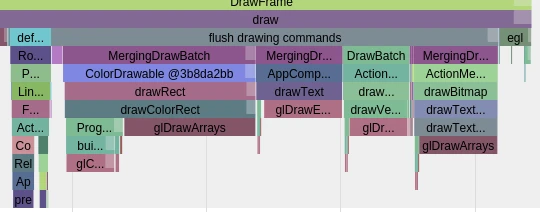
Draw

After syncFrameState comes the draw operation:

1
2
3
if (CC_LIKELY(canDrawThisFrame)) {
context->draw();
}

The draw function in CanvasContext is a core method located in frameworks/base/libs/hwui/renderthread/CanvasContext.cpp (Wait, the original text says OpenGLRenderer.cpp, but in 5.0 it’s often in CanvasContext.cpp for ThreadedRenderer). Let’s follow the provided snippet:

1
2
3
4
5
6
7
8
9
10
11
12
13
14
15
16
17
18
19
20
21
22
23
24
25
26
27
28
29
30
31
32
33
34
35
36
37
38
void CanvasContext::draw() {
profiler().markPlaybackStart();

SkRect dirty;
mDamageAccumulator.finish(&dirty);

// ......

status_t status;
if (!dirty.isEmpty()) {
status = mCanvas->prepareDirty(dirty.fLeft, dirty.fTop,
dirty.fRight, dirty.fBottom, mOpaque);
} else {
status = mCanvas->prepare(mOpaque);
}

Rect outBounds;
status |= mCanvas->drawRenderNode(mRootRenderNode.get(), outBounds);

profiler().draw(mCanvas);

mCanvas->finish();

profiler().markPlaybackEnd();

if (status & DrawGlInfo::kStatusDrew) {
swapBuffers();
}

profiler().finishFrame();

// M: enable to get overdraw count
if (CC_UNLIKELY(g_HWUI_debug_overdraw)) {
// ... debug logic ...
}

// ......
}

2.1 EglManager::beginFrame

While not shown in the immediate snippet above, beginFrame is typically called during this phase:

1
2
3
4
5
6
7
8
9
10
void EglManager::beginFrame(EGLSurface surface, EGLint* width, EGLint* height) {
makeCurrent(surface);
if (width) {
eglQuerySurface(mEglDisplay, surface, EGL_WIDTH, width);
}
if (height) {
eglQuerySurface(mEglDisplay, surface, EGL_HEIGHT, height);
}
eglBeginFrame(mEglDisplay, surface);
}

makeCurrent manages the context, and eglBeginFrame validates parameter integrity.

2.2 prepareDirty

1
2
3
4
5
6
7
status_t status;
if (!dirty.isEmpty()) {
status = mCanvas->prepareDirty(dirty.fLeft, dirty.fTop,
dirty.fRight, dirty.fBottom, mOpaque);
} else {
status = mCanvas->prepare(mOpaque);
}

Here, mCanvas is an OpenGLRenderer object. Its prepareDirty implementation is:

1
2
3
4
5
6
7
8
9
10
11
12
13
14
15
16
17
status_t OpenGLRenderer::prepareDirty(float left, float top,
float right, float bottom, bool opaque) {
setupFrameState(left, top, right, bottom, opaque);

// Layer renderers will start the frame immediately
// The framebuffer renderer will first defer the display list
// for each layer and wait until the first drawing command
// to start the frame
if (currentSnapshot()->fbo == 0) {
syncState();
updateLayers();
} else {
return startFrame();
}

return DrawGlInfo::kStatusDone;
}

2.3 drawRenderNode

1
2
Rect outBounds;
status |= mCanvas->drawRenderNode(mRootRenderNode.get(), outBounds);

Next, OpenGLRenderer::drawRenderNode is called to perform the actual rendering:

1
2
3
4
5
6
7
8
9
10
11
12
13
14
15
16
17
18
19
20
21
22
23
24
25
26
27
28
29
30
status_t OpenGLRenderer::drawRenderNode(RenderNode* renderNode, Rect& dirty, int32_t replayFlags) {
status_t status;
// All the usual checks and setup operations (quickReject, setupDraw, etc.)
// will be performed by the display list itself
if (renderNode && renderNode->isRenderable()) {
// compute 3d ordering
renderNode->computeOrdering();
if (CC_UNLIKELY(mCaches.drawDeferDisabled)) { // Check if reordering is disabled
status = startFrame();
ReplayStateStruct replayStruct(*this, dirty, replayFlags);
renderNode->replay(replayStruct, 0);
return status | replayStruct.mDrawGlStatus;
}

// Reordering required
bool avoidOverdraw = !mCaches.debugOverdraw && !mCountOverdraw;
DeferredDisplayList deferredList(*currentClipRect(), avoidOverdraw);
DeferStateStruct deferStruct(deferredList, *this, replayFlags);
renderNode->defer(deferStruct, 0); // Recursive reordering

flushLayers(); // Draw child Render Nodes with Layers set (to FBOs)
status = startFrame(); // Basic operations like clearing color buffers
status = deferredList.flush(*this, dirty) | status;
return status;
}

// Even if there is no drawing command (e.g., invisible),
// it still needs startFrame to clear buffer and start tiling.
return startFrame();
}

Here, renderNode is the RootRenderNode. Although this is just the beginning of the draw process, the key steps are already highlighted:

1
2
3
4
5
renderNode->defer(deferStruct, 0); // Reordering

flushLayers(); // Draw Layers for child nodes to get corresponding FBOs

status = deferredList.flush(*this, dirty) | status; // Execute actual rendering from the deferred list

These are the true core of the rendering engine. The implementation details are complex. For a deeper dive, I highly recommend Luo Shengyang’s article: Analysis of the Display List Rendering Process in Android UI Hardware Acceleration.

2.4 swapBuffers

1
2
3
if (status & DrawGlInfo::kStatusDrew) {
swapBuffers();
}

This ultimately calls the EGL function eglSwapBuffers(mEglDisplay, surface).

2.5 FinishFrame

1
profiler().finishFrame();

Mainly used for recording timing information.

Summary

Since I’m a bit lazy and my summarizing skills don’t quite match Luo’s, I’ll quote his summary here. The overall RenderThread flow is as follows:

  1. Synchronize the Display List maintained by the Main Thread to the one maintained by the Render Thread. This synchronization is performed by the Render Thread while the Main Thread is blocked.
  2. If the synchronization completes successfully, the Main Thread is awakened. From this point, the Main Thread and Render Thread operate independently on their respective Display Lists. Otherwise, the Main Thread remains blocked until the Render Thread finishes rendering the current frame.
  3. Before rendering the Root Render Node’s Display List, the Render Thread first renders child nodes with Layers onto their own FBOs. Finally, it renders these FBOs alongside nodes without Layers onto the Frame Buffer (the graphics buffer requested from SurfaceFlinger). This buffer is then submitted to SurfaceFlinger for composition and display.

Step 2 is crucial because it allows the Main Thread and Render Thread to run in parallel. This means that while the Render Thread is rendering the current frame, the Main Thread can start preparing the Display List for the next frame, leading to a much smoother UI.

Before Android 5.0, without a RenderThread, everything happened on the Main Thread. This meant that the next frame could only be prepared after the current draw was complete, as shown below:
Blocking Draw Flow

With Android 5.0, there are two scenarios:
Main Thread and Render Thread Parallelism

Render Thread Early Wakeup

In the second scenario, the RenderThread hasn’t finished drawing, but since it awakened the Main Thread early, the Main Thread can respond to the next Vsync signal on time and begin preparing the next frame. Even if the first frame took longer than usual (causing a dropped frame), the second frame remains unaffected.


About Me && Blog

Below are my personal details and links. I look forward to connecting and sharing knowledge with fellow developers!

  1. About Me: Includes my WeChat and WeChat group links.
  2. Blog Navigation: A guide to the content on this blog.
  3. Curated Android Performance Articles: A collection of must-read performance optimization articles. Self-nominations/recommendations are welcome!
  4. Android Performance Knowledge Planet: Join our community for more insights.

“If you want to go fast, go alone. If you want to go far, go together.”

WeChat QR Code

CATALOG
  1. 1. Preface
  2. 2. Starting from the Java Layer
  3. 3. The Native Layer
  4. 4. HWUI RenderThread
  5. 5. RenderThread.DrawFrame
    1. 5.1. 1. syncFrameState
    2. 5.2. 2. draw
      1. 5.2.1. 2.1 EglManager::beginFrame
      2. 5.2.2. 2.2 prepareDirty
      3. 5.2.3. 2.3 drawRenderNode
      4. 5.2.4. 2.4 swapBuffers
      5. 5.2.5. 2.5 FinishFrame
  6. 6. Summary
  • About Me && Blog