2017 has passed before we knew it. The blog hasn’t been updated for a while - one reason is that I increasingly realize how shallow my knowledge is and fear that writing about technical topics might mislead readers, and another reason is simply that I’ve been too lazy. Given these two reasons, I’ve decided that blog updates no longer need to be limited to technical articles - things I find meaningful, thoughts, and reflections will also be shared here. On one hand, it serves as my own record, and if it happens to help readers along the way, that would be even better (though there aren’t many readers anyway…).
Since 2017 has just passed, I feel it’s necessary to recommend to everyone the things that I found to be great experiences or very helpful for work and life in 2017 - perhaps you’ll need them in 2018. The recommendations include Apps, hardware, books, equipment, etc. It should be noted that these are things that brought me great help in 2017 - what works for me may not work for you. Without further ado, let’s get into it!
Historical note (reviewed October 2026): These are my 2017 experiences and recommendations. Models, features, and quoted promotional material retain their historical context and are not current buying or installation advice. Notes below clarify version and feature limits.
2017 Best iOS App Recommendation
Keywords: Weight Loss, Learning, Knowledge
Keep
If you’re a fitness enthusiast, planning to lose weight, or looking for an app to track your exercise, I recommend Keep. You may have heard Keep’s famous slogan: Self-discipline gives me freedom! I also love another quote: Don’t let work ruin your life - there’s always someone busier than you who’s still exercising.
The software is just an aid - the most important thing is self-discipline. Life requires self-discipline, exercise requires self-discipline, diet requires self-discipline. Self-discipline doesn’t mean life loses its fun - on the contrary, self-discipline gives me freedom and confidence. People always aspire to be their best selves. Keep It!
In 2017, with Keep’s help, my weight went from a peak of 78 kg to 70 kg. The numbers might not seem like a big deal, but looking back at photo comparisons, I’m really much more confident now.
Dedao (iGet)

As my wife—the boss at home—says, some people you know are impressive - and that’s about it.
Dedao actually gives us a way to get closer to those impressive people and understand their learning methods and ways of thinking. You’ll find that people smarter than you work even harder - so what excuse do you have to slack off?
In 2017, I listened to Wu Jun’s “Letters from Silicon Valley,” Xue Zhaofeng’s “PKU Economics Course,” Wan Weigang’s “Elite Daily Lesson,” Luo Pang’s year-long “Logical Thinking,” and many audiobooks.
In terms of expanding horizons and stimulating thought, what I gained far exceeded the subscription price of these columns.
WeRead
There are many reading platforms - the most important thing is to pick one and stick with it. I read on WeRead, Duokan, and Kindle. There’s no absolute better or worse - what matters is actually gaining knowledge.
People who constantly look at their phones are often criticized nowadays. Instead of scrolling through Weibo, Zhihu, or Jike on the subway, why not open a book and read quietly?
2017 Best Mac App Recommendation
Keywords: Work Planning, Work Recording
Things 3

It’s a bit pricey, but it’s really useful. All the features are complete, and data syncs across all platform versions (iPhone, iPad, Mac).
Things mainly handles the first part of my work routine: task planning. Often there are many tasks, and sometimes important things get forgotten. Now I record everything I need to do in Things, and every morning I filter out what to do today based on priority. If other urgent matters come up, they also get recorded, so nothing gets overlooked.
Things’ recurring tasks, task priorities, and task timing are all quite useful. After using the web-based Tower, I decisively migrated all my data to Things.
Update: Things 3 prioritizes through Today ordering and custom tags, rather than a built-in P1/P2 field. Sync requires the same Things Cloud account. With Things 3.23, updating one device requires the others to run 3.22 or 3.23 to keep syncing; cross-platform support does not mean every old version remains compatible.
MWeb

MWeb is a Markdown editor. I tried several before settling on this one. It’s feature-complete, has a beautiful interface, makes Markdown writing comfortable, and has excellent image support.
MWeb handles the second part of my work routine: task recording, including daily task completion records. Things is for planning tasks, but after completing tasks, you need to record and summarize - that’s the daily task record. Things records the workflow, while MWeb records the thoughts.
I also use MWeb to write blog posts, company documents, summaries, etc. In short, it’s a Markdown editor I enjoy using.
Evernote
No need to introduce Evernote much. Its powerful browser clipping plugin has helped me store many excellent technical articles; team sharing features help me share notes within the team.
Evernote handles the third part of my work routine: archiving. Whether it’s technical articles, meeting minutes, project plans, or PDFs - if you need a place for long-term storage, Evernote is a very reliable choice. Sometimes during meetings without making PPTs, Evernote’s presentation feature can also do the job.
Version note: This describes the older experience. Evernote and Yinxiang Biji are separate services, with separate accounts and feature sets. International Evernote decommissioned pre-v10 Mac, Windows, and Android clients on March 26, 2024. The old presentation workflow is not a promise about current versions; follow the documentation for the service you use when migrating or exporting.
2017 Best Android App Recommendation
Keywords: Android Tools
Android Network and Resource Access Tools
As a long-time user of Google’s apps and services, I relied on Shadowsocks for the Android experience I wanted at the time. As an Android developer, I couldn’t imagine how many sources of knowledge I’d lose without it.
Crossing the Great Firewall took some care. Thankfully, the government hadn’t shut every route down. Don’t ask me how I set it up—keeping a low profile was how you got by.
Greenify
This was my 2017 recommendation for controlling background apps, not a universal must-install recommendation today. Android 6.0 (API 23) introduced system-level Doze and App Standby; later systems and vendors have their own policies. Check actual battery use and background behavior on the device before adding another tool.
I had the privilege of discussing issues with Mr. Feng, the author of Greenify, in a WeChat group. Mr. Feng’s depth and passion for technology is something I can only aspire to. We all owe Mr. Feng a donation for the paid version.
The promotional description below is historical. The developer’s listing warns that hibernation interrupts background functions, including push messages, alarms, scheduled work, and widget updates. Foreground functionality does not imply unaffected background behavior or permanently new-device performance.
No more need to envy friends with iPhones - even with many apps installed, your phone won’t become slow and battery-draining. With ‘Greenify’, your Android device can stay as smooth and long-lasting as the first day you got it!
The most endorsed Android battery-saving software on Zhihu: http://www.zhihu.com/question/21007772
‘Greenify’ helps you identify apps that negatively impact overall system performance and battery consumption, and uses unique ‘hibernation’ technology to prevent them from draining your battery and occupying precious memory. Apps processed with ‘hibernation’ cannot ‘secretly’ run when you haven’t actively launched them, yet retain full functionality and experience when you do launch them normally - just like iPhone apps!
2017 Best Non-Technical Book Recommendation
Keywords: Self-Improvement
Deep Work
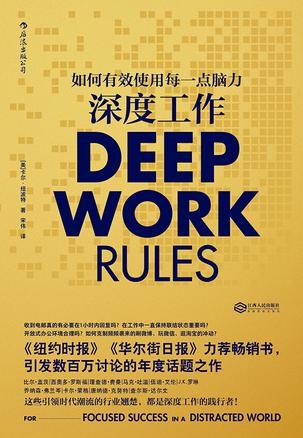
Strongly recommend this book, especially for programmers who need to learn throughout their lives. Different people may have different impressions after reading it, but I was definitely inspired by some of the methods in it. Combined with my own abilities and work, I made targeted improvements and achieved good results. Personally, I think it’s the best book I read in 2017. In this era of serious fragmentation, the consumption and satisfaction of quick knowledge has made us lazy, thinking we know many things, but without deep processing, the knowledge absorbed is just fragments that fade away with time.
Constantly sending and receiving emails, attending endless meetings, scrambling with instant messaging pings, constantly switching attention among complex multi-threaded work… You appear very busy, even unconsciously enjoying this busyness, but can your busyness really translate into productivity?
The author, Cal Newport with a PhD from MIT, sharply reveals the astonishing truth of the information economy - knowledge workers spend over 60% of their working hours on such shallow tasks, which not only produce limited value but also permanently damage people’s ability to do deep work!
The author created the concept of “deep work,” meaning focused professional activities in an undistracted state that push your cognitive capabilities to their limits. And precisely because deep work ability is increasingly rare in today’s society, its relationship with economic success is becoming increasingly close. All discussions in this book revolve around “deep work,” divided into two parts: In the first part, the author objectively analyzes the importance of achieving deep work in the new economic landscape from perspectives of neuroscience, psychology, and philosophy. The second part systematically teaches specific strategies for practicing deep work in daily life, such as incorporating deep work into daily work processes, improving the brain’s deep thinking ability, and staying away from social networks.
The author also emphasizes that deep work is not an outdated skill, but rather a remedy to rescue people from the spiritual alienation caused by technological monopoly. In this current network-centered shallow information age, advocating deep work is tantamount to calling for a return to craftsmanship.
Douban: https://book.douban.com/subject/27056409/
Peak: Secrets from the New Science of Expertise

This book is quite well-known. Actually, this book tells us a simple truth: to become an expert in any field, you need extensive deliberate practice, not just accumulating time.
For anyone who wants to improve themselves in any industry or field, deliberate practice is the gold standard - the most powerful learning method discovered so far.
Douban: https://book.douban.com/subject/26895993/
2017 Best Technical Book Recommendation
Keywords:
To be honest, I didn’t finish reading a single technical book properly in 2017, but from all the technical books I’ve read, there are still two I can recommend. However, the technical books I read are mostly related to my own work, so they may not be suitable for you.
Understanding Android Kernel Design (2nd Edition)
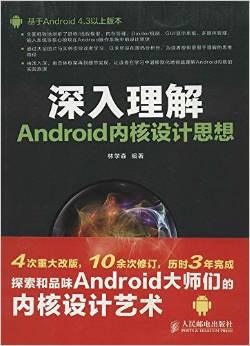
Edition note: The heading names the second edition, while the retained cover and description refer to Android 4.3 and 22 chapters. They do not establish the second edition’s exact source baseline. Check your copy’s edition, ISBN, and source version rather than extending the old compatibility claim indefinitely.
A classic book for system development. This book released its second edition this year with some new content. Whether you’re an app developer or a system developer, understanding more about Android system architecture and design is very helpful for deepening your knowledge.
Read source-oriented books against the Android version used by that edition first, then compare with your target system. Jumping straight to the latest branch can introduce path and architecture mismatches. The old description’s “Android 4.3 and above” does not establish compatibility with every subsequent version.
“Understanding Android Kernel Design” applies to Android 4.3 and above versions. The whole book starts from the basic knowledge of operating systems and comprehensively analyzes how core technologies such as process/thread management, memory management, Binder mechanism, GUI display system, multimedia management, and input system are implemented in Android. The knowledge points in the book mostly come from engineering projects, making it highly practical, hoping to help readers “know why and how.” The book is divided into 4 parts with 22 chapters covering compilation, system principles, application principles, and system tools, basically covering the knowledge needed for Android development, and guides readers through numerous illustrations and examples to make it easier to understand beyond source code analysis.
“Understanding Android Kernel Design” is suitable for both Android system engineers and application developers to read and enhance Android development capabilities. Readers can more deeply understand the Android system through the subtle learning process of “Understanding Android Kernel Design” and naturally apply the knowledge to solving actual development challenges.
Douban: https://book.douban.com/subject/25921329/
Running Linux Kernel
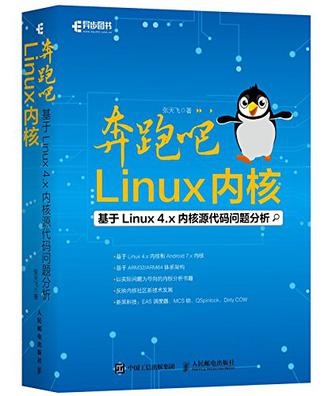
I’m still reading this book. Due to lack of related knowledge, progress is a bit slow. A must-have for Android system engineers.
This book’s content is based on the Linux 4.x kernel, mainly selecting four basic and commonly used kernel modules: memory management, process management, concurrency and synchronization, and interrupt management. The book is divided into 6 chapters, introducing ARM architecture, Linux memory management, process scheduling management, concurrency and synchronization, interrupt management, and kernel debugging techniques. Each section is a Linux kernel topic or technical point. Readers can think about the questions before each section and then analyze the kernel source code around the problems.
This book is rich in content with clear and thorough explanations. It’s suitable not only for people with some Linux foundation, including developers involved in Linux-related development, operating system researchers, embedded developers, and Android underlying developers, but also as a learning book for programmers interested in Linux, and can serve as textbooks for colleges and training schools.
Douban: https://book.douban.com/subject/27108677/
Version note: This is a Linux 4.x-era book. For a current Android device, check its kernel version, configuration, and vendor changes. The Android kernel overview helps compare architectures; generic Linux mainline and book examples are not necessarily the device kernel.
2017 Best Phone Recommendation – Meizu Pro7 Plus
Keywords: Flagship

It’s not that I don’t want to recommend iPhone X - it’s that I can’t afford it…
Despite Meizu’s Pro7 Plus being criticized by netizens, you can’t deny it’s an excellent flagship phone. The smooth Flyme system combined with decent hardware, the innovative secondary display is full of style. Whether it deserves the Pro + Plus title is up to individual judgment.
2017 Best Router Recommendation – Xiaomi Router Pro
Keywords: American TV Shows
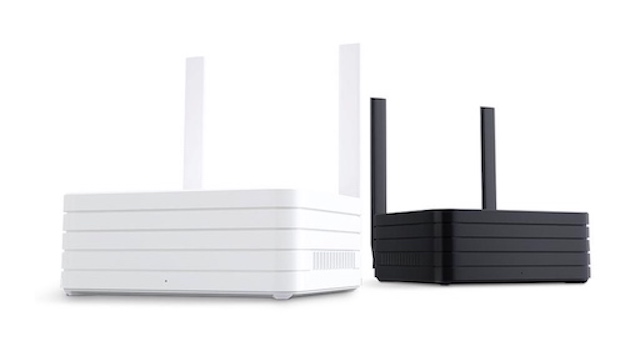
Xiaomi Router + Xiaomi Home Theater was convenient for me in 2017. Some sites offered a “Download to Xiaomi Router” link. One click, and the download would go to my router at home, ready to watch when I got back. That convenience was the whole point. The feature depended on the firmware and third-party services of the time; the old integration’s availability has not been verified for current use.
2017 Best Tablet Recommendation – iPad Pro
Keywords: Perfect

In my eyes, iPad Pro has both the advantages of iPhone and Mac. In terms of use cases - meetings, email, e-books, technical documentation, PDFs - it can handle them all.
iPad Pro paired with a keyboard (don’t buy the pencil, useless) is basically a smaller version of a Mac. Besides coding, it can meet all my needs. After getting this device, my several-year-old near-retirement Mac is used even less.
The software I mentioned earlier: Keep, Dedao, WeRead, Things, MWeb, Evernote - all have iPad versions, and the experience is much better than the iOS versions.
Apple knows how to make good products. My word for the iPad Pro: perfect!
Technical note: “A smaller Mac” describes my use cases, not macOS or native Mac-app compatibility. “Except coding” is also not a current platform limit: supported iPads can build Swift/SwiftUI apps with Swift Playground, subject to its device and OS requirements.
2017 Best Wearable Device Recommendation – Apple Watch
Keywords: Recording

Of my four Apple devices, the Watch is the one I notice least. Personally, I think the biggest issue is battery life - Gen 1 needs daily charging, Gen 2 every two days, which is really frustrating. After switching my main phone from iOS to Android, I stopped using its calls, texts, and alarm reminders. However, this device solved a pain point for me: exercise tracking.
Feature note: “iWatch” means Apple Watch here. My phone-switching experience does not mean alarms stop without an iPhone: alarms, timers, and workout tracking remain available offline. Setup still requires a compatible iPhone rather than Android pairing; calls and messages have separate model, network, and carrier requirements.
The treadmill and Apple Watch make a useful pair for my weight-loss efforts. The detailed exercise records also push me not to slack off. In short, Apple Watch is indispensable in my life.
2017 Best Headphone Recommendation – MDR-1000X
Keywords: Noise Cancellation
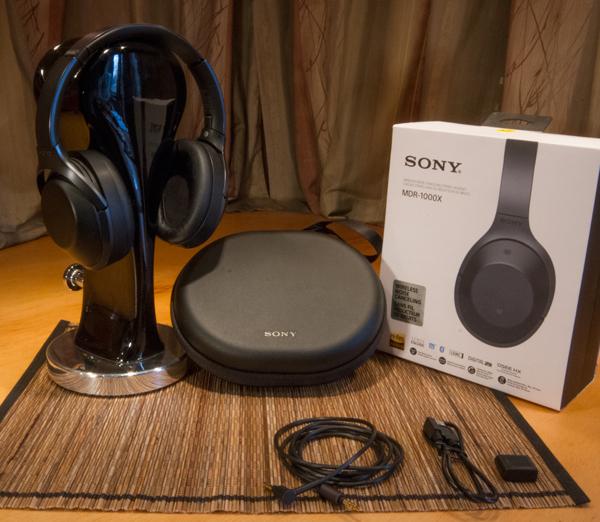
Having wireless noise-canceling headphones in a noisy office is really important. Noise cancellation gives you a quiet environment - whether you’re thinking, coding, or reading, the feeling of not being disturbed by the outside world is great. Wireless brings simplicity - without the cable constraints, it’s much more convenient and avoids the annoyance of cables tangling around chairs.
I’ve been using the MDR-1000X for a while now, and I’m very satisfied with the noise cancellation, ease of use, and sound quality. The original post provides no test source for the claim of 50% fewer interruptions, so it should not be treated as a measured benefit. The effect depends on the environment and how you use the headphones.
2017 Best Weight Loss Companion – Treadmill
Keywords: Persistence
People always tend to be lazy. Everyone knows running helps with weight loss, but just can’t stick with it. Plus outdoor running is too affected by environment - too cold, too hot, rain, snow.
I forced a treadmill into my already crowded home. The benefit of a treadmill is that you can run anytime, and the resistance to running isn’t as strong. After work every day, open Keep, start running - five kilometers a day isn’t hard. What’s important is persistence.
Other
Of course there are some other things that can significantly improve quality of life. I won’t list them all - I’ll update below as I think of them:
- Rouqilin’s beef sauce—look for 三观正的牛 (roughly, “a cow with its values in the right place”). Give it a try; I think you’ll love it
- Dishwasher - whoever uses it knows - no more resistance to cooking at home
- Robot vacuum - who doesn’t want clean floors when they get home? Especially when you have a long-haired creature and two cats at home
About Me && Blog
Below is my personal introduction and related links. I look forward to exchanging ideas with peers - when three people walk together, there must be a teacher among them!
- Blogger’s Personal Introduction: Contains my WeChat and WeChat group links.
- Blog Content Navigation: A navigation guide for my blog content.
- Personally Curated Excellent Blog Posts - Android Performance Optimization Must-Knows: Recommendations and self-recommendations welcome (just WeChat message me)
- Android Performance Optimization Knowledge Planet: Historical introduction; the paid community closed in 2026.
One person can walk faster, a group can walk further