
This is the sixth article in the Android Perfetto series, mainly introducing knowledge related to 120Hz refresh rate on Android devices. Nowadays, 120Hz has become standard configuration for flagship Android phones. This article will discuss the advantages and challenges brought by high refresh rates, and analyze the working principle of 120Hz from a system perspective.
Over the past few years, the refresh rate of mobile device screens has evolved from 60Hz to 90Hz, and then to the now common 120Hz. This improvement not only brings smoother visual experience, but also puts forward new requirements for system architecture and application development. Through the Perfetto tool, we can more intuitively understand the process and performance of frame rendering on high refresh rate devices.
Table of Contents
- Perfetto Series Catalog
- Basic Concepts
- System Implementation and Principles
- Advantages and Challenges of 120Hz
- Thoughts and Future Outlook
- Conclusion
- About Me && Blog
Perfetto Series Catalog
- Android Perfetto Series Catalog
- Android Perfetto Series 1: Introduction to Perfetto
- Android Perfetto Series 2: Capturing Perfetto Traces
- Android Perfetto Series 3: Familiarizing with the Perfetto View
- Android Perfetto Series 4: Opening Large Traces via Command Line
- Android Perfetto Series 5: Choreographer-based Rendering Flow
- Android Perfetto Series 6: Why 120Hz? Advantages and Challenges
- Android Perfetto Series 7: MainThread and RenderThread Deep Dive
- Android Perfetto Series 8: Understanding Vsync and Performance Analysis
- Android Perfetto Series 9: Interpreting CPU Information
- Android Perfetto Series 10: Binder Scheduling and Lock Contention
- Android Perfetto Series 11: PerfettoSQL, Trace Processor and Regression Detection
- Android Perfetto Series 12: Trace Dataflow and Data Loss
- Android Perfetto Series 13: Perfetto SDK, Track Event and App Field Traces
- Android Perfetto Series 14: heapprofd and Memory Profiling
- Android Perfetto Series 15: Boot Traces and Long-running Field Tracing
- Android Perfetto Series 16: GPU, Power Counters and Hardware Bottlenecks
- Android Perfetto Series 17: Scenario Automation and Platform Tracing
- Android Perfetto Series 18: Input Response Latency
- Video (Bilibili) - Android Perfetto Basics and Case Studies
- Video (Bilibili) - Android Perfetto: Trace Graph Types - AOSP, WebView, Flutter + OEM System Optimization
If you haven’t seen the Systrace series yet, here is the portal:
- Systrace Series Catalog: Systematically introduced the use of Systrace, the predecessor of Perfetto, and used Systrace to learn and understand the basic rules of Android performance optimization and Android system operation.
- Personal Blog: Personal blog, mainly content related to Android, and also put some content related to life and work.
Welcome everyone to join the WeChat group or Planet on the About Me page to discuss your problems, the parts about Perfetto you most want to see, and discuss all Android development related content with group friends.
Basic Concepts
What is Screen Refresh Rate?
Screen refresh rate is a hardware concept, referring to the number of times the screen refreshes the display content per second, in Hertz (Hz).
- 60Hz screen: Refresh 60 times per second, each refresh interval is about 16.67ms
- 90Hz screen: Refresh 90 times per second, each refresh interval is about 11.11ms
- 120Hz screen: Refresh 120 times per second, each refresh interval is about 8.33ms
The active screen mode limits how often a new frame can be displayed. A refresh can repeat the previous frame, and devices with adaptive refresh rates need not stay at one fixed frequency.
What is FPS?
FPS (Frames Per Second) needs a measurement target: it may count frames produced by an app or distinct new frames actually presented on screen.
- 60FPS: About 16.67ms between successive frames; this is not necessarily the time spent processing each frame
- 90FPS: About 11.11ms between successive frames
- 120FPS: About 8.33ms between successive frames
To get the best visual experience, ideally FPS should match the screen refresh rate, but the actual experience is closely related to the content type and user perception:
Content Type Difference:
- Video Content: Movies (24fps) or videos (30fps) look smooth even on 120Hz screens because video content contains natural motion blur and matches viewer expectations for the medium.
- Interactive Interface: Scrolling lists, animations, and other interactive scenarios have higher requirements for frame rate. Dropping from 120fps to 110fps may be perceived as stuttering by users.
Frame Rate Stability: Irregular frame intervals can be noticeable even when average FPS is high; compare frame presentation times in the same scene.
System Behavior:
- When FPS is lower than the refresh rate, the display can repeat an earlier frame; a black frame is not the normal fallback.
- When an app produces frames faster than the display can present them, some work may not become a distinct visible frame; check buffer and presentation records before calling it a dropped frame.
Different application scenarios have different smoothness standards, and developers need to choose appropriate optimization strategies according to the application type.
What is Vsync?
Vsync (Vertical Synchronization) provides display-related scheduling points for apps and SurfaceFlinger. Choreographer requests a callback when an app has pending frame work; not every display Vsync makes every app render a new frame.
Why 120Hz Became the New Standard?
The evolution of the market from 60Hz to 90Hz and then to 120Hz has clear technical and user experience driving factors:
Higher Smoothness: If the app produces distinct frames at that rate, 120Hz can show more intermediate states than 60Hz during scrolling and animation; static content gets no such benefit.
Reduced Wait for a Refresh Opportunity: The nominal interval falls from 16.67ms to 8.33ms; end-to-end input latency also includes dispatch, app work, GPU work, and composition, so it does not simply halve.
Device Capability: Chip, display, and thermal limits determine whether a device and app can sustain 120Hz display and 120FPS content; panel support alone does not guarantee either app frame rate or sustained performance.
Battery Technology Progress: More efficient battery and power management technologies alleviate the power consumption pressure brought by high refresh rates.
Variable Refresh Rate Technology: Adaptive refresh rate technologies like LTPO allow devices to intelligently switch refresh rates in different scenarios, balancing smoothness and power consumption.
Nowadays, 120Hz is not only standard for Android flagship models, but even iOS devices (iPhone 13 Pro and above) also support 120Hz ProMotion technology, marking that high refresh rate has become a basic feature of high-end mobile devices.
System Implementation and Principles
120Hz Rendering Process from Perfetto’s Perspective
At a 120Hz refresh rate, the nominal display interval is 8.33ms. This does not mean the app main thread, RenderThread, GPU, and SurfaceFlinger must all run sequentially within one 8.33ms window; the app deadline depends on the device’s scheduling phase and FrameTimeline prediction. The specific Perfetto trace is shown below:
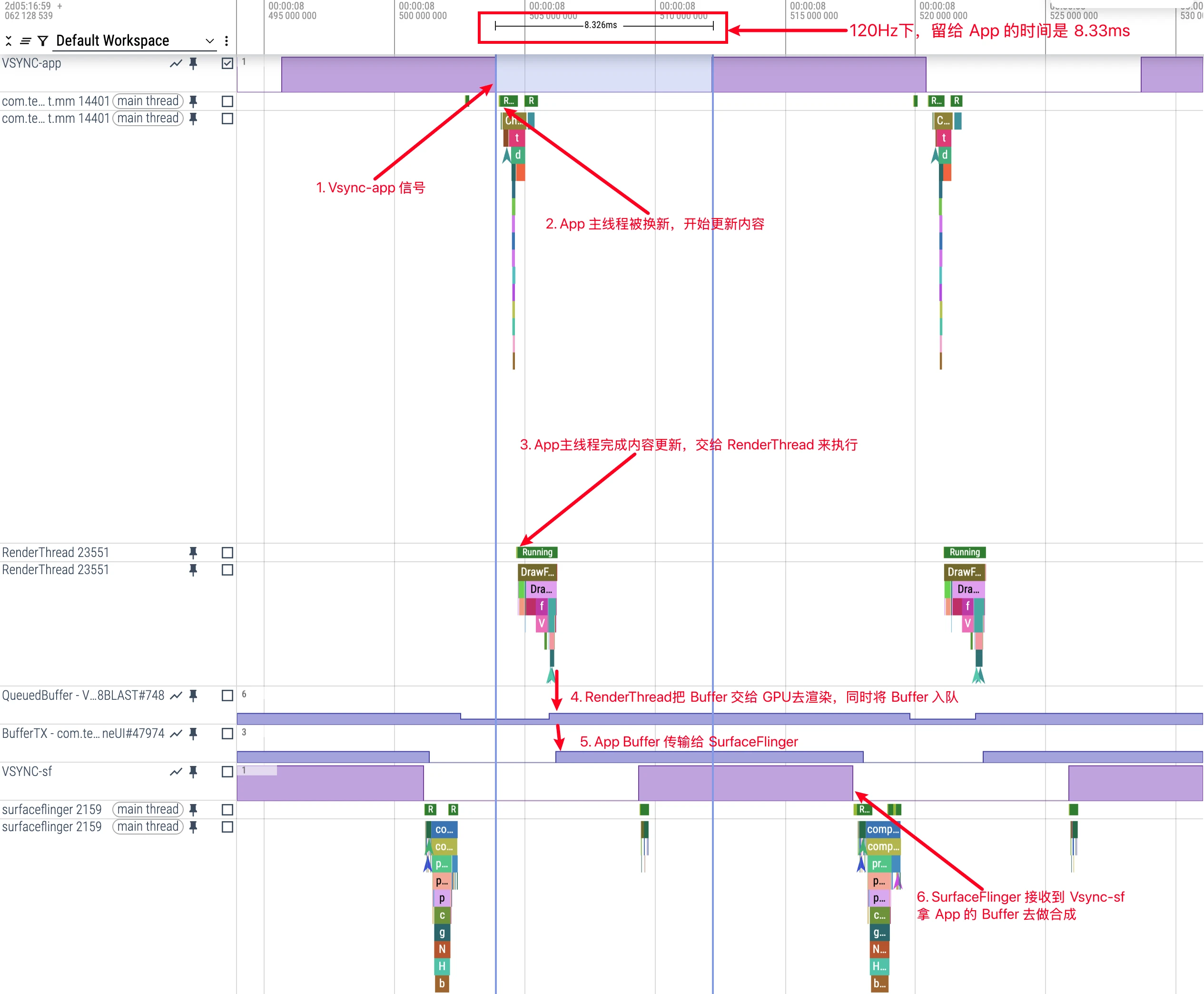
On 120Hz devices, we can see:
- Vsync Interval: VSYNC signal triggers once every 8.33ms
- Frame Processing Flow: Processing of each frame still follows the order of Input → Animation → Traversal
- Frame Deadline: Compare Expected and Actual Timeline for the target frame, then inspect the work that missed its predicted deadline
Two Buffer-related Traces appear in the figure above. Here is a brief explanation:
- QueuedBuffer: (e.g., QueuedBuffer - VRI[ImproveSnsTimelineUI]#748BLAST#748)
- This Trace Tag is printed in the App Process
- Indicates that the application has finished rendering one frame and put the rendered Buffer into the queue preparing to submit to SurfaceFlinger
- In systems using BlastBufferQueue, a rise means another Buffer entered the queue; check the acquire fence before assuming GPU work is complete
- BufferTX: (e.g., BufferTX - com.tencent.mm/com.tencent.mm.plugin.sns.ui.improve.ImproveSnsTimelineUI#47974)
- This Trace Tag is printed in the SurfaceFlinger Process
- Tracks the Layer’s pending Buffer count on the SurfaceFlinger side
- TX refers to the BLAST transaction, not a generic “Transfer/Transmission” stage
The correct process should be:
- App’s RenderThread calls
queueBuffer. At this time, the App considers itself to have handed over a Buffer, soQueuedBuffer+1. - The Buffer reaches SF in a BLAST transaction.
BufferTXrises while it is pending; this is before it is latched or dropped. - When SF latches or drops that Buffer,
BufferTXfalls. A dropped Buffer never appears on screen; a latched Buffer still needs composition and presentation. - When SF no longer needs this Buffer (for example, it has been replaced by a new frame, or has been stably displayed for enough time), SF will release this Buffer.
- After SF releases a Buffer, the App receives a release callback. The App-side
QueuedBuffermay then fall as that Buffer becomes reusable; the SF-sideBufferTXwas already decremented at latch or drop.
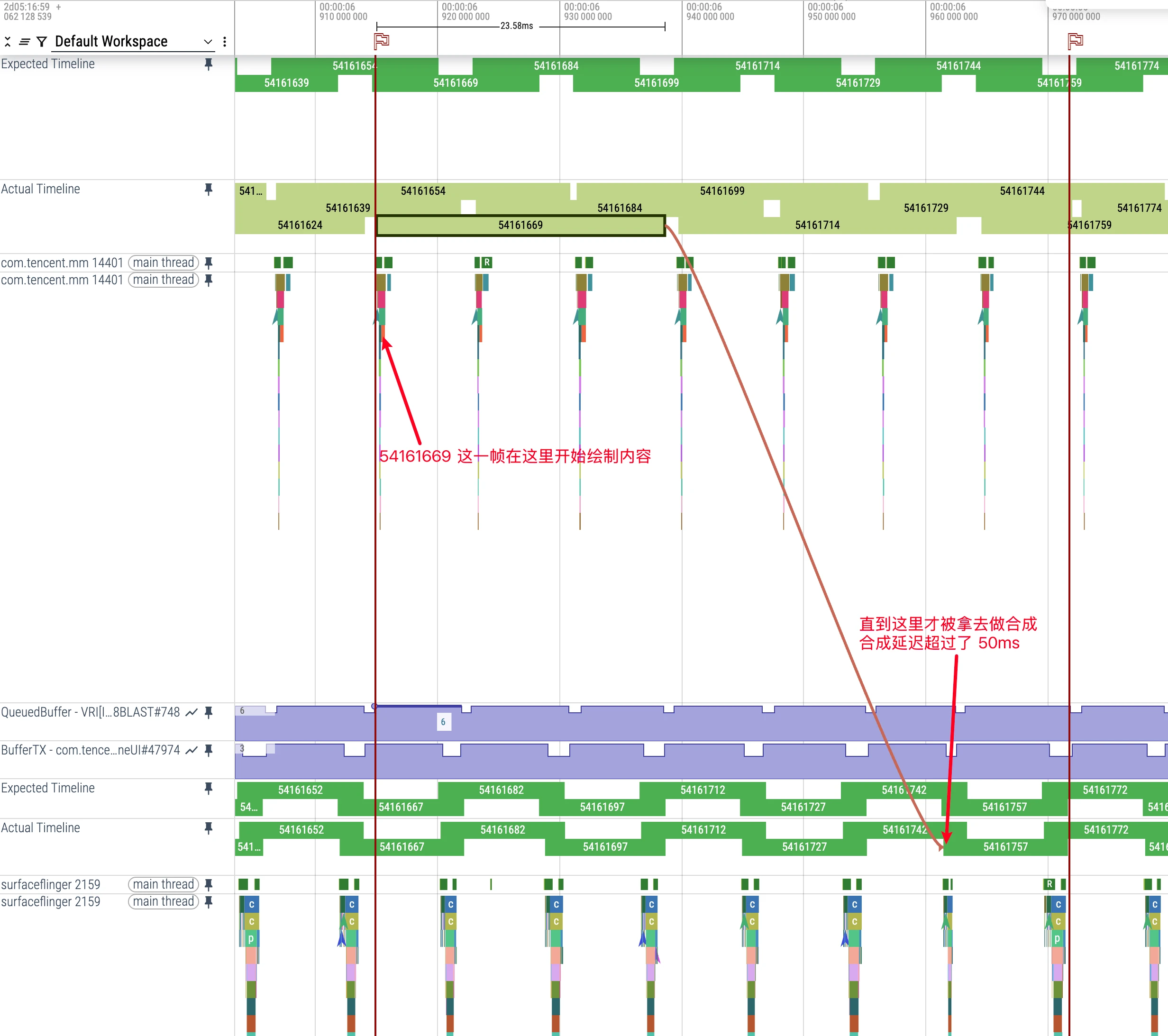
Perfetto also provides Buffer tracking. Selecting an App Actual Timeline slice links to the corresponding SurfaceFlinger frame, but does not alone prove a particular Buffer’s full production-to-presentation history; check layer and frame tokens as well (Actual Timeline Introduction).
System Architecture Optimization Supporting 120Hz
To support 120Hz high refresh rate smoothly, Android system architecture has made many adjustments and improvements. These changes involve multiple components, covering important optimizations of the entire rendering pipeline. Let’s look at several key technical points in detail:
Adaptive Refresh Rate Technology
Modern Android devices adopt multi-level refresh rate management strategies:
Hardware Layer Support: Some LTPO panels can adjust refresh rate over a wider range, but supported rates and whether switching is continuous depend on the device.
Content Perception Algorithm: The system automatically adjusts refresh rate by analyzing screen content types:
- Static content, video, scrolling, and games may request different display modes; actual rates depend on the supported modes and device policy.
API Support: Android provides
Surface.setFrameRate()API, allowing applications to explicitly specify their preferred frame rate, and the system will try its best to meet this request.
1 | // Application can specify preferred frame rate and refresh rate behavior |
Advantages and Challenges of 120Hz
Experience Improvements Brought by 120Hz
When I got my first 120Hz mobile phone, the most intuitive feeling was:
Everything becomes smoother: From desktop sliding, application switching to browsing Weibo, screen updates are more frequent, and content follows finger movement more accurately. Especially when quickly sliding Moments or Weibo feed stream, the text is still clear and distinguishable, rather than a blur.
Game experience can improve: If a game produces frames steadily and the display uses a matching mode, there are more opportunities to show new actions. “Seeing an action 8ms earlier” is not a fixed gain; input, rendering, and display latency must be measured.
Reduced eye fatigue: This may be a personal feeling, but staring at a 120Hz screen for a long time is indeed more comfortable than 60Hz, especially when reading and sliding content, the burden on eyes tracking content is reduced.
Touch and display are separate: A 120Hz display mode does not by itself show that the touch sampling rate increased; check the two specifications separately.
Practical Problems Faced by 120Hz
Of course, high refresh screens also bring a series of technical challenges:
Power consumption problem: A higher refresh mode may increase display and rendering power. The effect needs a same-device test with brightness, app workload, duration, and measurement method held constant; there is no universal 15-20% increase.
Tighter frame cadence: An app targeting stable 120FPS produces a frame about every 8.33ms, but its precise deadline follows FrameTimeline scheduling; the entire rendering pipeline is not one serial 8.33ms task.
Increased heating: Running high frame rate games for a long time, mobile phone heating is significantly more serious than 60Hz, which not only affects experience but may also lead to performance throttling.
Application target frame rate: A 60FPS app on a 120Hz display is not necessarily an adaptation failure; video, static content, or power policy may intentionally use a lower rate.
Thoughts and Future Outlook
On-Demand Adjustment: Intelligent Management of Refresh Rate from ProMotion
As 120Hz high refresh rate gradually becomes standard for flagship mobile phones, a question worth thinking about is: Do we really need to maintain 120Hz refresh rate in all scenarios?
Apple’s ProMotion technology actually gives a more reasonable answer: Activate high refresh rate only in animation scenarios with high perception, while appropriately reducing refresh rate in other scenarios to save power.
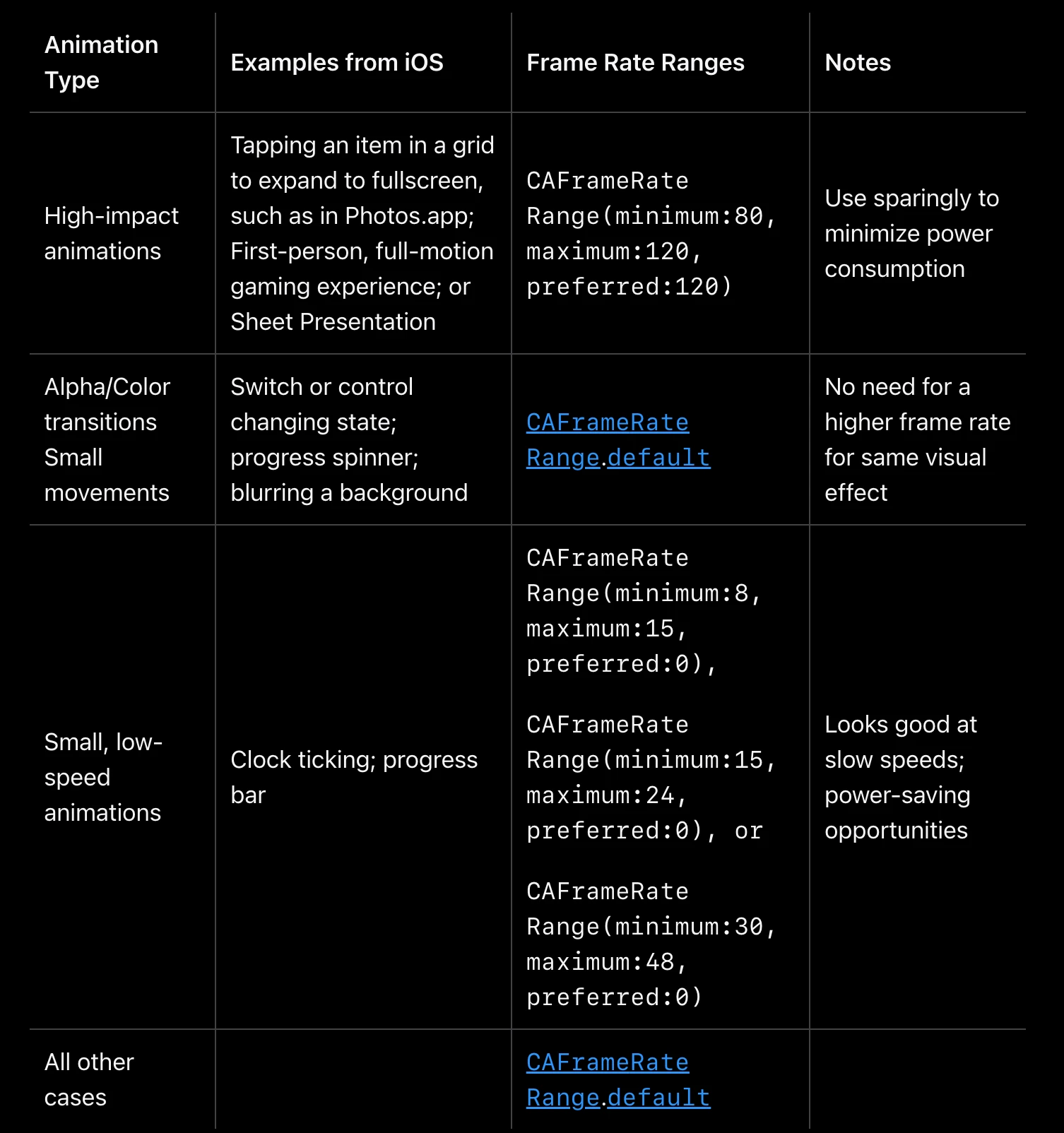
From the figure above, we can see that Apple provides very detailed ProMotion frame rate recommended configurations for different types of animation scenarios in iOS developer documentation:
High-impact animations:
- Applicable scenarios: Full screen transition (such as expanding when clicking thumbnail in Photos app), first-person games, Sheet popup display, etc.
- Recommended frame rate: 80-120Hz, preferred 120Hz (CAFrameRateRange(minimum:80, maximum:120, preferred:120))
- Usage suggestion: Use with caution, apply only in key interaction scenarios to reduce power consumption
Opacity/Color transition and micro movement:
- Applicable scenarios: Switch state change, progress indicator rotation, background blur effect, etc.
- Recommended frame rate: Use system default frame rate range (CAFrameRateRange.default)
- Usage suggestion: These animations do not need excessively high frame rate, visual effect difference is not big
Low speed small animation:
- Applicable scenarios: Clock pointer movement, slow progress bar, etc.
- Recommended frame rate: Depending on animation speed, choose 8-15Hz, 15-24Hz or 30-48Hz, etc.
- Usage suggestion: Low frame rate visual effect is good enough in these scenarios, and can significantly save power
All other cases:
- Recommended using system default frame rate
This refined frame rate management strategy not only allows the system to achieve the best balance between user experience and battery life, but also provides clear guidance for developers. Compared with simply and crudely using 120Hz globally, this targeted frame rate adjustment scheme is obviously more scientific and efficient.
Trade-off Between Power and Experience
Reducing refresh rate from 120Hz to 60Hz may save power, but the amount depends on the device, brightness, content, and actual app frame rate. A universal 10-15% saving cannot be inferred without a controlled measurement.
The main value of 120Hz lies in improving interaction smoothness and response speed, rather than always maintaining high refresh rate. A smarter approach is to dynamically adjust according to actual needs: Use high refresh rate in scenarios sensitive to user perception, and reduce refresh rate in scenarios insensitive to user perception.
Developer’s Adaptation Strategy
App developers should realize that not all content needs to be rendered at the highest frame rate. Through APIs provided by Android (such as Surface.setFrameRate()), appropriate frame rates can be specified for different content types, cooperating with the system’s adaptive refresh rate mechanism to achieve the best balance of performance and power.
In short, the future development direction of high refresh rate technology should be more intelligent and refined adaptive adjustment, rather than simply pursuing higher numbers. True technological progress is finding the best balance point between experience and energy efficiency without user perception.
Conclusion
Looking back at the development of high refresh screens in the past few years, I think 120Hz is indeed an important leap in mobile phone interaction experience. Although it brings challenges such as power consumption and development complexity, the benefits are obvious: smoother experience, lower input latency, and more natural animation effects.
For developers, tools like Perfetto help inspect performance problems under 120Hz. The nominal refresh interval changes from about 16.67ms to 8.33ms, but sustained 120FPS still depends on the app workload, device, thermal state, GPU, and presentation timing; avoiding main-thread blocking alone does not guarantee it.
From the trend point of view, I don’t think mobile phone screen refresh rate will climb indefinitely. 120Hz may become the standard for a long time, and the future focus will be more on how to intelligently adjust refresh rate to find the best balance between experience and power consumption in different scenarios. After all, what we pursue is not high numbers, but good actual experience.
About Me && Blog
Here is a personal introduction and related links. I hope to communicate more with my peers. When three people walk together, there must be one who can be my teacher!
- Blogger Personal Introduction: Contains personal WeChat and WeChat group links.
- This Blog Content Navigation: A navigation of personal blog content.
- Personal Collection of Excellent Blog Articles - Android Performance Optimization Must-Know: Welcome everyone to recommend themselves and others (WeChat private chat is fine)
- Android Performance Optimization Knowledge Planet: Welcome to join, thank you for your support~
One person can go faster, a group of people can go further