

Someone recently asked on Zhihu: “How to calculate APK startup time?”
“How can I use Python or direct ADB commands to calculate APK startup time? I want to measure the time from clicking the icon to the APK being fully started. For example, in a game, this would be from the icon tap to entering the login screen. Existing methods like
adb shell am start -WprovideThisTimeandTotalTime, but I’m unsure of the difference and they don’t seem to match visual reality.”
My colleague Guo Qifa and I provided detailed answers. Since Zhihu reach can be limited, I’ve compiled our responses here with his permission as a guide for other developers.
1. Startup Scenarios
Startup time can be accurately measured, but the method differs significantly between standard apps and games due to how they are developed and rendered on Android.
1.1 App Startup
For standard apps, we define a MainActivity. When a user taps the icon, the system launches this Activity, triggering lifecycle callbacks: onCreate, onStart, and onResume.
Many textbooks claim the app is “displayed” once onResume finishes. This is technically inaccurate. From the system’s perspective, onResume only completes the app’s internal configuration (window attributes, inflation of the View tree). Afterward, ViewRootImpl still triggers multiple performTraversals cycles for EGL initialization, measurement, layout, and drawing.
True startup time should be measured from the moment of the icon tap until the user sees the first frame of the layout defined in setContentView—the “App First Frame.”
The command adb shell am start -W packagename/activity is indeed the standard tool for this, but you must understand its output.
1.2 Cold Startup (First Launch)
This is the most common scenario: starting the app when its process doesn’t exist. The system must create the process before starting the MainActivity.
Running the command on Android 5.0+ returns three values:
1 | ➜ adb shell am start -W com.media.painter/com.media.painter.PainterMainActivity |
What do these mean?
The command implementation exists in Am.java. It makes a Binder call to ActivityManagerService.startActivityAndWait().
- WaitTime: The total time elapsed from the perspective of the
amcommand. It includes the time taken to pause the previous activity and the time taken to start the new one. - TotalTime: The time taken to start the new process and the Activity. This is usually the value developers should care about most.
- ThisTime: The time taken to start the last Activity in a sequence.
Why is ThisTime different from TotalTime?
If you tap an icon and it launches a single Activity, ThisTime will equal TotalTime. However, if your app launches a transparent “logic” Activity first, which then starts the real UI Activity (a common pattern in apps like Zhihu), TotalTime tracks from the start of the first (logic) Activity, while ThisTime only tracks the last (UI) Activity.
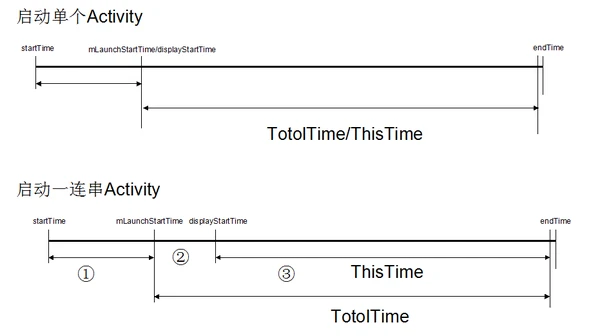
- Segment ①: AMS creates the ActivityRecord, chooses a Task, and pauses the current foreground activity.
- Segment ②: Process creation, calling
onCreateof the non-UI Activity, and then pausing/finishing it. - Segment ③: Calling
onCreateandonResumeof the UI Activity.
Understanding the “End Point”:
The system considers a launch “finished” only after the window is added to the Window Manager Service (WMS) and the first frame is fully drawn. WMS then calls reportLaunchTimeLocked() to notify AMS, which stops the timer.
Summary:
- For app-specific launch performance: use TotalTime.
- For system-wide perceived delay: use WaitTime.
- For a specific UI Activity’s transition time: use ThisTime.
2. Game Startup
Command-line tools are less effective for games because a significant portion of the “loading” happens inside the game engine, invisible to the Android View system.
2.1 System Phase
The system launches the game’s main Activity. This part can be measured via ADB.
2.2 Game Phase
Once the Activity is “started,” the game engine typically performs heavy tasks while showing a splash screen: loading assets, networking for updates, initializing the engine, etc. The game is only “loaded” when the user can interact with the menu.
Because these tasks are internal game logic, you must use Logs to mark the start and end points of these specific operations. We define game startup as the duration from the icon tap to the interactive state.
3. Conclusion
The beauty of computer science is its precision. While every launch might vary slightly due to system conditions, each measurement is a factual record of that specific instance.
Every company has different priorities. ROM developers prioritize lightning-fast launches of built-in apps to create a perception of smoothness. Internet apps often prioritize monetizable “Startup Pages” (ads) before showing the main UI. Regardless of your strategy, startup speed is a vital performance KPI.
As they say:
“In the world of Kung Fu, speed defines the winner!”
About Me && Blog
(Links and introduction)