

Phenomenon
Some users reported that while scrolling on the phone, the list would jitter. This happens when scrolling on the desktop or settings (as long as it is scrollable), but this is not reproducible for everyone; it appears for some users, but not for others.
Onlookers can scroll directly to the bottom to see The Culprit and Self-Check. Those interested in analyzing the problem can read the analysis process.
Systrace Analysis
There is a reproducible device for local testing. After analyzing it, it was found that sliding the desktop or settings with a finger will inevitably cause stuttering. From the Trace, it looks like this: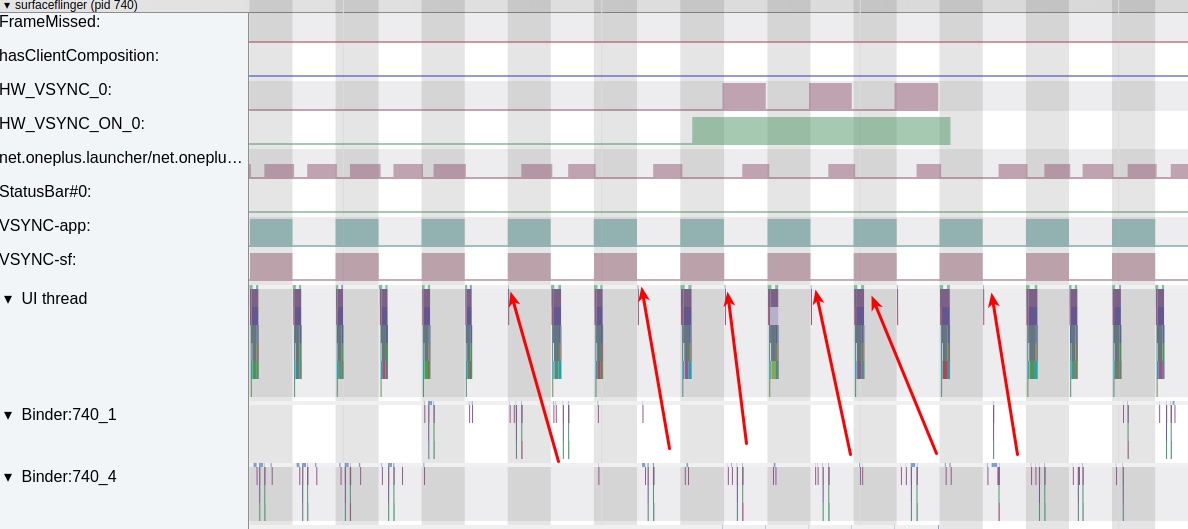
The red arrow indicates where the frame drop occurred. From the Buffer count above, it can be seen that the reason SF did not draw is that Launcher did not submit a Buffer.
The corresponding Launcher Trace is as follows. It can be seen that the reason Launcher did not draw is that no Input event was passed up. So the Launcher’s screen was not updated, causing frame drops.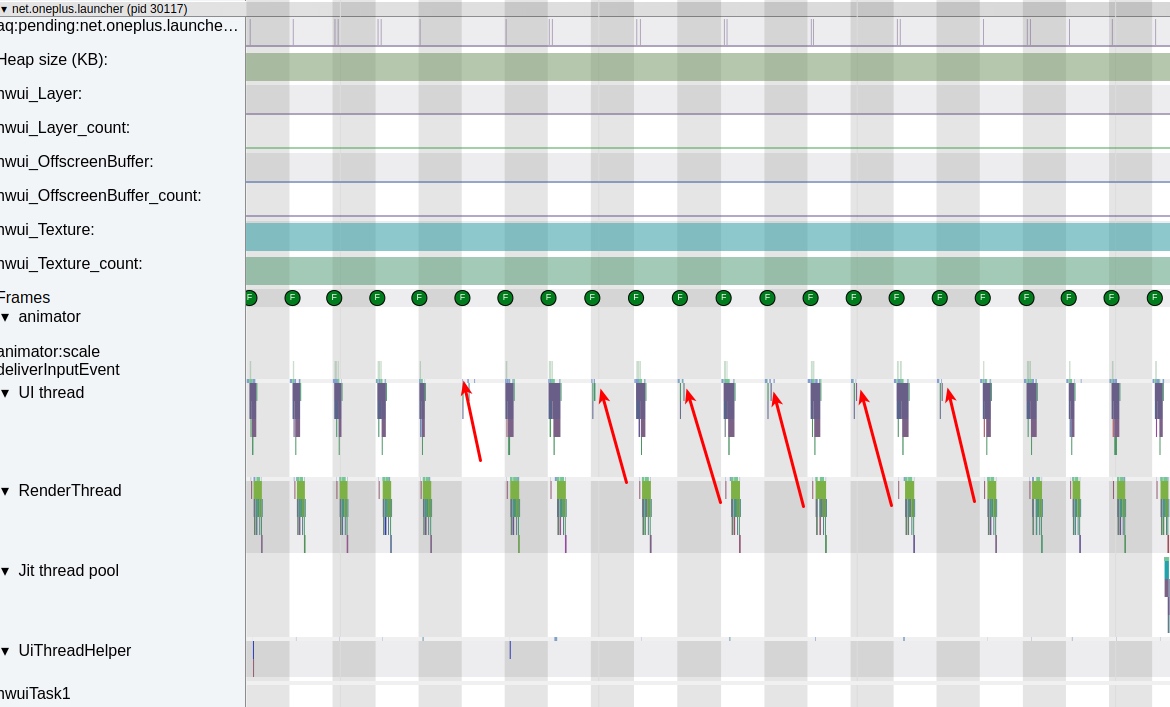
The fact that no event came up is problematic in itself. Our finger slides across the screen continuously, so the event reporting should be continuous. We suspect there is a problem with the screen reporting points, but before checking the hardware, let’s first see if the InputReader and InputDispatcher threads are working properly.
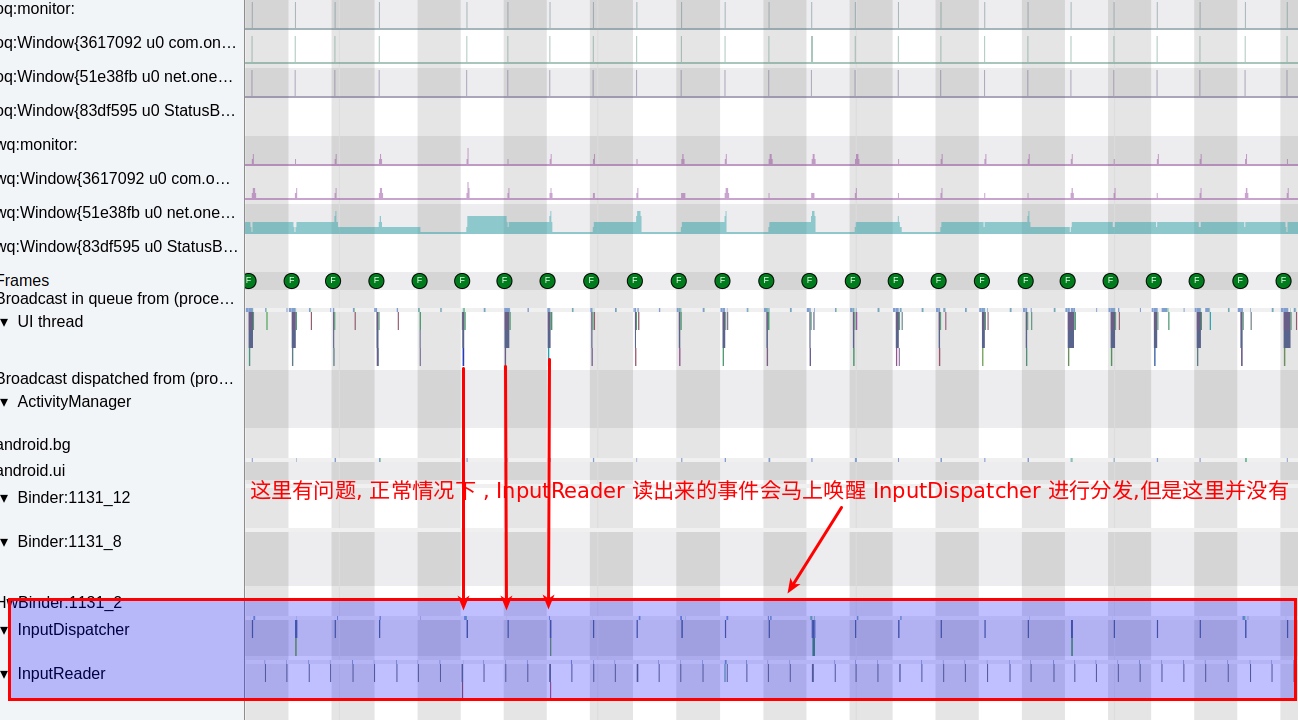
From the figure, it can be seen that the InputReader thread is working properly, but the InputDispatcher thread has problems. You can see the correspondence between these two threads under normal circumstances:

Returning to the problematic figure, if you look closely, you will find that the cycle of the InputDispatcher thread is the same as Vsync. That is to say, the wake-up logic of InputDispatcher has changed from being woken up by InputReader to being woken up by Vsync.
If you look more closely, clicking on the cpu state of the InputDispatcher thread shows that the InputDispatcher thread waking up to execute tasks is not woken up by the InputReader thread, but by the UI Thread of System_Server.
So next, we need to look at why InputReader did not wake up InputDispatcher from the code perspective.
Code Analysis
The logic for InputReader to wake up the InputDispatcher thread is as follows (taking the Move gesture in this example accurately).
frameworks/native/services/inputflinger/InputDispatcher.cpp
1 | void InputDispatcher::notifyMotion(const NotifyMotionArgs* args) { |
Note here that mPolicy->filterInputEvent returns directly, which means if it returns false here, it returns directly and does not continue to execute the following steps.
Continue to look at mPolicy->filterInputEvent
frameworks/base/services/core/jni/com_android_server_input_InputManagerService.cpp
1 | bool NativeInputManager::filterInputEvent(const InputEvent* inputEvent, uint32_t policyFlags) { |
Here it calls back from jni to the java layer, which is the filterInputEvent method of InputManagerService.
com/android/server/input/InputManagerService.java
1 | // Native callback. |
Following the code flow, it is found that this mInputFilter is an instance of AccessibilityInputFilter. When the switch is turned on in Accessibility, the updateInputFilter method of AccessibilityManagerService is called to set the InputFilter.
android/view/InputFilter.java
1 | final public void filterInputEvent(InputEvent event, int policyFlags) { |
Continue to look at onInputEvent(event, msg.arg1);
com/android/server/accessibility/AccessibilityInputFilter.java
1 |
|
Continue to look at processMotionEvent
1 | private void processMotionEvent(EventStreamState state, MotionEvent event, int policyFlags) { |
Continue to look at batchMotionEvent
1 | private void batchMotionEvent(MotionEvent event, int policyFlags) { |
Continue to look at scheduleProcessBatchedEvents
1 | private void scheduleProcessBatchedEvents() { |
mProcessBatchedEventsRunnable will be executed in the next Vsync cycle, which is Choreographer.CALLBACK_INPUT. Students familiar with Choregrapher should know what is happening here.
1 | private final Runnable mProcessBatchedEventsRunnable = new Runnable() { |
So the code is relatively clear here. It is because of the existence of AccessibilityInputFilter that the InputDispatcher thread was not woken up, but the event processing was put into the next Vsync for processing.
Conclusion
The problem lies in this Runnable. Normally, if AccessibilityInputFilter is not turned on, the upper layer will not intercept Input events at all. Once there is AccessibilityInputFilter, the logic above will be followed. At this time, InputDispatcher will not follow the rhythm of InputReader, but follow the rhythm of Vsync. This can also be seen from the Trace;
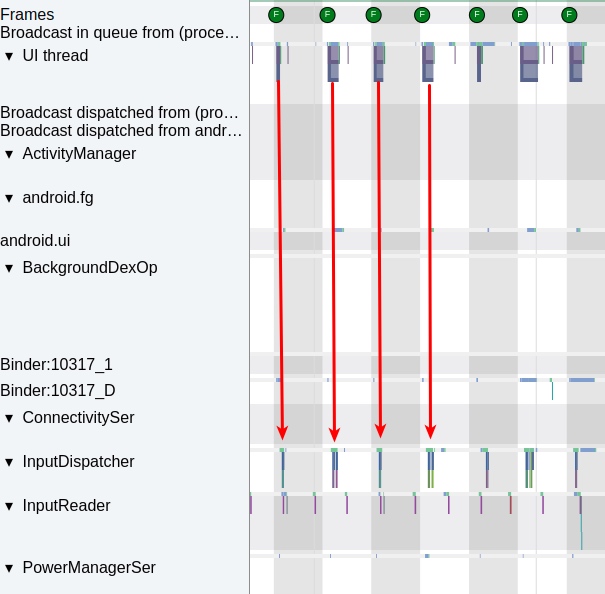
So where does this AccessibilityInputFilter come from? The answer is the Accessibility service, also known as the barrier-free service.
The Culprit
Through the above analysis, we know that the cause of the problem is the Accessibility service. The essence of the Accessibility service is to serve those users who are inconvenient to operate, such as blind people. However, in order to implement specific functions, some Apps have also added their own Accessibility services, such as the “one-click installation” function of major mobile phone markets. It is convenient for users, but if not used well, it will also have negative effects, such as this case, causing the user’s mobile phone to stutter. Users who don’t know may want to return the phone.
So who is the culprit? Currently two have been found, one is iFlytek Input Method and the other is Yingyongbao. Open Settings - System - Accessibility, you can see that various software inside are involved, but this is turned off by default. Many applications will guide users to turn it on, and many users turn it on confusedly.
The Accessibility service page is as follows: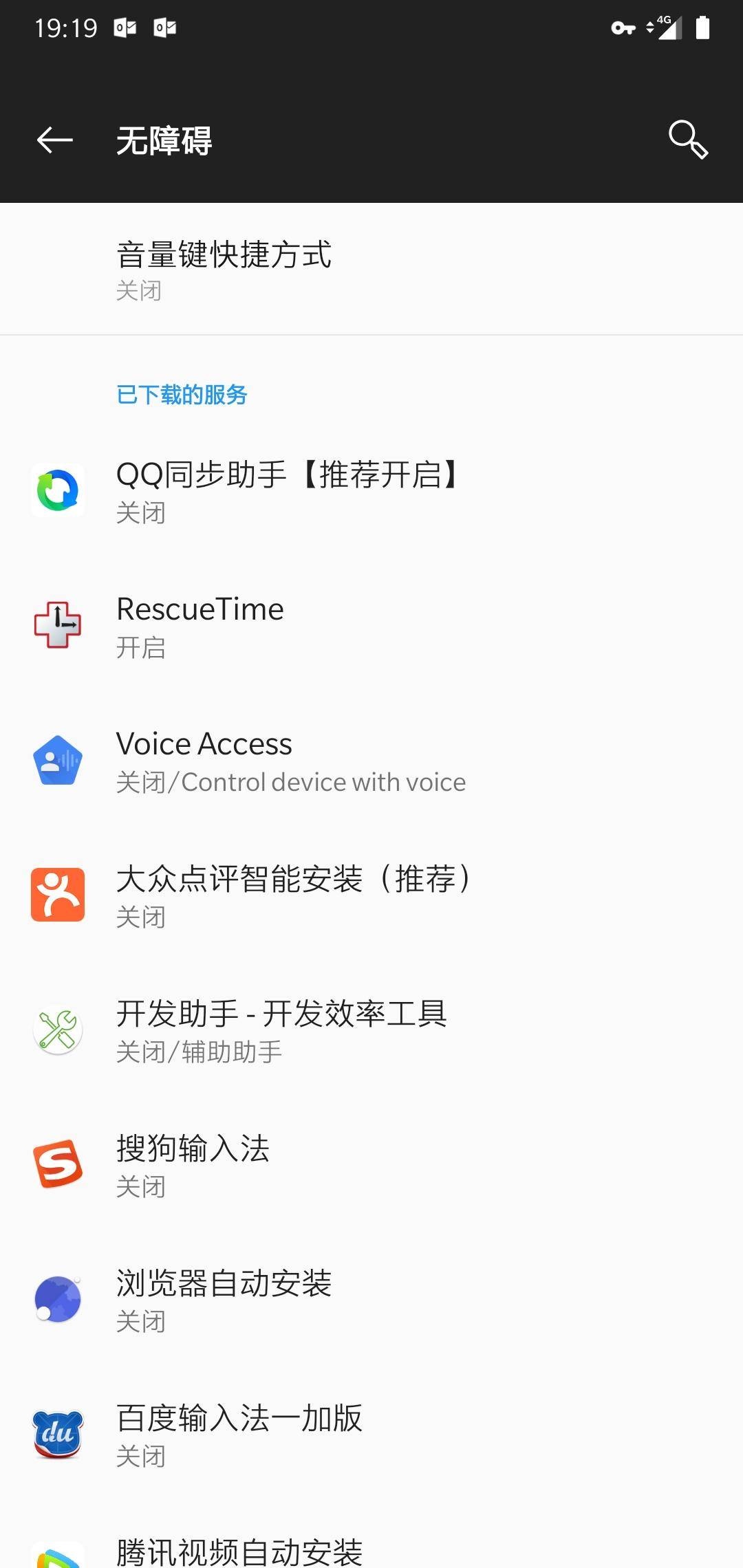
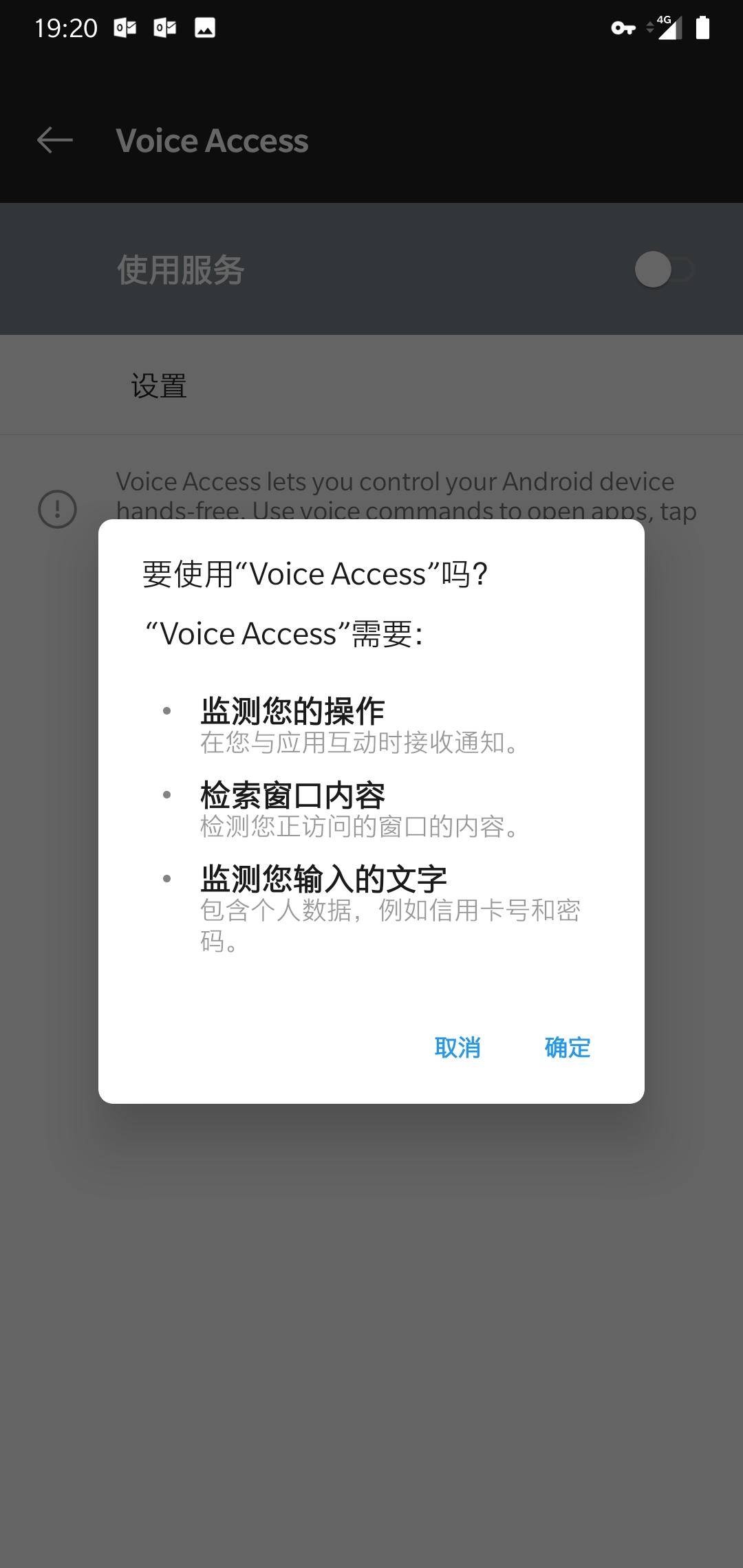
As for how awesome the Accessibility service is, everyone can look at the pop-up box below. This thing can detect your credit card number and password. As for SMS content and WeChat chat content, those are small cases.
As for what caused the whole machine to stutter in this example, it is the following listener “Perform Gesture”. Once an application listens to this, the InputDispatcher thread will follow the cycle of Vsync, resulting in untimely report processing, causing the sliding object to think that no event entered this frame, so there is no content change, and the page will not be updated, resulting in stuttering.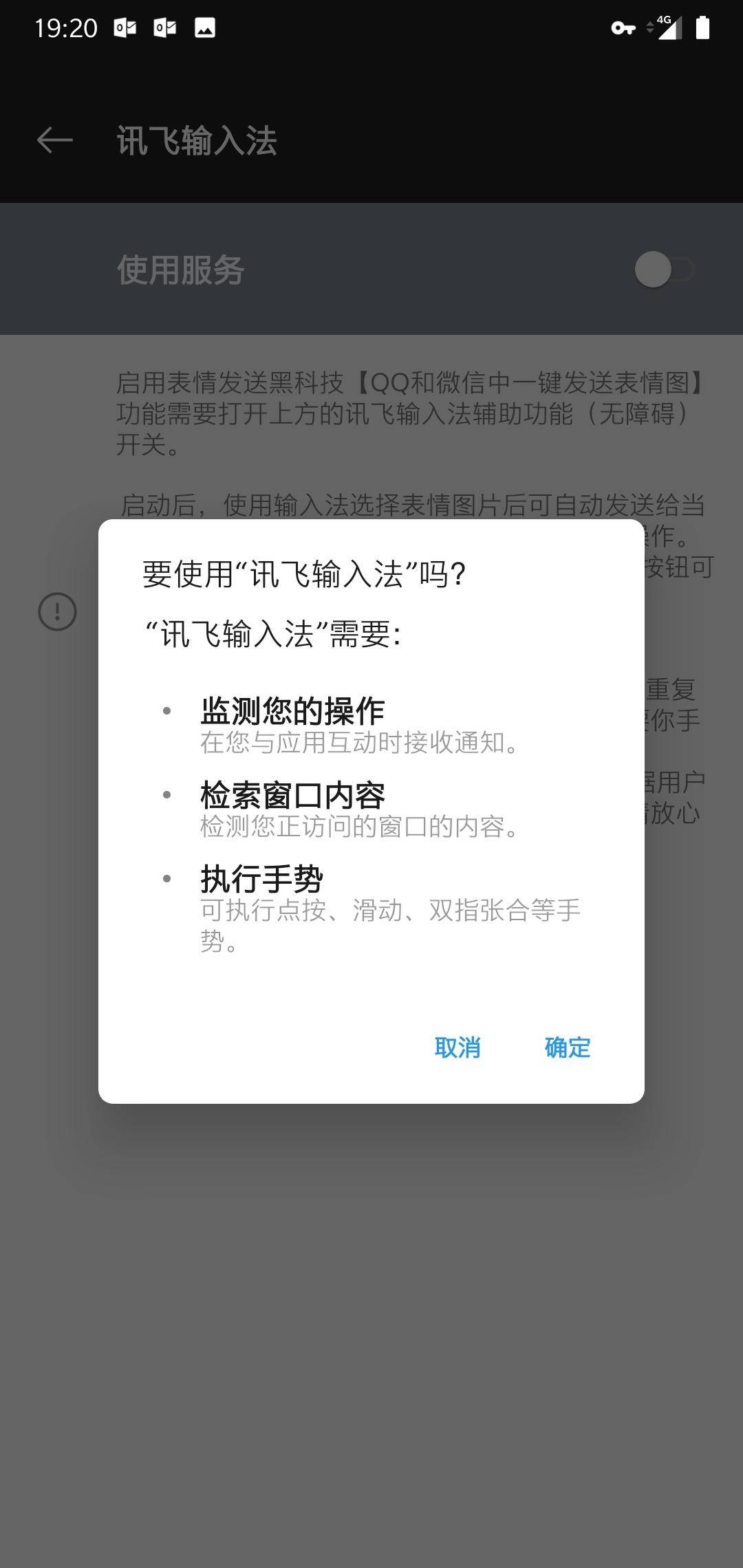
Self-Check
If you are using an Android phone, it is strongly recommended that you turn off all Accessibility services (if you don’t need them). Functions like automatic application installation are not worth the huge risk you pay for them. This is a native Android problem, and we have found this problem on Pixel and other third-party phones.
Close path: Settings - System - Accessibility, go in and close all the ones you have opened.
Strongly recommend Yingyongbao, iFlytek Input Method, do not listen to gesture events.
Zhihu Address of this article
Since blog message communication is inconvenient, for likes or communication, please move to the Zhihu interface of this article
Zhihu - Analysis of Global Stutter Caused by Accessibility Services of Yingyongbao and iFlytek Input Method on Android Platform
About Me && Blog
Below are personal introduction and related links. I hope to communicate more with everyone in the industry. If three people walk together, there must be one who can be my teacher!
- Blogger Personal Introduction: There are personal WeChat and WeChat group links inside.
- This Blog Content Navigation: A navigation of personal blog content.
- Excellent blog articles organized and collected by individuals - A must-know for Android efficiency optimization: Everyone is welcome to recommend themselves and recommend others (WeChat private chat is fine)
- Android Performance Optimization Knowledge Planet: Welcome to join, thanks for your support~
One person can go faster, a group of people can go further
