The Phenomemon
Users reported that scrolling through lists, whether on the home screen or in settings, occasionally felt jittery or “shaky.” This issue wasn’t universal but affected a subset of users consistently once it appeared.
For those in a hurry, you can skip to the “The Culprits” and “Self-Check” sections at the bottom. For those curious about the investigative process, let’s dive into the trace.
Systrace Analysis
We successfully reproduced the issue on a local test device. Analyzing the Systrace revealed that even simple flings on the desktop triggered significant frame drops.
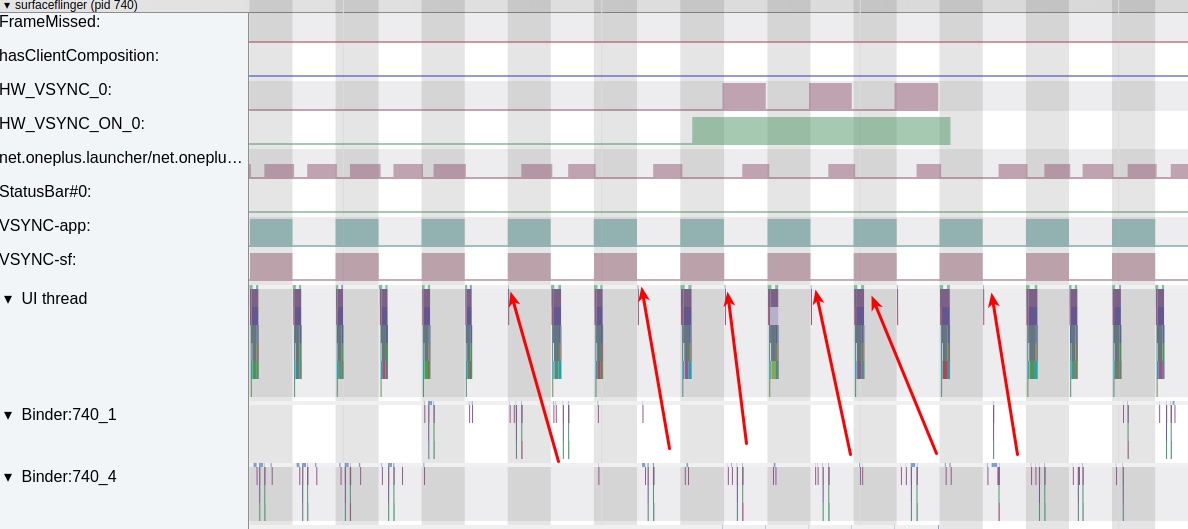
The red arrows indicate dropped frames. From the buffer count, we can see that SurfaceFlinger (SF) isn’t rendering because the Launcher process isn’t submitting any buffers.
Looking at the Launcher’s trace, the lack of rendering is due to a lack of Input events. Without input events, the Launcher doesn’t know it needs to update its state or render a new frame.
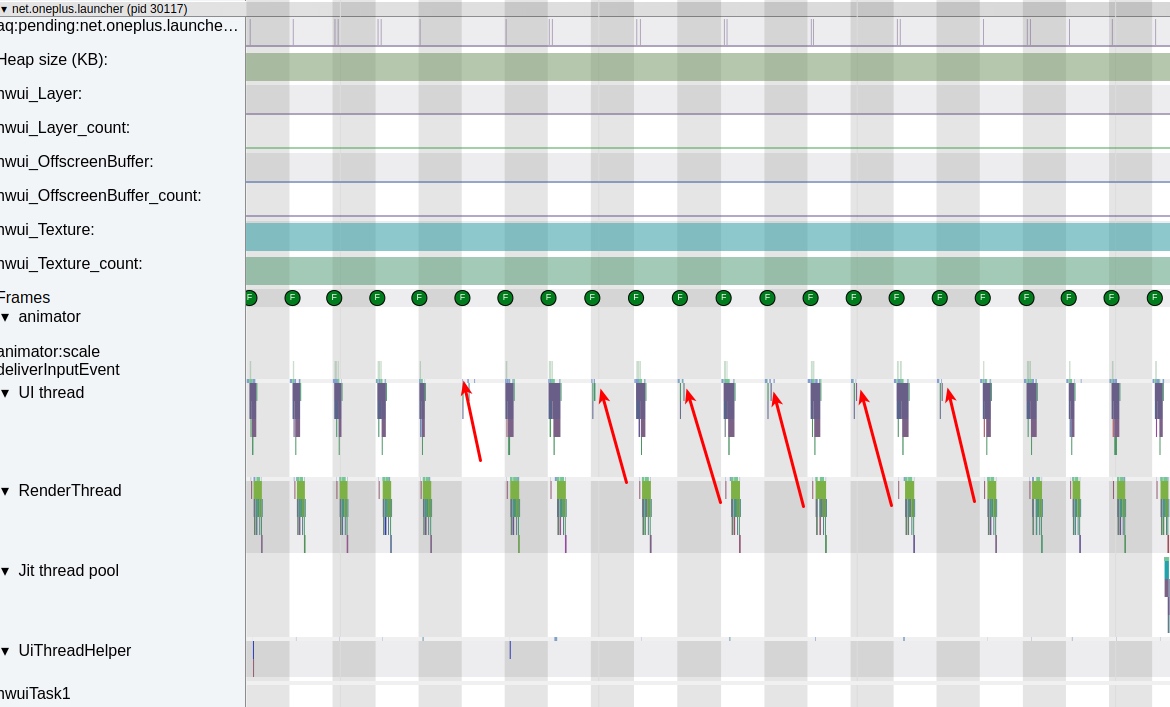
Missing input events during a continuous swipe is a major red flag. Usually, a finger move should report points continuously. We checked if the touchscreen hardware was faulty but first decided to inspect the InputReader and InputDispatcher threads in system_server.
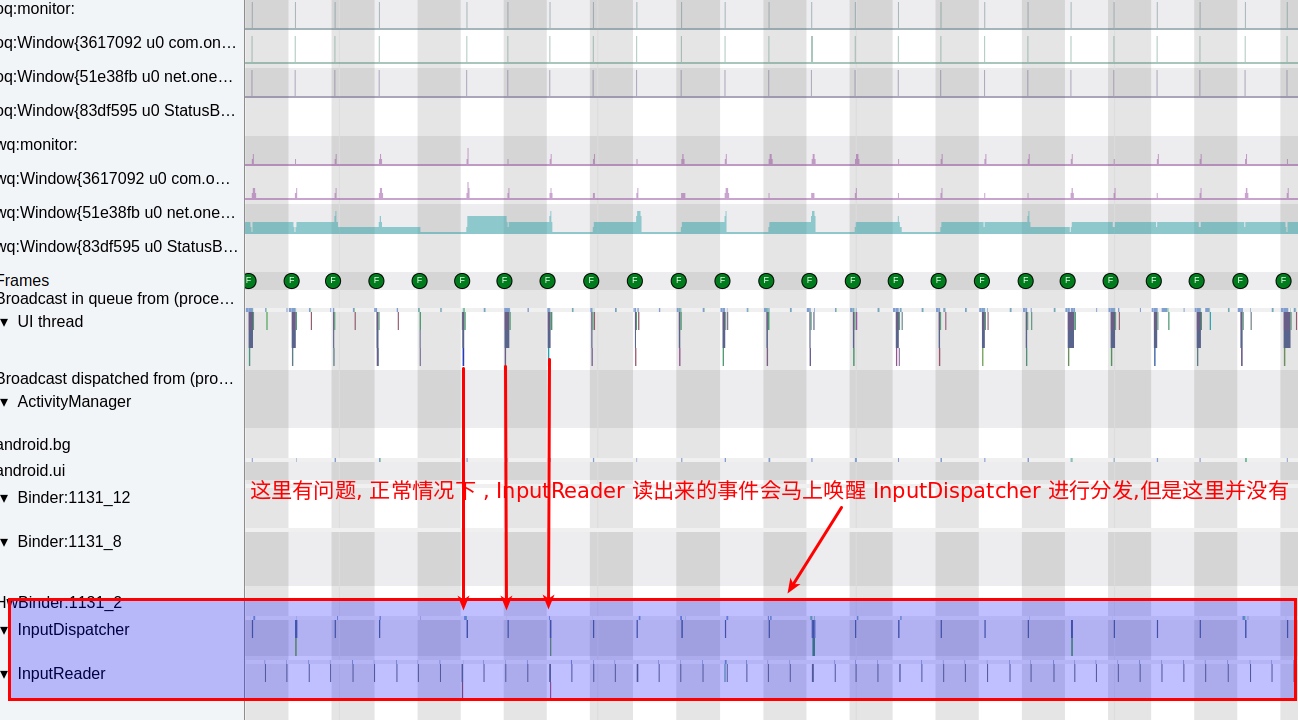
The trace shows InputReader is working fine, but InputDispatcher is behaving abnormally. In a healthy system, their cycles should look like this:

In the problematic trace, InputDispatcher has changed its rhythm to match the Vsync signal. Instead of being woken up by InputReader as soon as a point is read, it is being woken up by the System_Server UI thread during the Vsync pulse.
The next step was to dig into the code to find out why InputReader failed to wake up InputDispatcher.
Code Analysis
The logic for InputReader to wake InputDispatcher (for a Motion move event) is in InputDispatcher.cpp:
1 | void InputDispatcher::notifyMotion(const NotifyMotionArgs* args) { |
The key part is the filterInputEvent method. If it returns false, the entire function returns early, meaning InputDispatcher never gets woken up. Let’s trace this call:
JNI Layer (com_android_server_input_InputManagerService.cpp):
1 | bool NativeInputManager::filterInputEvent(const InputEvent* inputEvent, uint32_t policyFlags) { |
Java Layer (InputManagerService.java):
1 | public boolean filterInputEvent(InputEvent event, int policyFlags) { |
InputFilter.java:
1 | public boolean filterInputEvent(InputEvent event, int policyFlags) { |
AccessibilityInputFilter.java:
1 | public boolean onInputEvent(InputEvent event, int policyFlags) { |
The processMotionEvent method is where things get interesting:
1 | private boolean processMotionEvent(MotionEvent event, int policyFlags, int featureMask) { |
And the batchMotionEvent method:
1 | private void batchMotionEvent(MotionEvent event, int policyFlags, int featureMask) { |
Finally, the critical scheduleProcessBatchedEvents method:
1 | private void scheduleProcessBatchedEvents() { |
The mProcessBatchedEventsRunnable is where the actual processing happens:
1 | private final Runnable mProcessBatchedEventsRunnable = new Runnable() { |
The Root Cause
The issue is clear now: Accessibility services that monitor “Execute Gestures” cause all scroll events to be batched and processed on the next Vsync signal.
When an accessibility service enables the FEATURE_TOUCH_EXPLORATION or similar features that require monitoring gestures, the AccessibilityInputFilter intercepts all scroll events. Instead of passing them immediately to InputDispatcher, it batches them and schedules processing on the next Vsync pulse via mChoreographer.postCallback().
This creates a delay of up to 16.6ms (at 60Hz) between when the touchscreen reports a point and when the application receives it. During continuous scrolling, this delay accumulates, causing the jittery, “shaky” sensation users reported.
The Culprits
Any app that requests accessibility permissions and enables gesture monitoring can cause this issue. Common culprits include:
- “Cleaner” or “Battery Saver” apps that claim to optimize performance but actually degrade it
- “Gesture Navigation” enhancers that add custom swipe gestures
- “Screen Recording” or “Automation” tools that need to intercept touch events
- “Anti-Touch” or “Pocket Mode” apps that prevent accidental touches
Self-Check
If you’re experiencing similar jank issues, here’s how to diagnose them:
Check installed accessibility services:
- Go to Settings → Accessibility → Installed services
- Disable all services and test scrolling performance
- Re-enable services one by one to identify the culprit
Use Systrace to verify:
- Capture a trace during problematic scrolling
- Look for
InputDispatcherbeing woken by Vsync instead ofInputReader - Check if
AccessibilityInputFilterappears in the event chain
Monitor with logcat:
- Look for
AccessibilityInputFilterlogs - Check for
FEATURE_TOUCH_EXPLORATIONor similar feature flags
- Look for
Why Do Apps Do This?
Many apps misuse accessibility services for legitimate but misguided reasons:
- Automation: Automating repetitive tasks by simulating gestures
- Analytics: Tracking user interactions for “improving the user experience”
- Ad avoidance: Automatically closing ads or pop-ups
- Accessibility features: Providing alternative input methods for users with disabilities
However, the privacy implications are severe. An app with accessibility permissions can:
- Read everything on your screen
- Capture all your keystrokes (including passwords and credit card numbers)
- Control other apps by simulating taps and gestures
- Monitor all your notifications

The specific feature causing our jank issue is “Execute Gestures” monitoring, which requires intercepting all touch events to analyze gesture patterns.

Solution
For users:
- Review accessibility permissions regularly and remove unnecessary ones
- Be skeptical of apps requesting accessibility access for seemingly unrelated features
- Use built-in alternatives when available (e.g., Android’s built-in gesture navigation)
For developers:
- Avoid accessibility APIs unless absolutely necessary for accessibility features
- Use appropriate APIs for automation (e.g.,
UiAutomatorfor testing) - Consider performance implications of intercepting input events
For system integrators:
- Add warnings about performance impact when enabling gesture monitoring
- Consider rate-limiting or batching optimizations in the framework
- Monitor for abusive patterns in accessibility service usage
Conclusion
This case demonstrates how well-intentioned features (accessibility services) can be misused in ways that significantly degrade system performance. The architectural decision to batch gesture events for Vsync-aligned processing makes sense for gesture recognition accuracy but has unintended consequences for scrolling smoothness.
As Android continues to add features and complexity, understanding these cross-layer interactions becomes increasingly important for maintaining good user experience. Performance debugging often requires tracing issues across multiple system layers—from hardware touchscreens through kernel drivers, framework services, and finally to application rendering.
References
- Android Source Code - InputDispatcher.cpp
- Android Source Code - AccessibilityInputFilter.java
- Android Developer Guide - Accessibility Service
Zhihu Version
Since blog comments aren’t convenient for discussion, you can visit the Zhihu version of this article for likes and交流:
About Me && Blog
Below is my personal introduction and related links. I look forward to exchanging ideas with fellow professionals. “When three people walk together, one must be my teacher!”
- Blogger Introduction : Contains personal WeChat and WeChat group links.
- Blog Content Navigation : A navigation guide for my blog content.
- Curated Excellent Blog Articles - Android Performance Optimization Must-Knows : Welcome self-recommendations and recommendations (WeChat private chat is fine).
- Android Performance Optimization Knowledge Planet : Welcome to join, thanks for your support!
One walks faster alone, but a group walks further together.