

High-refresh-rate screens have been common on PCs for years, but they’ve only recently made their way to Android. While the Razer Phone introduced a 120Hz screen last year to a quiet reception, I believe the 90Hz screens on the Nubia Red Magic 3 and OnePlus 7 Pro represent the current “sweet spot” for Android. They offer a tangible, immediate boost to the user experience. If you’ve never used a high-refresh-rate mobile screen, I highly recommend visiting an Apple Store to try out the 120Hz ProMotion display on the iPad Pro.
Terminology Explained
What is Screen Refresh Rate?
This is a hardware specification. It refers to how often the display panel refreshes the image on the screen.
A 60Hz refresh rate means the screen refreshes 60 times per second; 90Hz means 90 refreshes per second. The screen doesn’t care what it’s displaying; it just pulls data from its buffer and shows it at the defined frequency.
What is FPS?
FPS (Frames Per Second) is a software metric. It refers to how many unique frames the operating system and apps generate every second. While the screen refreshes at a constant rate, the software might produce frames at varying speeds.
What is Vsync?
Vsync (Vertical Synchronization) is the mechanism that syncs the software’s FPS with the hardware’s Refresh Rate. Its primary job is to prevent “tearing.”
- 60Hz System: One frame must be generated every 16.67ms (1/60s).
- 90Hz System: One frame must be generated every 11.11ms (1/90s) to avoid a “FrameMiss.”
What is the Input Scanning Cycle?
Most modern phones have an input scanning cycle around 8ms. Since Android’s display system is Vsync-driven, input events are typically processed at the start of each Vsync pulse.
- In a 16.67ms Vsync window, there’s comfortably room for 2 input points.
- In an 11.11ms Vsync window, you might get 2 points, but often only 1. This can sometimes lead to a slightly “uneven” input feel if not handled correctly.
The 90Hz User Experience
The best experience occurs when the Hardware Refresh Rate matches the Software FPS. Currently, 90Hz hardware + 90 FPS software is the ideal combo.
- 90Hz screen running 60 FPS software: The screen refreshes, but the content isn’t ready, so it displays the previous frame again (judder).
- 60Hz screen running 90 FPS software: The software prepares frames faster than the screen can show them, leading to wasted CPU/GPU cycles and dropped frames.
While 120Hz is the ultimate goal (as seen on iPad Pro), current Android architecture and hardware are still catching up to that 8.3ms-per-frame requirement. We’ll likely see mature 120Hz Android flagships in 2020.
Check out this comparison video: 90Hz vs. 60Hz Screen Comparison
How 90 FPS Works (Platform Perspective)
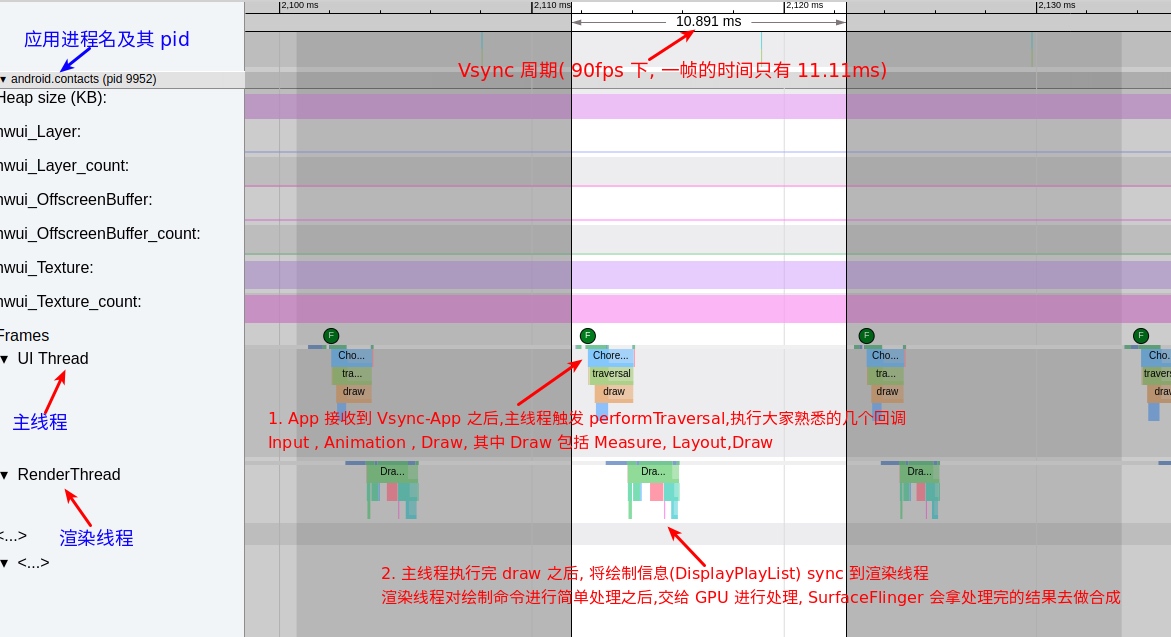
The Android rendering pipeline follows these basic steps:
- Event Trigger: User taps an icon or scrolls a list.
- Dispatch: System sends the event to the app.
- App Logic: The app processes the event (e.g., updating list state).
- Choreography: If UI changed, the app runs
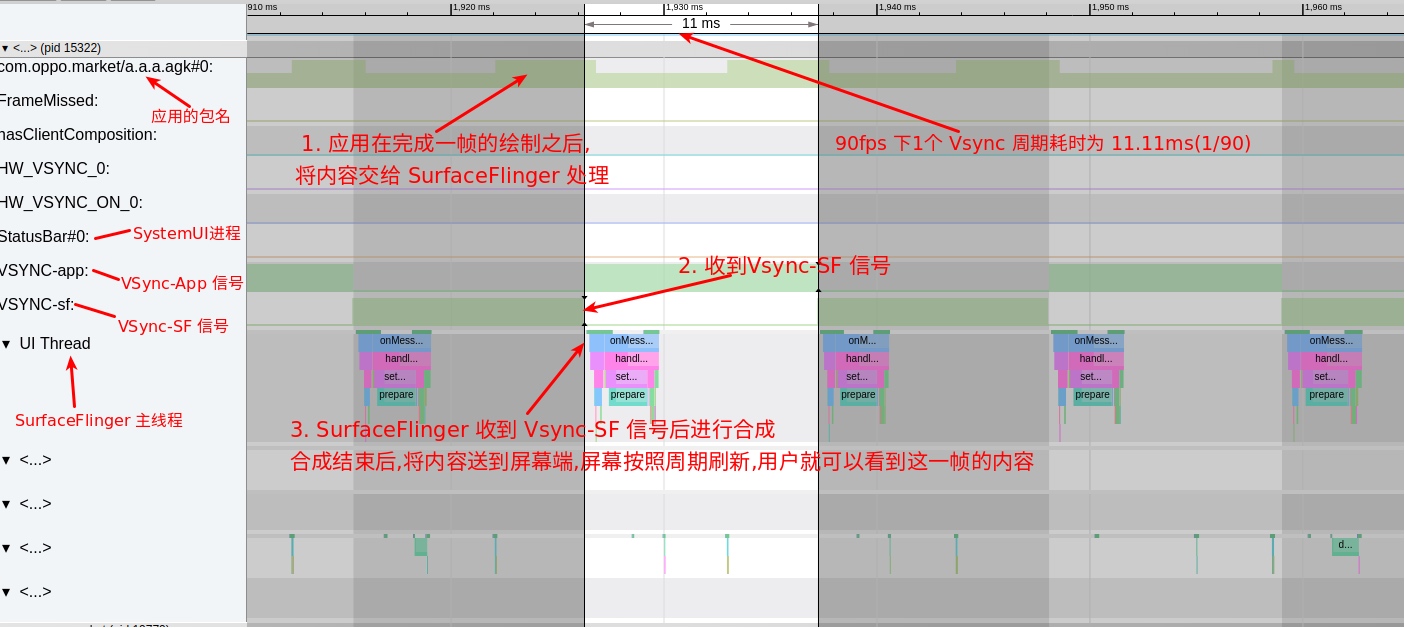
measure,layout, anddraw. Hardware acceleration uses theRenderThread. - Composition: The completed buffer is sent to
SurfaceFlinger, which composites all layers and sends them to the display hardware.
The process for 90 FPS is the same as 60 FPS—it just has to happen faster.
App Rendering Flow at 90 FPS
SurfaceFlinger Flow at 90 FPS
Advantages and Challenges
Advantages
- Unmatched Fluidity: Human eyes are highly sensitive to motion. Once you get used to the smoothness of 90 frames per second, 60 FPS begins to look stuttery and disconnected.
- Irreversible Change: High refresh rate is a “one-way street.” Once you adapt to it, going back to a lower refresh rate feels like a downgrade.
- Future-Proofing: As we keep our phones longer, buying a device with a top-tier screen, SoC, and UFS 3.0 storage is a wise investment.
Challenges
- Performance:
- App and System components must shrink their processing windows from 16.6ms to 11.11ms.
- This requires far more aggressive hardware (Snapdragon 855+, UFS 3.0). This explains why the Razer Phone struggled at 120Hz—the hardware simply weren’t ready for 8.3ms frames.
- Power Consumption: 90Hz screens consume significantly more battery, especially at high resolutions. Manufacturers must optimize power usage or allow dynamic switching to 60Hz in static scenarios.
- App & Game Adaptation:
- Standard apps usually run fine, but their fluidity depends on code quality.
- Games must be specifically optimized by developers to support and maintain a stable 90 FPS.
- View types like
WebVieworSurfaceViewrequire content-aware adjustments.
About Me && Blog
(Links and introduction)