

This is the third article in the Systrace series, explaining why 60 FPS is constantly emphasized. 60 FPS is a software concept, distinct from the 60Hz mentioned in screen refresh rates. For further context, refer to: A New Smooth Experience: A Talk on 90Hz.
The purpose of this series is to view the overall operation of the Android system from a different perspective using Systrace, while also providing an alternative angle for learning the Framework. Perhaps you’ve read many articles about the Framework but can never remember the code, or you’re unclear about the execution flow. Maybe from Systrace’s graphical perspective, you can gain a deeper understanding.
Series Article Index
- Introduction to Systrace
- Systrace Basics - Prerequisites for Systrace
- Systrace Basics - Why 60 fps?
- Android Systrace Basics - SystemServer Explained
- Systrace Basics - SurfaceFlinger Explained
- Systrace Basics - Input Explained
- Systrace Basics - Vsync Explained
- Systrace Basics - Vsync-App: Detailed Explanation of Choreographer-Based Rendering Mechanism
- Systrace Basics - MainThread and RenderThread Explained
- Systrace Basics - Binder and Lock Contention Explained
- Systrace Basics - Triple Buffer Explained
- Systrace Basics - CPU Info Explained
- Systrace Smoothness in Action 1: Understanding Jank Principles
- Systrace Smoothness in Action 2: Case Analysis - MIUI Launcher Scroll Jank Analysis
- Systrace Smoothness in Action 3: FAQs During Jank Analysis
- Systrace Responsiveness in Action 1: Understanding Responsiveness Principles
- Systrace Responsiveness in Action 2: Responsiveness Analysis - Using App Startup as an Example
- Systrace Responsiveness in Action 3: Extended Knowledge on Responsiveness
- Systrace Thread CPU State Analysis Tips - Runnable
- Systrace Thread CPU State Analysis Tips - Running
- Systrace Thread CPU State Analysis Tips - Sleep and Uninterruptible Sleep
Main Content
Today, let’s discuss why we start with 60 FPS when talking about smoothness.
First, let’s clarify some basic concepts:
- 60 FPS means the screen updates 60 times per second.
- These 60 updates must be uniform. If it’s fast one moment and slow the next, it won’t feel smooth visually.
- 60 times per second means one update every 1/60 ~= 16.67 ms.
With these basic concepts understood, let’s return to Android. Why is Android’s current rendering mechanism based on 60 FPS? This relates primarily to the screen refresh rate.
Basic Concepts
- The 60 FPS we referred to is software-based; we generally call it FPS.
- Screen Refresh Rate is hardware-based. Most current mobile screens maintain a refresh rate of 60 Hz. Mobile devices typically use 60 Hz because they have higher power requirements. Increasing the refresh rate causes logic power consumption to increase linearly. Additionally, higher refresh rates mean shorter TFT data writing times, making screen design more challenging.
- A 60 Hz refresh rate is sufficient and serves as the optimal solution currently. However, high-refresh-rate screens are undoubtedly the future (as of 2023, 120Hz is standard for Android and has even arrived on iOS). I believe this shift depends on breakthroughs in:
- Battery technology
- Software technology
- Hardware capabilities
In current conditions:
- At 60 FPS: Android’s rendering draws every 16.67 ms, and a 60 Hz screen refreshes every 16.67 ms.
- At 120 FPS: Android’s rendering draws every 8.33 ms, and a 120 Hz screen refreshes every 8.33 ms.
Performance Gains
To improve performance, both software and hardware must advance together. Upgrading only one is largely ineffective. If your screen is 75 Hz but the software is 60 FPS, the screen refreshes 75 times while the software only renders 60—resulting in wasted power for duplicate frames. Conversely, if your screen is 30 Hz but the software is 60 FPS, half the software-rendered frames are discarded before display.
If you want to experience a 120 Hz screen, I suggest trying an iPad Pro. You’ll notice that 60 Hz screens definitely have room for improvement.
This is a brief introduction. For deeper knowledge, you can search Google. Google also released a short video explaining “Why 60 FPS”:
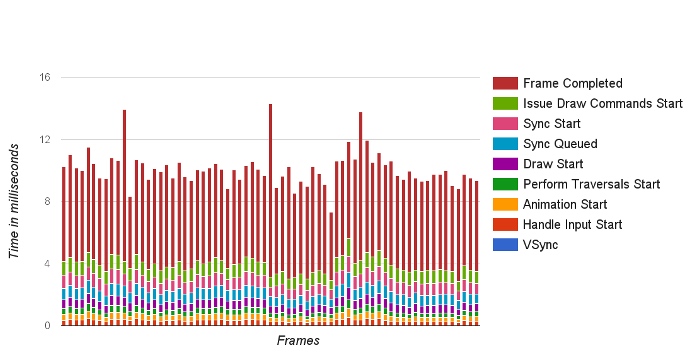
The diagram below shows the tasks an Android app must complete within a single frame; we’ll discuss this in detail later:
About Me && Blog
Below is my personal intro and related links. I look forward to exchanging ideas with fellow professionals. “When three walk together, one can always be my teacher!”
- Blogger Intro: Includes personal WeChat and WeChat group links.
- Blog Content Navigation: A guide for my blog content.
- Curated Excellent Blog Articles - Android Performance Optimization Must-Knows: Welcome to recommend projects/articles.
- Android Performance Optimization Knowledge Planet: Welcome to join and thank you for your support~
One walks faster alone, but a group walks further together.
