

Hardware Acceleration vs Software Acceleration
Many people confuse hardware acceleration and Hardware Layer in Android, thinking that enabling hardware acceleration means enabling Hardware Layer. So before discussing Hardware Layer, let’s first talk about hardware acceleration.
For more detailed articles about hardware acceleration, I recommend these three:
- Introduction to Android Hardware Acceleration Principles and Implementation
- Understanding Android Hardware Acceleration for Beginners
- Official Documentation: Hardware acceleration
Hardware acceleration, actually should be called GPU acceleration. The difference between hardware and software acceleration mainly lies in whether graphics drawing is handled by GPU or CPU. If by GPU, it’s considered hardware accelerated drawing; otherwise, it’s software drawing.
Current Android versions have hardware acceleration enabled by default. If your App doesn’t have special declarations, hardware acceleration is enabled by default.
The above three articles provide deeper explanations at code and principle levels. Here I’ll demonstrate the difference between App drawing under hardware acceleration and software acceleration from a Systrace perspective.
Hardware Accelerated App Performance
Since hardware acceleration is default, let’s take the most common desktop scrolling as an example to see how a hardware accelerated App performs in Systrace.
Under hardware acceleration, the App has both main thread and render thread; one frame’s drawing is executed cooperatively by both threads.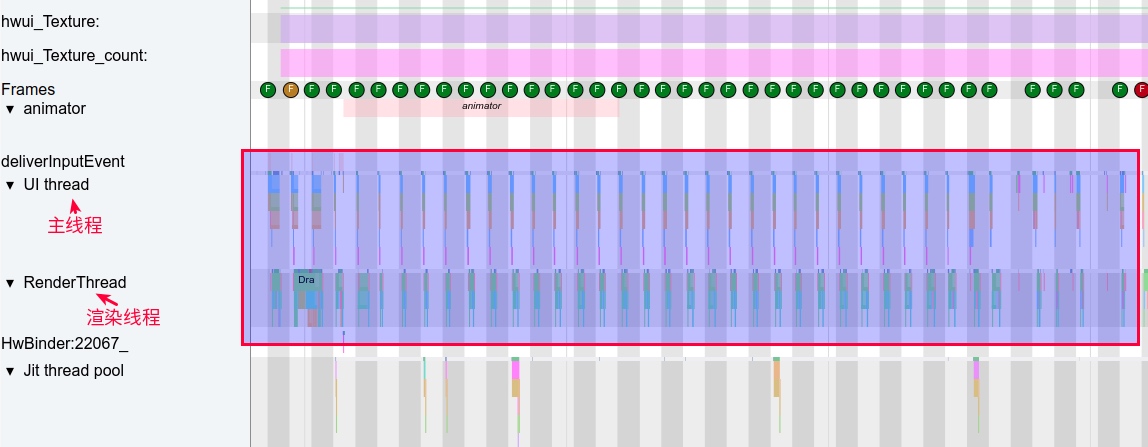
Let’s zoom in on Systrace to see how each frame’s main thread and render thread work, and when GPU intervenes to achieve “acceleration.”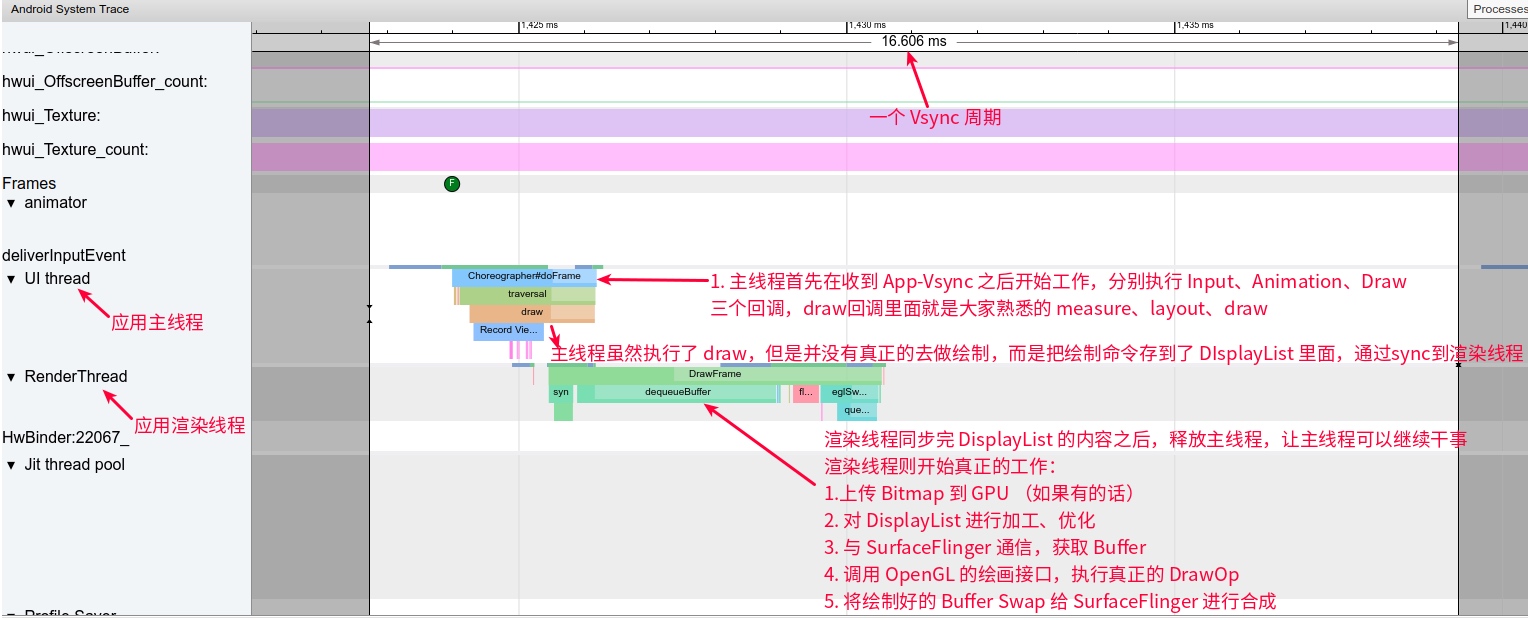
GPU’s actual intervention occurs in some operations within the RenderThread.
Software Accelerated App Performance
Correspondingly, let’s find an App for software acceleration demonstration: China UnionPay.
First, a panoramic view shows that under software rendering, there’s only main thread, no render thread; all rendering work completes on the main thread. Also visible is that under software rendering, each frame’s execution time is very long, exceeding one Vsync cycle, so scrolling feels jerky and uncomfortable. Systrace Download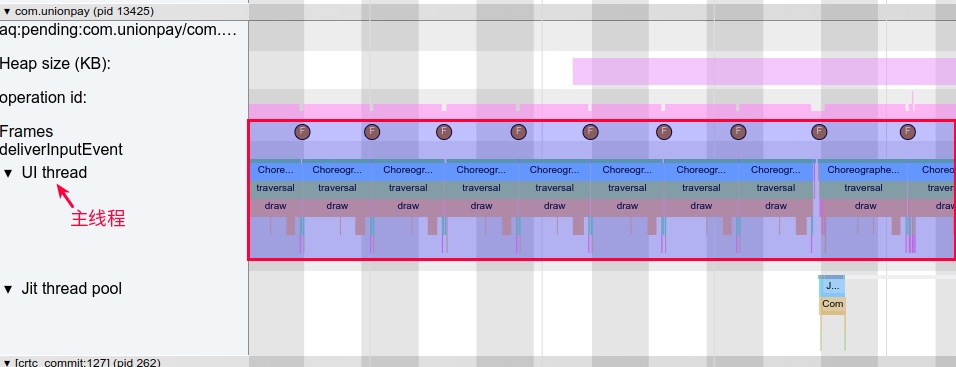
Let’s zoom in on Systrace to see how each frame’s main thread works.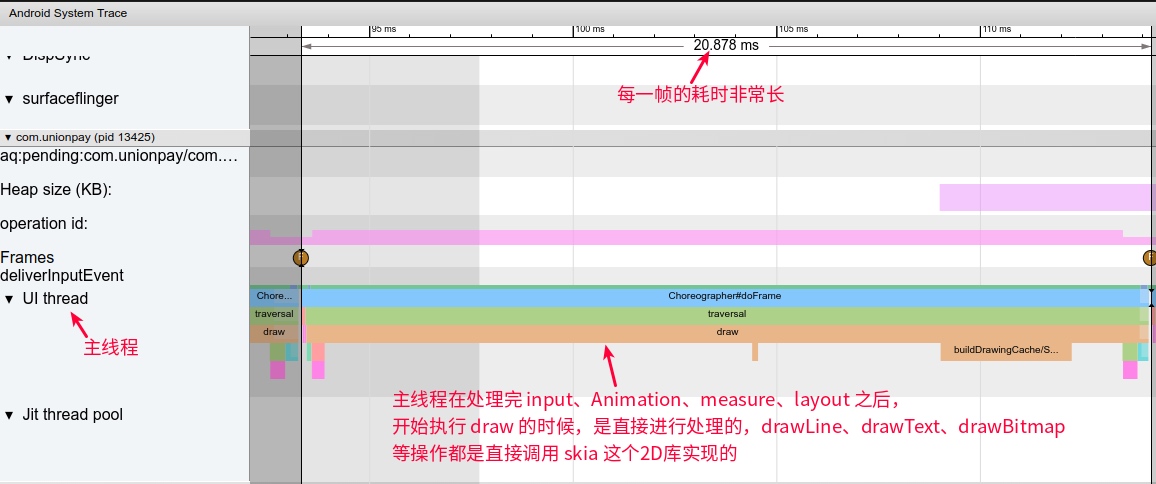
Summary
Through the above comparison and reading the recommended three articles, you should clearly understand the difference between hardware rendering and software rendering. Here’s a summary:
- Under hardware rendering, the app has both main thread and render thread; under software rendering, the app only has main thread, no render thread.
- Under hardware rendering, the app’s final drawing is achieved with GPU assistance; under software rendering, the app’s final drawing is achieved using CPU (calling skia library).
- Under hardware rendering, App performance is superior to software rendering.
- Since some APIs don’t support hardware rendering, only software rendering can be used. When developing Apps, such APIs should be avoided as much as possible (support status can be directly checked in Android official documentation: https://developer.android.google.cn/guide/topics/graphics/hardware-accel).
Software Layer VS Hardware Layer
Having discussed hardware rendering, let’s talk about Software Layer and Hardware Layer. These two concepts mainly refer to Views and have no direct relationship with whether the App is hardware or software rendered at that moment (but there is dependency, explained later).
A View’s layerType has three states (English below is official documentation; read English first, then I’ll explain):
- LAYER_TYPE_NONE: Indicates that the view does not have a layer.
- LAYER_TYPE_SOFTWARE: Indicates that the view has a software layer. A software layer is backed by a and causes the view to be rendered using Android’s software rendering pipeline, even if hardware acceleration is enabled.
- LAYER_TYPE_HARDWARE: Indicates that the view has a hardware layer. A hardware layer is backed by a hardware specific texture (generally Frame Buffer Objects or FBO on OpenGL hardware) and causes the view to be rendered using Android’s hardware rendering pipeline, but only if hardware acceleration is turned on for the view hierarchy. When hardware acceleration is turned off, hardware layers behave exactly as LAYER_TYPE_SOFTWARE.
LAYER_TYPE_NONE
By default, all Views have this layerType. In this case, this View doesn’t undergo any special processing; it proceeds as usual.
LAYER_TYPE_SOFTWARE
Software layerType indicates this View has a software-implemented Layer. How is it software-implemented? Essentially, it converts this View into a Bitmap object under certain conditions.
1 | android/view/View.java |
Software layer functions:
- When the application is not using hardware acceleration, a software layer is useful to apply a specific color filter and/or blending mode and/or translucency to a view and all its children. (When the application is not using hardware acceleration, Software layer can be used to apply specific color filters, blending modes, or translucency to View and all its child Views.)
- When the application is using hardware acceleration, a software layer is useful to render drawing primitives not supported by the hardware accelerated pipeline. It can also be used to cache a complex view tree into a texture and reduce the complexity of drawing operations. For instance, when animating a complex view tree with a translation, a software layer can be used to render the view tree only once. (When the application is using hardware acceleration, software layer can be used to render drawing primitives not supported by hardware accelerated pipeline. It can also cache complex view trees into textures, reducing drawing operation complexity. For example, when animating complex view trees with translation, software layer can render the view tree only once.)
- Software layers should be avoided when the affected view tree updates often. Every update will require to re-render the software layer, which can potentially be slow (particularly when hardware acceleration is turned on since the layer will have to be uploaded into a hardware texture after every update). (When affected view trees update frequently, software layers should be avoided. Each update requires re-rendering the software layer, which can be slow (especially when hardware acceleration is enabled, as the layer must be uploaded to hardware texture after each update).)
LAYER_TYPE_HARDWARE
Hardware layerType indicates this View has a hardware-implemented Layer. From the first section, we know “hardware” here refers to GPU, so hardware-implemented Layer, as the name suggests, is implemented via GPU, typically Frame Buffer Objects or FBO (off-screen rendering Buffer) on OpenGL hardware.
Note: Hardware layerType depends on hardware acceleration. If hardware acceleration is enabled, then FBO or frame buffer exists; if hardware acceleration is disabled, even if you set a View’s LayerType as Hardware Layer, it will be processed as Software Layer.
Hardware layer functions:
- A hardware layer is useful to apply a specific color filter and/or blending mode and/or translucency to a view and all its children. (Hardware layer can be used to apply specific color filters and/or blending modes and/or translucency to view and all its child views.)
- A hardware layer can be used to cache a complex view tree into a texture and reduce the complexity of drawing operations. For instance, when animating a complex view tree with a translation, a hardware layer can be used to render the view tree only once. (Hardware layer can be used to cache complex view trees into textures, reducing drawing operation complexity. For example, when animating complex view trees with translation, hardware layer can render the view tree only once; this is the main point.)
- A hardware layer can also be used to increase the rendering quality when rotation transformations are applied on a view. It can also be used to prevent potential clipping issues when applying 3D transforms on a view. (When rotation transformations are applied on a view, hardware layer can also improve rendering quality. It can also prevent potential clipping issues when applying 3D transforms on a view.)
Setting Hardware Layer helps performance for alpha, translation, scale, rotation property animations (similarly, setting Software Layer has the same effect; detailed explanation in following small example section). Specific usage as follows:
Before animation starts, set LayerType to LAYER_TYPE_HARDWARE (code from official example):
view.setLayerType(View.LAYER_TYPE_HARDWARE, null);
ObjectAnimator.ofFloat(view, "rotationY", 180).start();