Android Activities have several critical launch modes: standard, singleTop, singleTask, and singleInstance. Each serves a specific architectural purpose. In this post, I’ll demonstrate their behaviors using a demo and visualizing the Activity Stack at each step.
An Activity Stack is a Last-In-First-Out (LIFO) data structure. Paying attention to the “Stack Content” column in the examples below will help you grasp how these modes differ in practice.
If an instance of the Activity already exists at the top of the current stack, the system routes the intent to that instance via onNewIntent(). Otherwise, a new instance is created.
// Here, because the third SingleTopActivity is not at the top of the stack (StandardActivity is at the top), launching a new SingleTopActivity will create a new SingleTopActivity instance
// SingleTopActivity receives am_new_intent instead of creating a new Activity
singleTask Mode
1
android:launchMode="singleTask"
Without taskAffinity, a singleTask Activity is created within the current Task.
singleTask follows an “in-stack reuse” pattern: if the Activity doesn’t exist in the current Task, a new instance is created; if it already exists anywhere in the Task, that instance is reused (receiving onNewIntent).
When reusing an existing instance, all Activities above it in the Task are cleared.
Compared to singleTask, singleTaskWithAffinity creates a new Stack.
Launching a StandardActivity from singleTaskWithAffinity places that StandardActivity in the same stack as singleTaskWithAffinity.
Launching singleTaskWithAffinity again from Stack 0 does not create a new Task.
singleTaskWithAffinity appears in the multi-task overview.
singleInstance Mode
1
android:launchMode="singleInstance"
As the name suggests, singleInstance creates a unique Task for the Activity when it’s first launched, no matter where it’s launched from. Subsequent launches will not create new instances unless the original is destroyed.
// Stack 1 content (no Task in multi-task overview) com.example.launchmodetest/.SingleInstanceActivity // Stack 0 content com.example.launchmodetest/.StandardActivity com.example.launchmodetest/.StandardActivity com.example.launchmodetest/.StandardActivity com.example.launchmodetest/.MainActivity
Summary 1
SingleInstanceActivity creates a new Task, but this Task does not appear in the multi-task overview.
SingleInstanceActivity is globally unique. If reused, its onNewIntent is called.
Launching a new Activity from SingleInstanceActivity does not place it in the current Task; instead, it returns to the previous Task.
Test 2: singleInstance (With Affinity)
When android:taskAffinity="" is set in the Manifest, the SingleInstanceActivitydoes appear in the multi-task overview. All other behaviors remain the same as without affinity.
The Task that an Activity has an affinity for. Conceptually, Activities with the same affinity belong to the same Task (from the user’s perspective, they belong to the same “application”). A Task’s affinity is determined by the affinity of its root Activity.
Affinity determines two things:
The parent Task that an Activity will move to (see the allowTaskReparenting attribute).
The Task that will host an Activity launched with the FLAG_ACTIVITY_NEW_TASK flag.
By default, all Activities in an application share the same affinity. You can set this property to group them differently, or even place Activities defined in different applications within the same Task. To specify that an Activity has no affinity with any Task, set it to an empty string.
If this attribute is not set, the Activity inherits the affinity set for the application (see the taskAffinity attribute of the <application> element). The default affinity name for an application is the package name set by the <manifest> element.
Relationship Between ActivityRecord, TaskRecord, and ActivityStack
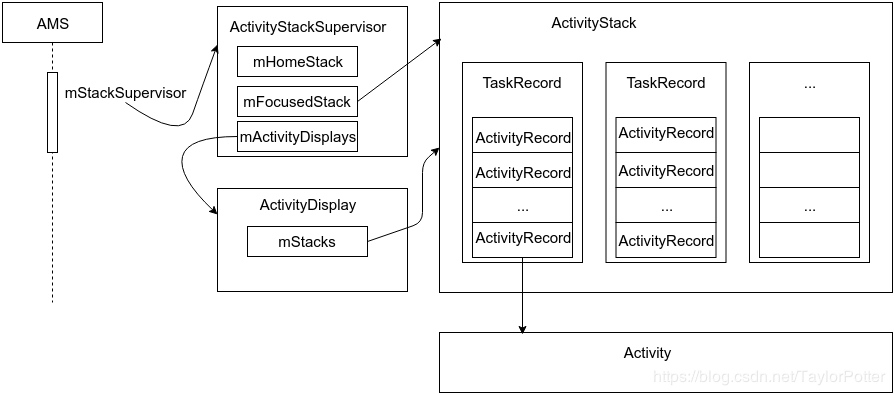
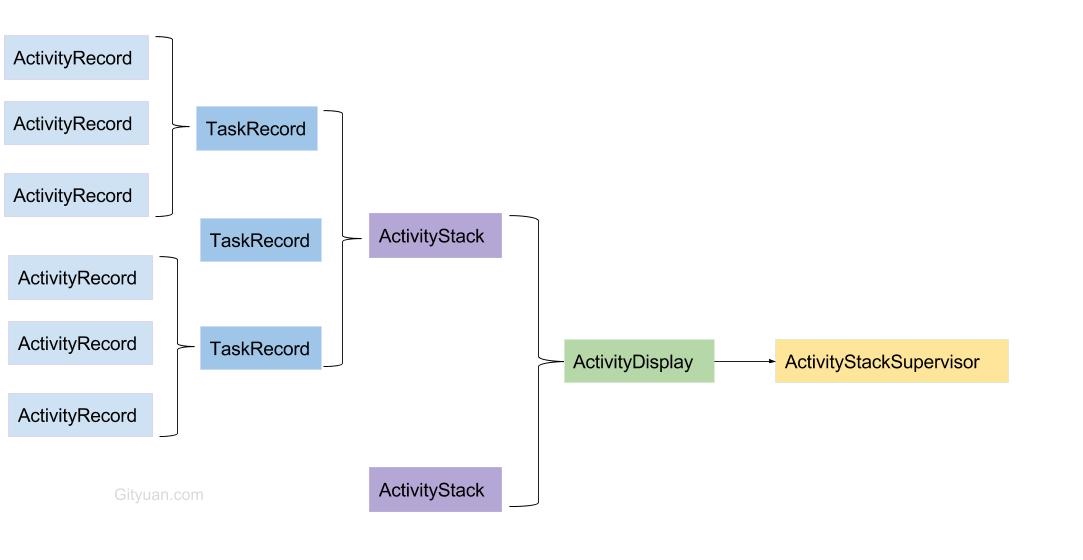
An ActivityRecord corresponds to an Activity instance and stores all information about that Activity. However, a single Activity may have multiple ActivityRecords because it can be launched multiple times, depending primarily on its launch mode.
A TaskRecord consists of one or more ActivityRecords. This is what we commonly call a “task stack,” following a Last-In-First-Out (LIFO) structure.
An ActivityStack manages TaskRecords and contains multiple TaskRecords.
Generally, without split-screen or virtual display functionality, both ActivityStackSupervisor and ActivityDisplay are unique to the system.
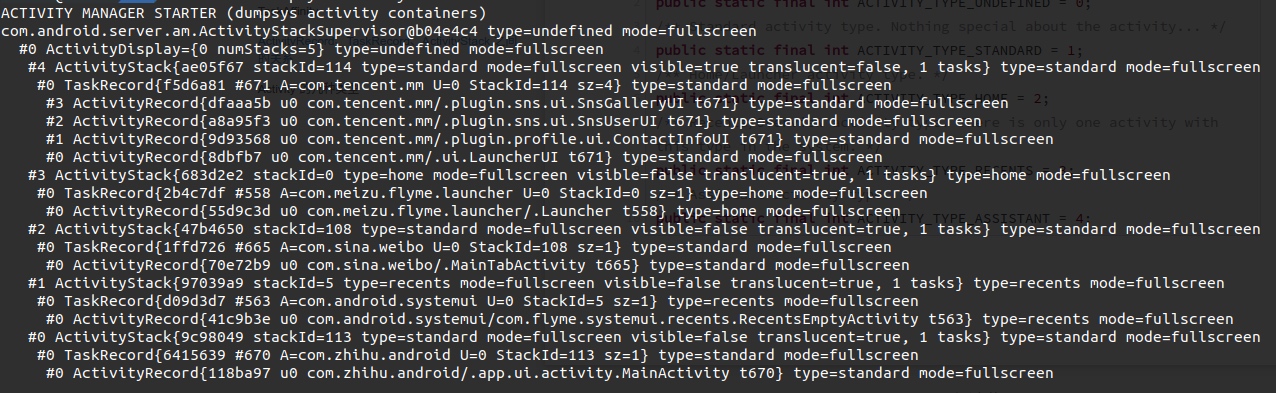
ActivityDisplay primarily consists of three stacks: Home Stack, App Stack, and Recents Stack.
Each ActivityStack can contain several TaskRecord objects.
Each TaskRecord contains several ActivityRecord objects.
Each ActivityRecord records information about one Activity.
Below is an example dump showing the current phone’s ActivityRecord, TaskRecord, and ActivityStack: (adb shell dumpsys activity containers)
Activity Types
1 2 3 4 5 6 7 8 9 10
/** Activity type is currently not defined. */ publicstaticfinalint ACTIVITY_TYPE_UNDEFINED = 0; /** Standard activity type. Nothing special about the activity... */ publicstaticfinalint ACTIVITY_TYPE_STANDARD = 1; /** Home/Launcher activity type. */ publicstaticfinalint ACTIVITY_TYPE_HOME = 2; /** Recents/Overview activity type. There is only one activity with this type in the system. */ publicstaticfinalint ACTIVITY_TYPE_RECENTS = 3; /** Assistant activity type. */ publicstaticfinalint ACTIVITY_TYPE_ASSISTANT = 4;
If you found this article helpful, feel free to share it on social media. I hope it helps others!
About Me && Blog
Below is my personal introduction and related links. I look forward to exchanging ideas with fellow developers—when three walk together, one is bound to be my teacher!