

This article introduces Choreographer, a class that app developers rarely encounter but is crucial in the Android Framework rendering pipeline. It covers the background of Choreographer‘s introduction, an overview, source code analysis, its relationship with MessageQueue, its use in APM, and optimization ideas from mobile manufacturers.
Choreographer was introduced to coordinate with Vsync, providing a stable timing for handling Messages in app rendering. When Vsync arrives, the system adjusts the Vsync signal period to control the timing of drawing operations for each frame. Most phones currently have a 60Hz refresh rate (16.6ms). To match this, the system sets the Vsync period to 16.6ms, waking Choreographer every period to perform app drawing—this is its primary role. Understanding Choreographer also helps developers grasp the principles of frame execution and deepens knowledge of Message, Handler, Looper, MessageQueue, Measure, Layout, and Draw.
This is the eighth article in the Systrace series, providing a brief introduction to Choreographer within Systrace.
The purpose of this series is to view the overall operation of the Android system from a different perspective using Systrace, while also providing an alternative angle for learning the Framework. Perhaps you’ve read many articles about the Framework but can never remember the code, or you’re unclear about the execution flow. Maybe from Systrace’s graphical perspective, you can gain a deeper understanding.
Series Article Index
- Introduction to Systrace
- Systrace Basics - Prerequisites for Systrace
- Systrace Basics - Why 60 fps?
- Android Systrace Basics - SystemServer Explained
- Systrace Basics - SurfaceFlinger Explained
- Systrace Basics - Input Explained
- Systrace Basics - Vsync Explained
- Systrace Basics - Vsync-App: Detailed Explanation of Choreographer-Based Rendering Mechanism
- Systrace Basics - MainThread and RenderThread Explained
- Systrace Basics - Triple Buffer Explained
- Systrace Basics - CPU Info Explained
- Systrace Smoothness in Action 1: Understanding Jank Principles
- Systrace Smoothness in Action 2: Case Analysis - MIUI Launcher Scroll Jank Analysis
- Systrace Smoothness in Action 3: FAQs During Jank Analysis
- Systrace Responsiveness in Action 1: Understanding Responsiveness Principles
- Systrace Responsiveness in Action 2: Responsiveness Analysis - Using App Startup as an Example
- Systrace Responsiveness in Action 3: Extended Knowledge on Responsiveness
- Systrace Thread CPU State Analysis Tips - Runnable
- Systrace Thread CPU State Analysis Tips - Running
- Systrace Thread CPU State Analysis Tips - Sleep and Uninterruptible Sleep
Essence of the Main Thread Mechanism
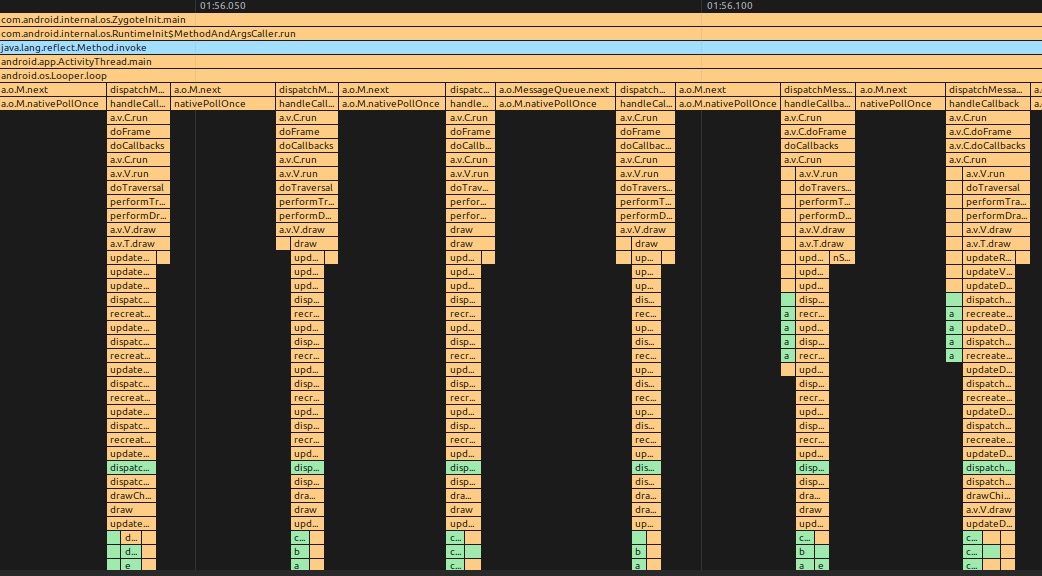
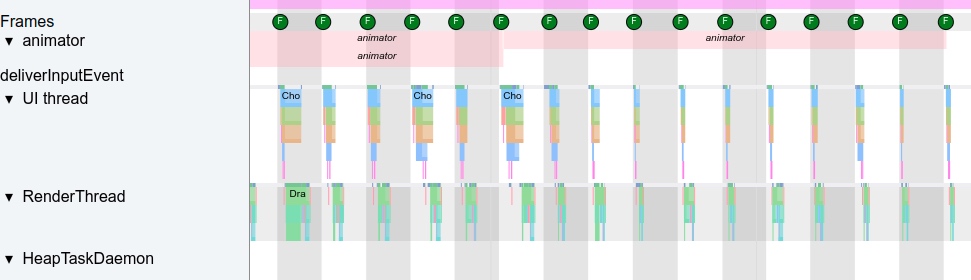
Before discussing Choreographer, let’s clarify the essence of the Android main thread: it’s effectively a Message processing loop. All operations, including frame rendering, are sent as Messages to the main thread’s MessageQueue. The queue processes a message and waits for the next, as shown:
MethodTrace Illustration
Systrace Illustration
Evolution
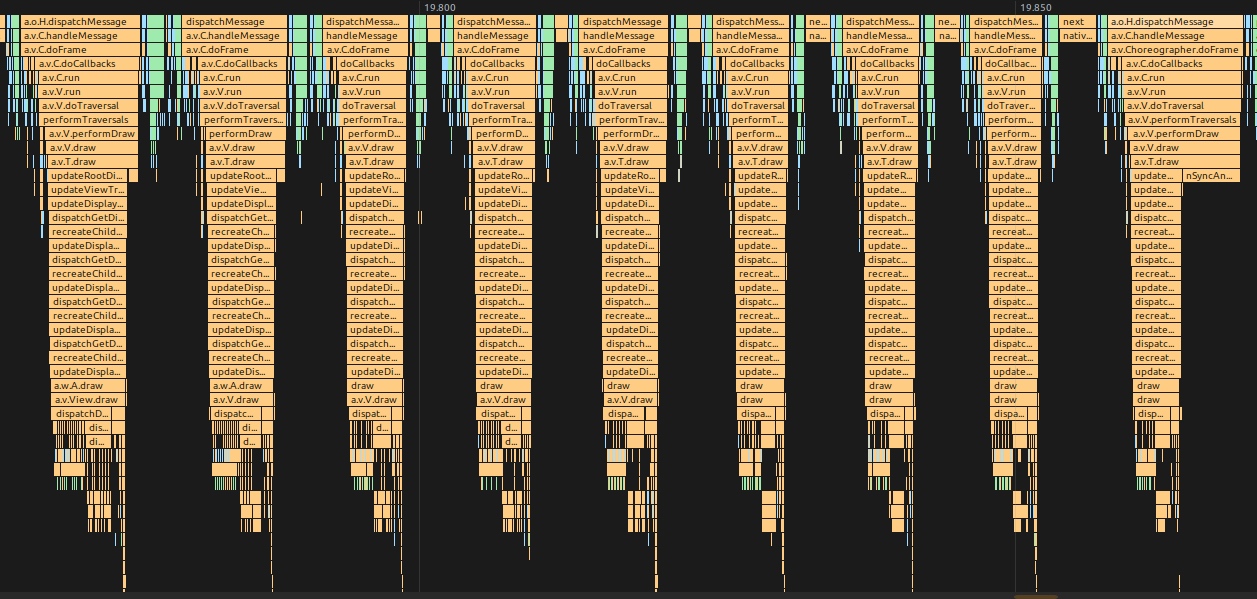
In Android versions before Vsync, Messages for rendering frames had no gaps; as soon as one frame finished drawing, the next frame’s Message was processed. This led to unstable frame rates that fluctuated unpredictably:
MethodTrace Illustration
Systrace Illustration
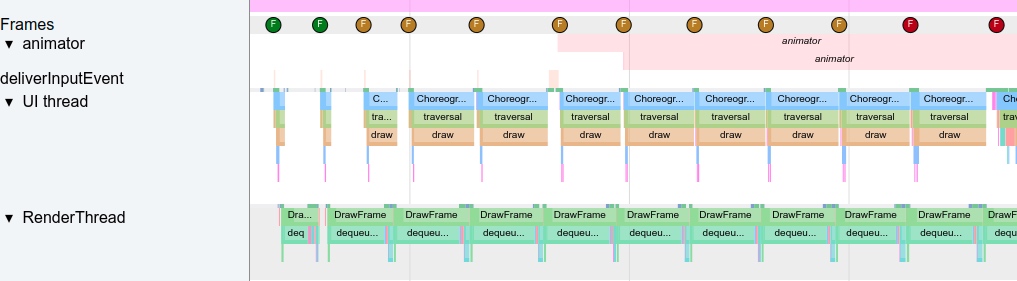
The bottleneck here was dequeueBuffer. Because screens have a fixed refresh cycle and SurfaceFlinger (SF) consumes Front Buffer at a constant rate, SF also consumes App Buffers at a constant rate. Apps would get stuck at dequeueBuffer, resulting in unstable buffer acquisition and frequent jank.
For users, a stable frame rate is a better experience. For example, a stable 50 fps feels smoother than one that fluctuates wildly between 60 and 40 fps.
Android’s evolution introduced Vsync + TripleBuffer + Choreographer, aiming to provide a stable frame rate mechanism that allows software and hardware to operate at a synchronized frequency.
Introducing Choreographer
Choreographer coordinates with Vsync to provide a stable Message processing timing. When Vsync arrives, the system adjusts the signal period to control when each frame is drawn. Vsync typically uses a 16.6ms (60 fps) period to match the 60Hz refresh rate of most phone screens. Every 16.6ms, the Vsync signal wakes Choreographer to perform app drawing. If the app renders within this window every cycle, it achieves 60 fps, appearing very smooth.
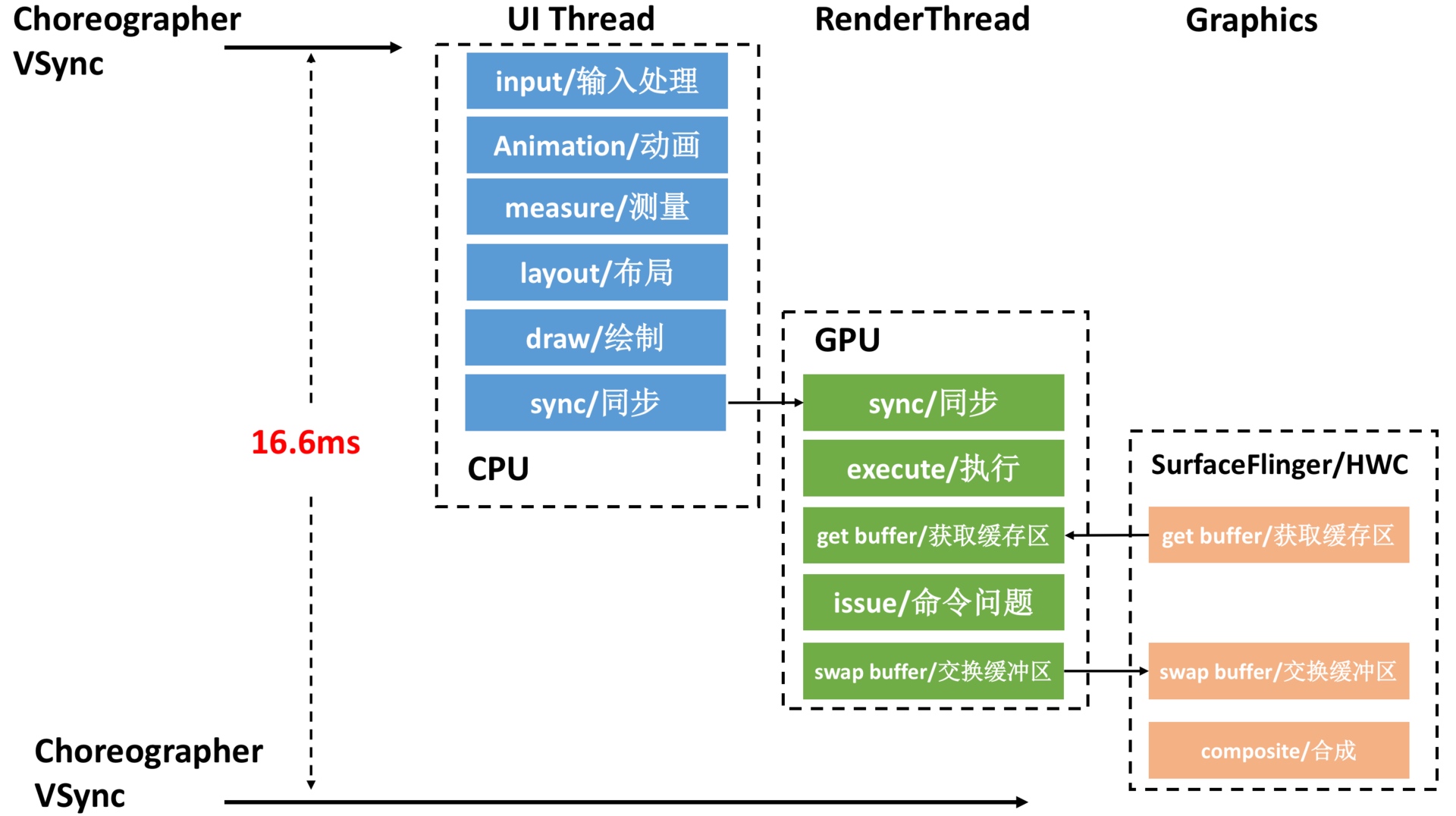
With 90Hz screens becoming common, the Vsync period has dropped from 16.6ms to 11.1ms, requiring faster task completion and higher performance. See: A New Smooth Experience: A Talk on 90Hz.
Choreographer Overview
Choreographer acts as a bridge in the Android rendering pipeline:
- Upper side: It receives and processes app update messages and callbacks, handling them collectively when Vsync arrives. This includes Input events, Animation logic, and Traversal (measure, layout, draw), while also detecting dropped frames and recording callback durations.
- Lower side: It requests and receives Vsync signals, handling event callbacks (via
FrameDisplayEventReceiver.onVsync) and scheduling Vsync (FrameDisplayEventReceiver.scheduleVsync).
Choreographer is a vital “utility player.” The Choreographer + SurfaceFlinger + Vsync + TripleBuffer stack ensures Android apps run at a stable frame rate (20, 90, or 60 fps), reducing the discomfort of frame fluctuations.
Understanding Choreographer also clarifies the fundamentals of frame execution and deepens knowledge of Message, Handler, Looper, MessageQueue, Input, Animation, Measure, Layout, and Draw. Many APM tools combine Choreographer (using FrameCallback + FrameInfo) + MessageQueue (using IdleHandler) + Looper (with custom MessageLogging) to optimize performance monitoring.
While diagrams are helpful, I prefer using Systrace and MethodTrace to show system operations (CPU, SurfaceFlinger, SystemServer, Apps) from left to right. Familiarity with the code allows you to map Systrace directly to actual phone behavior. This article will primarily use Systrace.
Choreographer Workflow from a Systrace Perspective
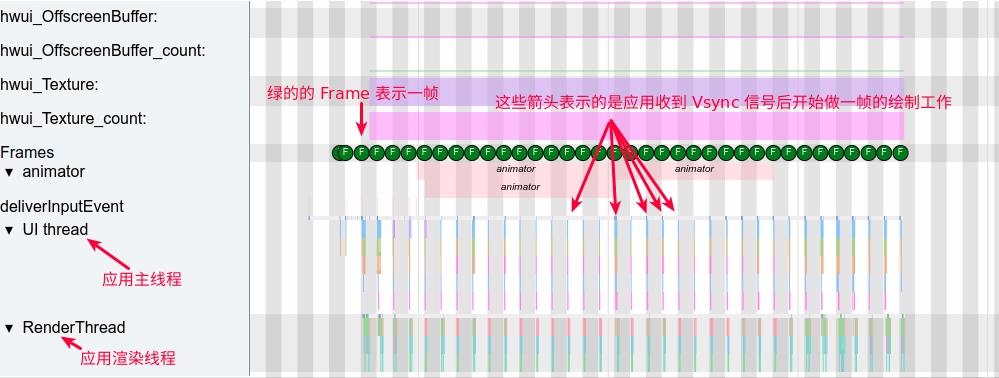
Using Launcher scrolling as an example, here is a complete preview of the App process. Each green frame represents a frame that finally appears on the screen.
- Each gray and white bar is a Vsync period (16.6ms).
- Frame processing flow: Vsync signal callback -> UI Thread -> RenderThread -> SurfaceFlinger (not shown).
- UI Thread and RenderThread together complete an app’s frame rendering. The rendered buffer is sent to SurfaceFlinger for composition, then displayed.
- Launcher scrolling frames are very short (Ui Thread + RenderThread time), but still wait for the next Vsync to begin processing.
Zooming into the UI Thread for a single frame, we see Choreogrepher‘s position and how it organizes the frame:
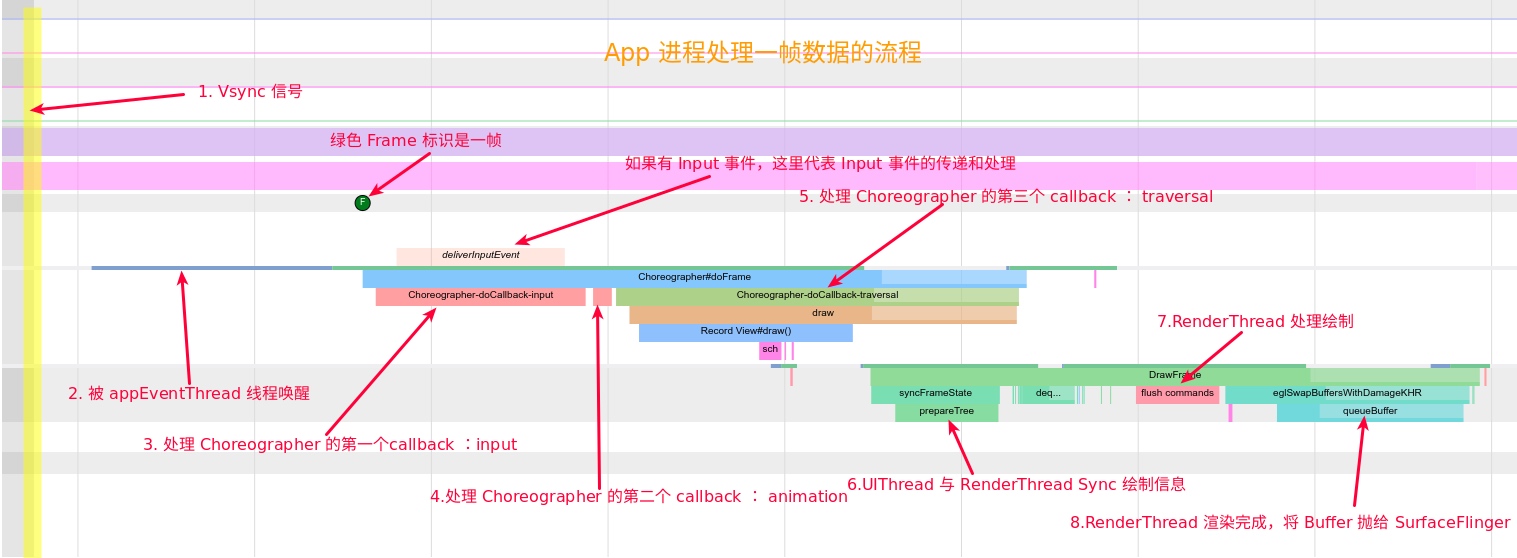
Choreographer Workflow
- Initialize Choreographer
- Initialize
FrameHandler, binding it to the Looper. - Initialize
FrameDisplayEventReceiverto communicate with SurfaceFlinger for Vsync. - Initialize
CallBackQueues.
- Initialize
- SurfaceFlinger’s
appEventThreadsends Vsync;ChoreographercallsFrameDisplayEventReceiver.onVsync, entering the main processing functiondoFrame. Choreographer.doFramecalculates dropped frames.- Processes the first callback: input.
- Processes the second callback: animation.
- Processes the third callback: insets animation.
- Processes the fourth callback: traversal.
traversal-drawsynchronizes UIThread and RenderThread data.
- Processes the fifth callback: commit?
RenderThreadprocesses draw commands and sends them to the GPU.- Calls
swapBufferto submit to SurfaceFlinger for composition. (The buffer isn’t truly finished until the CPU completes; newer Systrace versions use GPU fences to mark this).
After step 1, the system loops through steps 2-9.
Here is the corresponding MethodTrace (detailed view following):
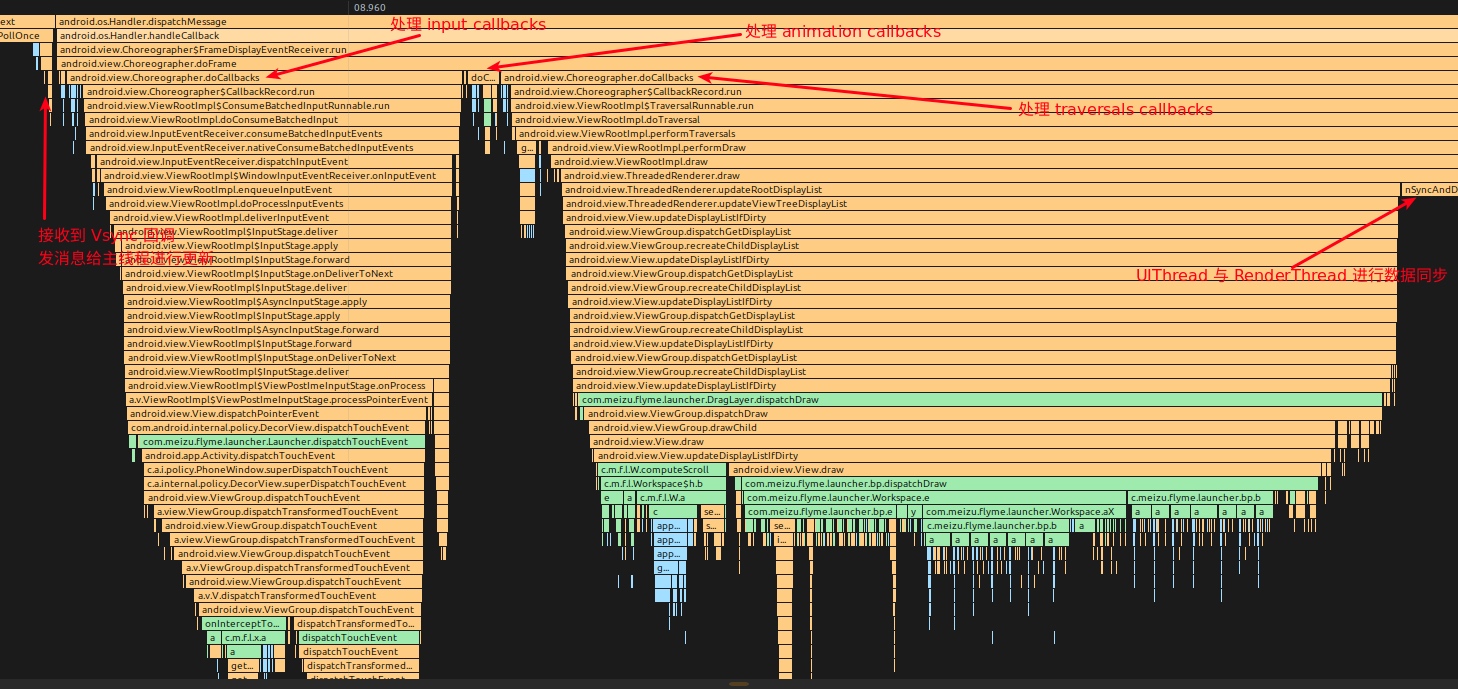
Now, let’s examine the implementation via source code.
Source Code Analysis
The following analysis covers important logic, omitting less relevant parts like Native interactions with SurfaceFlinger.
Choreographer Initialization
Singleton Initialization
1 | // Thread local storage for the choreographer. |
Choreographer Constructor
1 | private Choreographer(Looper looper, int vsyncSource) { |
FrameHandler
1 | private final class FrameHandler extends Handler { |
Choreographer Initialization Chain
During Activity startup, after onResume, Activity.makeVisible() is called, then addView(), eventually calling:
1 | ActivityThread.handleResumeActivity(IBinder, boolean, boolean, String) (android.app) |
FrameDisplayEventReceiver Overview
FrameDisplayEventReceiver handles Vsync registration, requests, and reception. It inherits from DisplayEventReceiver and has three key methods:
onVsync– Vsync signal callbackrun– ExecutesdoFramescheduleVsync– Requests the Vsync signal
1 | private final class FrameDisplayEventReceiver extends DisplayEventReceiver implements Runnable { |
Vsync Registration in Choreographer
The FrameDisplayEventReceiver.onVsync inner class receives Vsync callbacks and notifies the UIThread. It achieves this by listening to file descriptors initialized as follows:
android/view/Choreographer.java
1 | private Choreographer(Looper looper, int vsyncSource) { |
android/view/Choreographer.java
1 | public FrameDisplayEventReceiver(Looper looper, int vsyncSource) { |
android/view/DisplayEventReceiver.java
1 | public DisplayEventReceiver(Looper looper, int vsyncSource) { |
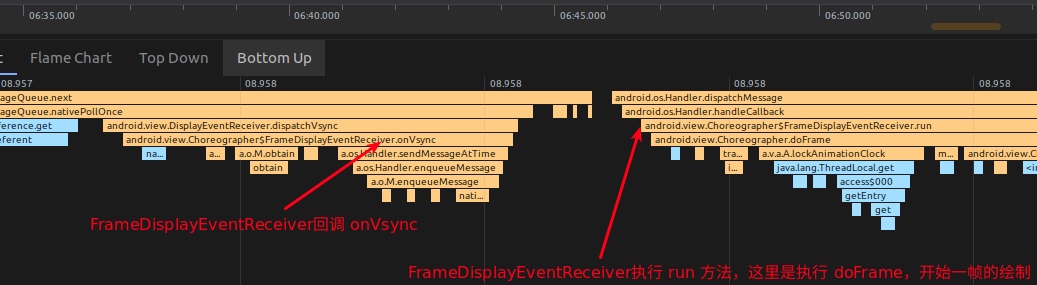
nativeInit uses a BitTube (essentially a socket pair) to pass and request Vsync events. When SurfaceFlinger receives Vsync, its appEventThread sends the event through BitTube to DisplayEventDispatcher, which then triggers Choreographer.FrameDisplayEventReceiver.onVsync, starting frame drawing:
Logic for Processing One Frame
The core logic resides in Choreographer.doFrame. FrameDisplayEventReceiver.onVsync posts itself, and its run method calls doFrame:
android/view/Choreographer.java
1 | public void onVsync(long timestampNanos, long physicalDisplayId, int frame) { |
doFrame performs three main tasks:
- Calculates dropped frame logic.
- Records frame drawing information.
- Executes
CALLBACK_INPUT,CALLBACK_ANIMATION,CALLBACK_INSETS_ANIMATION,CALLBACK_TRAVERSAL, andCALLBACK_COMMIT.
Dropped Frame Logic
1 | void doFrame(long frameTimeNanos, int frame) { |
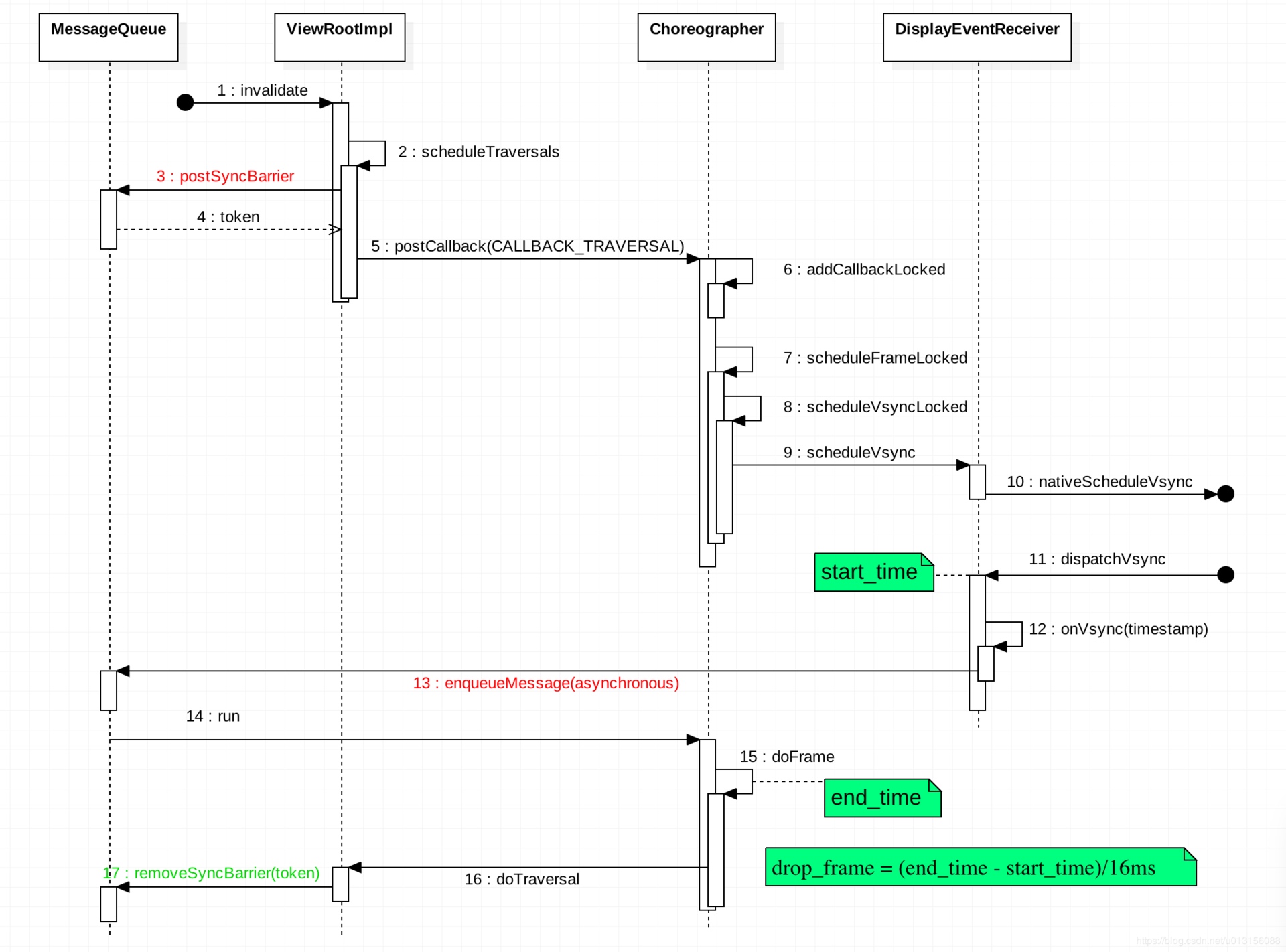
Dropped frame detection uses the difference between when Vsync was supposed to arrive (start_time) and when doFrame actually executes (end_time). This jitter represents the delay, or dropped frames:
Actual Systrace example of dropped frames:
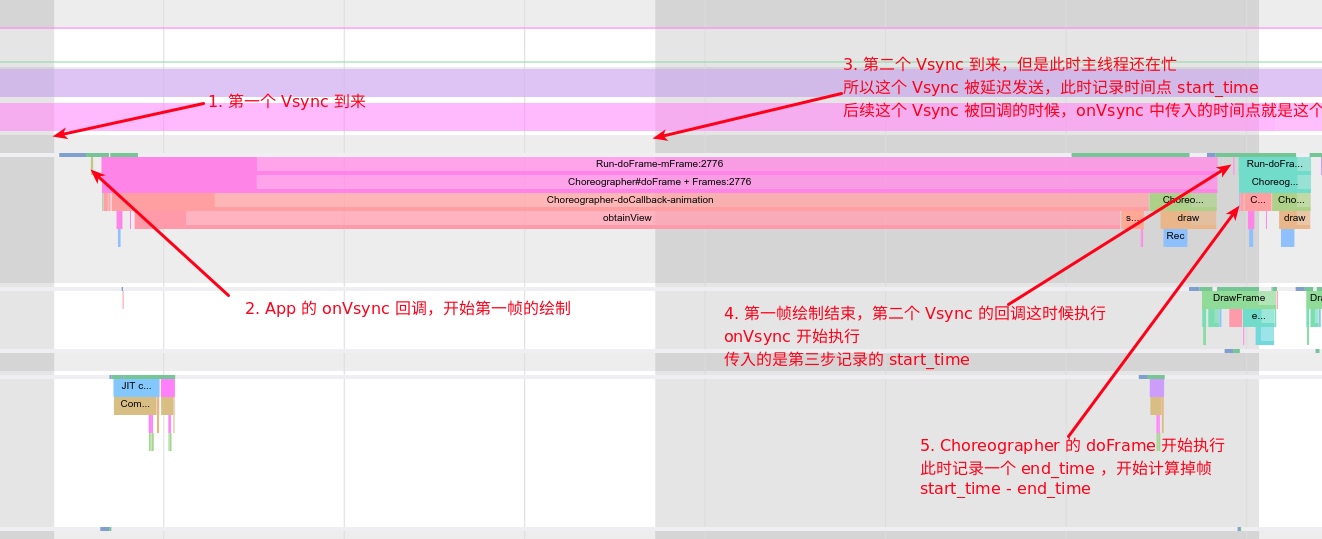
Note: This method calculates jitter for the previous frame, meaning some dropped frames might be missed.
Recording Frame Drawing Info
FrameInfo records key node times (visible via dumpsys gfxinfo). hwui records the remaining parts.
1 | // Various flags set to provide extra metadata about the current frame |
doFrame records times from Vsync to markPerformTraversalsStart:
1 | void doFrame(long frameTimeNanos, int frame) { |
Executing Callbacks
1 | void doFrame(long frameTimeNanos, int frame) { |
Input Callback Stack
input callback typically executes ViewRootImpl.ConsumeBatchedInputRunnable:
android/view/ViewRootImpl.java
1 | final class ConsumeBatchedInputRunnable implements Runnable { |
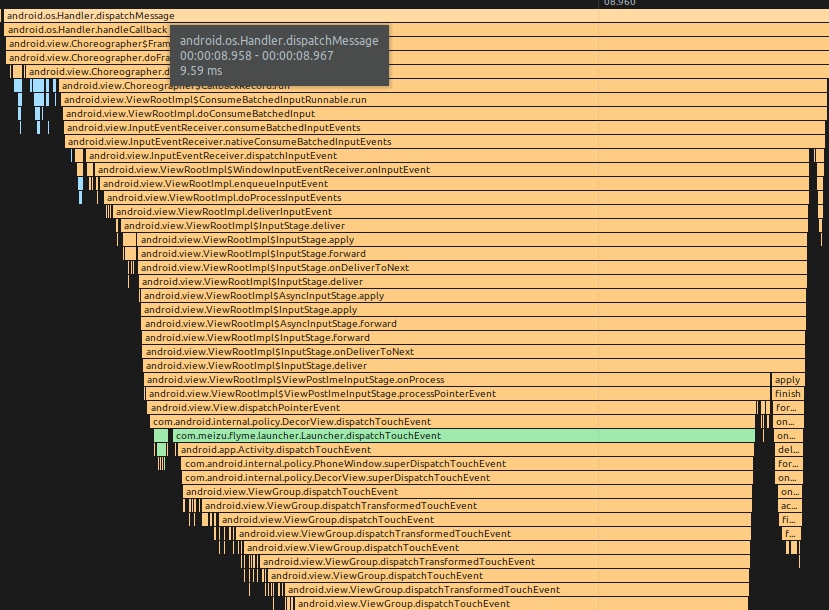
Input events eventually reach DecorView.dispatchTouchEvent for standard event distribution:
Animation Callback Stack
Commonly used via View.postOnAnimation:
1 | public void postOnAnimation(Runnable action) { |
Used for operations like startScroll and Fling:
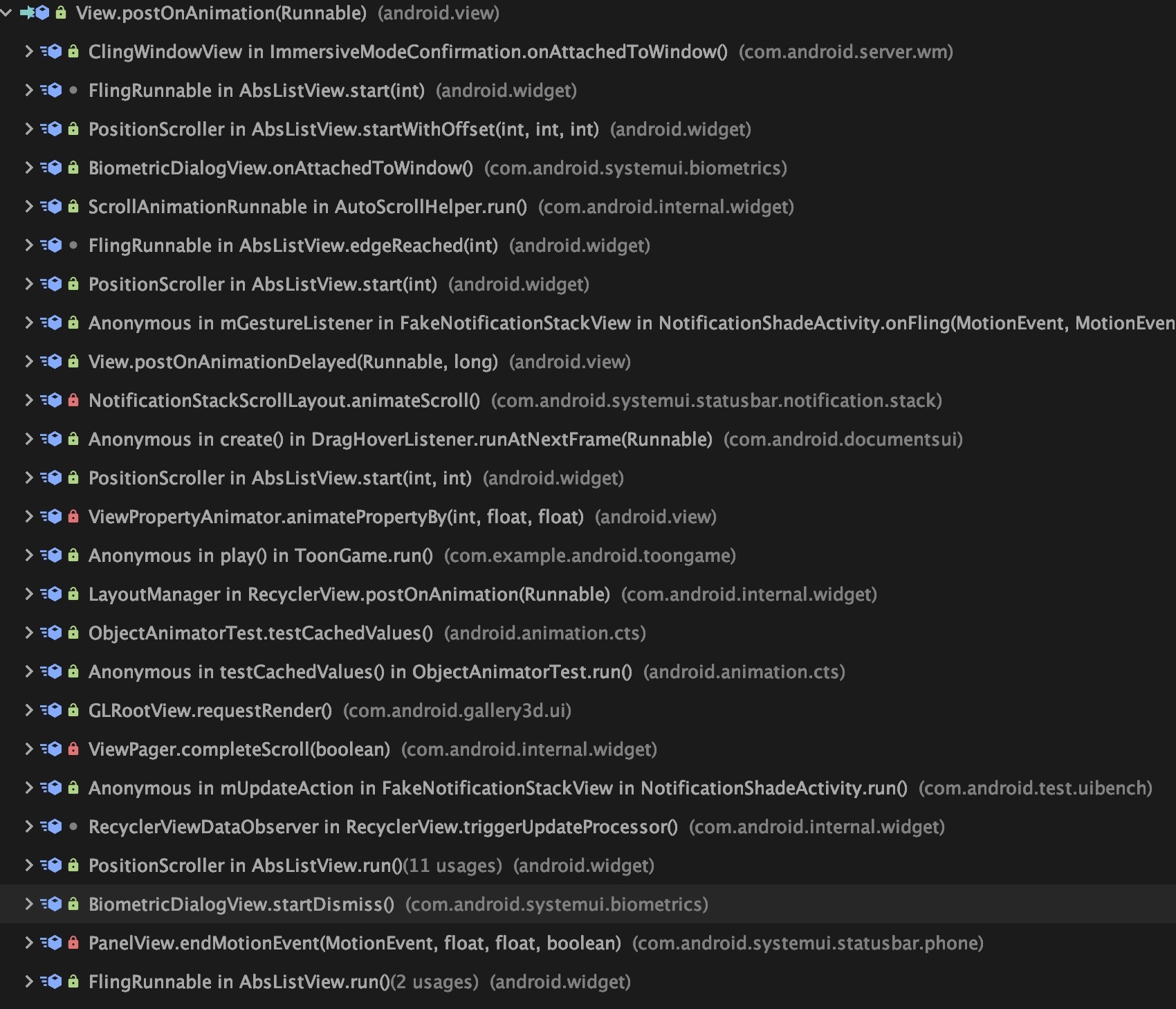
Here is a fling animation stack:
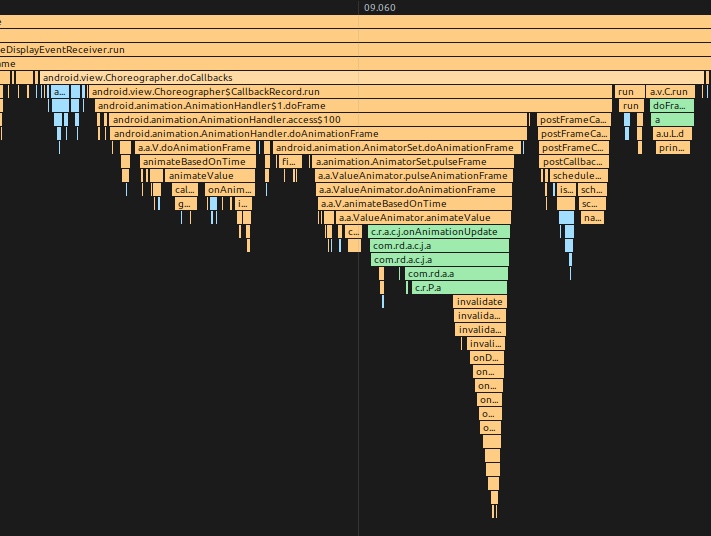
FrameCallback also uses CALLBACK_ANIMATION:
1 | public void postFrameCallbackDelayed(FrameCallback callback, long delayMillis) { |
Traversal Stack
1 | void scheduleTraversals() { |
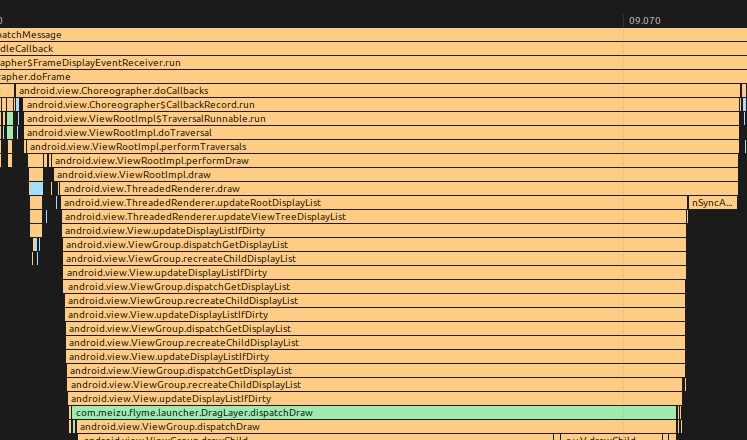
doTraversal TraceView Example
Requesting the Next Frame’s Vsync
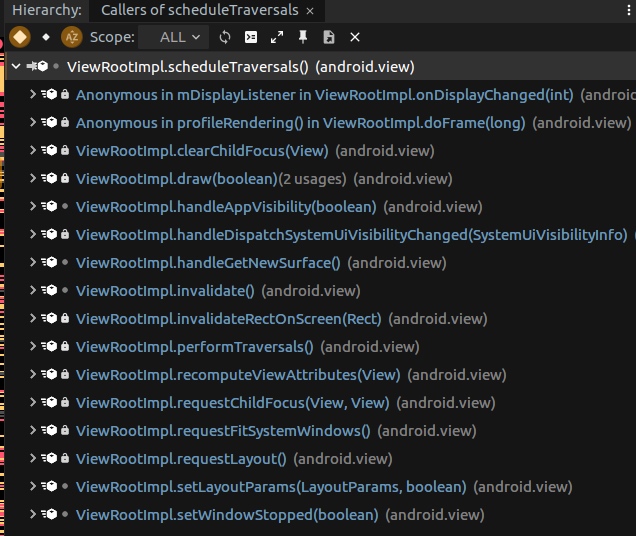
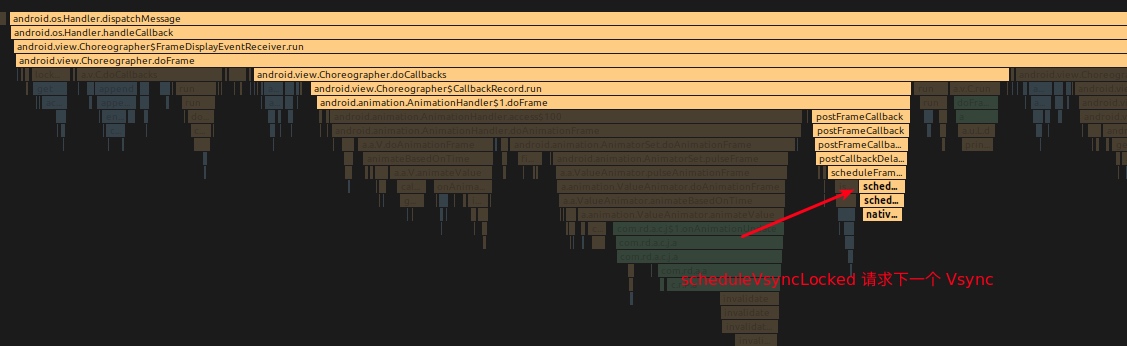
Continuous operations like animations or scrolling need a stable frame output. Every doFrame triggers another Vsync request as needed. invalidate and requestLayout also trigger requests.
ObjectAnimator Animation Logic
android/animation/ObjectAnimator.java
1 | public void start() { |
android/animation/ValueAnimator.java
1 | private void start(boolean playBackwards) { |
android/animation/AnimationHandler.java
1 | public void addAnimationFrameCallback(final AnimationFrameCallback callback, long delay) { |
Animation uses the FrameCallback interface to request the next Vsync for every frame:
Source Code Summary
- Choreographer is a thread singleton bound to a Looper (usually the app’s main thread).
- DisplayEventReceiver is an abstract class whose JNI part creates an
IDisplayEventConnection. Vsync signals fromAppEventThreadare passed toonVsync. - DisplayEventReceiver.scheduleVsync requests a Vsync interrupt before drawing UI.
- Choreographer.FrameCallback is called every Vsync, greatly assisting animation implementation by providing fixed timing.
- Choreographer invokes callbacks set via
postCallbackwhen Vsync arrives. Five types are defined:- CALLBACK_INPUT: Input events.
- CALLBACK_ANIMATION: Animation logic.
- CALLBACK_INSETS_ANIMATION: Insets animation.
- CALLBACK_TRAVERSAL: Measure, layout, draw.
- CALLBACK_COMMIT: trimMemory and frame monitoring.
- ListView item initialization happens within input or animation depending on context.
- CALLBACK_INPUT and CALLBACK_ANIMATION execute before CALLBACK_TRAVERSAL because they modify view properties.
APM and Choreographer
Given its position, Choreographer is central to performance monitoring. Analysts use its FrameCallback and FrameInfo interfaces:
FrameCallback.doFramecallbacks.FrameInfomonitoring (adb shell dumpsys gfxinfo <packagename> framestats).SurfaceFlingermonitoring (adb shell dumpsys SurfaceFlinger --latency).SurfaceFlinger PageFlipmechanism (adb service call SurfaceFlinger 1013).Choreographer‘s dropped frame calculation.BlockCanarybased onLooper.
Using FrameCallback.doFrame
1 | public interface FrameCallback { |
Usage:
1 | Choreographer.getInstance().postFrameCallback(youOwnFrameCallback ); |
TinyDancer uses this to calculate FPS.
Using FrameInfo
adb shell dumpsys gfxinfo <packagename> framestats output example:
1 | Window: StatusBar |
Using SurfaceFlinger
Data is in nanoseconds since boot. Each command returns 128 lines of frame data:
- Refresh period.
- Col 1: App drawing time.
- Col 2: Vsync timestamp before submission to hardware.
- Col 3: Hardware acceptance time (completion).
Jank is calculated when the jankflag (based on ceil((C - A) / refresh-period)) changes between lines.
Using SurfaceFlinger PageFlip
1 | Parcel data = Parcel.obtain(); |
BlockCanary
Monitors performance by recording time before and after every Looper message:
1 | public static void loop() { |
MessageQueue and Choreographer
Asynchronous messages can bypass SyncBarriers. A Barrier blocks all subsequent synchronous messages until removed. This is used in Choreographer to prioritize Traversal messages:
SyncBarrier Example in Choreographer
scheduleTraversals posts a SyncBarrier:
1 | void scheduleTraversals() { |
doTraversal removes it:
1 | void doTraversal() { |