

This is the ninth article in the Systrace series, primarily introducing the MainThread and RenderThread in Android Apps—commonly known as the Main Thread and Rendering Thread. This article examines their workflows from the perspective of Systrace and covers related topics: jank, software rendering, and dropped frame calculation.
The purpose of this series is to view the overall operation of the Android system from a different perspective using Systrace, while also providing an alternative angle for learning the Framework. Perhaps you’ve read many articles about the Framework but can never remember the code, or you’re unclear about the execution flow. Maybe from Systrace’s graphical perspective, you can gain a deeper understanding.
Table of Contents
- Series Article Index
- Main Content
- Creation of the Main Thread
- Creation and Evolution of the Render Thread
- Division of Labor: Main Thread vs. Render Thread
- Main Thread and Render Thread in Games
- Main Thread and Render Thread in Flutter
- Performance
- References
- Attachments
- Other Addresses
- About Me && Blog
Series Article Index
- Introduction to Systrace
- Systrace Basics - Prerequisites for Systrace
- Systrace Basics - Why 60 fps?
- Android Systrace Basics - SystemServer Explained
- Systrace Basics - SurfaceFlinger Explained
- Systrace Basics - Input Explained
- Systrace Basics - Vsync Explained
- Systrace Basics - Vsync-App: Detailed Explanation of Choreographer-Based Rendering Mechanism
- Systrace Basics - MainThread and RenderThread Explained
- Systrace Basics - Binder and Lock Contention Explained
- Systrace Basics - Triple Buffer Explained
- Systrace Basics - CPU Info Explained
- Systrace Smoothness in Action 1: Understanding Jank Principles
- Systrace Smoothness in Action 2: Case Analysis - MIUI Launcher Scroll Jank Analysis
- Systrace Smoothness in Action 3: FAQs During Jank Analysis
- Systrace Responsiveness in Action 1: Understanding Responsiveness Principles
- Systrace Responsiveness in Action 2: Responsiveness Analysis - Using App Startup as an Example
- Systrace Responsiveness in Action 3: Extended Knowledge on Responsiveness
Main Content
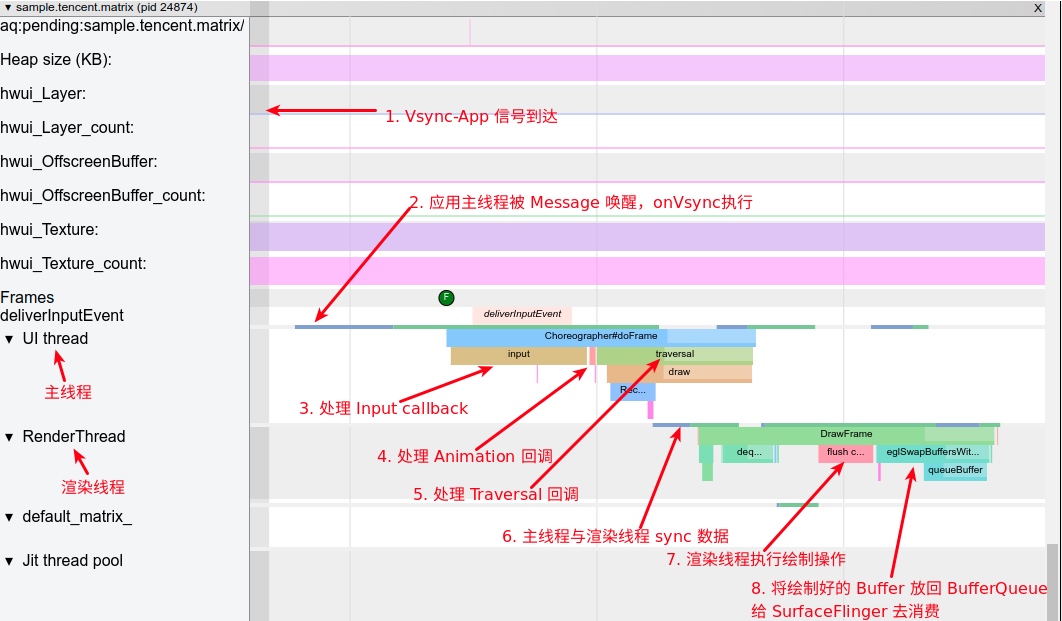
Using list scrolling as an example, we intercept the workflow of a single frame for the main thread and rendering thread (every frame follows this process, though some involve more work than others). Pay special attention to the “UI Thread” and RenderThread rows.
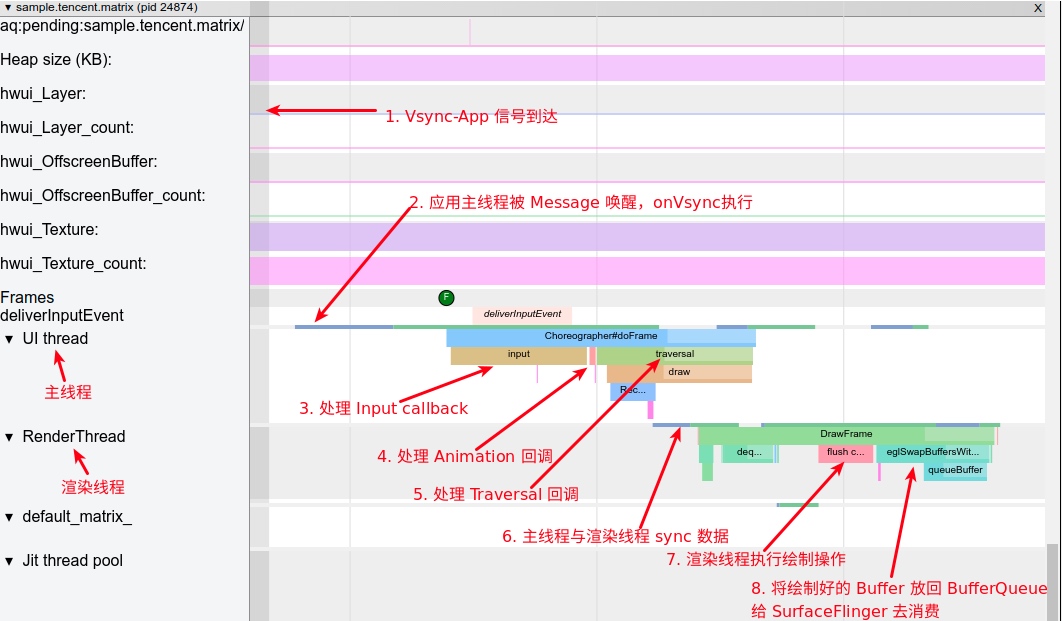
The workflow corresponding to this diagram is as follows:
- The main thread is in a Sleep state, waiting for the Vsync signal.
- Vsync arrived, and the main thread is woken up.
ChoreographercallbacksFrameDisplayEventReceiver.onVsyncto start drawing a frame. - Process the App’s Input events for this frame (if any).
- Process the App’s Animation events for this frame (if any).
- Process the App’s Traversal events for this frame (if any).
- The main thread synchronizes rendering data with the rendering thread. Once synchronization is finished, the main thread completes its drawing for the frame. It can then process the next Message (if any,
IdleHandlerwill also be triggered if not empty) or return to Sleep to wait for the next Vsync. - The rendering thread first takes a Buffer from the
BufferQueue(dequeueBuffer). After processing data and calling OpenGL-related functions for the actual rendering, it returns the rendered Buffer to theBufferQueue(queueBuffer). Once Vsync-SF arrives,SurfaceFlingertakes all prepared Buffers for composition (this process is mentioned in theSurfaceFlingersection).
The above process is detailed in the article Detailed Explanation of Android Rendering Mechanism Based on Choreographer, including what doFrame does in each frame, jank calculation principles, and APM. I recommend checking that article if you haven’t yet.
In this article, we’ll dive into several points not covered in that previous piece to help you better understand the main and rendering threads:
- Evolution of the Main Thread
- Creation of the Main Thread
- Creation of the Render Thread
- Division of Labor: Main Thread vs. Render Thread
- Main Thread and Render Thread in Games
- Main Thread and Render Thread in Flutter
Creation of the Main Thread
An Android App process is based on Linux, and its management follows Linux process management mechanisms. Thus, its creation involves the fork function:
frameworks/base/core/jni/com_android_internal_os_Zygote.cpp
1 | pid_t pid = fork(); |
The forked process can be seen as the main thread, but it’s not yet connected to Android and cannot handle Android App Messages. Since Android App execution is message-driven, this forked main thread must be bound to the Android Message mechanism to handle various Messages.
This is where ActivityThread comes in. More accurately, it could be called ProcessThread. ActivityThread connects the forked process with the App’s Messages. Their cooperation forms what we know as the Android App main thread. ActivityThread isn’t literally a thread; it initializes the MessageQueue, Looper, and Handler required for the Message mechanism. Since its Handler processes most Messages, we typically refer to ActivityThread as the main thread, though it’s actually a logic processing unit for the main thread.
Creation of ActivityThread
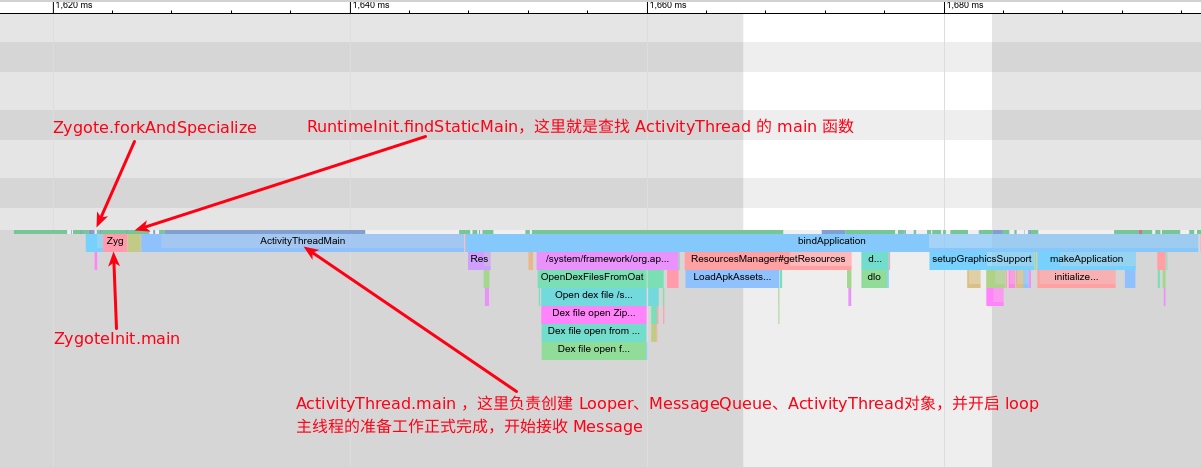
After the App process is forked, control returns to the App process to find the main function of ActivityThread:
com/android/internal/os/ZygoteInit.java
1 | static final Runnable childZygoteInit( |
Here, startClass is ActivityThread. Once found and called, the logic moves to the main function of ActivityThread:
android/app/ActivityThread.java
1 | public static void main(String[] args) { |
The comments are clear. Once main finishes, the main thread is officially online. Its Systrace flow looks like this:
Functions of ActivityThread
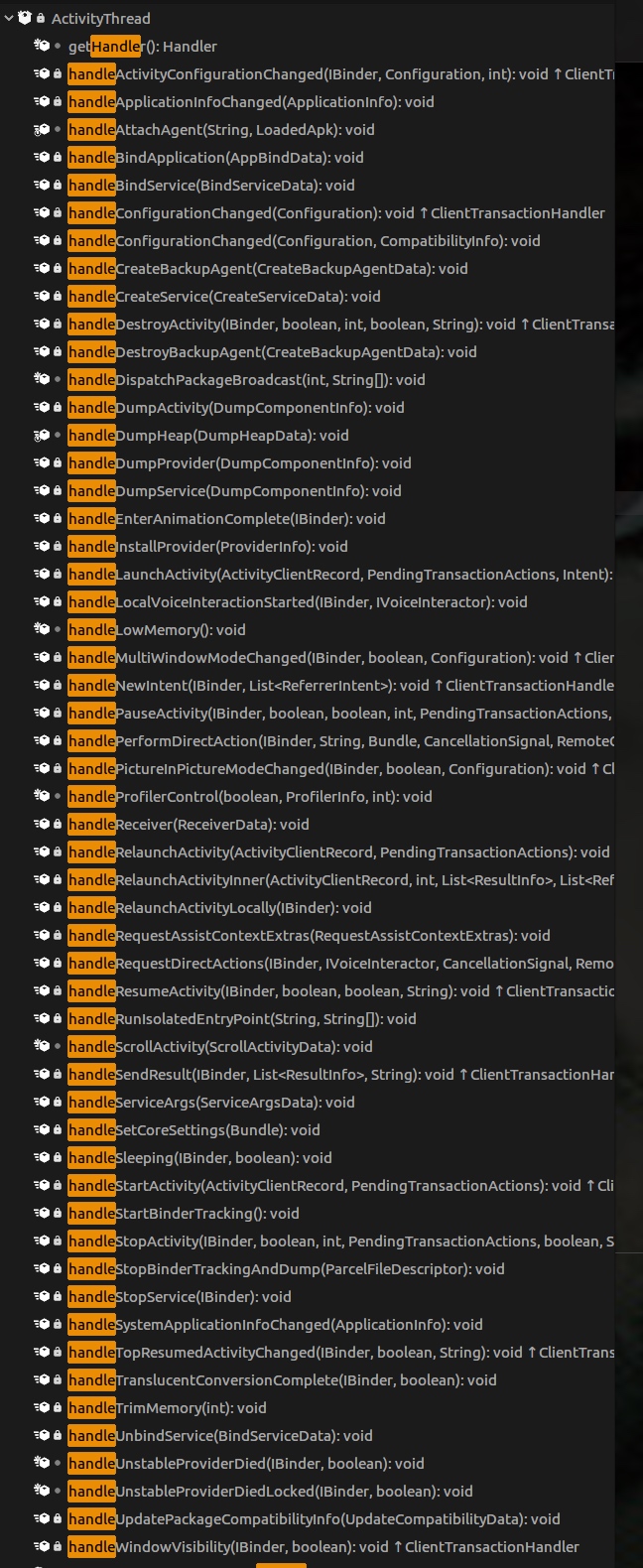
We often say Android’s four components run on the main thread. This is easily understood by looking at the ActivityThread‘s Handler Messages:
1 | class H extends Handler { // Snippet |
As shown, process creation, Activity launch, and management of Services, Receivers, and Providers are all handled here, leading into specific handleXXX methods.
Creation and Evolution of the Render Thread
Now for the rendering thread, or RenderThread. Early Android versions didn’t have a dedicated rendering thread; all rendering was done on the main thread using the CPU via the libSkia library. RenderThread was introduced in Android Lollipop to take over some of the main thread’s rendering workload, reducing its burden.
Software Rendering
“Hardware acceleration” usually refers to GPU acceleration—using RenderThread to call the GPU for faster rendering. In current Android versions, hardware acceleration is enabled by default. Thus, processes with visible content will have both a main thread and a rendering thread by default. If we disable it in the Application tag of the AndroidManifest via:
1 | android:hardwareAccelerated="false" |
The system will detect this and forgo initializing RenderThread, using the CPU via libSkia for direct rendering. Its Systrace looks like this:
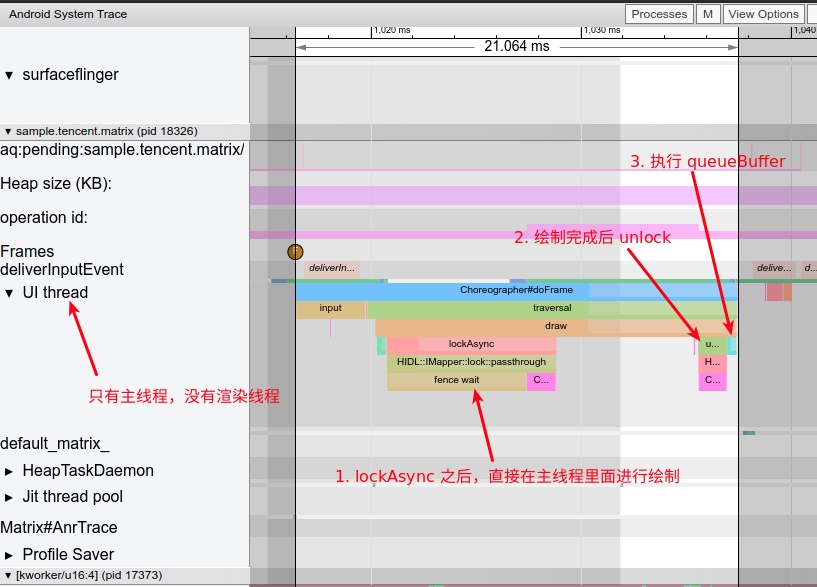
Compared to the hardware-accelerated version at the start, the main thread’s execution time increases significantly because it must handle rendering, making jank more likely and reducing the idle intervals for other Messages.
Hardware-Accelerated Rendering
With hardware acceleration on, the main thread’s draw function doesn’t perform the actual drawCall. Instead, it records the content to a DisplayList, which is then synced to the RenderThread. Once synced, the main thread is freed to handle other tasks while the RenderThread continues rendering.
Rendering Thread Initialization
RenderThread is initialized when drawing content is required. Typically, when starting an Activity, the first draw execution checks if the rendering thread is initialized and performs the initialization if not.
android/view/ViewRootImpl.java
1 | mAttachInfo.mThreadedRenderer.initializeIfNeeded( |
Subsequently, draw is called directly:
android/graphics/HardwareRenderer.java
1 | mAttachInfo.mThreadedRenderer.draw(mView, mAttachInfo, this); |
The draw here only updates the DisplayList. Afterward, syncAndDrawFrame is called to notify the rendering thread to start work while releasing the main thread. Core implementation of RenderThread is in the libhwui library (frameworks/base/libs/hwui).
frameworks/base/libs/hwui/renderthread/RenderProxy.cpp
1 | int RenderProxy::syncAndDrawFrame() { |
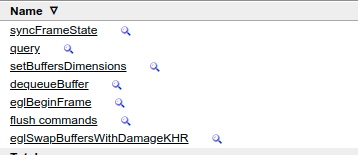
I won’t detail the full RenderThread workflow here, as it warrants its own article. Many excellent resources on hwui exist, which you can consult alongside the source code. Its core flow in Systrace looks like this:
Division of Labor: Main Thread vs. Render Thread
The main thread handles process Messages, Input events, Animation logic, Measure, Layout, Draw, and updates the DisplayList, but it doesn’t interact directly with SurfaceFlinger. The rendering thread handles rendering-related work, partly via the CPU and partly by calling OpenGL functions.
With hardware acceleration, Android uses DisplayList instead of direct CPU drawing for each frame during the Draw phase. DisplayList is a record of drawing operations, abstracted as the RenderNode class. This indirect approach offers several advantages:
DisplayListcan be drawn multiple times as needed without re-interacting with business logic.- Specific operations (like translation or scaling) can apply to the entire
DisplayListwithout redistributing draw commands. - Once all draw operations are known, they can be optimized (e.g., drawing all text together).
DisplayListprocessing can be offloaded to another thread (RenderThread).- The main thread can handle other Messages once
syncis finished, without waiting forRenderThreadto complete.
Detailed RenderThread flow can be found here: http://www.cocoachina.com/articles/35302
Main Thread and Render Thread in Games
Most games use a separate rendering thread with its own Surface and interact directly with SurfaceFlinger. The main thread plays a minimal role, as most logic is implemented within the custom rendering thread.
Check the Systrace for “Honor of Kings” (Honor of Kings), focusing on the application process and SurfaceFlinger process (30fps):
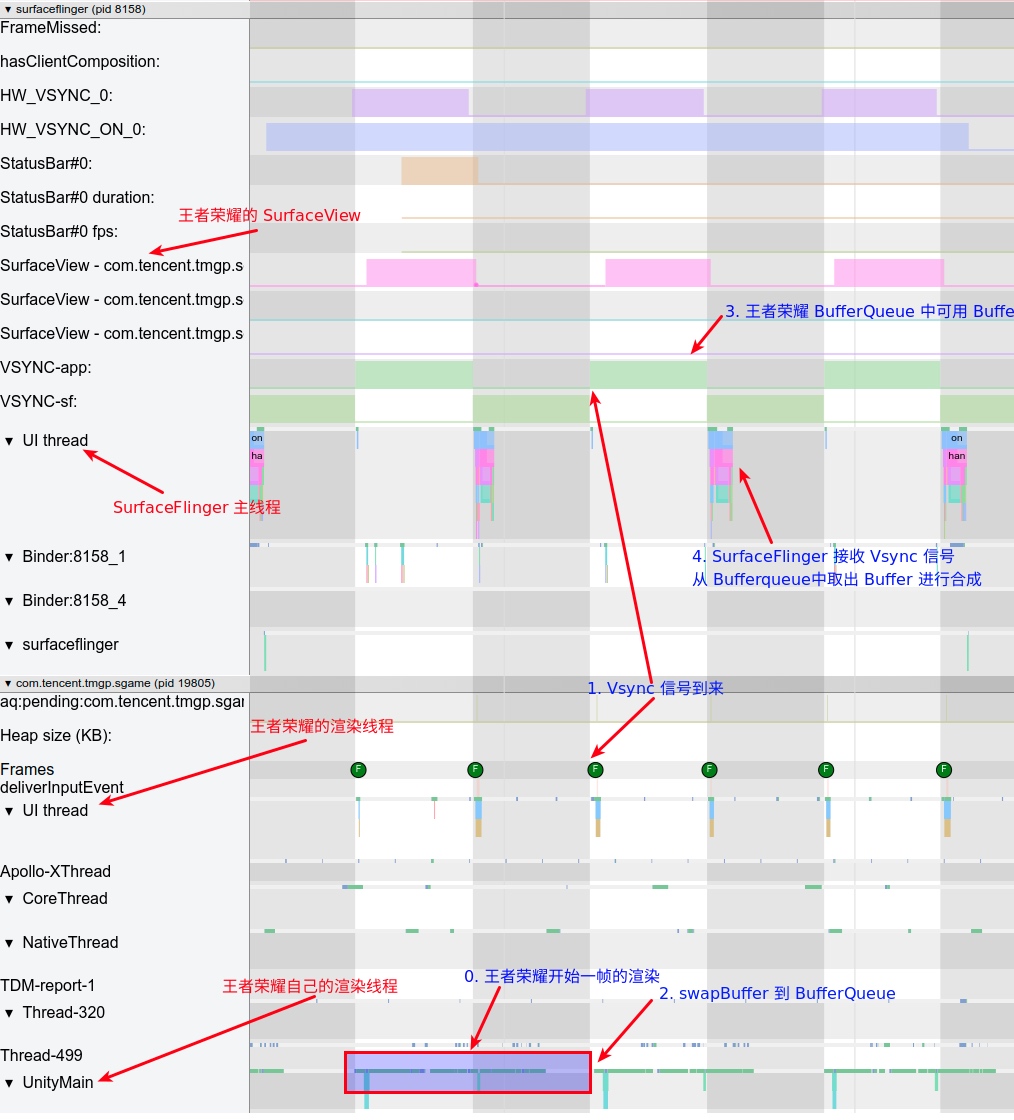
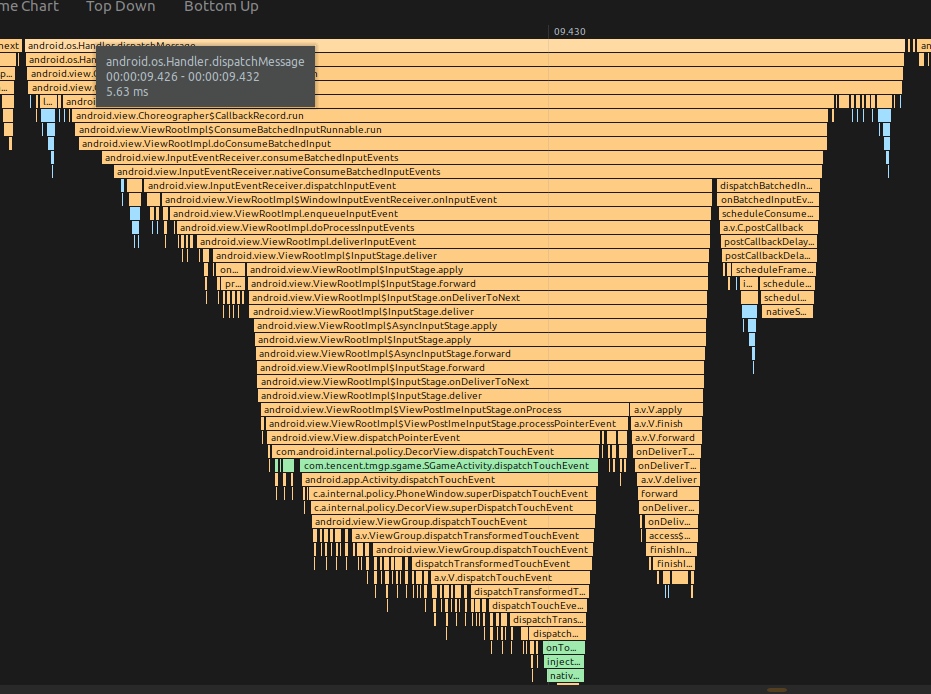
The main thread’s primary job is simply passing Input events to Unity’s rendering thread. The rendering thread then handles logic processing and screen updates.
Main Thread and Render Thread in Flutter
Flutter Apps also show distinct patterns in Systrace. Since Flutter rendering is based on libSkia, it doesn’t use the standard RenderThread. Instead, it builds its own RenderEngine. Flutter’s two most important threads are the UI thread and the GPU thread, corresponding to the Framework and Engine layers mentioned below:
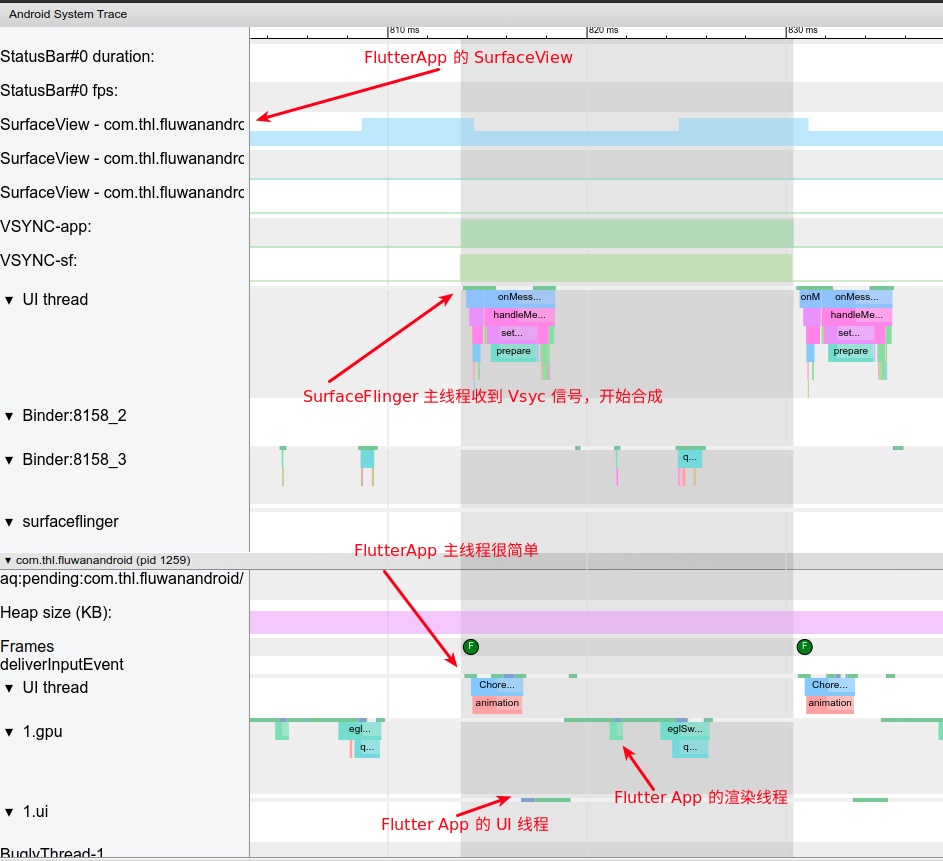
Flutter also listens for Vsync signals. Its VsyncView uses postFrameCallback to monitor doFrame callbacks, then calls nativeOnVsync to pass information to the Flutter UI thread to begin a frame’s drawing.

Flutter’s approach is similar to game development: it doesn’t depend on the specific platform, builds its own rendering pipeline, and offers fast updates and cross-platform advantages.
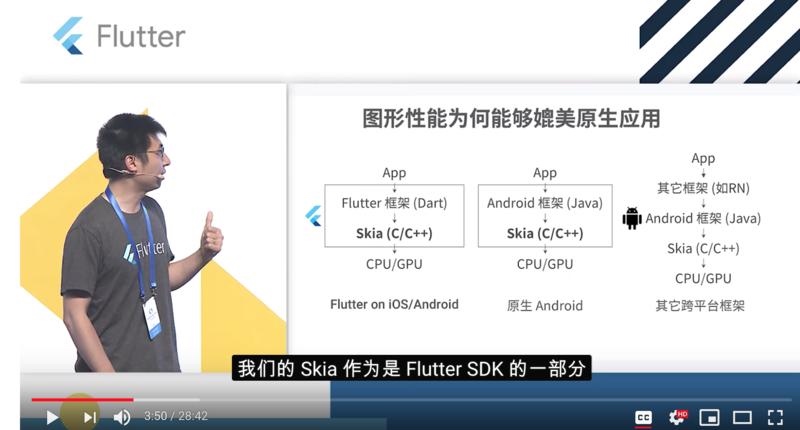
Flutter SDK includes the Skia library, enabling the latest Skia features without waiting for OS updates. Google has optimized Skia heavily, claiming performance comparable to native apps.
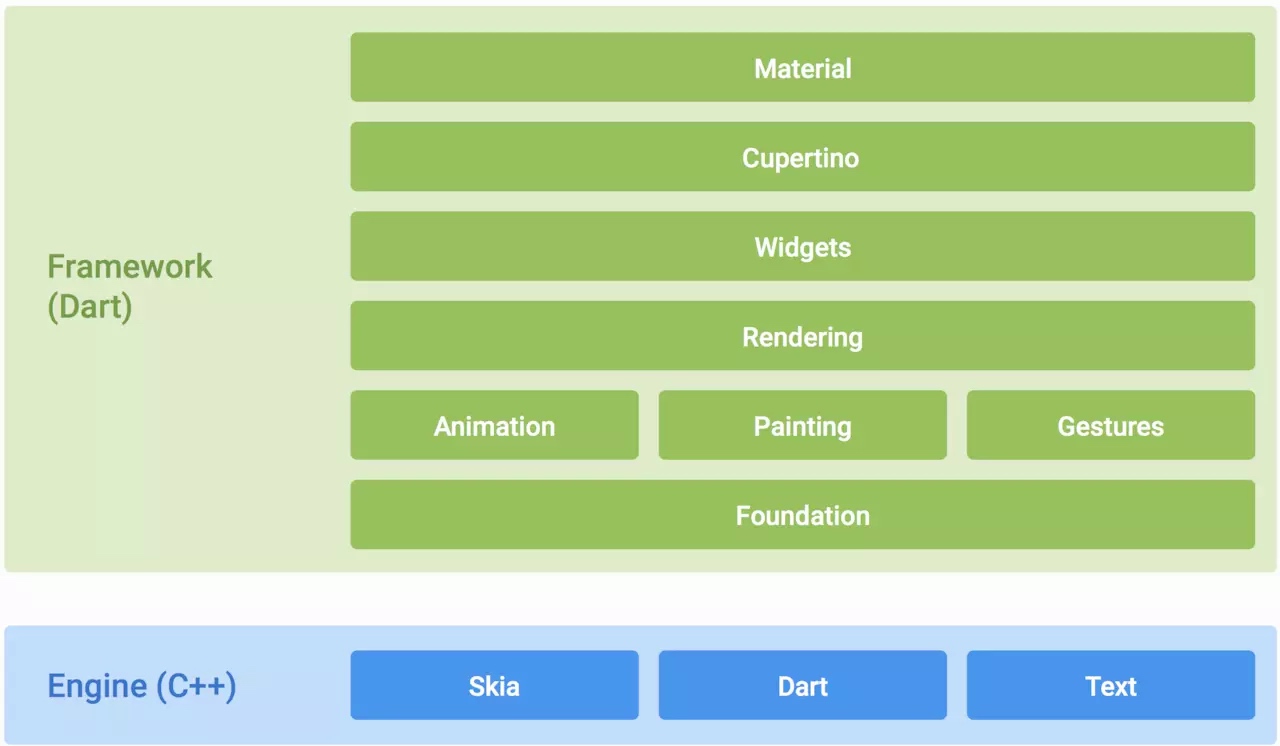
Flutter’s framework is divided into Framework (Dart) and Engine (C++) layers. Apps are built on the Framework, which handles Build, Layout, Paint, and layer generation. The Engine combines those layers, generates textures, and submits data to the GPU via OpenGL.
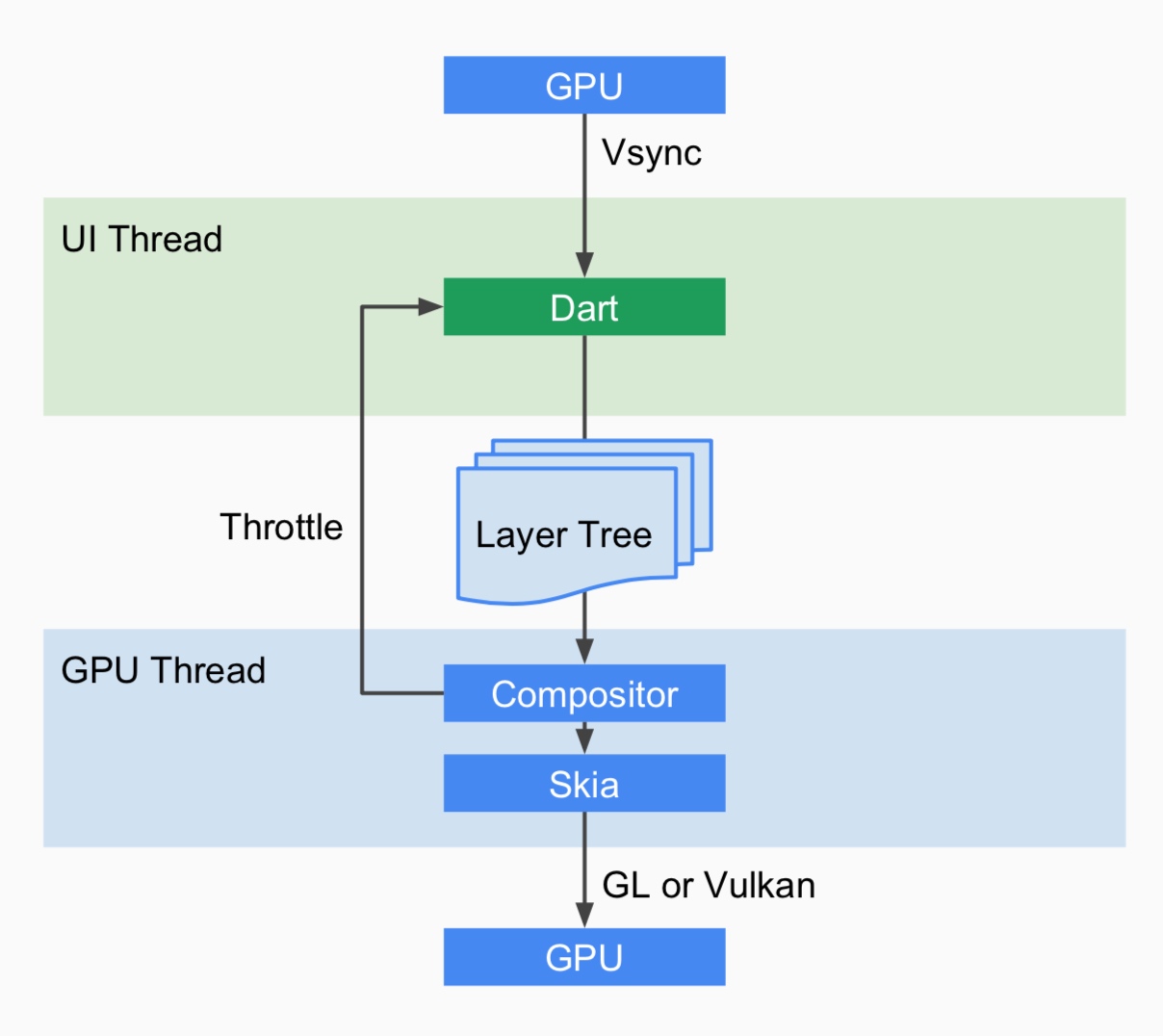
When the UI needs updating, the Framework notifies the Engine. The Engine waits for the next Vsync, notifies the Framework, which then performs animations, build, layout, compositing, and paint to generate a layer for the Engine. The Engine combines the layers and submits them to the GPU.
Performance
If the main thread handles all tasks, long-running operations (like network access or database queries) will block the entire UI thread. A blocked thread cannot dispatch events, including draw events. Overloading the main thread leads to two major issues:
- Jank: If the combined work of the main and rendering threads exceeds 16.6ms (at 60fps), dropped frames occur.
- Freeze: If the UI thread is blocked for several seconds (thresholds vary by component), users see the “Application Not Responding“ (ANR) dialog (though some manufacturers skip the dialog and crash to desktop).
These are undesirable for users, so App developers must address them before release. ANR is relatively easy to locate via call stacks, but intermittent jank often requires tools like Systrace + TraceView. Understanding the relationship and mechanics of the main and rendering threads is crucial—this is the primary motivation for this series.
Regarding jank, consult these three articles. A janky App isn’t always the App’s fault; it could be the system. Regardless, you must first know how to analyze it.
- Overview of Jank Causes in Android - Methodology
- Overview of Jank Causes in Android - System Side
- Overview of Jank Causes in Android - App Side
References
- https://juejin.im/post/5a9e01c3f265da239d48ce32
- http://www.cocoachina.com/articles/35302
- https://juejin.im/post/5b7767fef265da43803bdc65
- http://gityuan.com/2019/06/15/flutter_ui_draw/
- https://developer.android.google.cn/guide/components/processes-and-threads
Attachments
Attachments for this article have been uploaded. Extract and open in Chrome:
Download Systrace attachments for this article
Other Addresses
Please visit the Zhihu or Juejin pages for this article for comments or likes:
Juejin - Systrace Basics - MainThread and RenderThread Explained
About Me && Blog
Below is my personal intro and related links. I look forward to exchanging ideas with fellow professionals. “When three walk together, one can always be my teacher!”
- Blogger Intro: Includes personal WeChat and WeChat group links.
- Blog Content Navigation: A guide for my blog content.
- Curated Excellent Blog Articles - Android Performance Optimization Must-Knows: Welcome to recommend projects/articles.
- Android Performance Optimization Knowledge Planet: Welcome to join and thank you for your support~
One walks faster alone, but a group walks further together.
