

This article summarizes major Android app startup optimization strategies available today. If you need to optimize your app’s launch performance, use this as a checklist to identify gaps in your current implementation. Since many solutions depend on specific business requirements, I focus on presenting the options rather than deep-diving into every implementation detail. You can easily find specific technical guides for each method online.
I’ve also included some optimizations performed by system manufacturers. Understanding what happens at the OS level can help you make better decisions, such as requesting whitelisting or integrating manufacturer SDKs.
Application Startup Overview
General Startup Workflow
The journey from tapping an app icon to the main interface becoming interactive follows this general flow:
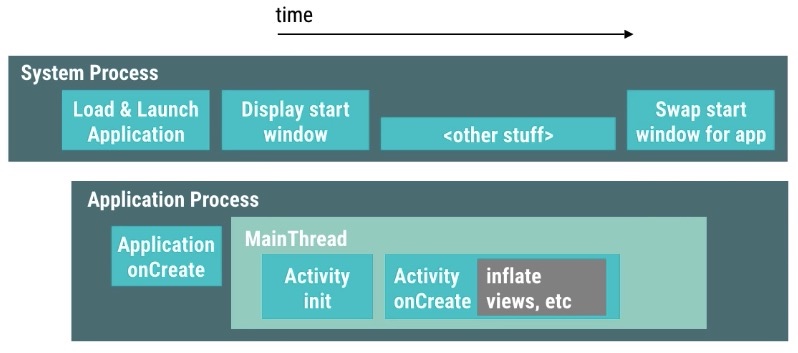
The two most critical processes during startup are SystemServer and the App Process.
- SystemServer: Handles startup scheduling, process creation/management, and window creation/management (StartingWindow and AppWindow).
- App Process: Once created, it performs process initialization, component initialization (Activity, Service, ContentProvider, Broadcast), main UI construction, and content inflation.
Cold vs. Hot Startup
These are two fundamental concepts in performance optimization:
- Cold Startup: Starting an app when its process isn’t running in the background. The system must create a new process and initialize components from scratch.
- Hot Startup: Starting an app when its process is already alive in the background (e.g., after the user pressed Back or Home). The system simply brings the existing process to the foreground and restarts the activity.
Measuring Startup Speed
While every team has its own method, the challenge lies in defining the “end point” of a startup. Simple tools like adb shell am start -W are fun but unsuitable for production. Screen recording introduces performance overhead.
I recommend the methodology used by the Mobile Taobao team: Automated, Stable, and CI-integrated. They use OCR to extract text from screenshots as key features. When text appears, the image is considered “loaded,” which aligns with actual user perception.
App-Level Optimizations
1. Startup Window Optimization
The StartingWindow (also known as SplashWindow or Preview Window) is shown immediately by the system when the user taps the icon.
- Do not disable the system’s default preview window: Avoid setting
android:windowDisablePreviewtotruein your theme. Disabling it causes a jarring lag between the icon tap and the first frame of your app. - Customize the StartingWindow: Set the splash theme’s background to match your app’s primary color or brand logo.
- Merge Splash and Main Activity: This reduces one activity transition, though it requires careful management of internal state.
2. Thread Optimization
Excessive concurrent threads during startup strain the CPU, especially on low-end devices. This leads to more Sleep and Runnable states for the main thread, slowing down the launch.
- Control thread counts using thread pools.
- Audit locks to prevent dependency deadlocks.
- Use a structured startup framework (e.g., mmkernel, Alpha).
3. System Schedule Optimization
Avoid making the main thread too busy.
- Minimize system calls: Avoid excessive communication with AMS/WMS during launch to prevent lock competition in
SystemServer. - Avoid starting sub-processes: Multiplying processes during startup doubles the system burden.
- Be cautious with other components: Activity, Service, ContentProvider, and BroadcastReceiver initializations all happen on the main thread.
- Asynchronously initialize non-critical code in
ApplicationandMainActivity.
4. GC Optimization
Reduce the number of GC cycles during startup.
- Avoid heavy string manipulations, especially serialization/deserialization.
- Reuse frequently created objects.
- Move logic to Native code if possible.
5. IO Optimization
IO performance drops significantly under the high load of startup.
- Monitor exactly which files are read, the buffer sizes used, and on which threads.
- Avoid network IO during initial launch.
- Optimize disk IO, especially for large database files.
6. Resource Reordering
Use Linux’s PageCache and ReadAhead mechanisms. By reordering files in the APK to match their read sequence during startup, you can minimize disk seeks and improve performance.
7. Class Reordering
Use tools like ReDex (Interdex) to adjust the order of classes within the Dex file. Moving classes needed during startup to the primary Dex file can provide a noticeable speed boost.
8. Layout Optimization
- Decrease view hierarchy depth.
- Use
ViewStubfor UI elements not needed immediately. - Use custom Views instead of complex nested layouts.
9. IdleHandler Usage
Use IdleHandler to execute non-critical tasks (like fetching push tokens or loading secondary UI) only when the message queue is idle.
10. Class Loading Optimization
Watch for verifyClass in Systrace. This verification process can be time-consuming as the system checks every instruction.
11. App Thinning
- Use Inspect Code (Lint) for cleanup.
- Use ProGuard/R8 for obfuscation and shrinking.
- Prefer
RGB_565for images where high quality isn’t critical. - Use resource obfuscators and reduce the number of Dex files.
12. Startup Frameworks
Structure your startup tasks using a Directed Acyclic Graph (DAG). This allows you to manage dependencies clearly and execute independent tasks in parallel across multiple stages, maximizing hardware utilization while preventing congestion.
13. Networking Optimization
- Batch requests to reduce the number of individual connections.
- Defer non-essential data and resource downloads.
- Optimize JSON parsing; complex strings can block the main thread for seconds on low-end devices.
14. Pre-loading
Load data before the Activity is even created, and show it once the UI is ready.
15. Process Preservation (Keep-Alive)
While controversial, if a process isn’t killed, the “startup” becomes a hot start. Instead of “black magic” (which OEMs target), focus on being a “good citizen”: release resources in the background, stop unnecessary services/animations, and respond to low-memory warnings. This builds trust and might help you get on an OEM’s Whitelist.
16. Business Component Review
Audit every module initialized at startup. Use these 4 categories:
- Essential & Time-Consuming: Move to a background thread.
- Essential & Fast: Keep on the main thread.
- Non-Essential but Time-Consuming: Defer or use lazy loading.
- Non-Essential & Fast: Remove or load on demand.
17. Activity Jump Hierarchy
Always prefer: StartingWindow -> MainActivity.
Avoid: StartingWindow -> SplashActivity -> MainActivity if possible, as every transition adds latency.
OEM-Level Optimizations
System manufacturers also optimize for startup:
- Resource Tipping: During an app launch, the system tilts CPU, IO, and GPU resources toward that process (VIP treatment).
- Pre-Fork (Android Q+): Forking empty processes in advance to save time when an app starts.
- Message Reordering: Prioritizing startup-related messages in the queue.
- Big Core Allocation: Forcing the app’s main and render threads onto high-performance CPU cores.
- Startup Prediction: Learning user habits to pre-warm apps in the background.
References
(List of references in original article)
About Me && Blog
(Links and introduction)