

This article compiles most current Android app startup optimization solutions. If you need optimization guidance, simply reference this article to review others’ approaches and identify gaps. Many solutions require business-specific adjustments, so this article doesn’t detail every method—when you need a particular solution, search online for its specific implementation. This serves as a comprehensive reference.
I’ve also included some system manufacturer optimizations related to startup, though I’ve only listed those I’m aware of. Some manufacturers have proprietary technologies not discussed here. Understanding manufacturer practices may help you—for example, contacting manufacturers for whitelisting or integrating their SDKs.
App Startup Overview
General App Startup Flow
From tapping the app icon on the home screen to having the main interface ready for user interaction, app startup generally follows this flow:
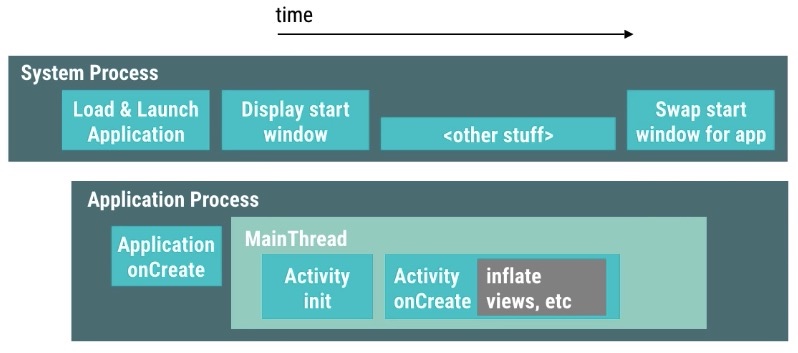
During app startup, the two most critical processes are SystemServer and App Process. Their responsibilities are divided as follows:
- SystemServer handles app startup flow scheduling, process creation and management, window creation and management (StartingWindow and AppWindow), etc.
- After being created by SystemServer, the app process performs a series of process initializations, component initializations (Activity, Service, ContentProvider, Broadcast), main interface construction, content population, etc.
Cold Start vs. Hot Start
We also need to introduce the concepts of cold start and hot start, which we frequently encounter:
- Cold Start: When starting an app with no existing process in the background, the system creates a new process for the app, then launches the corresponding process components based on startup parameters.
- Hot Start: When starting an app with an existing process in the background (e.g., after pressing back/home—the app exits but its process remains in the background, visible in the task list), the startup reuses the existing process to launch the corresponding components.
Measuring Startup Speed
Different companies have their own measurement methods. The key challenge is defining the endpoint of startup—some apps are easy to measure, while others are too complex for direct measurement. Methods like adb are fine for personal experimentation but useless in production; screen recording itself introduces performance overhead…
I recommend learning from the measurement approach mentioned in “历时1年,上百万行代码!首次揭秘手淘全链路性能优化(上)”: automated, stable, and integrated into CI/CD.
Extract text information from images using OCR as key features. This algorithm’s advantages: 1. App pages typically contain text; OCR can recognize text on images—text appearance indicates image loading completion, aligning with user perception. 2. Using text as features filters out much noise from image features, reducing algorithm debugging effort. Additionally, Alibaba Group has mature, excellent OCR services—“读光” with over 99.7% document recognition rate. Using the OCR service encapsulated by the Waterdrop platform enables quick integration. The final recognition solution is based on OCR.
App-Level Optimizations
Startup Window Optimization
The startup window, also called the launch page, SplashWindow, or StartingWindow, refers to the preview window displayed during app startup. iOS apps mandatorily have a launch screen—after users tap the app icon, the system immediately shows this launch window, then displays the main page once ready. Android has a similar mechanism (the startup window is system-provided) but also provides an interface for developers to set whether to show this startup window (default is show). Some developers disable the system-provided startup window and implement their own.
However, displaying a custom window takes longer than showing the system’s startup window, causing user-perceived delay—tapping the icon results in a pause before the window animation enters the app. We should avoid this:
- Don’t disable the system’s default startup window: i.e., don’t set
android:windowDisablePreviewtotruein the theme. - Customize startup window content: e.g., set the splash page theme background to the splash image, or尽量使闪屏页面的主题和主页一致 (make the splash page theme consistent with the main page). Reference practices from Zhihu and TikTok.
- Merge splash and main page Activities: WeChat’s approach. However, since WeChat sets
android:windowDisablePreviewand is on most manufacturers’ whitelists (rarely killed), cold starts are infrequent. Still, it’s worth considering.
Thread Optimization
Thread optimization primarily reduces CPU scheduling fluctuations, making startup times more stable. Too many threads launching simultaneously puts significant pressure on the CPU, especially on lower-end devices. Excessive concurrent threads increase the main thread’s Sleep and Runnable states, slowing app startup. During optimization, note:
- Control thread count—use thread pools.
- Check inter-thread locks to prevent dependency waits.
- Use reasonable startup architectures:
- mmkernel (used internally by WeChat)
- Alibaba’s Alpha
System Scheduling Optimization
During app startup, if the main thread handles too much work, it becomes overly busy. Note these system scheduling-related points:
- Reduce system calls during startup, avoiding lock competition with AMS and WMS. During startup, AMS and WMS already handle much work, and many AMS/WMS operations are locked. If the app makes excessive Binder calls to communicate with AMS/WMS, SystemServer experiences大量锁等待 (significant lock waits), blocking critical operations.
- Don’t launch child processes during startup. If multiple processes start simultaneously, system load doubles, and SystemServer becomes busier.
- Be cautious launching components other than Activity during startup. Since all four major components launch on the main thread, slow component startup占用Message通道 (occupies the Message channel), affecting app startup speed.
- Asynchronously initialize certain code in Application and main Activity’s onCreate.
Busy CPU during startup: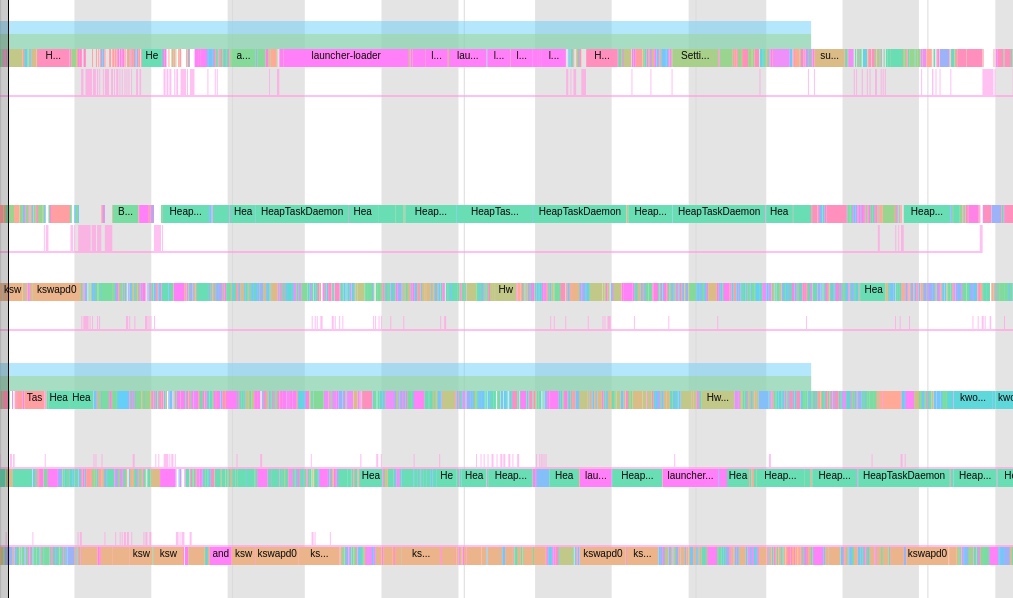
Busy SystemServer during startup: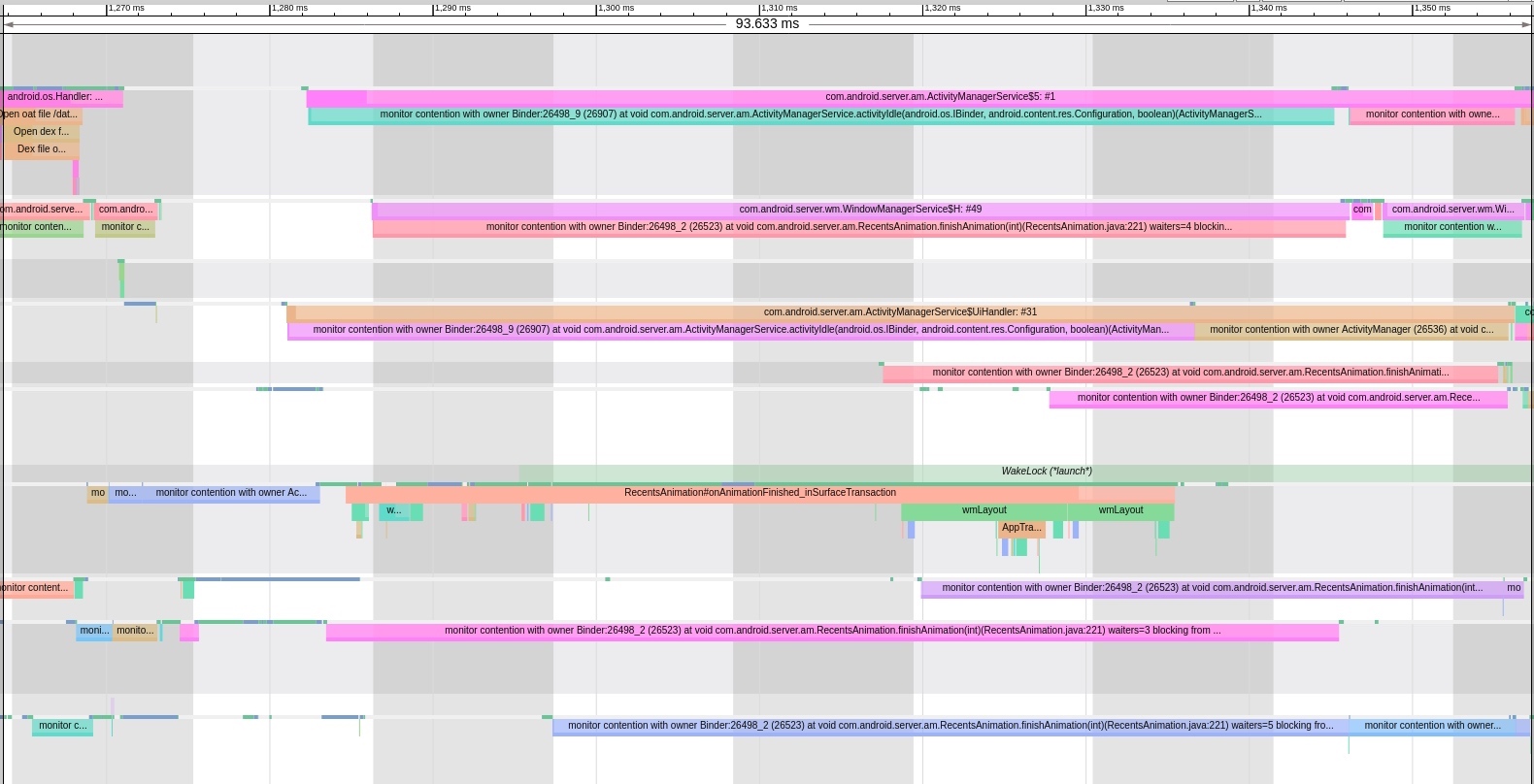
GC Optimization
Reduce GC frequency during startup:
- Avoid大量字符串操作 (extensive string operations), especially serialization/deserialization.
- Consider reusing frequently created objects.
- Move implementations to Native.
Reference: “支付宝客户端架构解析:Android 客户端启动速度优化之「垃圾回收」”
IO Optimization
Startup负载比较高 (load is relatively high), with many system IOs occurring simultaneously. IO performance declines rapidly during this period, making app IO operations slower than usual, especially on lower-performance devices.
IO分为网络IO和磁盘IO (IO分为网络IO和磁盘IO). Avoid network IO during startup. For disk IO, scrutinize carefully—as mentioned in the expert course:
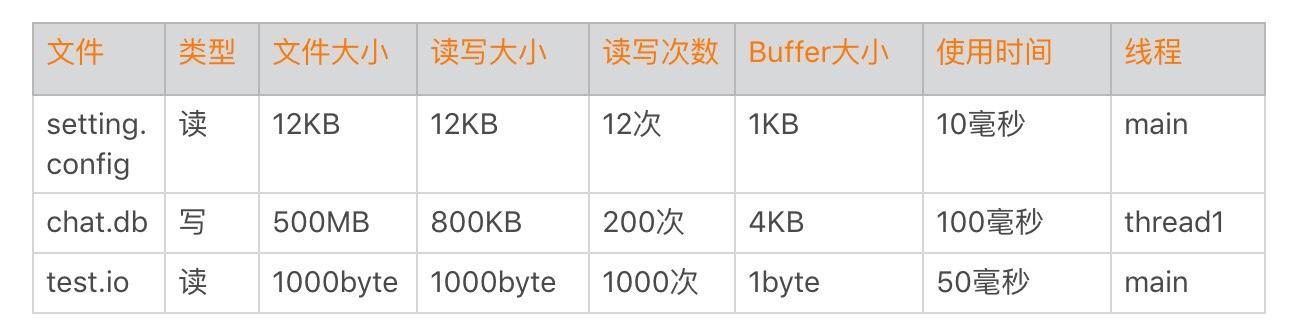
- Understand exactly what files are read during startup: how many bytes, buffer size, duration, thread, etc.
- Monitor IO during startup. WeChat discovered users with 500MB database files during IO monitoring.
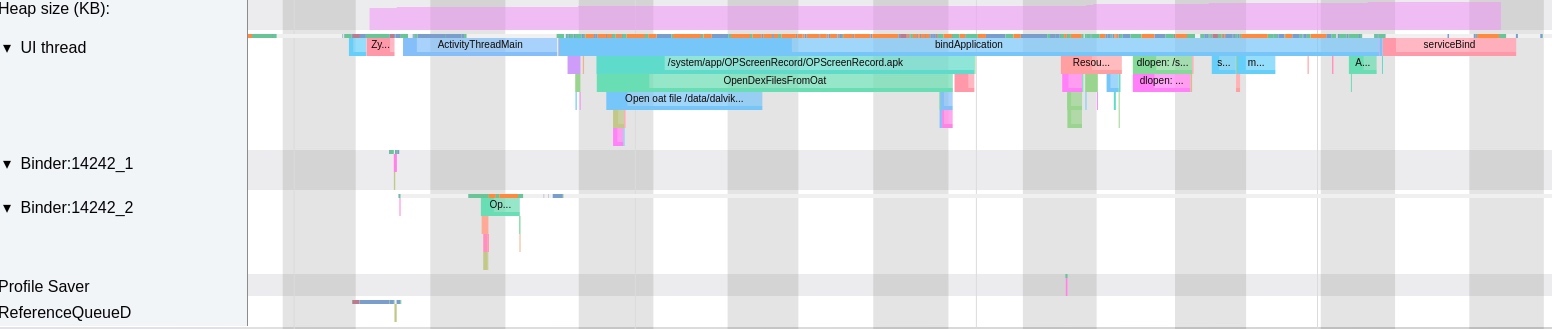
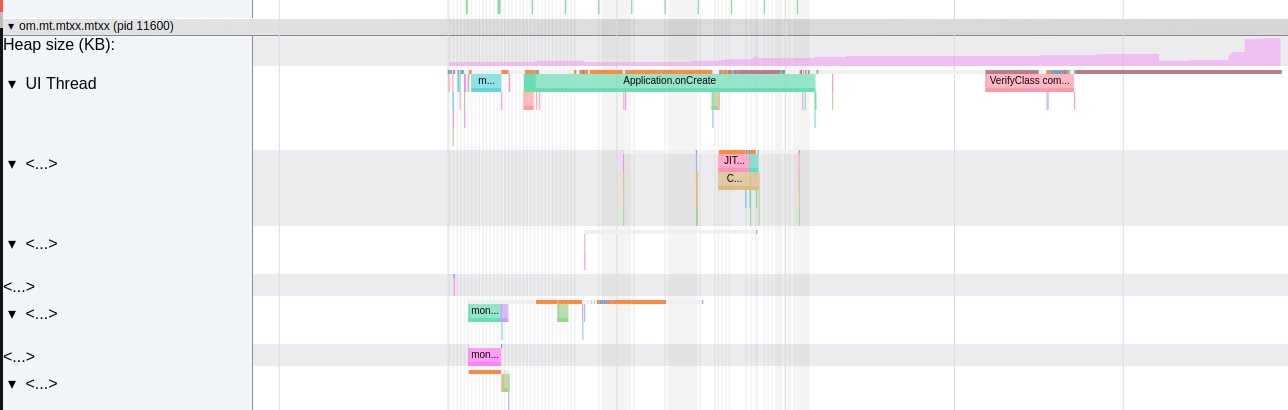
The image below shows significant IO waits on the main thread during app startup under low memory (UI Thread column, orange代表IO等待 (represents IO wait)):
Resource Reordering
Leverage Linux’s IO reading策略 (strategies), PageCache, and ReadAhead mechanisms. Reorder resources according to read sequence to reduce disk IO次数 (count). For具体操作 (specific operations), reference “支付宝 App 构建优化解析:通过安装包重排布优化 Android 端启动性能”.
Between the底层文件系统 (underlying filesystem) VFS and app processes lies a pagecache layer composed of physical pages in memory, whose content corresponds to blocks on disk. Pagecache size changes dynamically—it can expand or shrink under memory pressure. Cached storage devices are called backing store. A page typically contains multiple blocks, which aren’t necessarily contiguous.
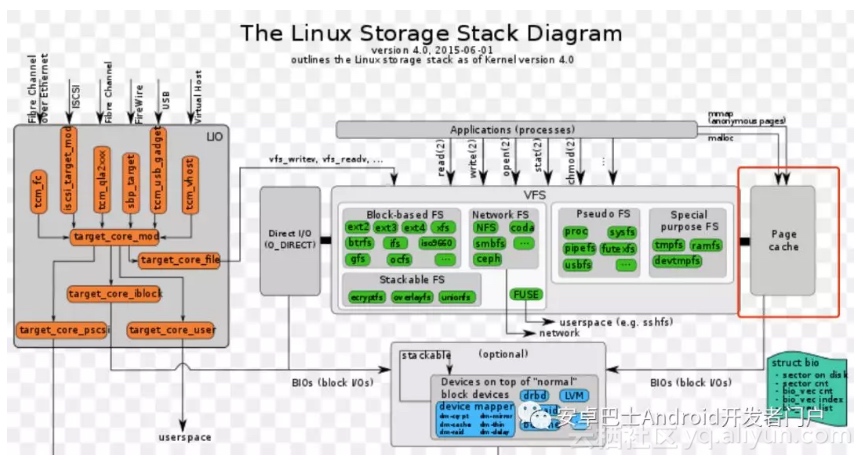
Combining file re-layout with the Pagecache mechanism reduces actual IO次数 (count) during startup. Simply put, file re-layout arranges files needed during startup phase together within the APK,尽可能利用pagecache机制 (maximizing use of the pagecache mechanism), reading as many startup-phase files as possible with minimal disk IO, reducing IO overhead to improve startup performance.
Class Reordering
Class reordering adjusts class arrangement within Dex files using ReDex’s Interdex. Interdex optimization doesn’t require analyzing class references—it simply reorders classes within Dex, placing startup-required classes sequentially in the main dex. We can implement this entirely during compilation. This optimization improves startup speed, with Facebook’s data showing significant效果 (effectiveness) and high cost-effectiveness. For具体实现 (specific implementation), reference “Redex 初探与 Interdex:Andorid 冷启动优化”.
Main Page Layout Optimization
Main interface layout optimization is a common topic. Combined approaches无非就是下面两点 (essentially boil down to these two points), requiring optimization based on specific interface layouts. Plenty of online resources exist:
- Reduce view hierarchy by eliminating冗余或者嵌套布局 (redundant or nested layouts).
- Replace UI controls not needed during startup with ViewStub.
- Use custom Views instead of complex View stacking.
Idle Calls
IdleHandler: Called only when the Handler is idle. If返回true (returns true), it continues executing; if返回false (returns false), it executes once then removes itself from the message queue. For example, we can place server token fetching in a delayed IdleHandler, or load less important Views via IdleHandler.
Class Loading Optimization
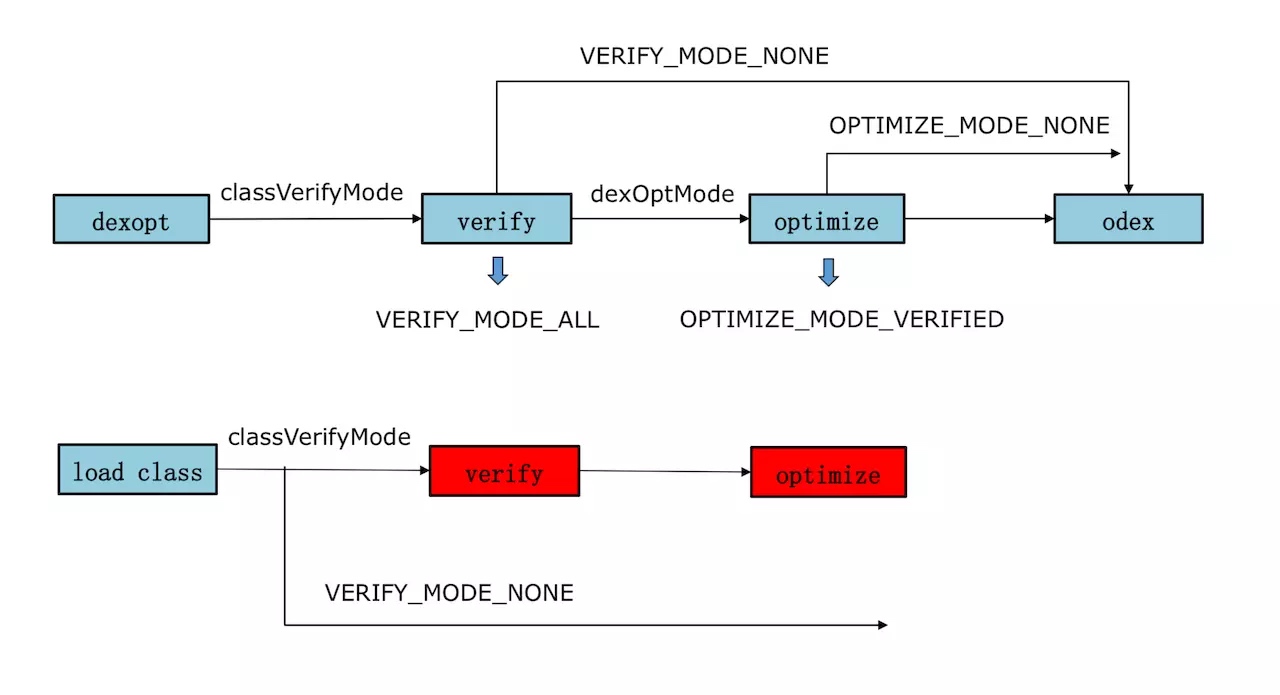
You can see the verifyClass process in systrace-generated files. Since it需要校验方法的每一个指令 (needs to verify every instruction of each method), it’s a relatively time-consuming operation.
App Thinning (App 瘦身)
App thinning includes both code and resource optimization. Common practices include:
- Inspect Code: Use Android Studio’s built-in code inspection tool, which embeds Lint for static analysis.
- Code Obfuscation: Use ProGuard/R8 to remove unused code and shrink the APK size.
- Image Format Selection: If image quality requirements are not critical, consider using RGB_565 format instead of ARGB_8888.
- Resource Obfuscation: Implement resource name obfuscation to reduce APK size.
- Reduce Dex Count: Minimize the number of Dex files to improve class loading performance.
Choosing the Right Startup Framework (选择合适的启动框架)
Startup optimization requires systematic process organization. We introduce the concept of a Directed Acyclic Graph (DAG) to structure the startup flow. The entire startup process is organized into a DAG structure, with tasks loaded sequentially.
In the startup phase, we first load essential startup items using a multi-process approach, controlled by the DAG. Non-essential items can be deferred for later loading. The DAG-based sequential loading also considers process requirements, determining which items should load in the main process versus other processes.
This approach draws inspiration from Spark’s DAGScheduler, which employs Stage-Oriented Scheduling: dividing applications into stages and arranging tasks within those stages. By building a DAG, task dependencies are clearly organized. Stage-based execution allows concentrating resources to complete stage one before moving to stage two, controlling congestion while ensuring proper sequencing and enabling concurrent execution to maximize device performance.
For reference, see Taobao’s full-link optimization case: “历时1年,上百万行代码!首次揭秘手淘全链路性能优化(上)”
Startup Network Optimization (启动网络链路优化)
Problems and Optimization Points
- Send/Receive Processing Stage: Network library bindService affects the first few requests; image concurrency limits cause thread queuing in image libraries.
- Network Latency: Some requests have large response sizes, including SO files, cache resources, and large original images.
- Response Processing: Complex JSON parsing for certain data gateway requests causes severe delays (up to 3s), compounded by inappropriate historical thread queue designs.
- UI Blocking: Callbacks to the UI thread get blocked, causing severe main thread stutter. High-end devices experience ~1s delays, while low-end devices worsen to 3s+.
- Callback Blocking: Some business callbacks execute slowly, blocking either the main thread or callback threads.
Optimization Strategies
- Request Consolidation: Business teams must consolidate duplicate requests and reduce non-essential ones.
- Large Data Requests: Defer or cancel non-essential large requests like resource files and SO libraries during startup.
- Callback Optimization: Business teams must optimize callbacks that block the main thread. For smooth 60fps operation, each frame must complete within 16ms. Push teams whose callbacks exceed 16ms on the main thread to optimize their execution.
- JSON Parsing Optimization: Overly complex JSON structures cause severe parsing delays. Since network concurrency threads are limited, lengthy parsing occupies MTOP threads, affecting other critical requests. Encourage business teams to use custom threads for parsing or simplify JSON structures.
Preloading (预加载)
Preload data before the Activity opens, then display the preloaded data once the UI layout initializes, significantly reducing startup time. Reference implementation: PreLoader
Keep-Alive (保活)
Keep-alive is both a nightmare for app developers and a focus area for Android manufacturers. From a startup perspective, if an app process isn’t killed, startup naturally becomes faster (hot start). However, we don’t recommend using “black magic” techniques like mutual wake-up or notification bombing.
Instead, provide genuine functionality that makes users feel your background presence is reasonable and acceptable. When in the background, release all possible resources, avoid power-hungry operations, stop unnecessary services, and disable animations.
While this may seem idealistic given current manufacturer practices (aggressively killing background apps), it’s the right direction. Google is working on both standardizing app background behavior and regulating manufacturer app handling. Improving Android’s ecosystem requires collaboration between app developers and manufacturers.
Another approach is collaborating with manufacturers: optimize background memory usage, eliminate duplicate wake-ups, remove aggressive logic, and respond promptly to low-memory warnings. After implementing these improvements, contact system manufacturers to discuss feasibility for whitelisting in both kill lists and auto-start lists.
Business Organization (业务梳理)
This involves specific business logic unique to each app, though the approach remains consistent. As mentioned in the expert course:
- Audit Every Module: Clearly identify which modules are absolutely necessary during startup, which can be eliminated, and which can be lazily loaded.
- Different Launch Modes: Determine different startup patterns based on various business scenarios.
- Prevent Centralization: Implement lazy loading to avoid resource concentration.
Business logic can be categorized into four dimensions:
- Essential & Time-Consuming: Startup initialization - consider using threads for initialization.
- Essential & Fast: Homepage rendering.
- Non-Essential but Time-Consuming: Data reporting, plugin initialization.
- Non-Essential & Fast: Remove entirely; load only when needed.
Then optimize loading based on these categories.
Business Optimization (业务优化)
- Optimize Code Efficiency: Focus on obvious bottlenecks first, then gradually optimize other areas.
- Address Technical Debt: Refactor historical code; don’t let it accumulate indefinitely.
Specific businesses have specific optimization scenarios. Reference this article for optimization processes and items: https://www.jianshu.com/p/f5514b1a826c
- Move database and IO operations to worker threads with THREAD_PRIORITY_BACKGROUND priority (maximum 10% CPU time slice), ensuring main thread execution priority.
- Process Organization & Deferred Execution: Most effective for startup acceleration. Through process analysis, discover issues like:
- Update operations called before first screen display, causing resource competition.
- Calls to iOS-specific switches (for App Store review avoidance) causing dense network requests.
- Custom statistics creating fixed 5-thread pools in Application, causing resource competition.
- Modify ad splash logic to take effect next time.
- Remove unused legacy code still being executed.
- Remove development-only code executed in production.
- Eliminate duplicate logic execution.
- Remove excess code in third-party SDKs or demos.
- Information Caching: Cache commonly used information; fetch only once, then retrieve from cache.
- Multi-process Architecture: Execute Application.onCreate() only in the main process.
Reducing Activity Navigation Hierarchy (减少Activity的跳转层次)
The StartingWindow is created and displayed immediately after user taps the app icon (provided the app hasn’t disabled StartingWindow). When the AppWindow is ready, the StartingWindow disappears, and the AppWindow displays.
Default App Startup Window Flow
1 | StartingWindow(SystemWindow) |
Most Third-Party App Startup Flow
1 | StartingWindow(SystemWindow) |
Worse Startup Flow
1 | StartingWindow(SystemWindow) |
Even Worse: Disabled StartingWindow
1 | SplashActivity(AppWindow) |
For users, the first flow is best, involving only one window transition. Some apps use the second flow due to ad page requirements. However, avoid the third and fourth flows as they provide poor user experience.
Manufacturer Optimizations (厂商优化)
Beyond app-level optimizations, Android frameworks also focus heavily on application startup, implementing numerous optimizations. Different manufacturers have varying strategies, but most include these approaches:
Startup Acceleration
During app launch, the system heavily prioritizes resources (CPU, IO, GPU) for the launching app. Capture a Systrace to see this - whether in frequency or scheduling algorithms, the launching app receives VIP treatment.
Some manufacturers provide resource scheduling SDKs that apps can integrate to request resources directly when needed.
PreFork
Android Q introduced the PreFork mechanism, which forks several empty processes in advance. When an app launches, it can directly reuse these pre-forked processes instead of forking anew.
Message Reordering
Reorganizing messages during startup to prioritize launch-related operations.
Main Thread & Render Thread Acceleration
Some manufacturers give special treatment to the app’s main and render threads during startup, such as forcing them onto big cores while moving less important threads to little cores.
Startup Prediction
Some scenarios learn user habits - when, where, and in what context users typically open their phones. The system predicts which app you’ll launch and pre-warms it in the background, making your tap result in a hot start.
Background Keep-Alive
Systems may specially handle certain apps to improve user experience, including: process/thread priority adjustment, kill whitelisting, user frequent app recording, etc. Appropriate background keep-alive ensures the next launch is a hot start.
Background Restart
Systems may specially handle important apps that shouldn’t be killed. Some manufacturers perform seamless restarts when such apps go to the background. For example, if an app exceeds memory limits or crashes continuously, background restart effectively addresses this, ensuring the next user launch is a hot start.
Memory Optimization
Some apps require substantial memory during startup (e.g., modern camera apps). Without sufficient memory, the system must kill many apps and release caches to make room, causing these memory-intensive apps to perform frequent memory operations during startup, slowing them down.
Some manufacturers monitor such memory-intensive app launches and perform memory reclamation in advance, ensuring sufficient memory is available when the app starts.
Optimizing Startup Logic
Android system updates also optimize app startup speed, such as the aforementioned Pre-Fork mechanism and simplifying doFrame counts.
OEM-Level Optimizations
System manufacturers also optimize for startup:
- Resource Tipping: During an app launch, the system tilts CPU, IO, and GPU resources toward that process (VIP treatment).
- Pre-Fork (Android Q+): Forking empty processes in advance to save time when an app starts.
- Message Reordering: Prioritizing startup-related messages in the queue.
- Big Core Allocation: Forcing the app’s main and render threads onto high-performance CPU cores.
- Startup Prediction: Learning user habits to pre-warm apps in the background.
References
- 都9102年了,Android 冷启动优化除了老三样还有哪些新招?
- App startup time
- 历时1年,上百万行代码!首次揭秘手淘全链路性能优化(上)
- 极客时间 : Android 高手开发课
- Facebook-Redex
- 关于 Android 异步启动框架 alpha 的思考
- 支付宝 App 构建优化解析:通过安装包重排布优化 Android 端启动性能
- Redex 官网
- Redex 初探与 Interdex:Andorid 冷启动优化
- Android性能优化笔记(一)——启动优化
Other Locations for This Article
Since blog comments aren’t convenient for discussion, you can visit the Zhihu or Juejin versions of this article for likes and交流:
About Me && Blog
Below is my personal introduction and related links. I look forward to exchanging ideas with fellow professionals. “When three walk together, one can always be my teacher!”
- Blogger Introduction : Contains personal WeChat and WeChat group links.
- Blog Content Navigation : A navigation guide for my blog content.
- Curated Excellent Blog Articles - Android Performance Optimization Must-Knows : Welcome self-recommendations and recommendations (WeChat private chat is fine).
- Android Performance Optimization Knowledge Planet : Welcome to join, thanks for your support!
One walks faster alone, but a group walks further together.
