

This is the tenth article in the Systrace series, primarily providing a brief introduction to Binder and lock information in Systrace. It covers the basic situation of Binder, the representation of Binder communication in Systrace, how to view Binder information, and analysis of lock contention in SystemServer.
The purpose of this series is to view the overall operation of the Android system from a different perspective using Systrace, while also providing an alternative angle for learning the Framework. Perhaps you’ve read many articles about the Framework but can never remember the code, or you’re unclear about the execution flow. Maybe from Systrace’s graphical perspective, you can gain a deeper understanding.
Table of Contents
- Series Article Index
- Binder Overview
- Binder Call Diagram
- Lock Information in Systrace
- Waiting for Lock Analysis
- Related Code
- References
- Attachments
- About Me && Blog
Series Article Index
- Introduction to Systrace
- Systrace Basics - Prerequisites for Systrace
- Systrace Basics - Why 60 fps?
- Android Systrace Basics - SystemServer Explained
- Systrace Basics - SurfaceFlinger Explained
- Systrace Basics - Input Explained
- Systrace Basics - Vsync Explained
- Systrace Basics - Vsync-App: Detailed Explanation of Choreographer-Based Rendering Mechanism
- Systrace Basics - MainThread and RenderThread Explained
- Systrace Basics - Binder and Lock Contention Explained
- Systrace Basics - Triple Buffer Explained
- Systrace Basics - CPU Info Explained
- Systrace Smoothness in Action 1: Understanding Jank Principles
- Systrace Smoothness in Action 2: Case Analysis - MIUI Launcher Scroll Jank Analysis
- Systrace Smoothness in Action 3: FAQs During Jank Analysis
- Systrace Responsiveness in Action 1: Understanding Responsiveness Principles
- Systrace Responsiveness in Action 2: Responsiveness Analysis - Using App Startup as an Example
- Systrace Responsiveness in Action 3: Extended Knowledge on Responsiveness
- Systrace Thread CPU State Analysis Tips - Runnable
- Systrace Thread CPU State Analysis Tips - Running
- Systrace Thread CPU State Analysis Tips - Sleep and Uninterruptible Sleep
Binder Overview
Most inter-process communication in Android uses Binder. I won’t provide an over-explanation of Binder here. If you want a deep understanding of Binder’s implementation, I recommend reading these three articles:
- Understanding Android Binder Mechanism 1/3: Driver Layer
- Understanding Android Binder Mechanism 2/3: C++ Layer
- Understanding Android Binder Mechanism 3/3: Java Layer
The reason for discussing Binder and locks in Systrace separately is that many jank and responsiveness issues stem from cross-process Binder communication. Lock contention can extend Binder communication time, affecting the calling end. A classic example is when an app’s rendering thread calls dequeueBuffer, and the SurfaceFlinger main thread is blocked, causing the dequeueBuffer to take longer and resulting in app jank. Another example is when AMS or WMS methods in SystemServer are holding locks, causing long wait times for app calls.
Here is a Binder architecture diagram from an article. This piece focuses on Systrace, so we’ll cover how Binder appears in Systrace without diving into its internal implementation.
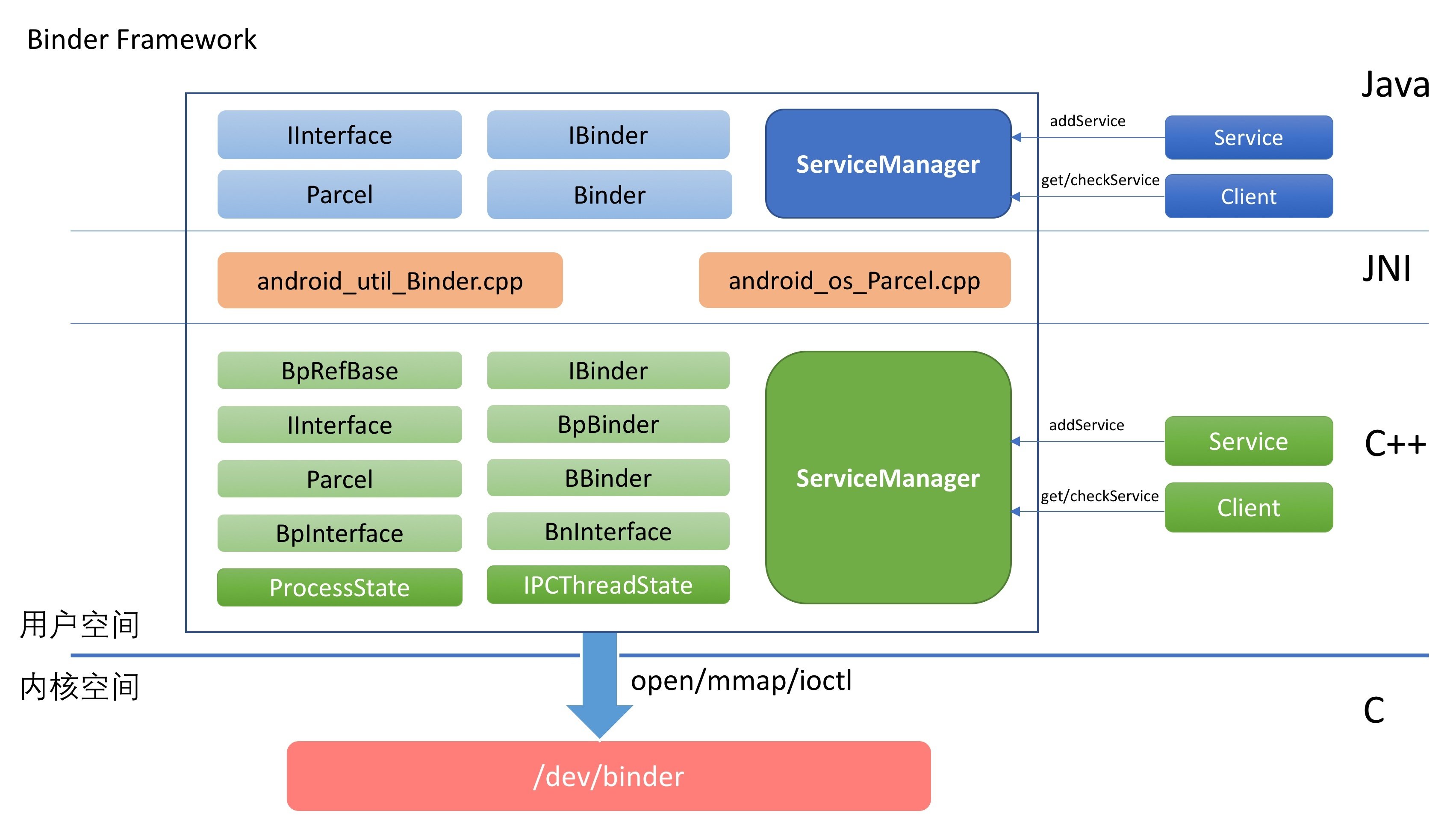
Binder Call Diagram
Binder is primarily used for cross-process communication. The diagram below simply shows how Binder communication is displayed in Systrace:
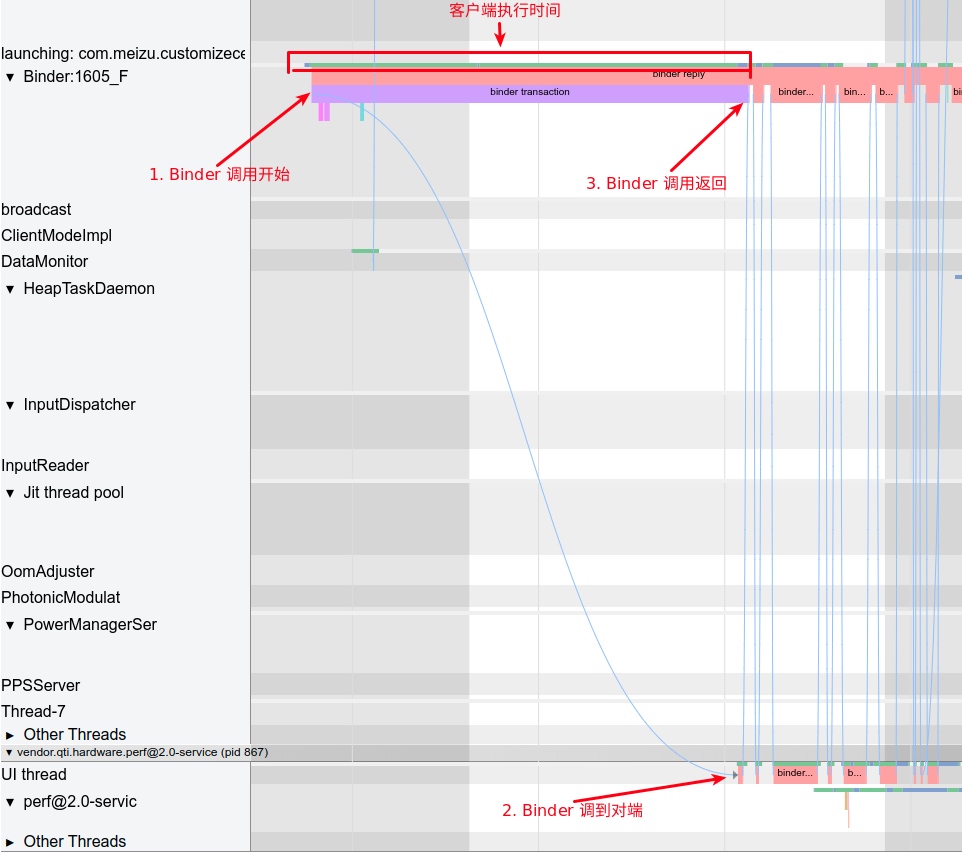
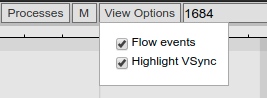
In the diagram, the SystemServer process is communicating with Qualcomm’s perf process. Enabling Flow Events in the ViewOptions in the top right corner of Systrace will reveal Binder information.
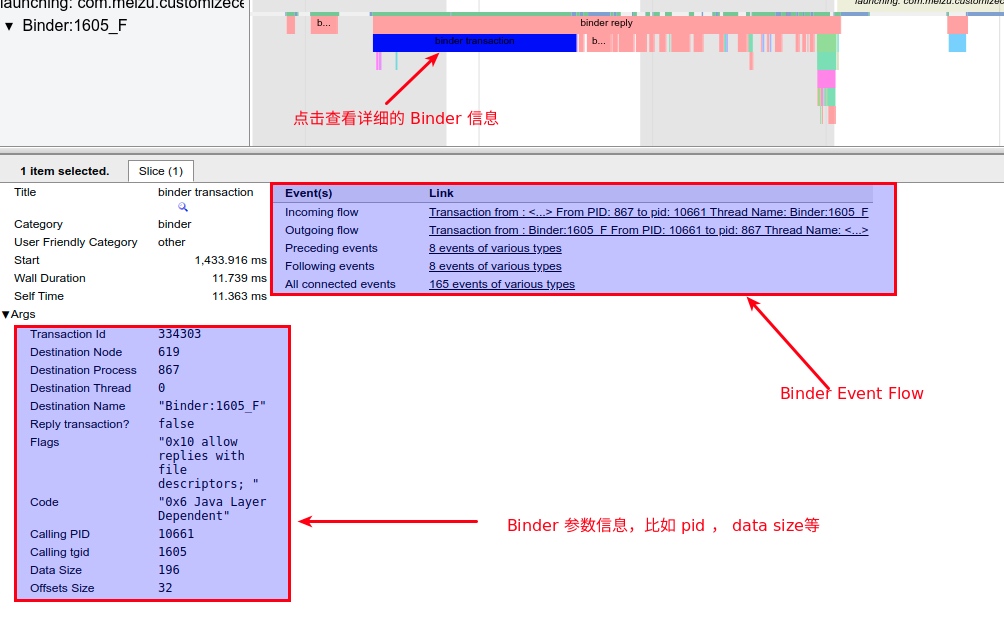
Clicking on a Binder event reveals detailed information. Some of this data is useful during problem analysis, but we won’t go into detail here.
For Binder, this section focuses on how to view lock information and lock waiting in Systrace. Analyzing many jank and responsiveness issues depends on interpreting this information. Ultimately, you’ll need to return to the code: once an issue is identified, read the source code to understand the logic and perform appropriate optimizations.
Lock Information in Systrace
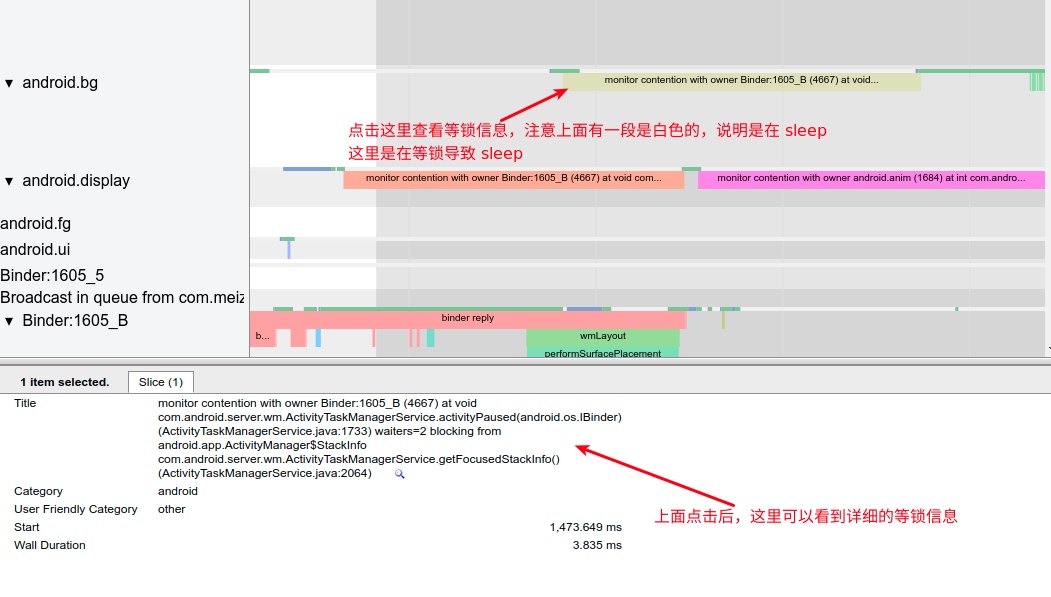
monitor contention with owner Binder:1605_B (4667) at void com.android.server.wm.ActivityTaskManagerService.activityPaused(android.os.IBinder)(ActivityTaskManagerService.java:1733) waiters=2 blocking from android.app.ActivityManager$StackInfo com.android.server.wm.ActivityTaskManagerService.getFocusedStackInfo()(ActivityTaskManagerService.java:2064)
Let’s break the above message into two parts, using blocking as the dividing line.
Part 1 Interpretation
monitor contention with owner Binder:1605_B (4667) at void com.android.server.wm.ActivityTaskManagerService.activityPaused(android.os.IBinder)(ActivityTaskManagerService.java:1733) waiters=2
Monitor refers to the current pool for the lock object. In Java, every object has two pools: a lock (monitor) pool and a wait pool.
Lock Pool (Synchronized Queue): Suppose thread A already owns the lock of an object (not a class). Other threads wanting to call a synchronized method (or block) on this object must first acquire ownership of that object’s lock. Since thread A currently owns it, these other threads enter the object’s lock pool.
The word contention is used here, meaning there’s a struggle because the object’s lock is currently held by another object (Owner), so ownership cannot be acquired, and the thread enters the lock pool.
Owner: The object currently possessing the lock for this object. Here, it’s Binder:1605_B, with thread ID 4667.
at: Describes what the Owner thread is currently doing. Here, it’s executing the void com.android.server.wm.ActivityTaskManagerService.activityPaused method. The code location is ActivityTaskManagerService.java:1733. The corresponding code is:
com/android/server/wm/ActivityTaskManagerService.java
1 |
|
We can see synchronized (mGlobalLock) acquires the ownership of the mGlobalLock lock. Until it releases the lock, any other place calling synchronized (mGlobalLock) must wait in the lock pool.
waiters: The number of operations currently waiting in the lock pool for the object’s lock. waiters=2 indicates there’s already one operation waiting for the lock, so adding this one makes a total of three.
Part 2 Interpretation
blocking from android.app.ActivityManager$StackInfo com.android.server.wm.ActivityTaskManagerService.getFocusedStackInfo()(ActivityTaskManagerService.java:2064)
The second part is simpler: it identifies the method currently being blocked while waiting for the lock. Here, ActivityManager‘s getFocusedStackInfo is blocked. The corresponding code is:
com/android/server/wm/ActivityTaskManagerService.java
1 |
|
This also calls synchronized (mGlobalLock) (Note: The original text might have varied between mGlobalLock and ActivityManagerService.this due to Android versions, but the principle is the same), requiring wait for the ownership of the object’s lock.
Summary
The above message translates to:
The getFocusedStackInfo method of ActivityTaskManagerService was blocked during execution because it couldn’t acquire ownership of the synchronization object’s lock when executing a synchronized block. It must wait until another method, ActivityTaskManagerService.activityPaused, which currently owns the lock, finishes execution before it can acquire ownership and continue.
Compare with the original text:
monitor contention with owner Binder:1605_B (4667)
at void com.android.server.wm.ActivityTaskManagerService.activityPaused(android.os.IBinder)(ActivityTaskManagerService.java:1733)
waiters=2
blocking from android.app.ActivityManager$StackInfo com.android.server.wm.ActivityTaskManagerService.getFocusedStackInfo()(ActivityTaskManagerService.java:2064)
Waiting for Lock Analysis
In the same Systrace, the Binder info shows waiters=2, meaning two operations preceded this one in waiting for the lock release. This sums to three operations waiting for Binder:1605_B (4667) to release the lock. Let’s look at the execution of Binder:1605_B:
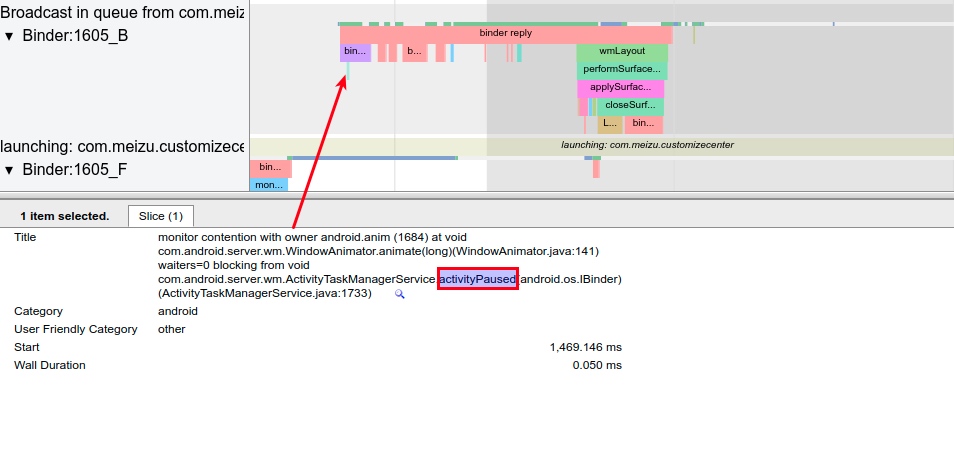
The diagram shows Binder:1605_B executing activityPaused, with some other Binder operations in between, before finally releasing the lock upon completion.
Now let’s trace the execution order, including the two waiters:
Lock Waiting
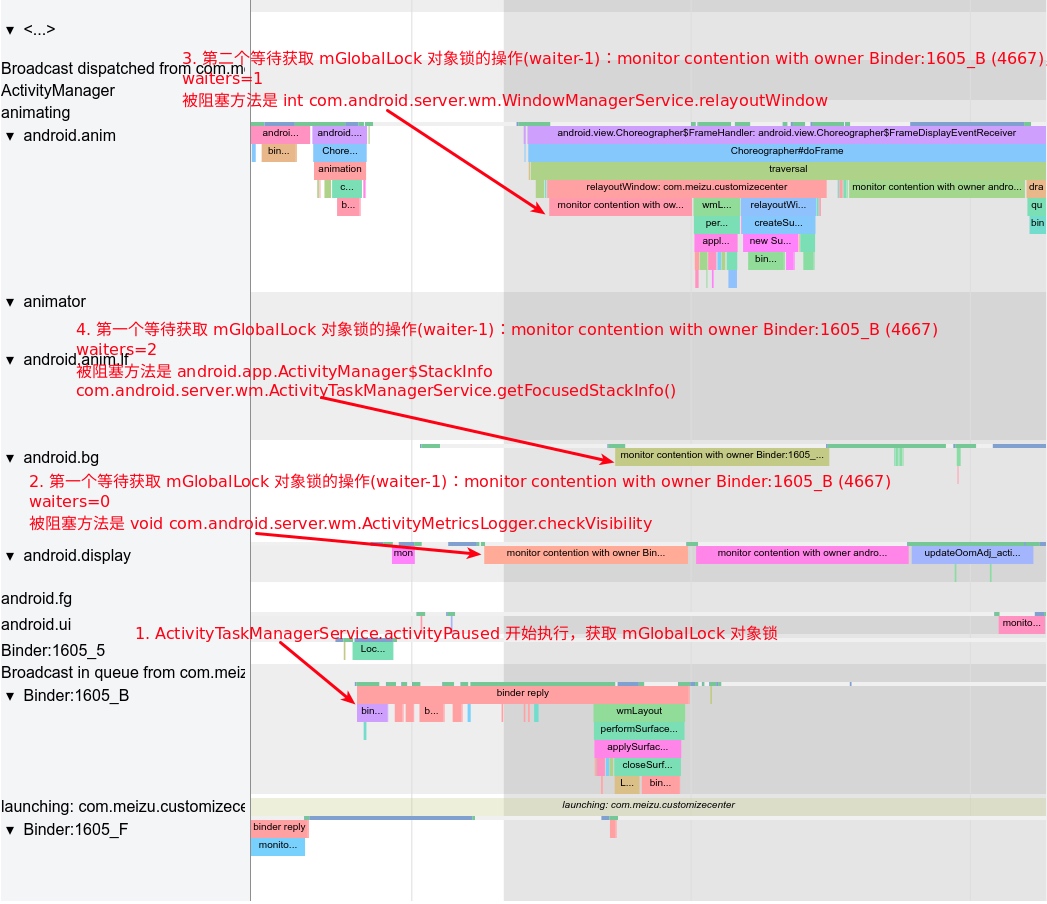
The diagram illustrates the contention for the mGlobalLock object lock:
Binder_1605_Bfirst begins executing activityPaused, which requires themGlobalLocklock. Since there’s no current contention,activityPausedacquires the lock and starts.- The
android.displaythread starts executing the checkVisibility method, which also needs themGlobalLocklock. SinceBinder_1605_Bholds it,checkVisibilitywaits and enters a sleep state. - The
android.animthread starts executing relayoutWindow, also needing themGlobalLocklock. SinceBinder_1605_Bholds it, it also waits and enters sleep. - The
android.bgthread starts getFocusedStackInfo, also needing the lock. It also waits and sleeps.
After these four steps, Binder_1605_B is running while the other three threads failed to acquire the mGlobalLock lock and are sleeping, waiting for Binder_1605_B to finish and release the lock.
Lock Release
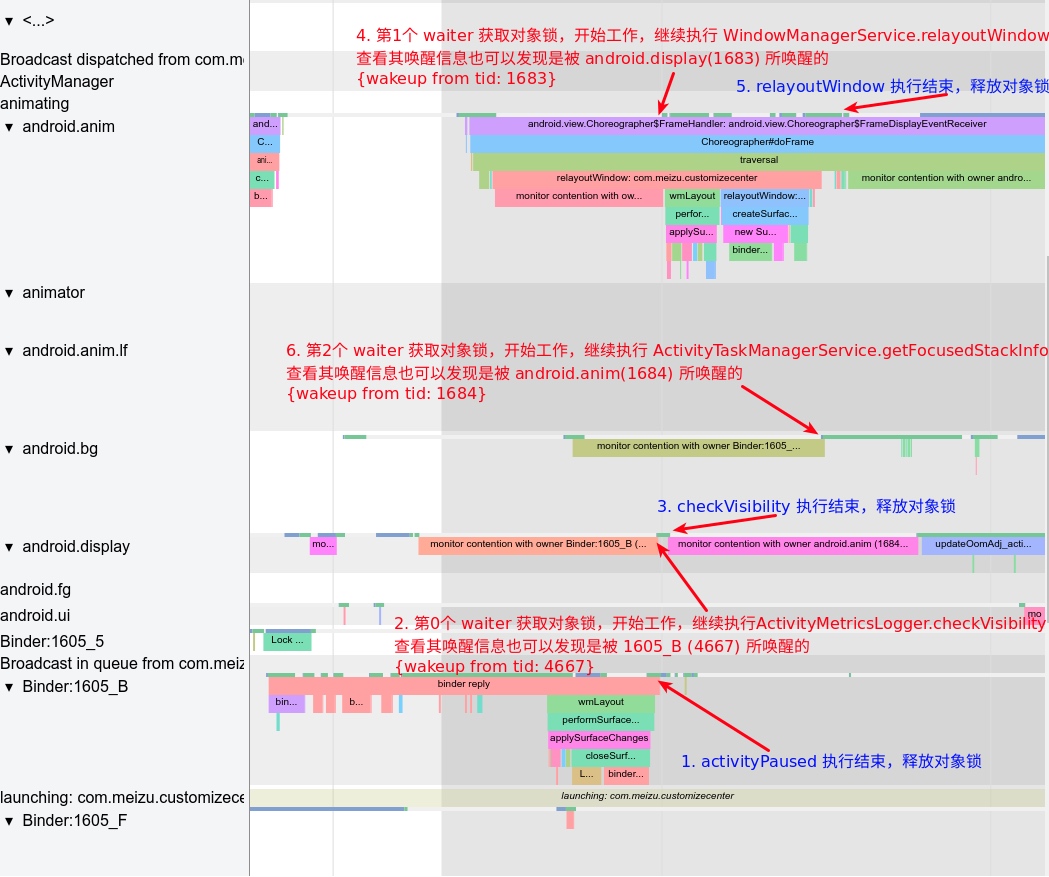
This diagram shows the lock release and subsequent flow:
Binder_1605_B‘s activityPaused finishes, and themGlobalLocklock is released.- The first waiting thread,
android.display, starts executing checkVisibility. Its wakeup info shows it was woken byBinder_1605_B (4667). checkVisibilityfinishes, and the lock is released.- The second waiting thread,
android.anim, starts relayoutWindow. Its wakeup info shows it was woken byandroid.display (1683). relayoutWindowfinishes, and the lock is released.- The third waiting thread,
android.bg, starts getFocusedStackInfo. It was woken byandroid.anim (1684).
After these 6 steps, this round of lock waiting caused by mGlobalLock concludes. This is a simple example; in practice, Binder lock waiting in SystemServer can be very severe, with waiters often reaching 7-10—quite alarming, as seen below:
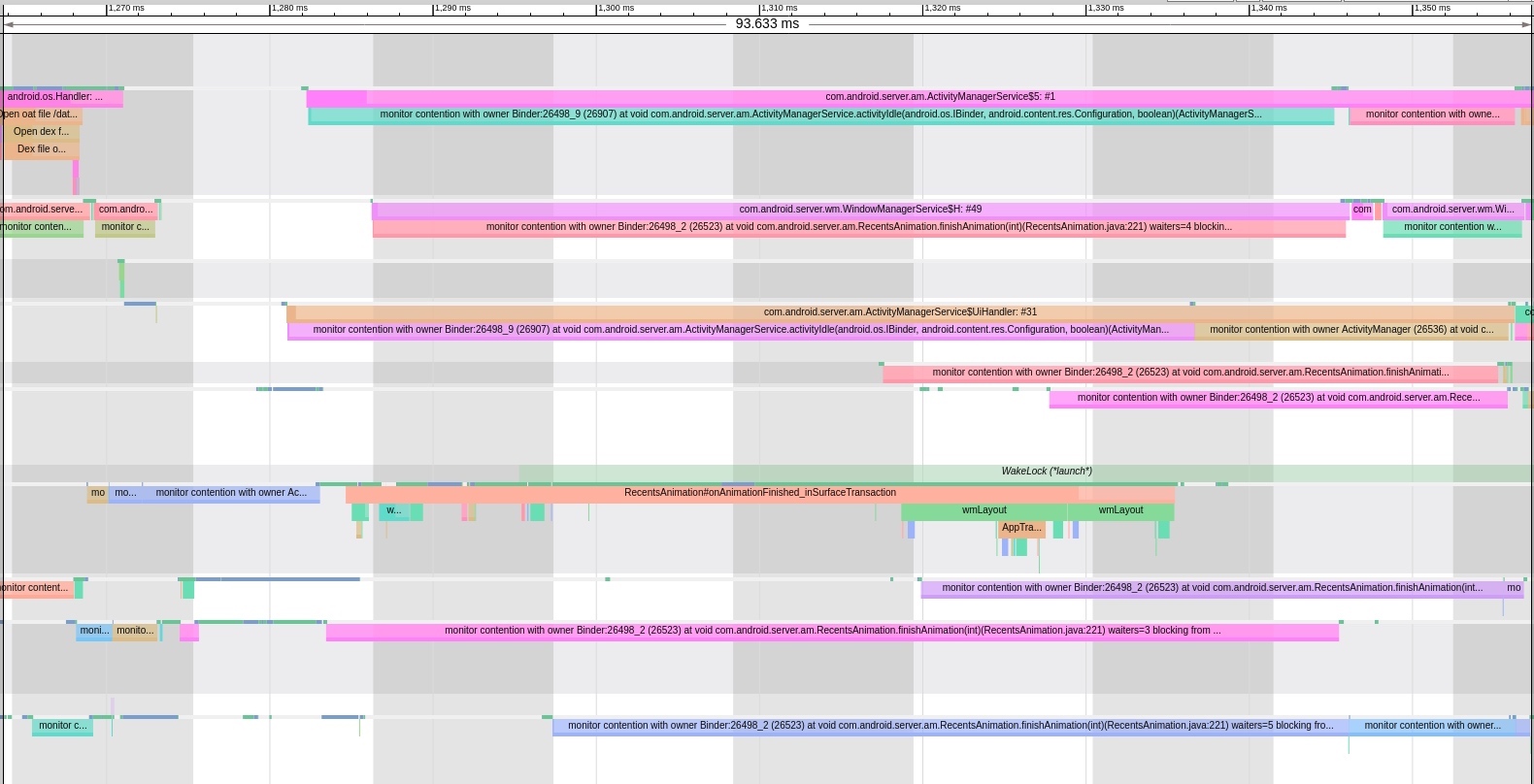
This explains why the system can become laggy after many apps are installed or after prolonged use. A brief period of this can also occur after a reboot.
If you’re unsure how to view wakeup information, refer to this article: Analyzing Process Wakeup Information in Systrace.
Related Code
Monitor Info
art/runtime/monitor.cc
1 | std::string Monitor::PrettyContentionInfo(const std::string& owner_name, |
Block Info
art/runtime/monitor.cc
1 | if (ATRACE_ENABLED()) { |
References
- Understanding Android Binder Mechanism 1/3: Driver Layer
- Understanding Android Binder Mechanism 2/3: C++ Layer
- Understanding Android Binder Mechanism 3/3: Java Layer
Attachments
The attachments involved in this article have been uploaded. Download, extract, and open them in Chrome:
Click here to download the Systrace attachments related to the article
About Me && Blog
Below is my personal intro and related links. I look forward to exchanging ideas with fellow professionals. “When three walk together, one can always be my teacher!”
- Blogger Intro: Includes personal WeChat and WeChat group links.
- Blog Content Navigation: A guide for my blog content.
- Curated Excellent Blog Articles - Android Performance Optimization Must-Knows: Welcome to recommend projects/articles.
- Android Performance Optimization Knowledge Planet: Welcome to join and thank you for your support~
One walks faster alone, but a group walks further together.
