

This is the eleventh article in the Systrace series, providing a brief introduction to Triple Buffer within Systrace. It covers how to identify jank in Systrace, perform preliminary localization and analysis, and explains the impact of Triple Buffer on performance.
The purpose of this series is to view the overall operation of the Android system from a different perspective using Systrace, while also providing an alternative angle for learning the Framework. Perhaps you’ve read many articles about the Framework but can never remember the code, or you’re unclear about the execution flow. Maybe from Systrace’s graphical perspective, you can gain a deeper understanding.
Table of Contents
- Series Article Index
- How to Define Dropped Frames (Jank)?
- BufferQueue and Triple Buffer
- The Role of Triple Buffer
- Debugging Triple Buffer
- References
- Attachments
- About Me && Blog
Series Article Index
- Introduction to Systrace
- Systrace Basics - Prerequisites for Systrace
- Systrace Basics - Why 60 fps?
- Android Systrace Basics - SystemServer Explained
- Systrace Basics - SurfaceFlinger Explained
- Systrace Basics - Input Explained
- Systrace Basics - Vsync Explained
- Systrace Basics - Vsync-App: Detailed Explanation of Choreographer-Based Rendering Mechanism
- Systrace Basics - MainThread and RenderThread Explained
- Systrace Basics - Binder and Lock Contention Explained
- Systrace Basics - Triple Buffer Explained
- Systrace Basics - CPU Info Explained
- Systrace Smoothness in Action 1: Understanding Jank Principles
- Systrace Smoothness in Action 2: Case Analysis - MIUI Launcher Scroll Jank Analysis
- Systrace Smoothness in Action 3: FAQs During Jank Analysis
- Systrace Responsiveness in Action 1: Understanding Responsiveness Principles
- Systrace Responsiveness in Action 2: Responsiveness Analysis - Using App Startup as an Example
- Systrace Responsiveness in Action 3: Extended Knowledge on Responsiveness
- Systrace Thread CPU State Analysis Tips - Runnable
- Systrace Thread CPU State Analysis Tips - Running
- Systrace Thread CPU State Analysis Tips - Sleep and Uninterruptible Sleep
How to Define Dropped Frames (Jank)?
Systrace displays app frame drops. While it’s common to say jank occurs if the main thread exceeds 16.6 ms, this isn’t always true due to Triple Buffer (explained later). Generally, jank in Systrace should be judged by looking at both the App side and the SurfaceFlinger side.
Judging Jank on the App Side
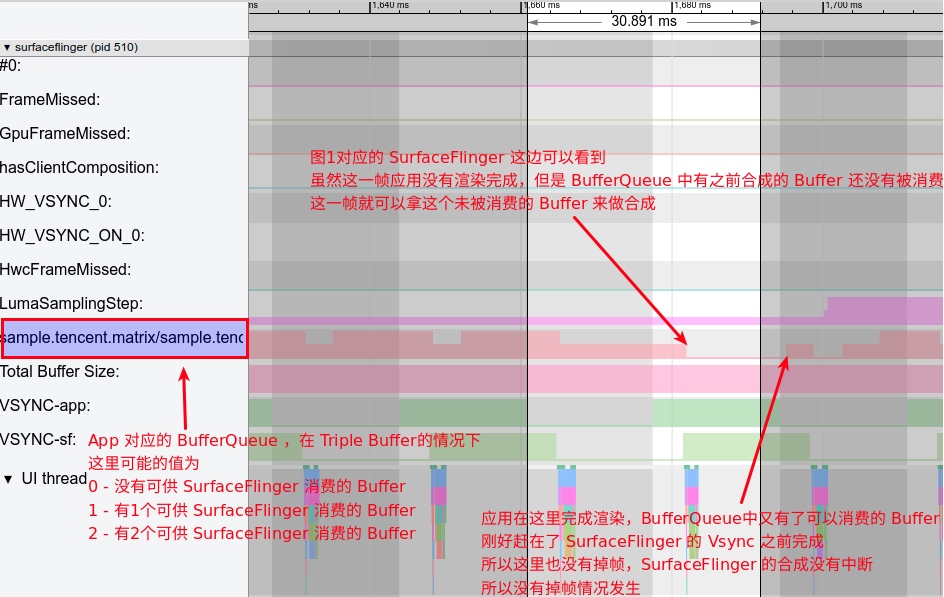
Theoretically, the app in the following trace appears to drop a frame because its main thread drawing time exceeds 16.6ms. However, this isn’t necessarily a jank. Due to BufferQueue and Triple Buffer, SurfaceFlinger might already have a prepared buffer from a previous frame to composite.
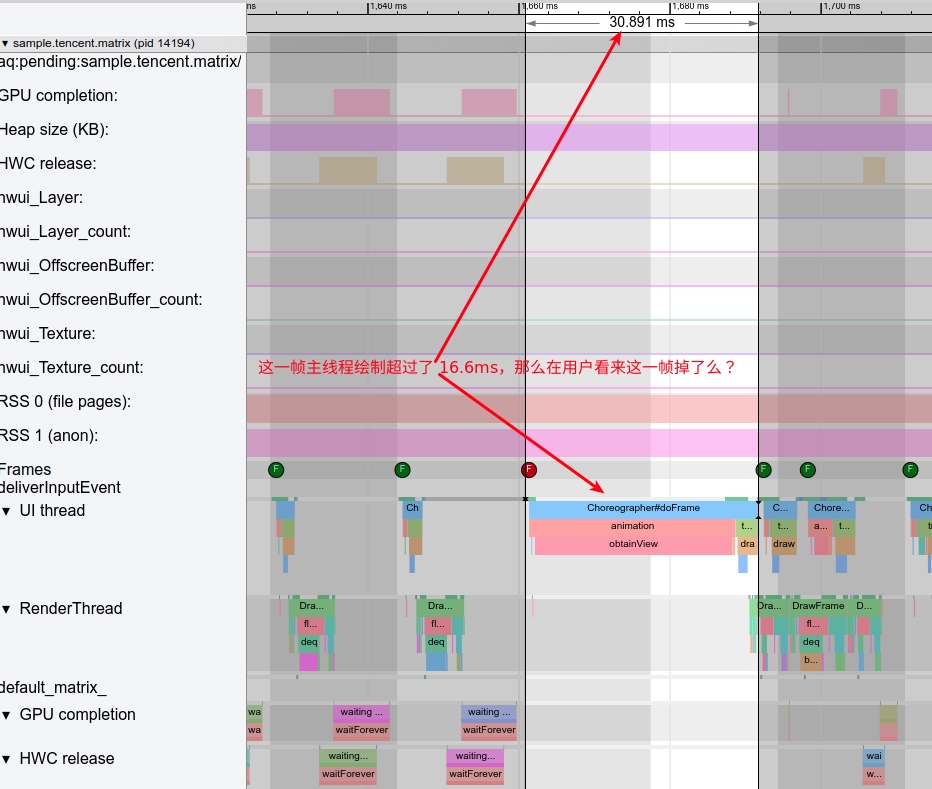
Therefore, you cannot definitively judge jank from the App-side trace alone; you must check the SurfaceFlinger-side trace.
Judging Jank on the SurfaceFlinger Side
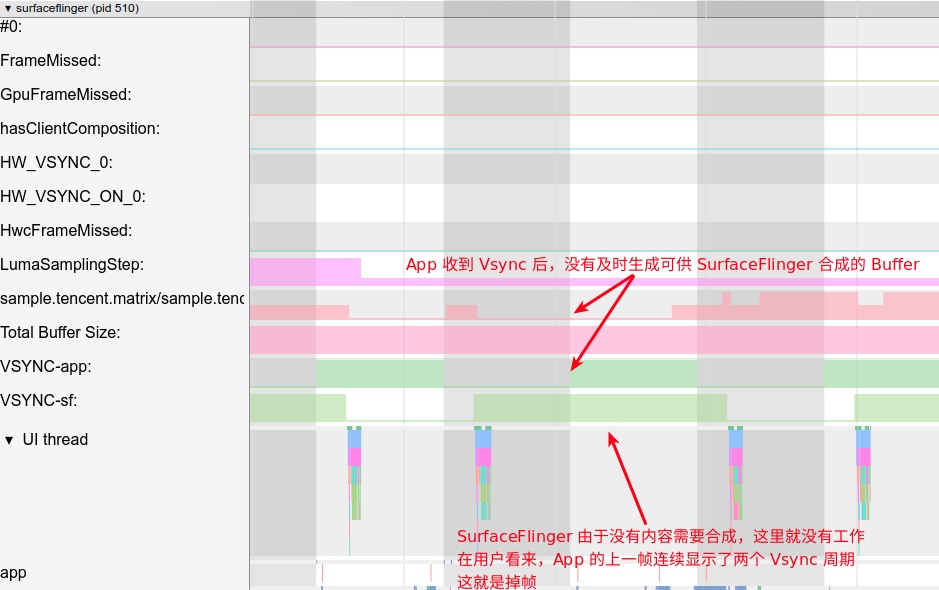
In SurfaceFlinger, you can see the main thread’s composition status and the buffer count in the app’s corresponding BufferQueue. The image above shows a clear jank: the app didn’t render in time, and the BufferQueue was empty, so SurfaceFlinger didn’t composite the app’s layer for that frame.
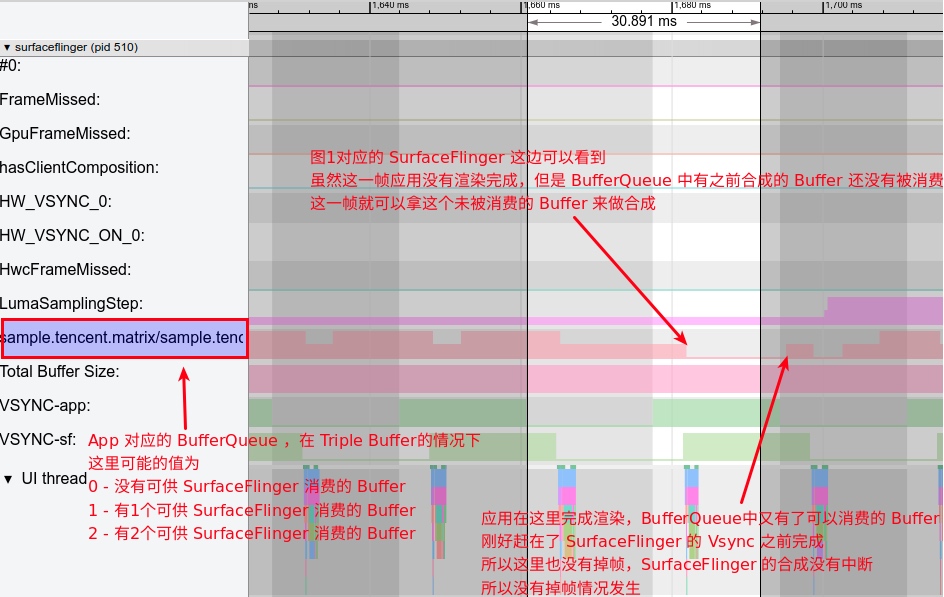
In the first image, where we said it’s hard to tell from the App side, the corresponding SurfaceFlinger trace is shown below. Thanks to Triple Buffer, SF has a buffer available from the app, so even though the app’s frame took over 16.6ms, SF still composited a buffer, and no jank occurred.
Logical Jank
While the rendering-related jank above is easily spotted in Systrace, logical jank also exists.
Logical jank occurs when the app’s code logic results in non-uniform or jerky visual updates, even if rendering and composition happen in time. Systrace won’t show this, but users will feel it.
For example, when scrolling a list, a perfect experience has the list advancing along a smooth, decaying curve after release. If the list jumps 20 pixels, then 10, then 30, it will feel jittery even if every frame completes within 16.6ms. Android optimizes for this in android/view/animation/AnimationUtils.java; specifically, check these methods:
1 | public static void lockAnimationClock(long vsyncMillis) |
System animations rarely have this issue, but developers might inadvertently write such code—for instance, calculating animation properties based on real-time clock instead of the Vsync arrival time. In such cases, any rendering delay leads to uneven animation steps.
Dropped frames have many causes. Refer to these three articles:
- Overview of Jank Causes in Android - Methodology
- Overview of Jank Causes in Android - System Side
- Overview of Jank Causes in Android - App Side
BufferQueue and Triple Buffer
BufferQueue
BufferQueue uses a Producer-Consumer model. Typically, the Consumer creates and owns the BufferQueue data structure, while the Producer exists in a different process.
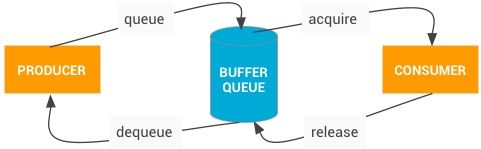
Operating logic:
- When a Producer needs a buffer, it calls
dequeueBuffer(), specifying dimensions and format, to request a buffer fromBufferQueue. - The Producer fills the buffer and calls
queueBuffer()to return it to the queue. - The Consumer calls
acquireBuffer()to take and consume the content. - Once finished, the Consumer calls
releaseBuffer()to return it to the queue.
Android uses Vsync to control these flows. For details, see:
- Systrace Basics - Vsync Explained
- Detailed Explanation of Android Rendering Mechanism Based on Choreographer
In app rendering, the App is the Producer and SurfaceFlinger is the Consumer:
- App calls
dequeueBuffer()to request a buffer. - App renders (via CPU or GPU) and calls
queueBuffer()to return it. - SurfaceFlinger receives a Vsync signal, calls
acquireBuffer()to take the buffer, and performs composition. - SurfaceFlinger calls
releaseBuffer()to return it after composition.
The number of buffers in the BufferQueue significantly affects performance. Let’s analyze single, double, and triple buffering.
Single Buffer
With only one buffer, it must be used for both composition and rendering simultaneously.
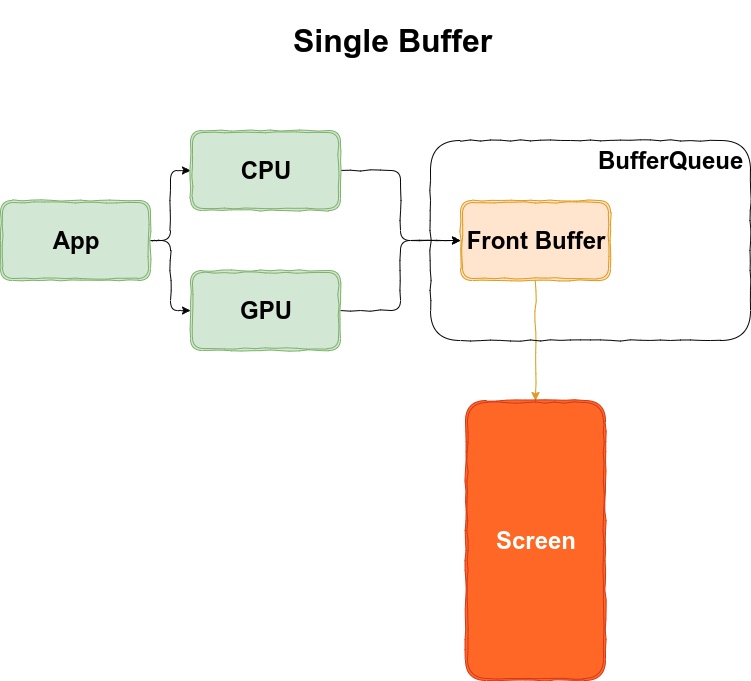
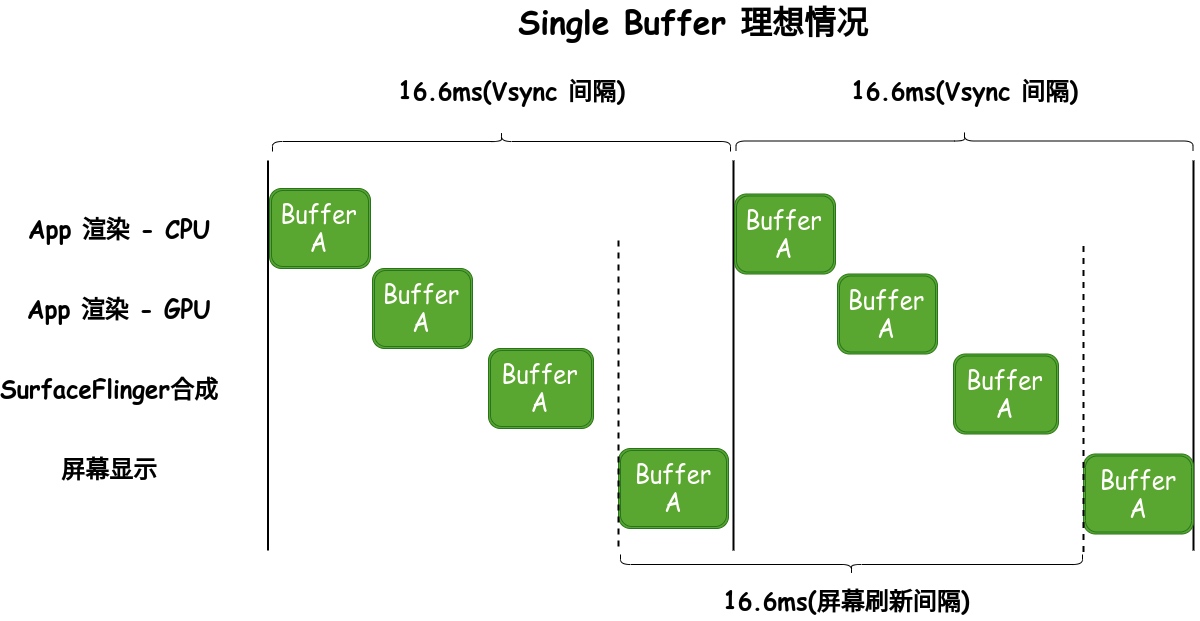
Ideally, this could work with Vsync-Offset:
- App receives Vsync and starts rendering.
- After Vsync-Offset,
SurfaceFlingerreceives Vsync and composites. - Screen refreshes to show the frame.
However, if rendering or composition isn’t finished before the refresh, the user sees an incomplete buffer—manifesting as screen tearing.
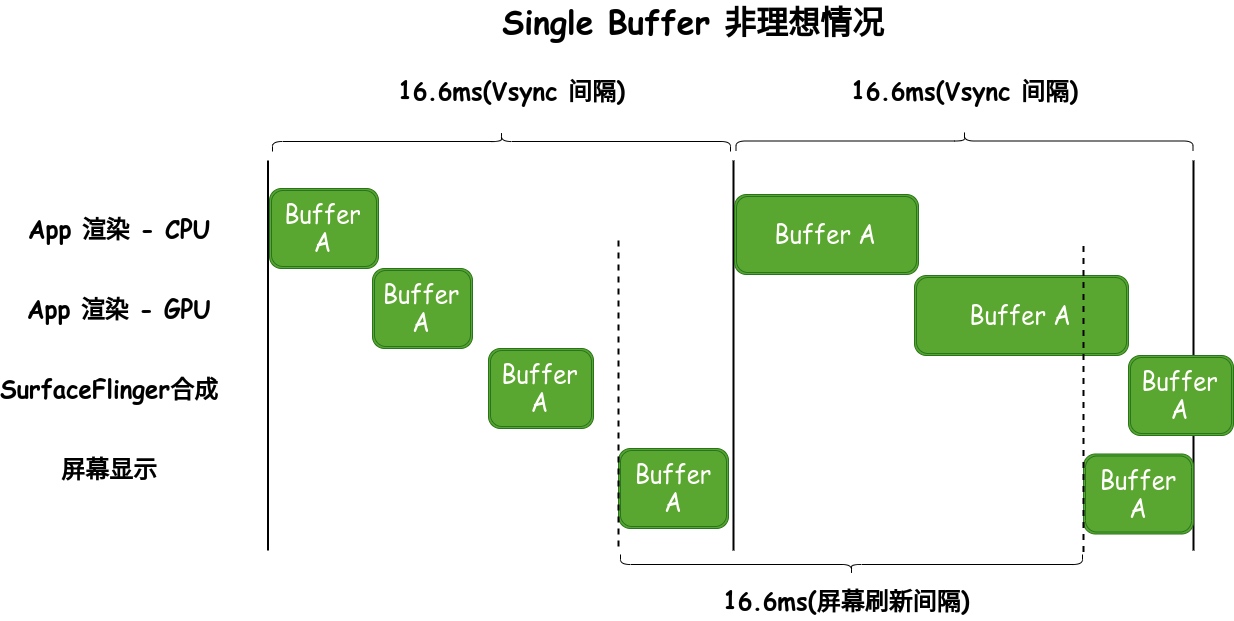
Single buffering is no longer used; this is purely illustrative.
Double Buffer
Double buffering provides two alternately rotating buffers. While the Consumer uses one, the Producer can use the spare.
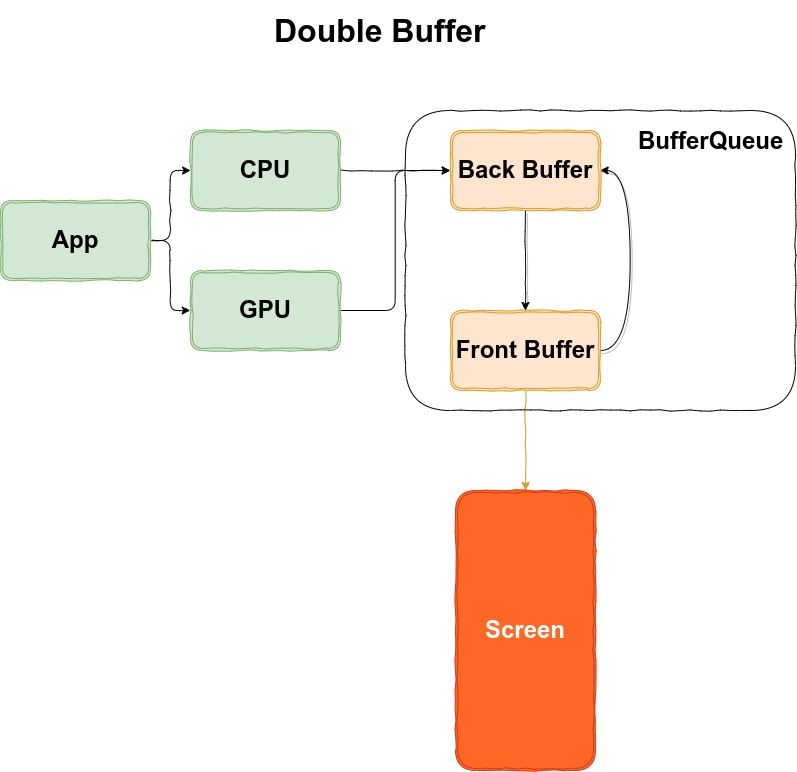
Ideal double buffering workflow:
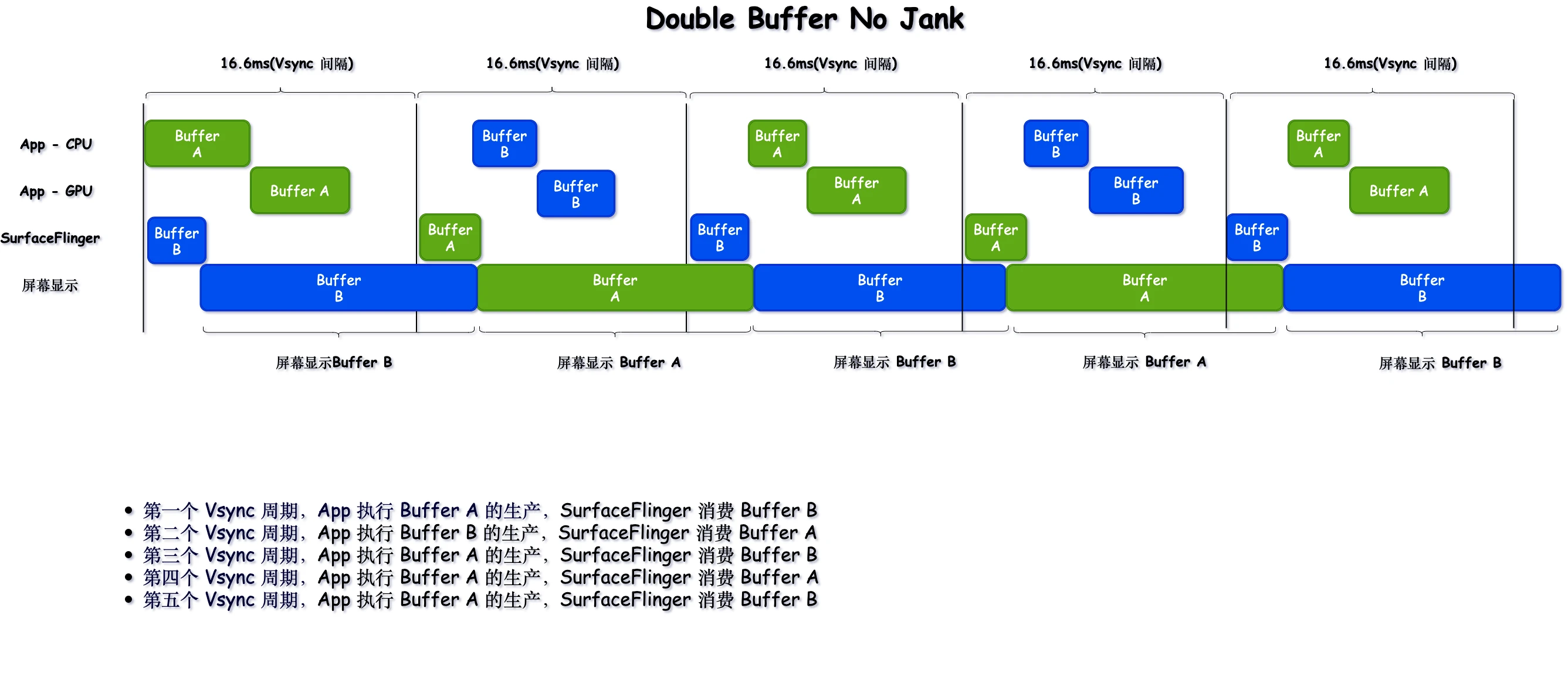
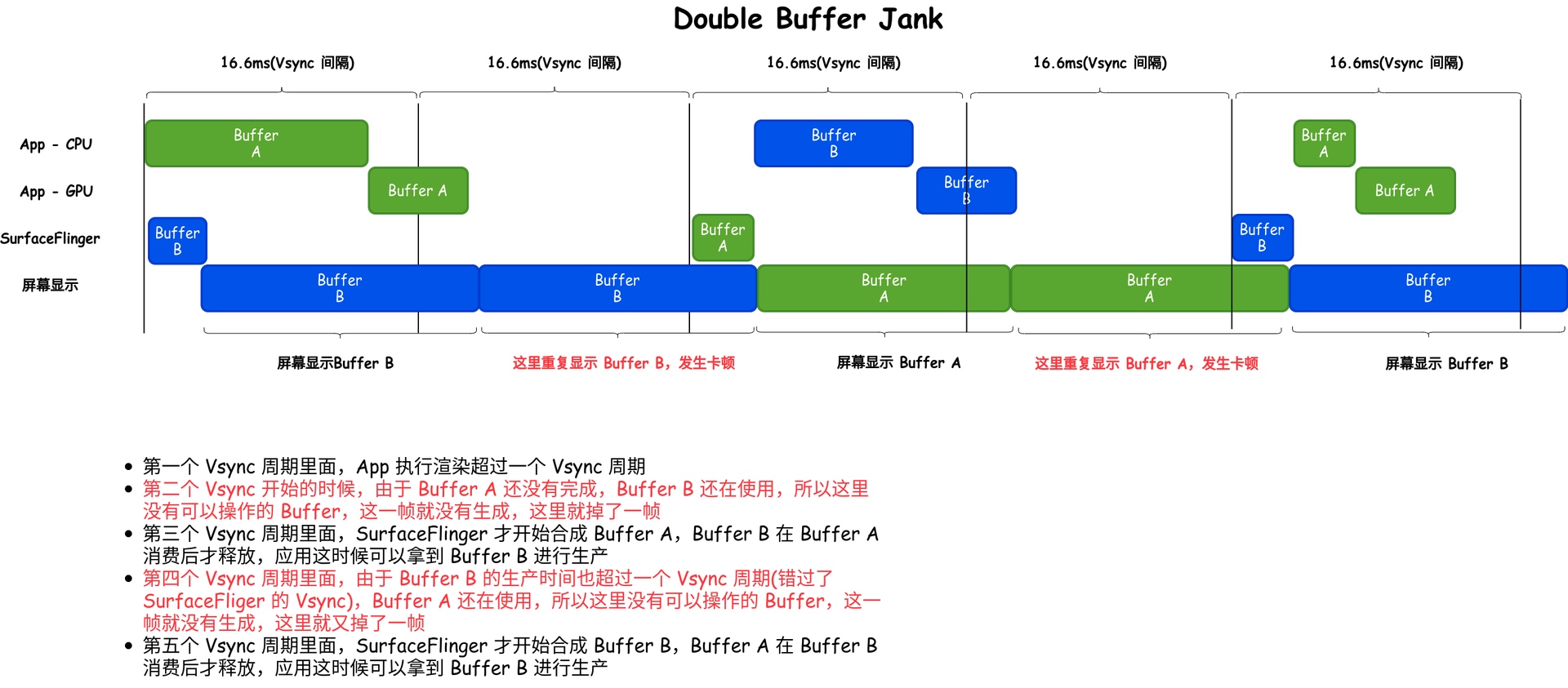
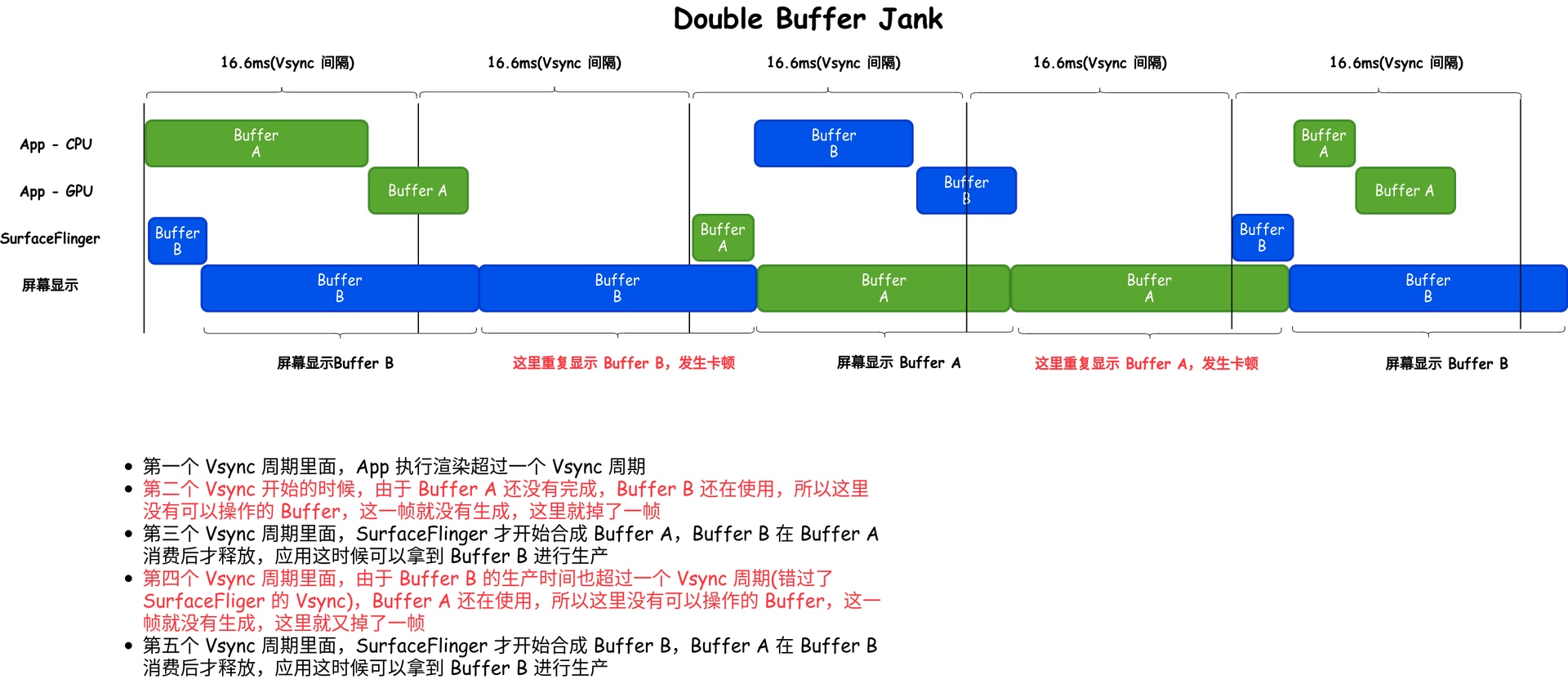
However, if an app’s production consistently exceeds Vsync cycles (missing SF’s composition window), jank occurs:
Triple Buffer
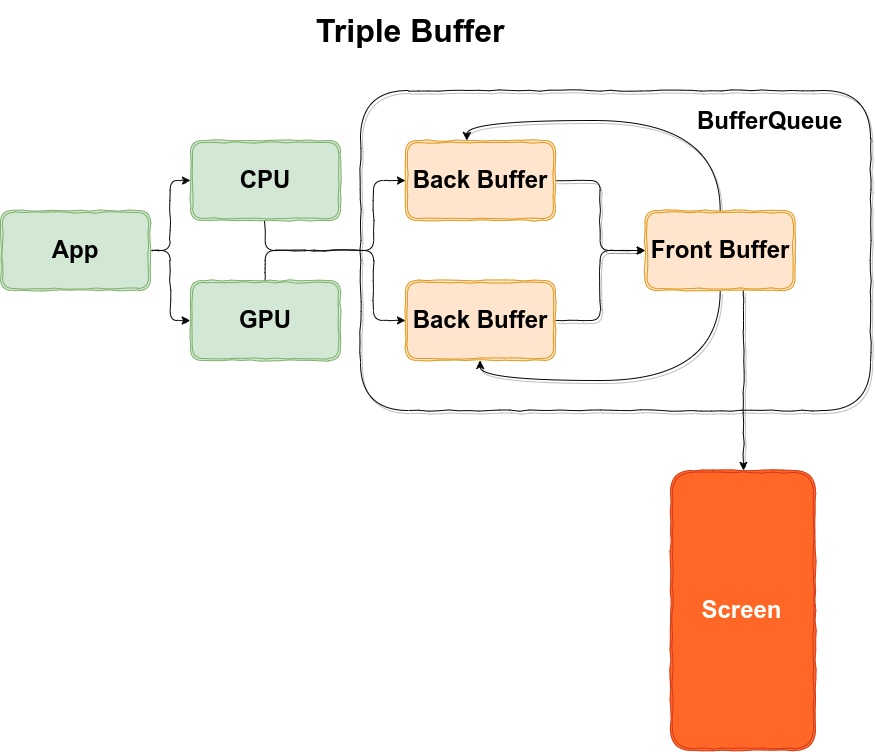
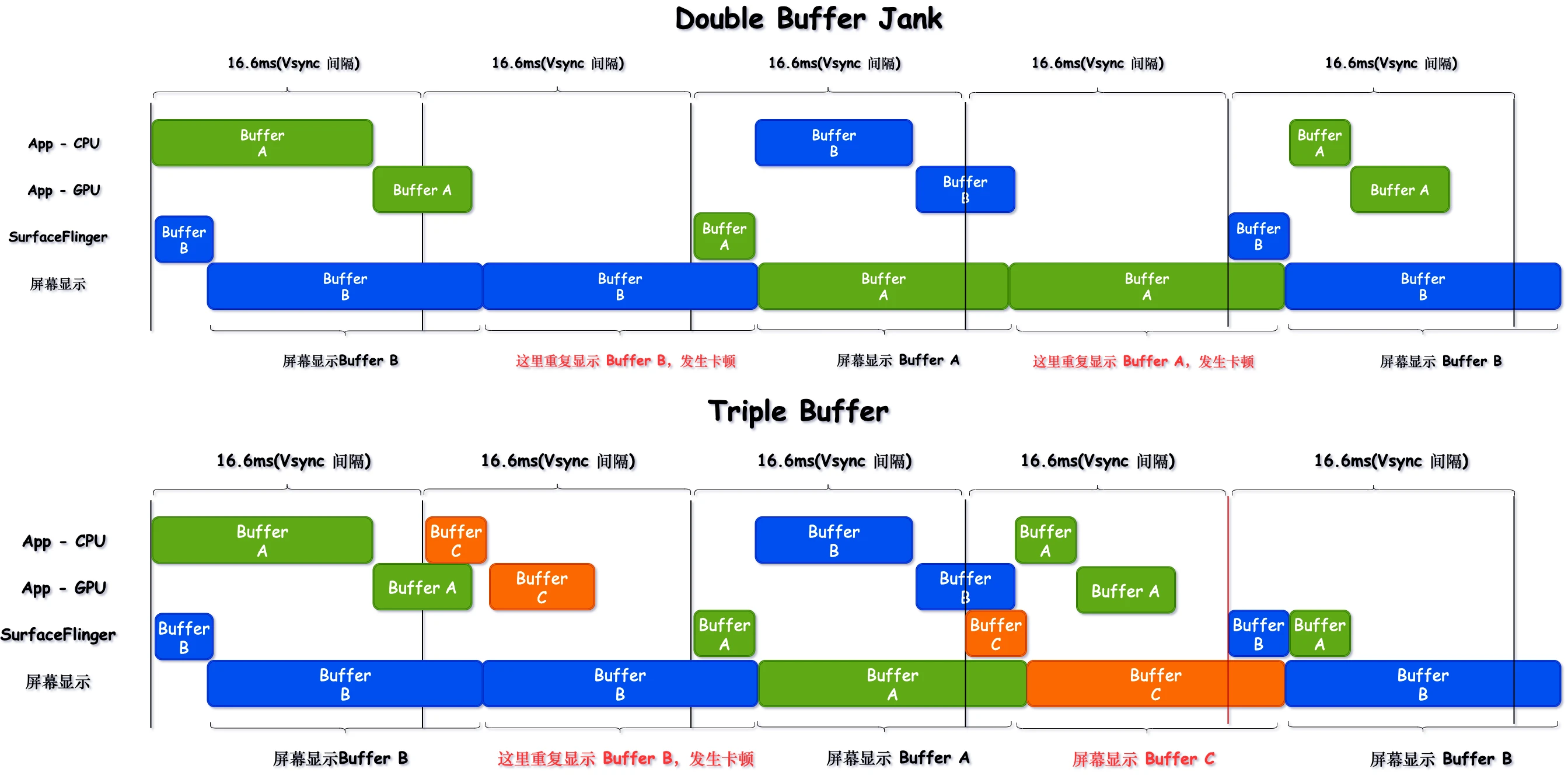
Triple buffering adds a BackBuffer, allowing three buffers to rotate. While FrontBuffer is in use, the app has two idle buffers. Even if the GPU times out, the CPU can still take a fresh buffer for production (SF consumes FrontBuffer, GPU uses one BackBuffer, CPU uses another BackBuffer).
Triple buffering solves the jank caused by buffer shortages in double buffering:
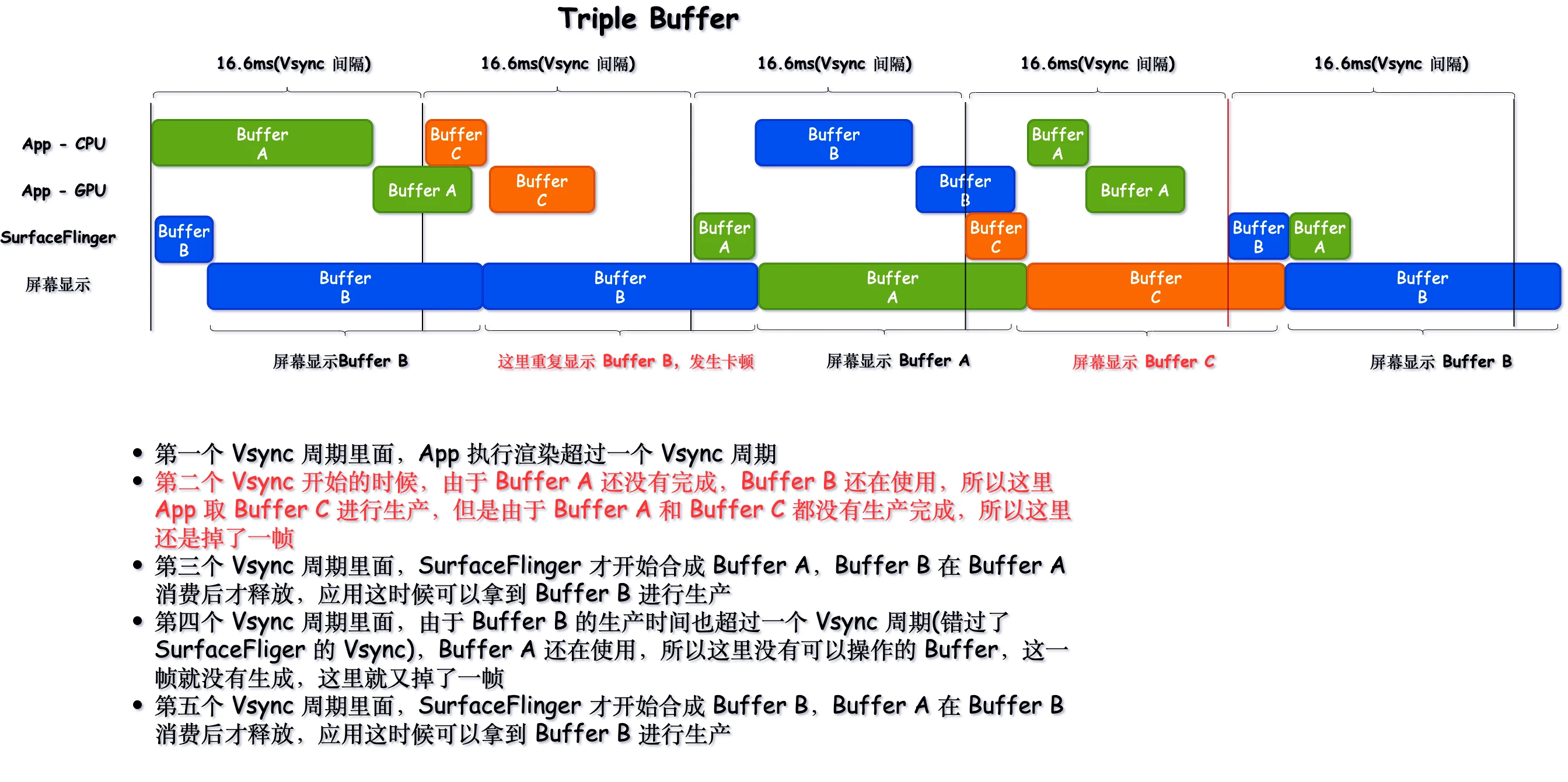
Comparison (Double Buffer janks twice; Triple Buffer janks once):
The Role of Triple Buffer
Mitigating Jank
As shown in the comparison, triple buffering helps reduce the frequency of jank during consecutive main thread timeouts (reducing two janks to one). This is why an app-side timeout doesn’t always result in a user-perceived jank in SurfaceFlinger.
Reducing Wait Times
In Double Buffering, the app’s main thread must sometimes wait for SurfaceFlinger to release a buffer before it can start production. Since most phones receive Vsync signals for SF and App simultaneously, this delay shortens the available time for the main thread:
In Systrace, this appears as:
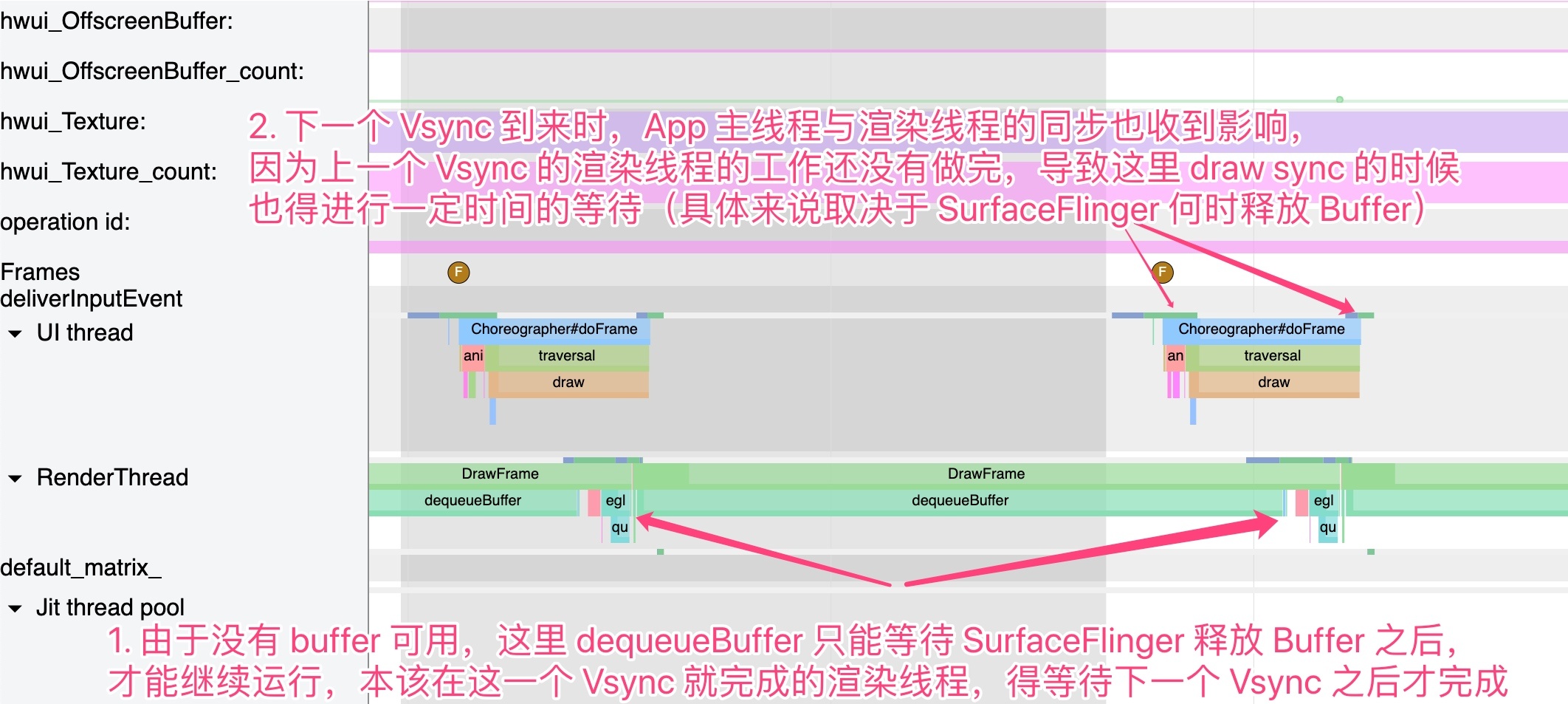
With Triple Buffering, this wait rarely occurs. The rendering thread can smoothly dequeueBuffer and begin work immediately.
Lowering GPU and SurfaceFlinger Bottlenecks
In double buffering, any GPU timeout easily prevents SurfaceFlinger from compositing in time, causing jank. Triple buffering allows app buffers to enter the queue earlier for GPU rendering (without waiting), effectively lowering thresholds. It also reduces dequeueBuffer wait times when SurfaceFlinger itself is heavily loaded.
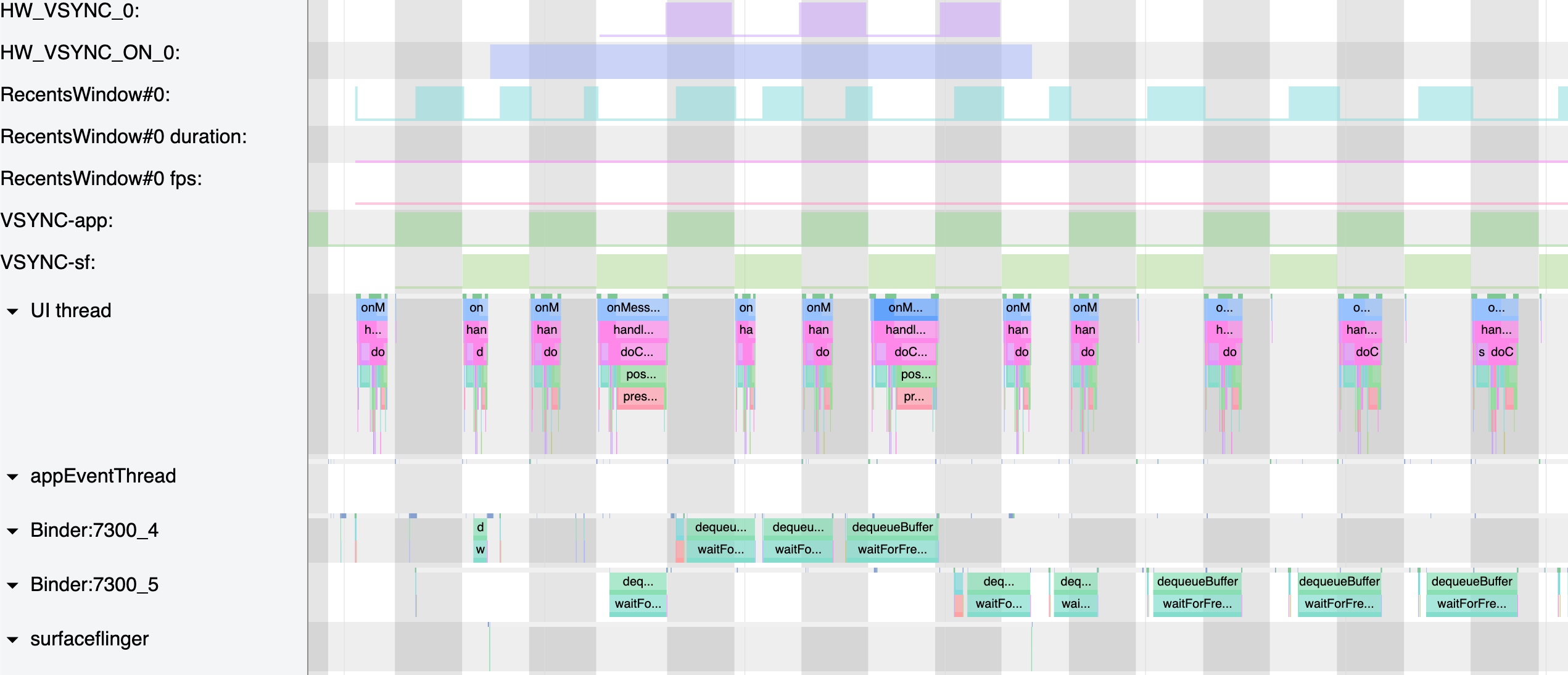
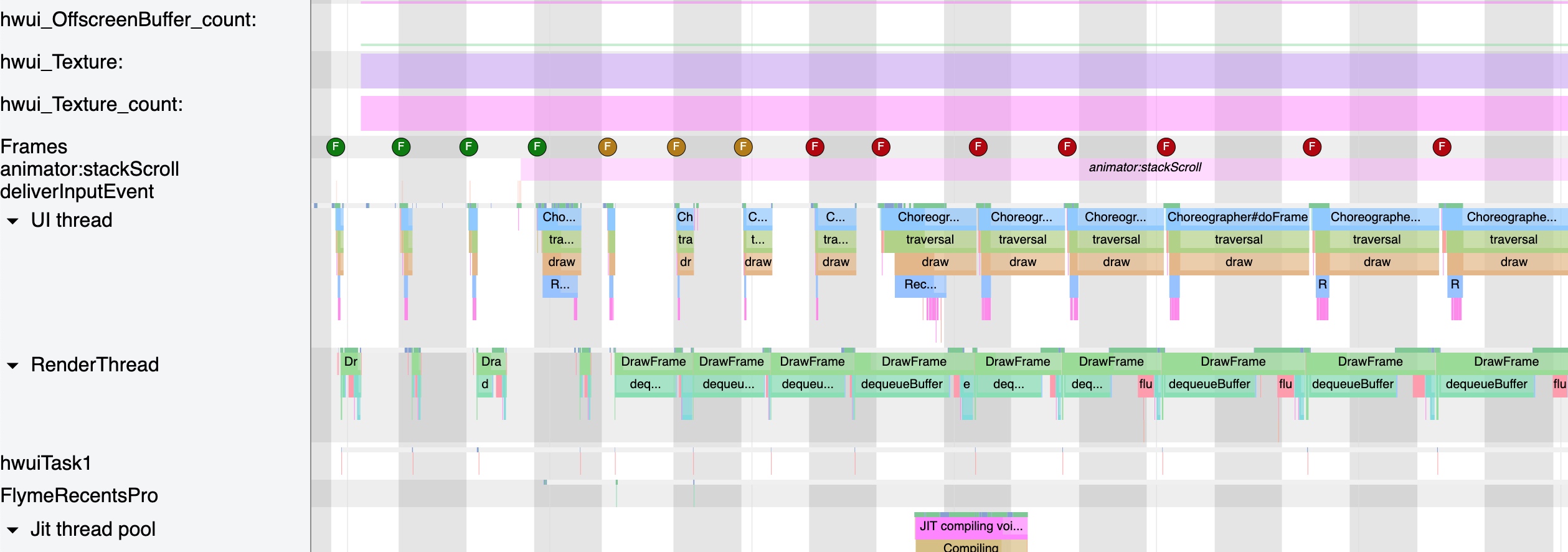
Below are traces showing Double Buffering jank caused by high SurfaceFlinger load and delayed dequeueBuffer responses. These issues mostly disappear with Triple Buffering.
Debugging Triple Buffer
Dumpsys SurfaceFlinger
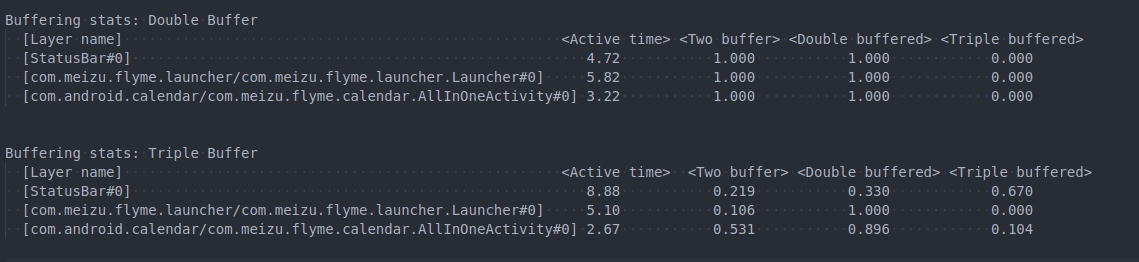
dumpsys SurfaceFlinger provides status, performance metrics, buffer states, and layer info. Below is a snippet showing buffer usage; apps under different loads use Triple Buffering differently:
Disabling Triple Buffer
Properties vary across Android versions (a logic bug fixed in Android 10).
Android Version <= Android P
1 | // Logic |
Modify and restart Framework (requires Root):
1 | adb root |
Android Version > Android P
1 | // Logic |
Modify and restart Framework (requires Root):
1 | adb root |
References
Attachments
Systrace attachments are available for download. Extract and open in Chrome:
Download Systrace attachments for this article
About Me && Blog
Below is my personal intro and related links. I look forward to exchanging ideas with fellow professionals. “When three walk together, one can always be my teacher!”
- Blogger Intro: Includes personal WeChat and WeChat group links.
- Blog Content Navigation: A guide for my blog content.
- Curated Excellent Blog Articles - Android Performance Optimization Must-Knows: Welcome to recommend projects/articles.
- Android Performance Optimization Knowledge Planet: Welcome to join and thank you for your support~
One walks faster alone, but a group walks further together.
