This is the twelfth article in the Systrace series, primarily providing a brief introduction to the CPU information area (Kernel) in Systrace. It covers how to view CPU-related information output by the Kernel module, including CPU frequency, scheduling, frequency locking, and core locking.
The purpose of this series is to view the overall operation of the Android system from a different perspective using Systrace, while also providing an alternative angle for learning the Framework. Perhaps you’ve read many articles about the Framework but can never remember the code, or you’re unclear about the execution flow. Maybe from Systrace’s graphical perspective, you can gain a deeper understanding.
Table of Contents
- Series Article Index
- CPU Area Legend
- Core Architecture
- Core Binding (Pinning)
- Frequency Locking
- CPU States
- Detailed Information in Systrace
- References
- About Me && Blog
Series Article Index
- Introduction to Systrace
- Systrace Basics - Prerequisites for Systrace
- Systrace Basics - Why 60 fps?
- Android Systrace Basics - SystemServer Explained
- Systrace Basics - SurfaceFlinger Explained
- Systrace Basics - Input Explained
- Systrace Basics - Vsync Explained
- Systrace Basics - Vsync-App: Detailed Explanation of Choreographer-Based Rendering Mechanism
- Systrace Basics - MainThread and RenderThread Explained
- Systrace Basics - Binder and Lock Contention Explained
- Systrace Basics - Triple Buffer Explained
- Systrace Basics - CPU Info Explained
- Systrace Smoothness in Action 1: Understanding Jank Principles
- Systrace Smoothness in Action 2: Case Analysis - MIUI Launcher Scroll Jank Analysis
- Systrace Smoothness in Action 3: FAQs During Jank Analysis
- Systrace Responsiveness in Action 1: Understanding Responsiveness Principles
- Systrace Responsiveness in Action 2: Responsiveness Analysis - Using App Startup as an Example
- Systrace Responsiveness in Action 3: Extended Knowledge on Responsiveness
- Systrace Thread CPU State Analysis Tips - Runnable
- Systrace Thread CPU State Analysis Tips - Running
- Systrace Thread CPU State Analysis Tips - Sleep and Uninterruptible Sleep
CPU Area Legend
Below is the CPU Info area in the Kernel of a Systrace captured from a Qualcomm Snapdragon 845 device (we’re focusing on Kernel CPU info here, skipping lower sections).
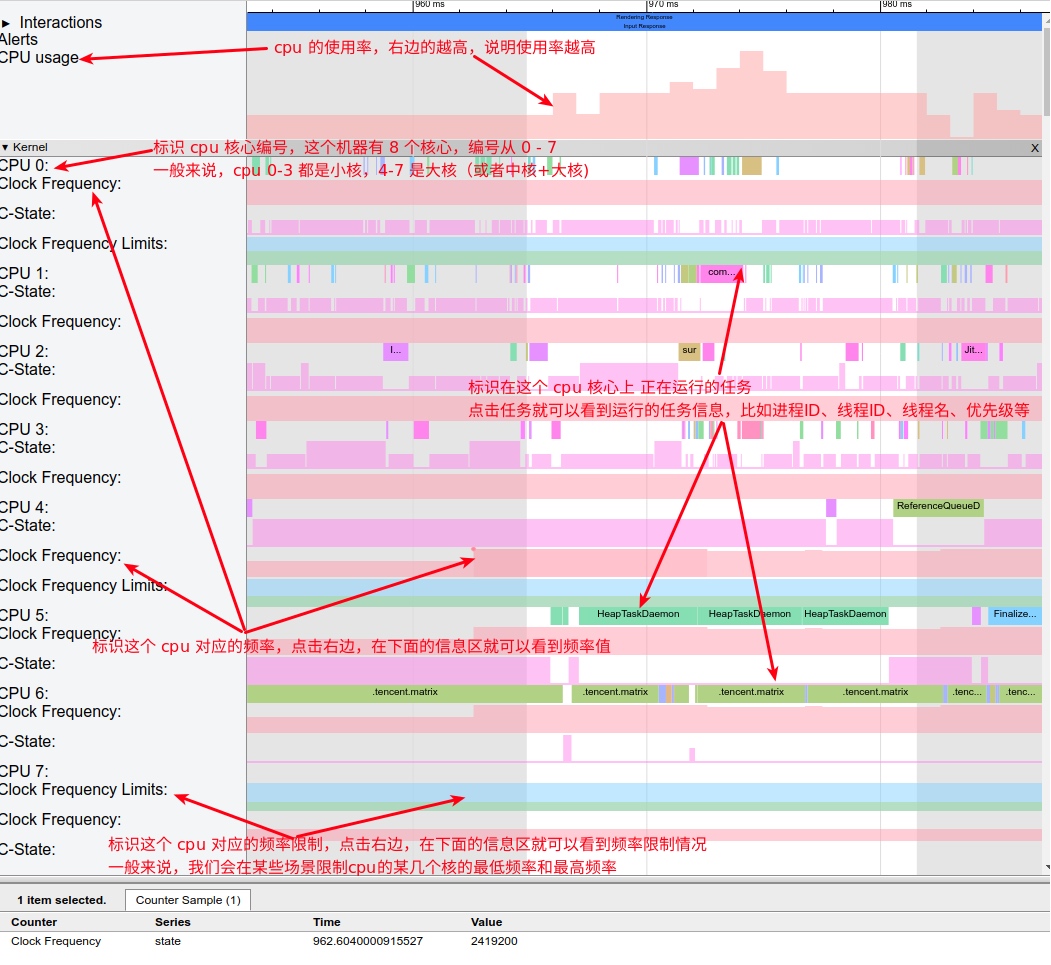
The CPU Info in Systrace is generally at the top, and commonly used information includes:
- CPU frequency changes
- Task execution status
- Scheduling across large and small cores
- CPU Boost scheduling
In general, Kernel CPU Info in Systrace is used to examine task scheduling and determine if frequency or scheduling is causing performance issues for the current task. For example:
- A task runs slowly in a certain scenario; was it scheduled to a small core?
- A task runs slowly; is the current CPU frequency insufficient?
- For special tasks like fingerprint unlocking, can it be pinned to a large core?
- For high-CPU-demand scenarios, can we limit the minimum CPU frequency while it’s running?
Detailed explanations related to CPU execution can be found in the article Android Systrace Basics - Prerequisites for Analyzing Systrace.
Core Architecture
Briefly, modern mobile CPUs can be categorized into three types based on core count and architecture:
- Non-big.LITTLE architecture
- big.LITTLE architecture
- Big-Medium-Small core architecture
Most current CPUs use big.LITTLE, while some (like Snapdragon 855/865) use the Big-Medium-Small core architecture. A small number of CPUs use a uniform architecture.
Let’s discuss the differences to help interpret Systrace:
Non-big.LITTLE Architecture
Older devices with dual or quad cores typically had uniform core architectures, meaning all cores were isomorphic—same frequency, same power consumption, enabling or disabling together. Some entry-level Qualcomm processors also use isomorphic octa-core processors, like Snapdragon 636.
Most modern devices no longer use this architecture.
big.LITTLE Architecture
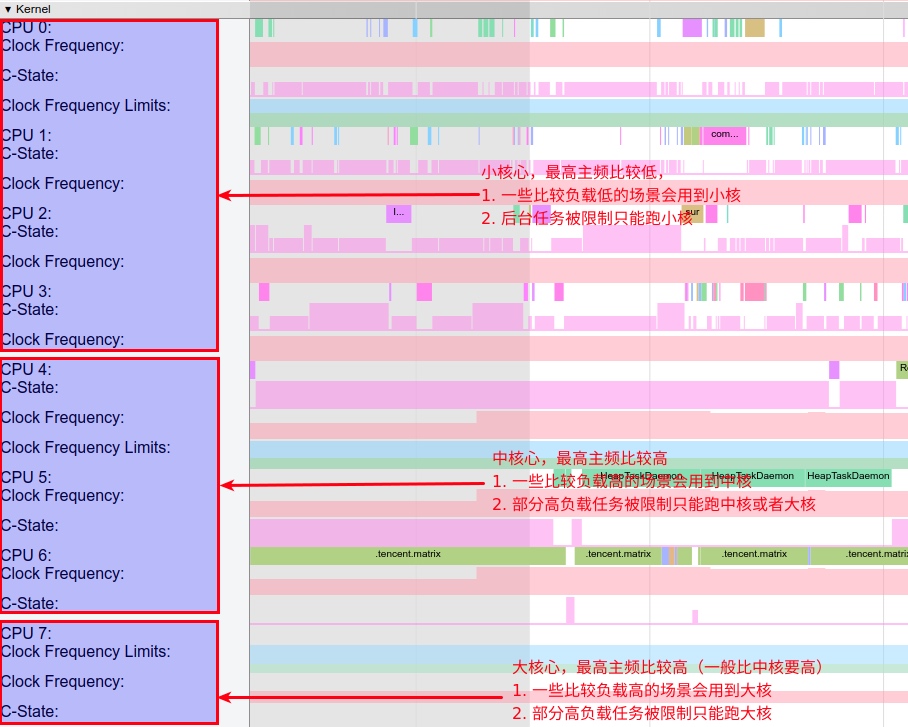
Modern CPUs generally use 8 cores. CPU 0-3 are typically small cores, while CPU 4-7 are large cores, as arranged in Systrace.
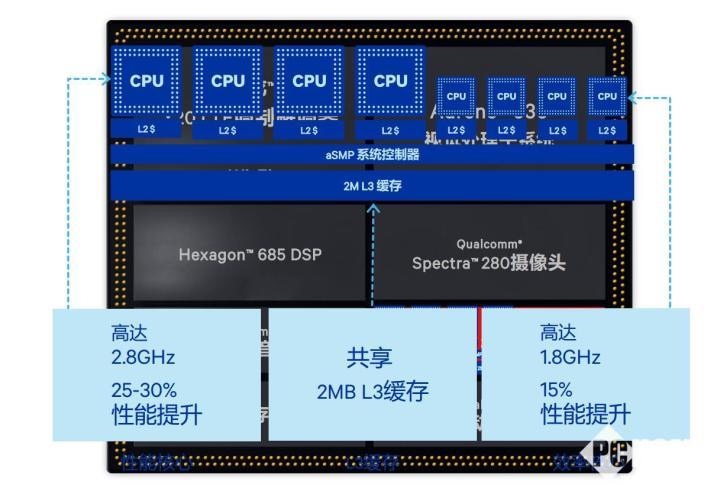
Small cores generally have lower clock speeds and power consumption, typically using the ARM A5x series. For example, the Snapdragon 845 small cores consist of four A55 cores (up to 1.8GHz).
Large cores have higher maximum frequencies and power consumption, typically using the ARM A7x series. For example, the Snapdragon 845 large cores consist of four A75 cores (up to 2.8GHz).
Here is the Snapdragon 845 CPU:
Variations exist, such as Snapdragon 636 (4 small + 2 large) or Snapdragon 710 (6 small + 2 large). The principle remains: large cores support high-load scenarios, and small cores handle daily use. Performance depends on the device’s tier; as the saying goes, “you get what you pay for.”
Parameters for mainstream Qualcomm big.LITTLE processors:

Big-Medium-Small Core Architecture
Some CPUs utilize a Big-Medium-Small architecture, such as:
- Snapdragon 855: 8 cores (1 x A76 Big + 3 x A76 Medium + 4 x A55 Small)
- MTK X30: 10 cores (2 x A73 Big + 4 x A53 Medium + 4 x A35 Small)
- Kirin 980: 8 cores (2 x A76 Big + 2 x A76 Medium + 4 x A55 Small)
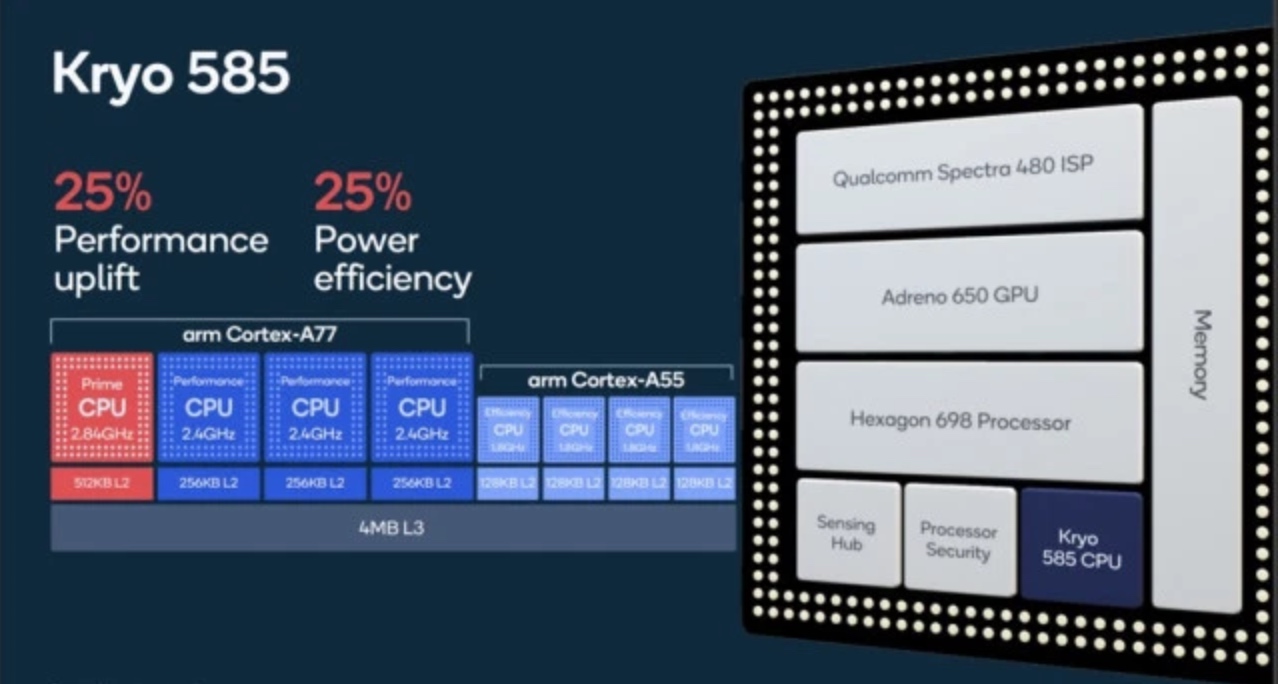
Compared to big.LITTLE, the “Big” core here is often a “Prime” core (Qualcomm calls it Gold+), usually numbering only 1 or 2. It has very high clock speeds and power consumption, designed for highly demanding tasks.
Comparison of 855, 845, and Kirin 980:
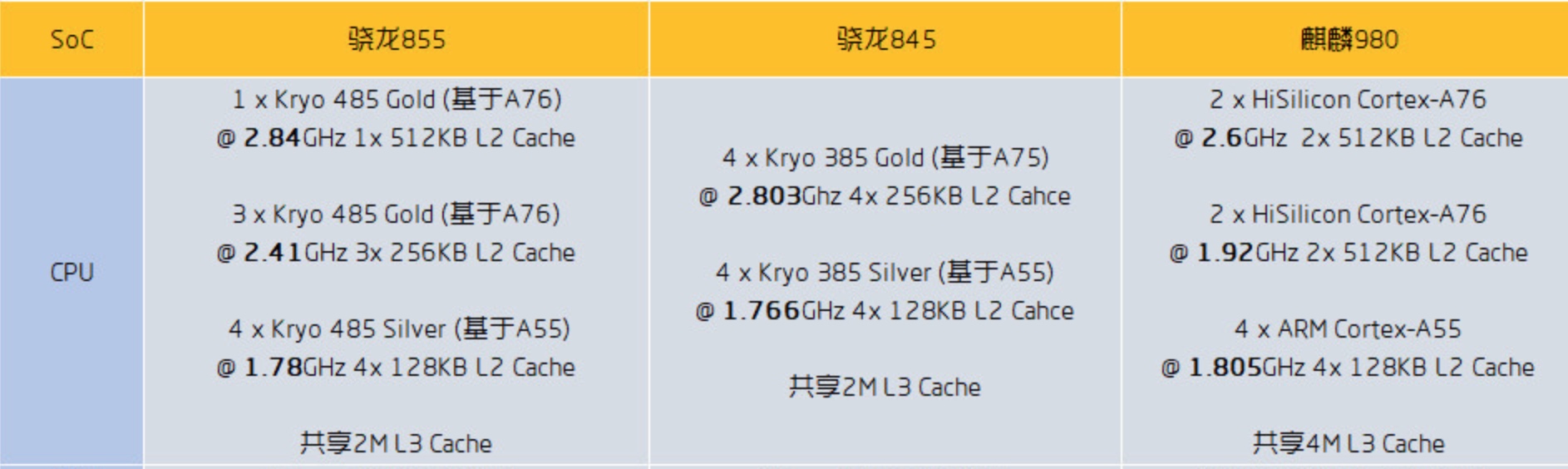
Notably, the Snapdragon 865 continues the Big-Medium-Small architecture, using the A77 architecture for big and medium cores and A55 for small cores. The Prime and medium cores have different maximum frequencies; there is only one Prime core, clocked at 2.8GHz.
Core Binding (Pinning)
Core binding involves pinning a specific task to a certain core or set of cores to meet its performance requirements:
- A high-load task needs large cores to meet timing requirements.
- A task shouldn’t be frequently context-switched and needs to stay on one core.
- An unimportant task with low timing requirements can be restricted to small cores.
In Android, binding is generally handled by the system using three common methods:
Configuring CPUsets
The CPUset subsystem limits specific types of tasks to specific CPUs or CPU groups. Android defines default groups that manufacturers can customize:
system-background: Low-priority tasks, restricted to small cores.foreground: Foreground processes.top-app: Processes currently interacting with the user.background: Background processes.foreground/boost: Previously used to migrate all foreground processes during app launch; now largely inactive.
CPUset configurations vary by architecture and manufacturer. Here is the Google default:
1 | // Default Official Configuration |
You can view tasks in each group via the tasks node:
1 | $ adb shell cat /dev/cpuset/top-app/tasks |
Placement is dynamic and can be changed by authorized processes. Some processes are configured at startup, such as lmkd, which places itself in system-background:
1 | service lmkd /system/bin/lmkd |
Most App processes change groups dynamically. Detailed definitions are in the Process class:
android/os/Process.java
1 | public static final int THREAD_GROUP_DEFAULT = -1; |
OomAdjuster dynamically modifies CPUsets based on process state (check computeOomAdjLocked, updateOomAdjLocked, and applyOomAdjLocked in Android 10).
Configuring Affinity
affinity sets which core a task runs on using the taskset system call.
Usage of taskset
Display CPU for a process:
1 | taskset -p pid |
The returned value is hexadecimal. When converted to binary, each bit corresponds to a logical CPU (lowest bit is CPU 0). A ‘1’ indicates the process is bound to that CPU. For example, 0101 means binding to CPU 0 and 3.
Binding setup:
1 | taskset -pc 3 pid # Bind process PID to the 3rd core |
Android can use this call to pin tasks. Older kernels lacking CPUset support often used taskset.
Scheduling Algorithms
Modifying scheduling logic within the Linux scheduler can also pin tasks to specific cores. Some manufacturers use this for “core scheduling optimization.”
Frequency Locking
Normally, CPU scheduling satisfies daily use, but some Android scenarios require more performance than the default scheduler provides. For app launches, relying solely on the scheduler to ramp up frequency and migrate cores might be too slow. A task might start on a small core, find it insufficient, ramp up frequency, find it still lacking, and eventually migrate through medium to large cores. This process wastes time.
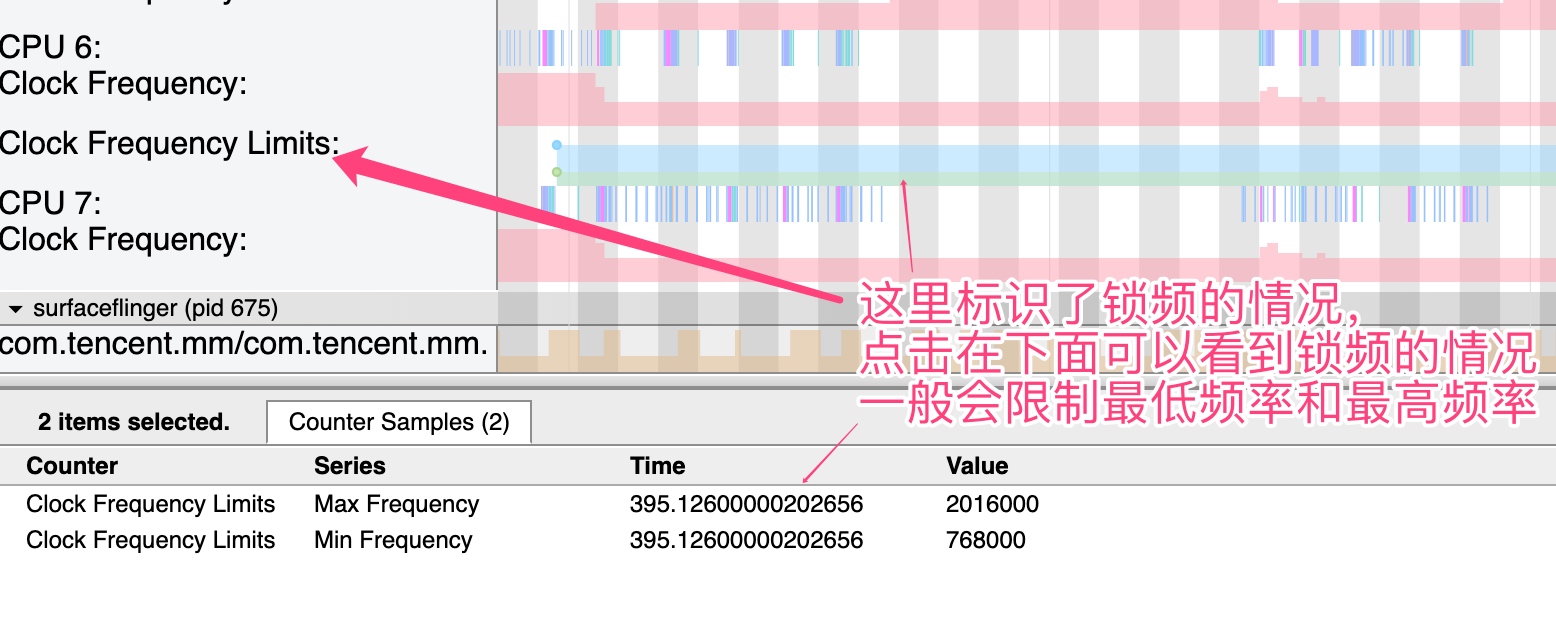
To address this, the system “forcefully” ramps up hardware resources (CPU, GPU, IO, BUS, etc.) to maximum for specific scenarios. Conversely, it might limit resources—for example, capping maximum CPU frequency to cool down a device.
Android typically locks frequencies in these scenarios:
- App launches
- App installation
- Screen rotation
- Window animations
- List Flinging
- Gaming
On Qualcomm platforms, frequency locking is visible in CPU Info:
CPU States
CPU Info also shows CPU states. As seen below, there are states 0, 1, 2, and 3: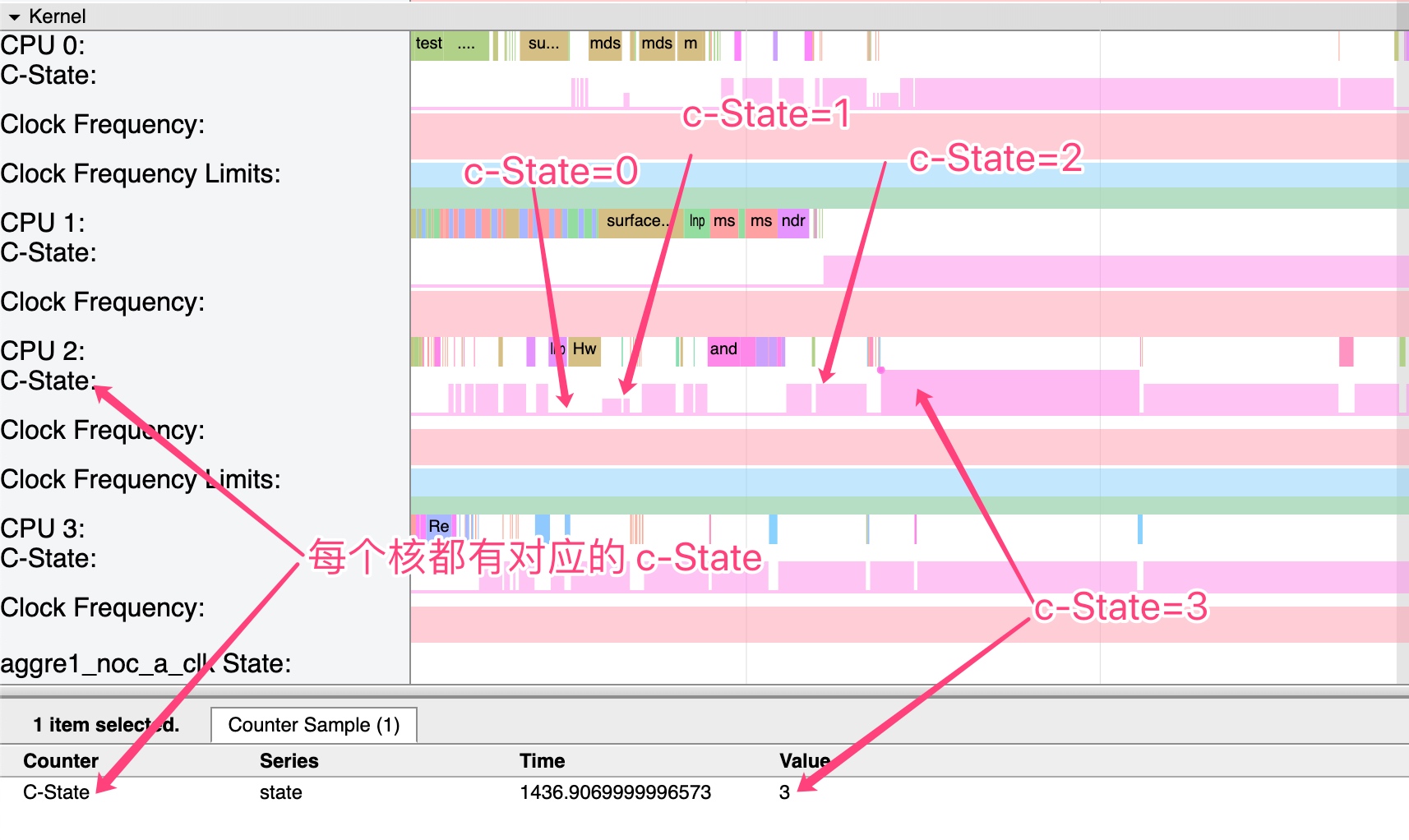
While older CPUs supported hot-unplugging (shutting down when idle), modern CPUs use C-States.
Below are power states for a processor supporting C0-C4 (Android performance varies by platform):
- C0 State (Active): Max work state, receiving instructions and processing data. Required by all modern processors.
- C1 State (Halt): Entered via the
HLTinstruction. Ultra-fast wakeup (as fast as 10 nanoseconds!). Saves 70% CPU power. Required by all modern processors. - C2 State (Stop-Clock): Processor clock and I/O buffers are stopped. Saves 70% CPU and platform energy. Wakeup takes over 100 nanoseconds.
- C3 State (Deep Sleep): Bus clock and PLLs are locked. Cache is invalidated in multi-core systems. In single-core systems, memory is off but cache remains valid. Saves 70% CPU power. Wakeup takes around 50 microseconds.
Detailed Information in Systrace
While Systrace is usually viewed graphically in Chrome, it can be opened as text to see raw details.
Here is a CPU scheduling message:
1 | appEventThread-8193 [001] d..2 1638545.400415: sched_switch: prev_comm=appEventThread prev_pid=8193 prev_prio=97 prev_state=S ==> next_comm=swapper/1 next_pid=0 next_prio=120 |
Breakdown:
appEventThread-8193: TASK-PID identification.[001]: CPU number (CPU 1 here).d..2: Four bits forirqs-off,need-resched,hardirq/softirq, andpreempt-depth.1638545.400415: Delay TIMESTAMP.sched_switch ...: Info area containing previous task description, PID, and priority, and current task info.
Other interesting outputs:
sched_waking:comm=kworker/u16:4 pid=17373 prio=120 target_cpu=003sched_blocked_reason:pid=17373 iowait=0 caller=rpmh_write_batch+0x638/0x7d0cpu_idle:state=0 cpu_id=3softirq_raise:vec=6 [action=TASKLET]cpu_frequency_limits:min=1555200 max=1785600 cpu_id=0cpu_frequency_limits:min=710400 max=2419200 cpu_id=4cpu_frequency_limits:min=825600 max=2841600 cpu_id=7
About Me && Blog
Below is my personal intro and related links. I look forward to exchanging ideas with fellow professionals. “When three walk together, one can always be my teacher!”
- Blogger Intro: Includes personal WeChat and WeChat group links.
- Blog Content Navigation: A guide for my blog content.
- Curated Excellent Blog Articles - Android Performance Optimization Must-Knows: Welcome to recommend projects/articles.
- Android Performance Optimization Knowledge Planet: Welcome to join and thank you for your support~
One walks faster alone, but a group walks further together.

References
Spring Bamboo Shoots
I took a photo and thought it was quite nice, sharing it with everyone.