

Around 1:30 AM on May 23, 2020, a large number of Samsung phone users in China experienced severe issues including freezes, infinite reboots, and forced entries into Recovery Mode. Improper handling by users led to data loss, and the incident quickly became a trending topic on social media platforms like Zhihu, with service centers overwhelmed.
Social media responses ranged from frustration to anger, with some comparing the incident to the Note 7 battery disaster, “charging-gate,” or “green-screen-gate.” Some predicted Samsung would be forced out of the Chinese market. People lost job offers due to missed calls, others lost valuable data, and some even resorted to smashing their devices in frustration.
As an Android developer, I am not here to pile on Samsung. My goal is to uncover the root cause of this incident and see what we can learn from it. Since it’s a technical failure in the Android system, it’s essential to analyze it from a technical perspective.
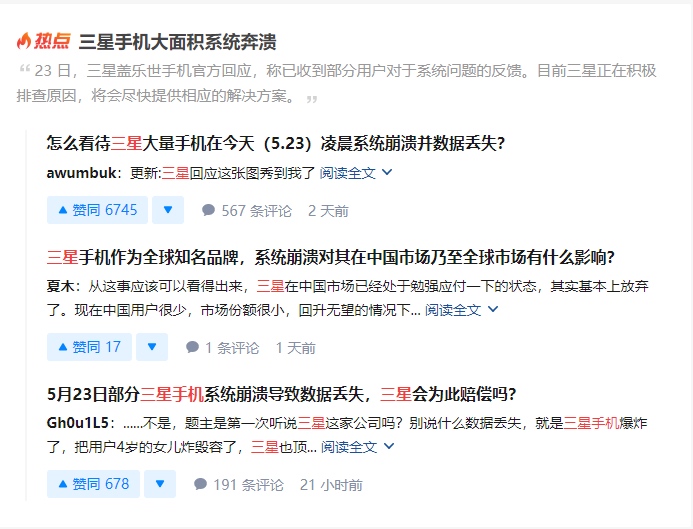
Even display units in shopping malls were bricked:

Conclusion
For those who prefer the bottom line, here is the summary of the investigation:
The incident was caused by a critical system service repeatedly crashing, which triggered the system’s self-rescue mechanism and forced phones into Recovery Mode. The culprit was Samsung’s SystemUI process, specifically during the initialization of the Always On Display (AOD) plugin. Because AOD is a core part of the system interface, its failure caused SystemUI to crash loop. After a certain number of crashes, Android automatically enters Recovery Mode to protect the device (see image below).
AOD stands for Always On Display, a feature on high-end models that displays the time, weather, and patterns on the screen while the device is locked.
The crash occurred because May 23, 2020, marked the beginning of a “Leap 4th Month” in the Chinese lunar calendar. When AOD tried to render the lunar date, it hit a rare code branch for leap months. This branch attempted to retrieve a string resource called common_date_leap_month. Due to a bug in the build process of specific AOD versions, this field was missing from the resource files. This triggered a FATAL EXCEPTION, causing the process to restart. Upon restarting, it hit the same missing field, crashed again, and ultimately triggered the system’s jump to Recovery Mode.
This explains why the issue was localized to Chinese users: only they required the lunar “Leap” (闰) character to be displayed. It wasn’t the “Year 2000 bug” (Y2K), nor a server hack, nor a malicious move by Samsung. It was a build-time bug that remained hidden until a rare leap month occurred. In such cases, one simply has to admit the failure and apologize sincerely.
Analysis
For interested Android developers, let’s dive deeper into the technical analysis.
For Samsung’s engineers, analyzing this crash was likely trivial—they just needed to pull the logs from their monitoring systems. In fact, the problem was quickly identified and had technically been fixed in newer versions for about six months. However, for outside developers, we need to use a few tools to piece the story together.
1. Starting from the Symptoms
As mentioned, a frequent crash in a persist process triggers a system self-rescue into Recovery Mode. Most user screenshots reflected this:

Some users, however, saw an interface with specific error messages (presumably a custom Samsung diagnostic feature), which provided the essential clues:
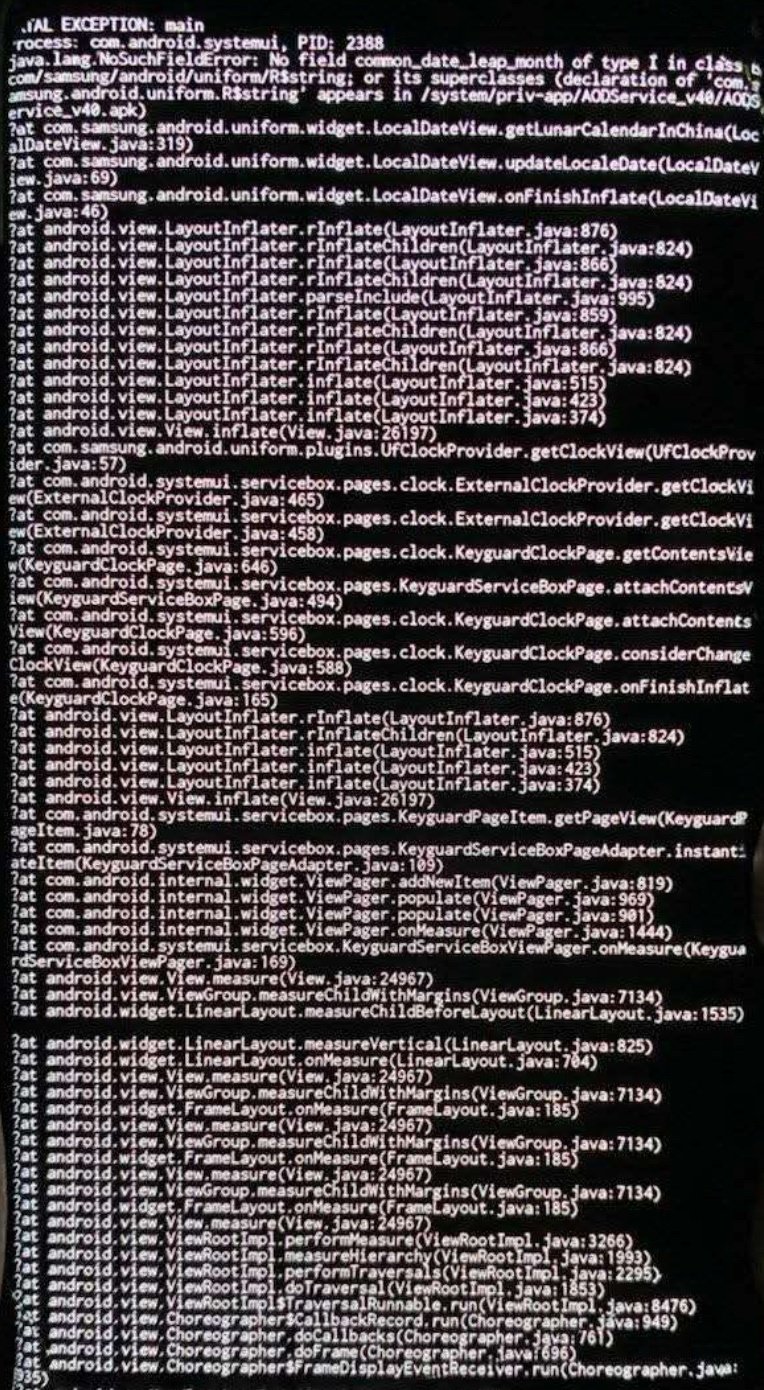
This stack trace is all an Android developer needs. During a frame rendering flow, AOD’s LocalDataView failed during initialization. Specifically, the getLunarCalendarInChina method threw an error while trying to find the common_date_leap_month string resource.
The investigation then focused on two points:
- The code logic surrounding the
common_date_leap_monthfield. - Why the string field was missing despite being referenced by the code.
2. Code Analysis
To analyze the logic, we need to decompile the AOD APK. A highly recommended tool for this is TTDeDroid.
We can find the AOD APK on sites like APKMirror. Looking at the version history, Samsung updates AOD frequently. Feedback suggests that not all users were affected, and updating to the latest version resolved the issue. This implies the bug resided in older versions (likely around V4.0).
Normal Version (V5.2.05)
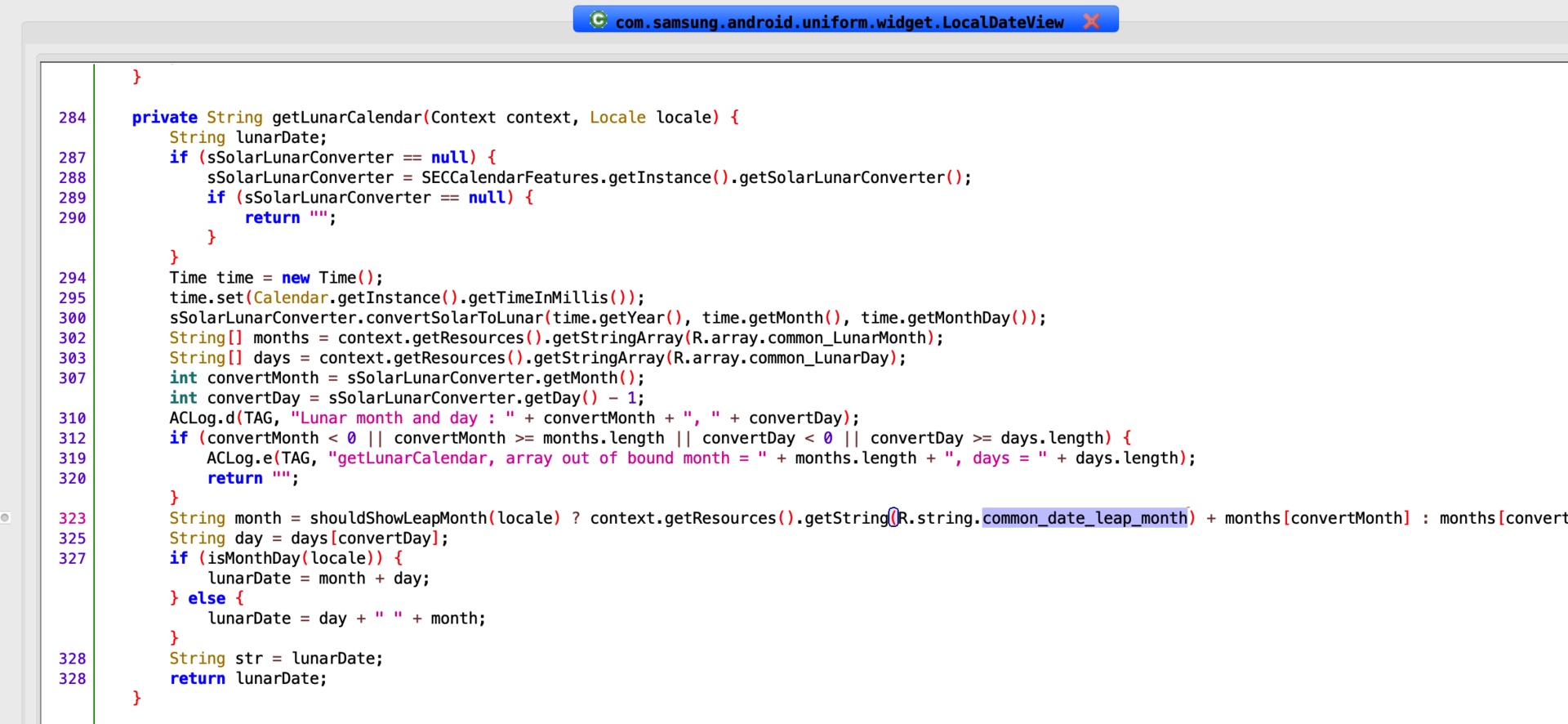
The latest version works correctly. The logic in this version is:
1 | String month = shouldShowLeapMonth(locale) ? context.getResources().getString(R.string.common_date_leap_month) + months[convertMonth] : months[convertMonth]; |
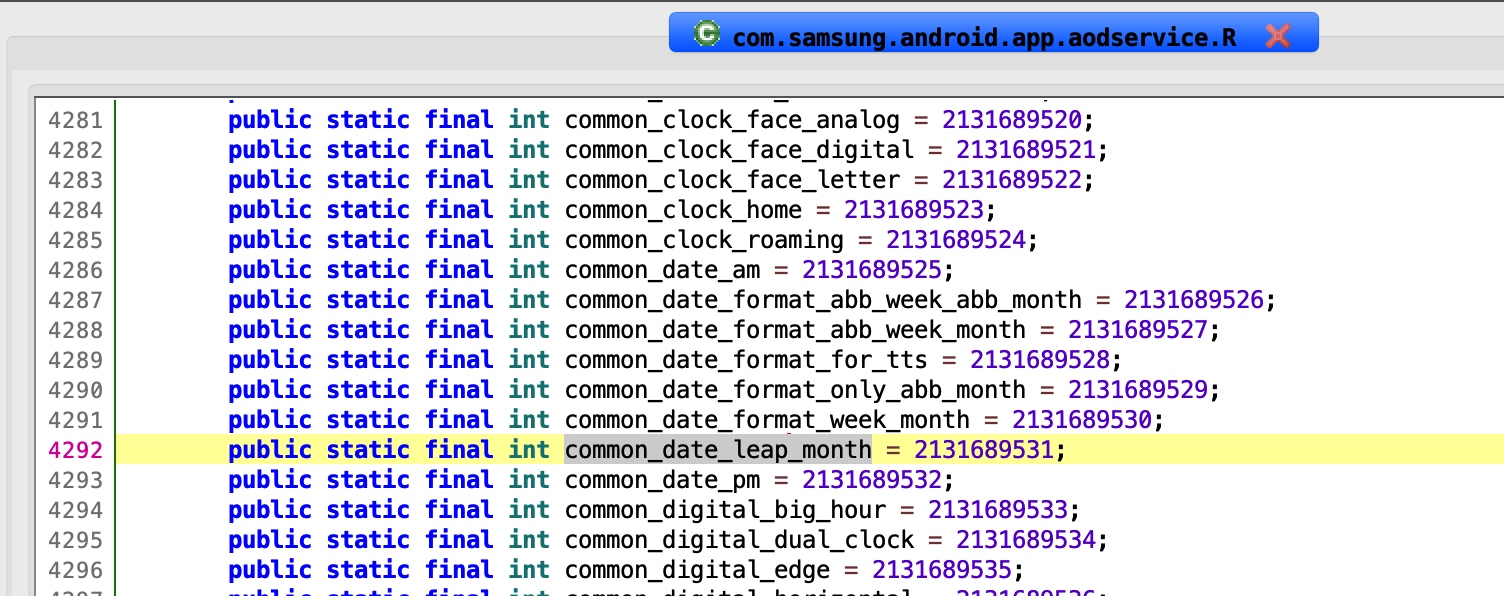
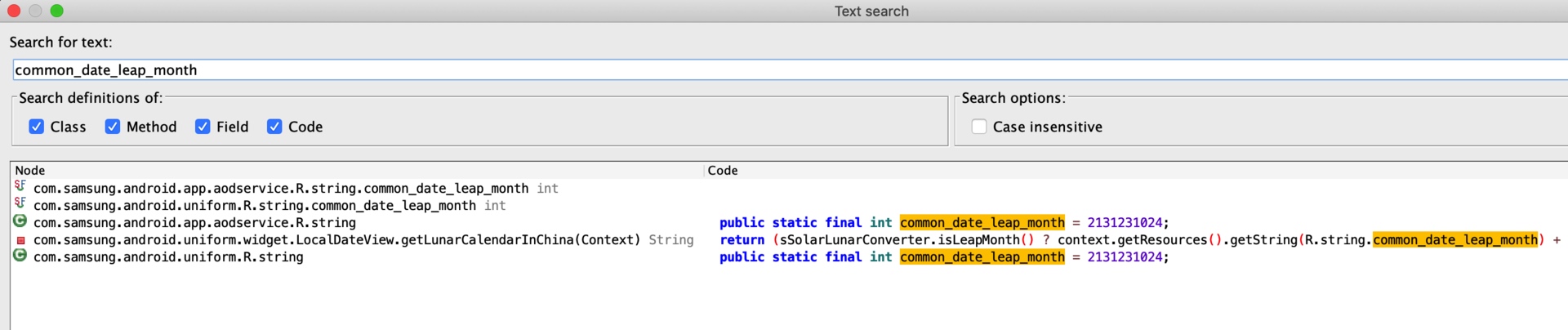
If it is a leap month, it fetches common_date_leap_month. A global search reveals this field is correctly defined in this version’s R.java and strings.xml.
This confirms the logic: The code only attempts to access common_date_leap_month when a leap month needs to be displayed. For 99.9% of the time, this code branch is never hit.

Affected Version (V4.1.70)
In the versions that crashed on May 23, a global search for common_date_leap_month shows it is referenced in the code, but there is no corresponding entry in R.java or strings.xml. The code uses the field, but it is neither defined nor assigned a value.

The problematic code matches the stack trace exactly:
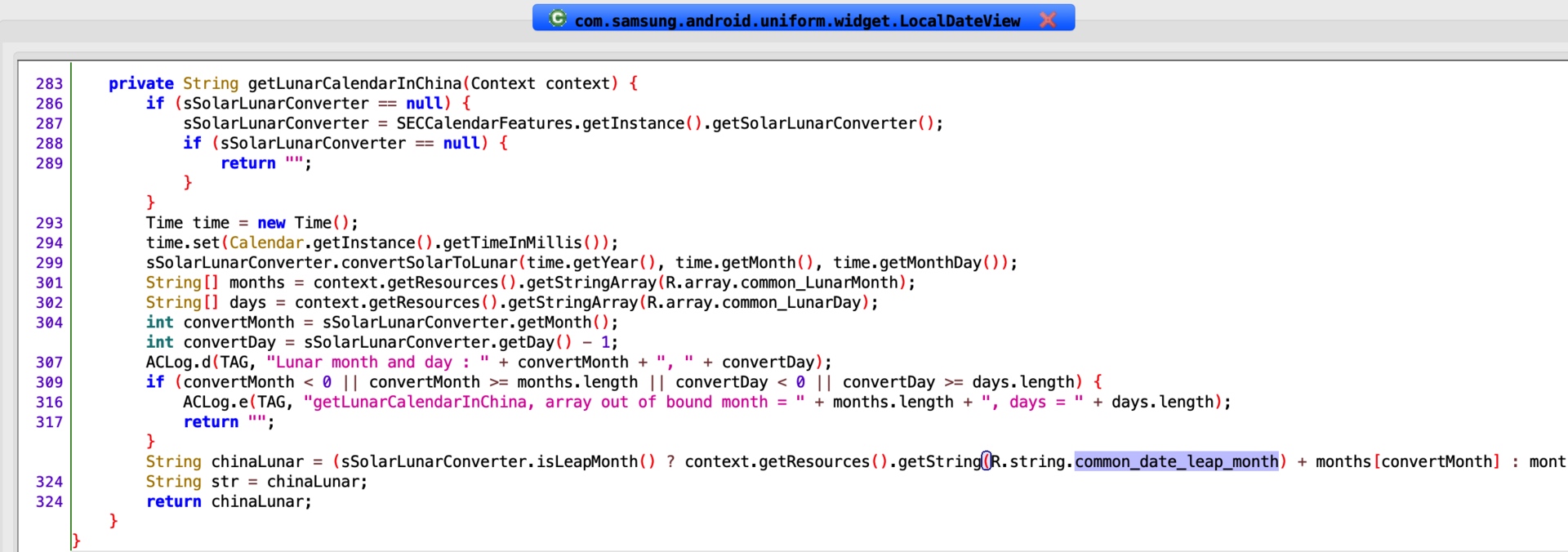
1 | private String getLunarCalendarInChina(Context context) { |
3. When did the bug appear?
Investigation shows the field disappeared when AOD was upgraded from V3.3.18 to V4.0.57 (October 2018). It remained missing until V4.2.44 was released in June 2019.

Timeline Recap:
- October 24, 2018: Bug introduced in V4.0.57.
- June 24, 2019: Bug fixed in V4.2.44.
Devices built with and never updated beyond those two dates were silent “time bombs,” waiting for the next leap month on May 23, 2020, to crash.
4. The Build Issue
A critical question remains: How did it compile?
Usually, if you reference R.string.some_field in code without defining it in strings.xml, the compiler will fail immediately.

Possible explanations for this compiled APK existing:
- Inter-library conflict: Different versions of the same library were used during compilation versus runtime.
- Maven/Dependency Sync: The project used one version of a resource package during compilation, but a different version was packaged into the final APK.
It’s likely the second case: the main project and its sub-modules had mismatched dependencies. The code successfully found the field at compile time from one module, but the field was missing in the resource package included in the final APK, leading to the runtime NoSuchFieldError.
Summary
This incident was a perfect storm: a build-time dependency error meeting a once-in-a-decade lunar leap month.
Lessons Learned:
- Feature Testing: Specialized functions like lunar calendars often go untested because they aren’t “daily” features. High-risk, rare-occurrence code paths must be meticulously validated, ideally by subject-matter experts.
- Dependency Management: In projects with complex dependencies, ensure absolute consistency between compile-time and runtime environments.
- UI Stability: Modules like
SystemUI(lock screen, status bar, AOD) and the Launcher are critical to user perception. A failure here is catastrophic. Engineers in these areas must balance innovation with extreme stability. - Updates: Users should be encouraged to stay current with system and core app updates, as these often contain critical fixes that aren’t advertised as flashy features.
- Curiosity and Humility: For developers, curiosity helps look past symptoms to find the essence of a bug. Humility reminds us that the Android ecosystem is vast, and our knowledge is but a drop in the ocean.
About Me && Blog
Below is my personal intro and related links. I look forward to exchanging ideas with fellow professionals. “When three walk together, one can always be my teacher!”
- Blogger Intro
- Blog Content Navigation: A guide for my blog content.
- Curated Excellent Blog Articles - Android Performance Optimization Must-Knows
- Android Performance Optimization Knowledge Planet
One walks faster alone, but a group walks further together.
