

A fellow developer shared a Weibo post (https://weibo.com/1808884742/IApbpEVQr) where blogger @王波粒 noticed a peculiar phenomenon on the Mate 30 Pro. I highly recommend watching the video first.
The video’s description and some of the comments aren’t quite technically accurate. Here’s a summary of what’s actually happening: On Huawei phones, the Weibo app continues to load images smoothly while scrolling the main feed. However, the exact same version of the Weibo client on other phones waits until scrolling completely stops before it begins loading images.
This post looks at this phenomenon from a technical perspective, explores why it happens, and discusses what we can learn from it.
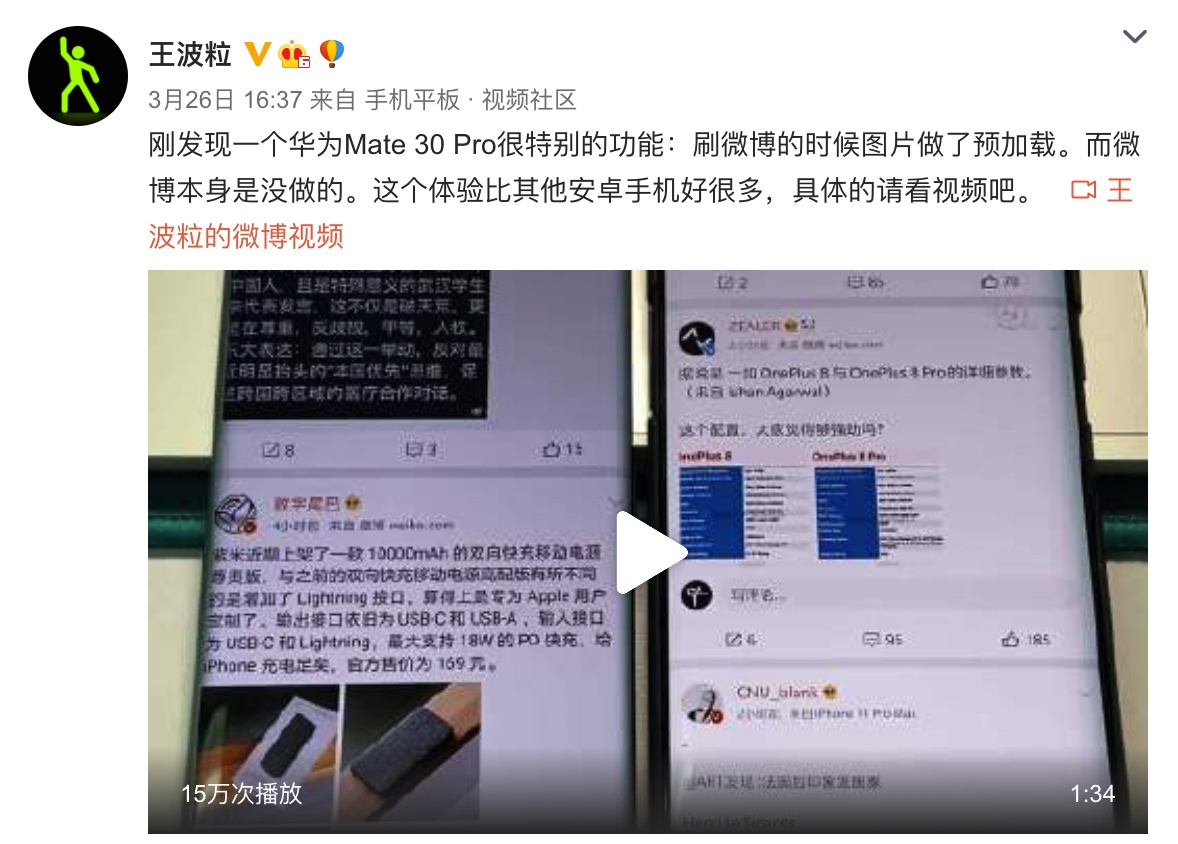
What makes this so special?
- Technical Standard: Waiting for a scroll to finish before loading images is a classic optimization for list performance. Most mainstream apps do this to prevent “scrolling jank.” If an app tries to load every photo or video it encounters mid-scroll, it wastes resources and can delay the loading of content the user actually stops to look at. The fact that the same APK behaves differently on Huawei suggests a deep, device-specific optimization—likely a joint effort between Weibo and Huawei.
- User Experience: Loading images during the scroll allows users to see content sooner, reducing the time spent looking at blank placeholders even if they are just flicking through.
- The “Fling” Curve: If you look closely, the deceleration curve (the “fling”) on Huawei phones is different. It’s smoother, gentler, and lacks the abrupt stops common in standard Android implementations. It feels more organic, similar to how iOS handles inertial scrolling.
This collaboration between Huawei and Weibo is a great case study for head-tier app optimization. It shows a level of attention to detail that is rare in the Android ecosystem.
Contextual Notes
- Server-Side Control: The “load images during scroll” feature is controlled by Weibo’s server and can be toggled on or off. The observation that other phones “wait for stop” was true when the feature was disabled for non-optimized devices.
- Current State (Aug 2020): Weibo has since enabled this feature for more devices. However, Huawei’s PerfSDK still provides a superior experience by optimizing the deceleration curve itself, ensuring the phone stays smooth even under the increased load of mid-scroll image fetching.
- Analyzed Version: Weibo v10.8.1.
The Verdict
The “smooth image loading during scroll” on Huawei is the result of a joint optimization. The key technical points are:
- Velocity Monitoring: Huawei provides a lightweight PerfSDK to Weibo. This allows the app to listen for the precise velocity of the list in real-time.
- Dynamic Loading Logic: Weibo uses this velocity data to decide when to fetch images. If the velocity is below a certain threshold (meaning the user is slow-scrolling or the fling is nearing its end), image loading is enabled. If it’s too fast, loading is paused to prioritize UI responsiveness.
- Custom Fling Curves: When Huawei detects an app using this SDK, it applies a specialized system-level fling curve to the app’s scrollable containers, making the inertial movement look and feel premium.
How the Optimization Works
Phenomenon Analysis
A scroll operation generally has three phases:
- SCROLL_STATE_TOUCH_SCROLL: Finger is on the screen, actively moving the list.
- SCROLL_STATE_FLING: Finger leaves the screen with speed; the list moves by inertia.
- SCROLL_STATE_IDLE: The list has come to a complete stop.
The Huawei/Weibo optimization targets Phase 1 and Phase 2.
Phase 1 Optimization
- Before: Image loading is paused whenever a finger is on the screen to prevent frame drops during touch interaction.
- After: Since touch-scrolling is generally slower than a full fling, image loading is kept active, allowing content to appear immediately as it enters the viewport.
Phase 2 Optimization (Fling)
- Smart Image Loading:
- High Velocity: Image loading is paused to ensure the GPU/CPU can stay at 60Hz (or 90/120Hz) while the list renders at high speed.
- Low Velocity: Once the fling slows down to a manageable speed, image loading resumes before the list fully stops.
- Inertial Smoothing:
- Huawei replaces the default Android fling curve (which can feel linear or jerky) with a custom, “soft” curve that lasts longer and stops gracefully.
Technical Deep Dive (Reverse Engineering)
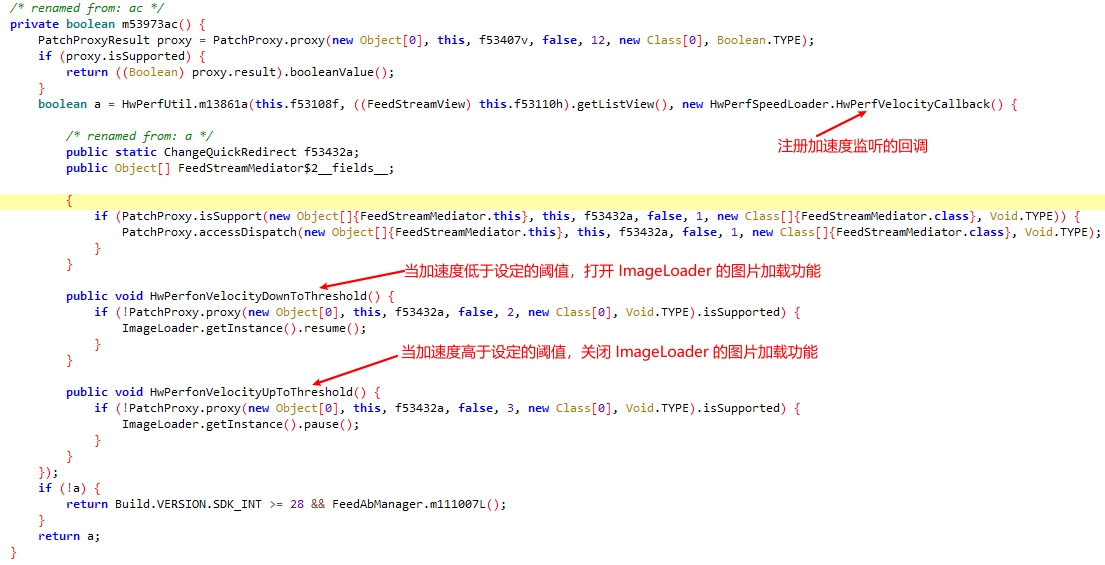
Analysis of Weibo v10.8.1 reveals that during initialization, the app checks for the presence of Huawei’s PerfSDK.
Monitoring Velocity
Weibo registers a HwPerfVelocityCallback on its main ListView. It listens for two key events:
HwPerfonVelocityDownToThreshold: Velocity dropped below the safe limit; resume image loading.HwPerfonVelocityUpToThreshold: Velocity exceeds the limit; pause loading to save frames.
The Fling Curve (Framework Layer)
In Huawei’s modified OverScroller.java, we can see custom logic for distance and velocity calculations when specific vendor flags are set.
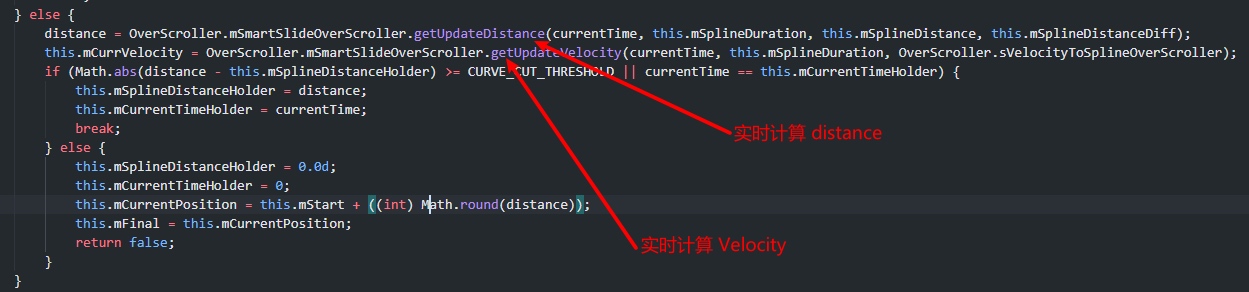
This results in a scroll feel that is closer to iOS—where the list takes a long time to come to a very gradual halt—rather than the “abrupt stop” often seen in vanilla Android.
Handling Other Manufacturers
If the app detects it’s not on a Huawei device (HwPerfUtil.a returns false), it falls back to a global server-side feature flag: feed_scroll_loadimage_enable. While this allows other phones to load images during scroll, it often lacks the “velocity-aware” precision and smooth fling curves provided by the Huawei SDK.
The “Scroll-to-Click” Challenge
One side effect of a long, “soft” fling curve (like iOS or optimized Huawei) is that the list stays in the FLING state for much longer. In standard Android, clicking an item while it’s flinging will stop the list but won’t trigger the item’s onClick event. The user has to click twice: once to stop, once to open.
This requires a delicate balance. If the fling is too long, it becomes an annoyance. Modern implementations (like MIUI 12 or optimized Huawei firmware) allow “click-through” logic where if the velocity is very low (e.g., the last 5% of the scroll), a tap will both stop the list and trigger the item action simultaneously.
Extended Reading
Performance Considerations
Why pause loading during fast scrolls?
- Efficiency: If a user is flicking through hundreds of posts to find a specific one, loading every intermediate image is a waste of data and battery.
- Latency: If 50 images are in the load queue, the one image the user actually stops to look at will have to wait for the previous 49 to finish (or be canceled), leading to “placeholder lag.”
Scroll State Cheat Sheet
For developers using AbsListView.OnScrollListener:
SCROLL_STATE_IDLE: Not moving.SCROLL_STATE_TOUCH_SCROLL: Finger is touching and moving the list.SCROLL_STATE_FLING: Finger released; moving by inertia.
Conclusion
This “Weibo + Huawei” collaboration is more than just a marketing gimmick. It’s a pragmatic way to solve the “smoothness vs. data” trade-off. As Android users demand higher fluidity, we can expect more apps to seek these kinds of vendor-level integrations.
About Me && Blog
Below is my personal intro and related links. I look forward to exchanging ideas with fellow professionals. “When three walk together, one can always be my teacher!”
- Blogger Intro
- Blog Content Navigation: A guide for my blog content.
- Curated Excellent Blog Articles - Android Performance Optimization Must-Knows
- Android Performance Optimization Knowledge Planet
One walks faster alone, but a group walks further together.
