

Different people have different understandings of smoothness (jank/dropped frames) and different perceptions of jitter thresholds. Therefore, before starting this series, it is necessary to clarify the content to avoid misunderstandings and help everyone approach these articles with the right questions. Here are some basic explanations:
- For mobile users, jank encompasses many scenarios: dropped frames when scrolling lists, excessive white screen during app startup, slow screen wake-up when pressing the power button, unresponsive interface followed by a crash, no response when clicking an icon, incoherent window animations, lagging touch response, or stuttering when entering the desktop after a reboot. These scenarios differ slightly from what developers understand as “jank.” Developers categorize these more finely, which is a cognitive gap between developers and users that must be noted when handling feedback from users or testers.
- For developers, the above scenarios fall into three major categories: Smoothness (dropped frames in lists, incoherent animations, stuttering desktop entry), Responsiveness (long startup white screens, slow screen wake-up, lagging touch), and Stability (unresponsive interface/crashes, no response to icon clicks). This classification is used because each category requires different analysis methods and steps. Quickly identifying the category is crucial.
- Technically, Smoothness, Responsiveness, and Stability (ANR) all feel like “jank” to users because their underlying principles are identical: the main thread’s Message exceeds its processing deadline. They are simply categorized by different timeout thresholds. Understanding these problems requires knowledge of basic system operation mechanisms, which this article will introduce.
- This series primarily analyzes smoothness-related issues. Responsiveness and stability will be covered in dedicated articles. Understanding smoothness first will make analyzing responsiveness and stability much easier.
- This series focuses on using Systrace (Perfetto) for analysis. Systrace is our entry point because many factors affect smoothness—some within the app itself and others within the system. Systrace (Perfetto) provides a holistic view of the system’s operation during the problem, helping us initially pinpoint the root cause.
Table of Contents
- Understanding Jank Principles
- System Operation Mechanism Overview
- Series Articles
- Attachments
- About Me && Blog
Systrace Series Articles:
- Introduction to Systrace
- Systrace Basics - Prerequisites for Systrace
- Systrace Basics - Why 60 fps?
- Android Systrace Basics - SystemServer Explained
- Systrace Basics - SurfaceFlinger Explained
- Systrace Basics - Input Explained
- Systrace Basics - Vsync Explained
- Systrace Basics - Vsync-App: Detailed Explanation of Choreographer-Based Rendering Mechanism
- Systrace Basics - MainThread and RenderThread Explained
- Systrace Basics - Binder and Lock Contention Explained
- Systrace Basics - Triple Buffer Explained
- Systrace Basics - CPU Info Explained
- Systrace Smoothness in Action 1: Understanding Jank Principles
- Systrace Smoothness in Action 2: Case Analysis - MIUI Launcher Scroll Jank Analysis
- Systrace Smoothness in Action 3: FAQs During Jank Analysis
- Systrace Responsiveness in Action 1: Understanding Responsiveness Principles
- Systrace Responsiveness in Action 2: Responsiveness Analysis - Using App Startup as an Example
- Systrace Responsiveness in Action 3: Extended Knowledge on Responsiveness
- Systrace Thread CPU State Analysis Tips - Runnable
- Systrace Thread CPU State Analysis Tips - Running
- Systrace Thread CPU State Analysis Tips - Sleep and Uninterruptible Sleep
If you are not familiar with the basic use of Systrace (Perfetto), please catch up on the Systrace Basics Series first. This article assumes you are already familiar with using Systrace (Perfetto).
Understanding Jank Principles
Jank Phenomena and Impact
As stated at the beginning, this article focuses on smoothness issues. Smoothness is a qualitative definition, but we often use fps (Frames Per Second) to quantify it. For example, 60 fps means the screen updates 60 times per second; 120 fps means 120 times. On a 120 fps system, if the screen only updates 110 times in a second (during continuous animation), we call this a dropped frame, which manifests as jank. The fps drops from 120 to 110, which can be accurately monitored.
Dropped frames have many causes: app-specific issues, system-driven jank, hardware bottlenecks, or overall system lag. Refer to these four articles:
- Overview of Jank Causes in Android - Methodology
- Overview of Jank Causes in Android - System Side
- Overview of Jank Causes in Android - App Side
- Overview of Jank Causes in Android - Low Memory Side
Jank is what users notice first:
- Occasional minor jank degrades user experience, like a stutter when scrolling Weibo or returning to the desktop.
- Severe system-wide jank makes the phone unusable.
- In the high-refresh-rate era, if users are accustomed to 120 fps and the system suddenly switches to 60 fps in an easily perceptible scenario, they will immediately notice and feel it as jank.
Therefore, both apps and systems should aim to avoid jank. Identified jank issues should be prioritized for resolution.
Jank Definition
Overall App Frame Rendering Flow
To understand why jank occurs, we must know how the app’s main thread processes a frame.
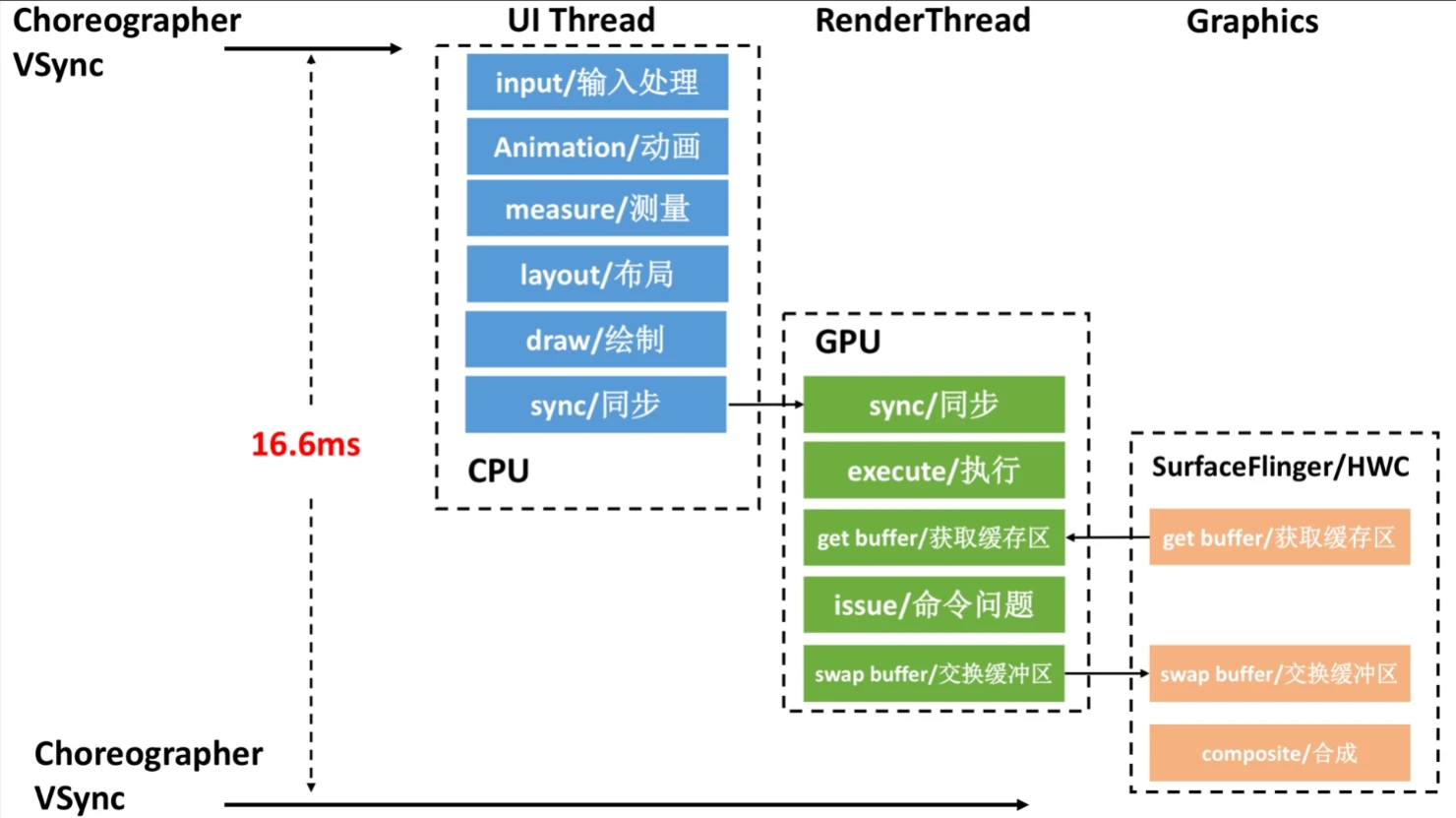
From the Perspective of Execution Order
The flow starts when Choreographer receives Vsync and ends when SurfaceFlinger/HWC composites a frame (followed by physical display hardware, which isn’t listed here).
From the Perspective of Systrace
The flow is more intuitive when visualized in Systrace (Perfetto):
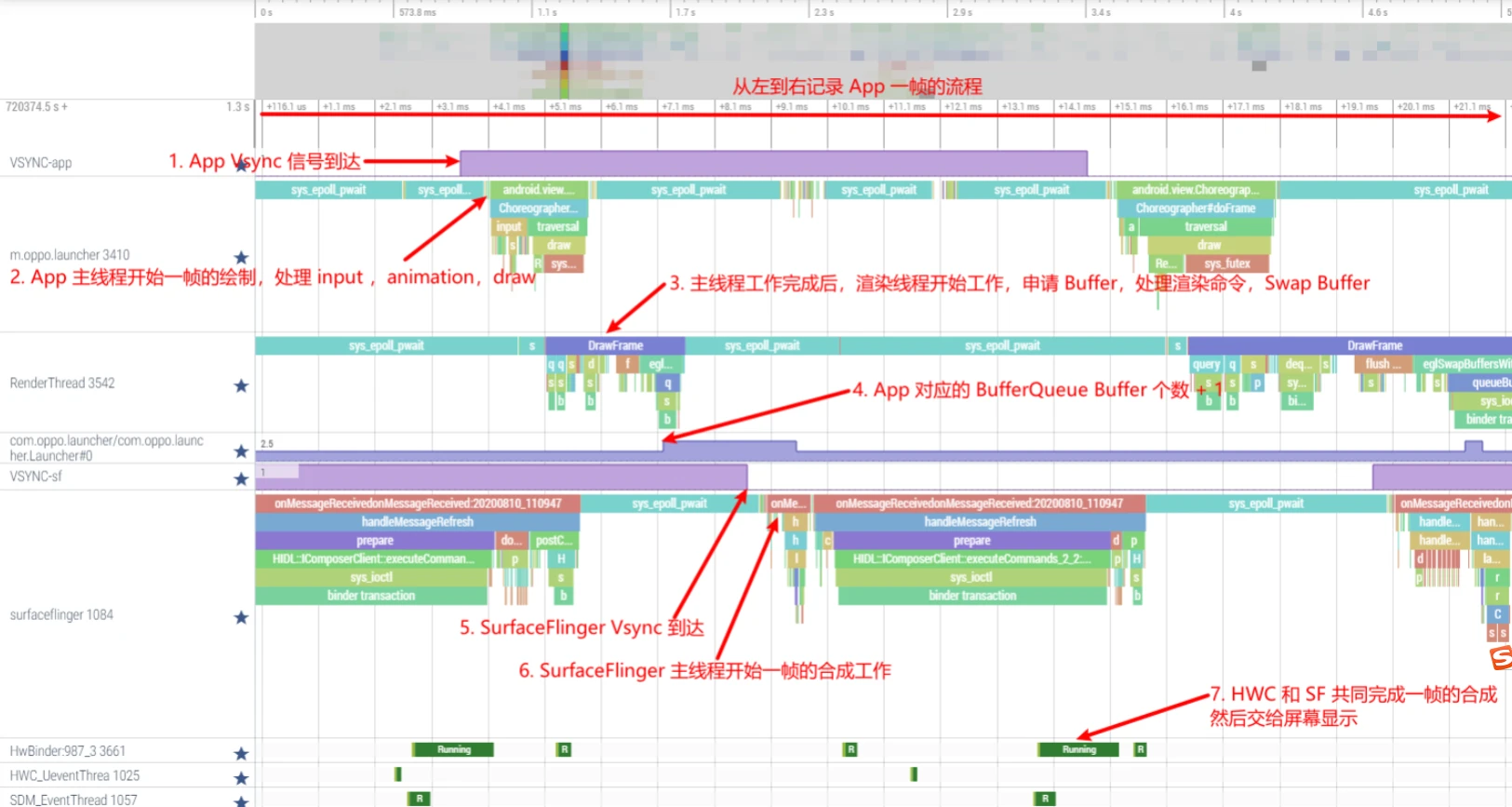
A timeout at any step in this overall flow can lead to jank. Therefore, analyzing jank requires looking at multiple levels: App main thread, Render thread, SystemServer process, SurfaceFlinger process, Linux kernel areas, etc.
Jank Definition
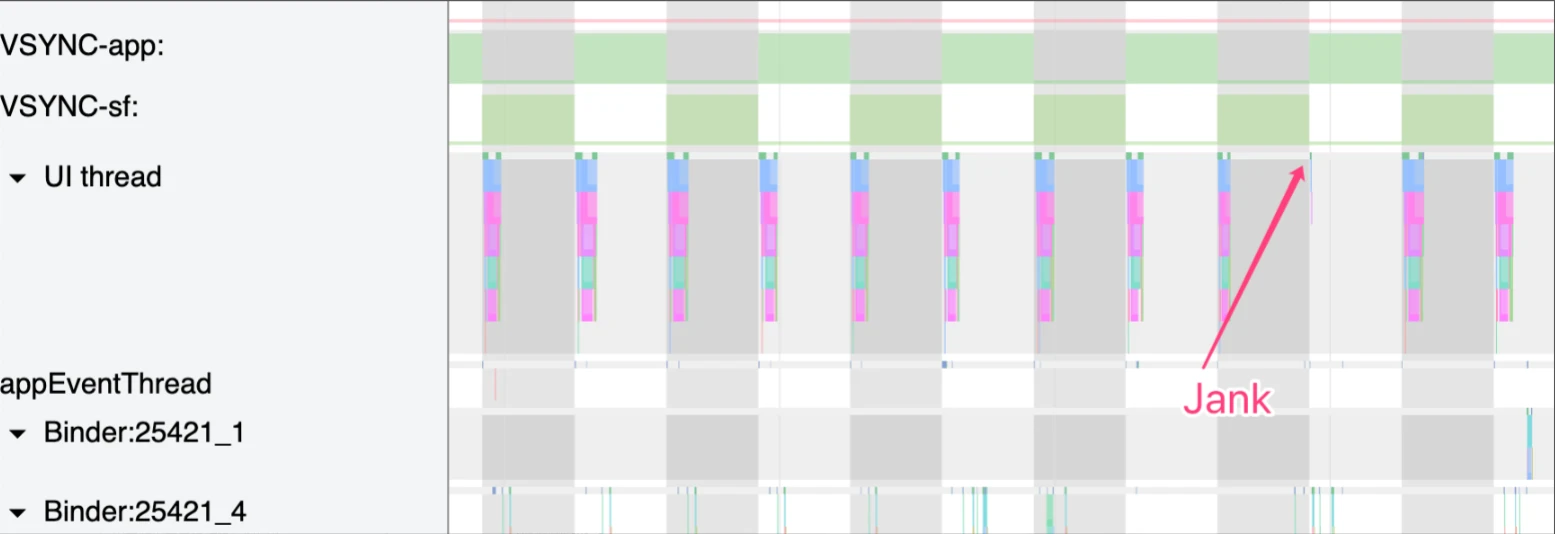
My definition of jank is: One or more frames fail to be drawn during a stable frame rate output. Corresponding terms: Smooth VS Jank.
For instance, in the image below, if an App’s main thread is drawing normally (usually during animation or scrolling) but one frame is not drawn, we consider that frame as potentially causing jank (potentially, because Triple Buffering might prevent actual frame drops).
We define jank from three perspectives:
- From a Phenomenological perspective: During continuous app animation or finger scrolling (continuity is key), if the app’s screen content doesn’t change for 2 or more consecutive frames, we consider it jank.
- From the SurfaceFlinger perspective: During continuous app animation or scrolling, if a Vsync arrives and the App has no Buffer available for composition,
SurfaceFlingerwill skip composition for that app layer (or composite other layers) during that Vsync cycle. The screen will continue to display the App’s previous frame. We consider this a jank. - From the App perspective: If the Render thread fails to
queueBufferto the App’sBufferQueuewithinSurfaceFlingerduring a Vsync cycle, we consider it a jank.
The App main thread isn’t mentioned directly because its timeouts usually indirectly delay the Render thread, increasing the risk of Render thread execution timeouts and thus causing jank. Most app-driven jank is caused by main thread timeouts.
It’s also important to distinguish Logical Jank. Logical jank occurs when the rendering flow itself is fine, and a Buffer is provided to SurfaceFlinger for composition, but the content of that Buffer is identical (or nearly identical and imperceptible) to the previous Buffer. To the user, it appears as identical content for two consecutive frames. This is still considered jank (depending on context) and is caused by the app’s own code logic.
System Operation Mechanism Overview
Because there are many causes for jank, analyzing it requires an understanding of Android’s system mechanisms. Here is a brief introduction:
- App Main Thread Operation Principles
- Message, Handler, MessageQueue, and Looper Mechanisms
- Screen Refresh Mechanism and Vsync
- Choreographer Mechanism
- Buffer Flow and TripleBuffer
- Input Flow
System Mechanism - App Main Thread Operation Principles
When an App process is created and Fork completes, ActivityThread.main() is called to initialize the main thread.
1 | // frameworks/base/core/java/android/app/ActivityThread.java |
Once initialized, the main thread has its own Looper, MessageQueue, and Handler. The ActivityThread Handler then processes Messages, including lifecycle functions for Application, Activity, ContentProvider, Service, and Broadcast, which are processed sequentially on the main thread as Messages. Here are some examples:
1 | // frameworks/base/core/java/android/app/ActivityThread.java |
For more, see Android Systrace Basics - MainThread and RenderThread Explained.
System Mechanism - Message Mechanism
As described above, once the main thread is initialized, it enters a blocked state waiting for Messages. When a Message arrives, it wakes up, processes it, and returns to sleep if no other Messages are pending.
The core of the Android Message mechanism consists of: Handler, Looper, MessageQueue, and Message.
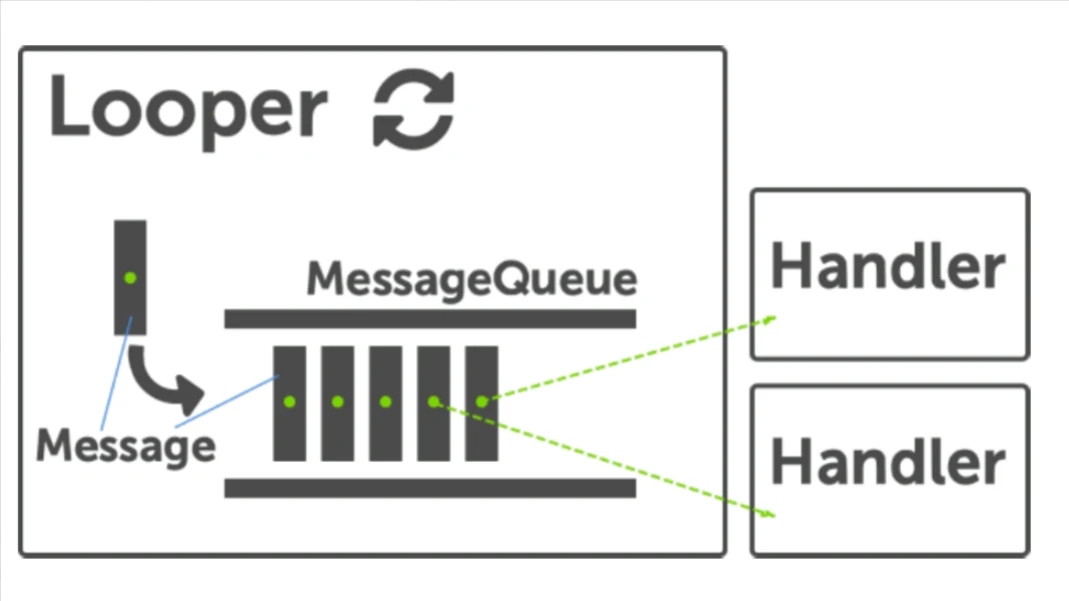
Many code-level analyses exist, so here is a brief overview of the components:
- Handler: Primarily handles Messages. Apps can create Handlers in any thread by specifying a
Looper. If omitted, it defaults to the current thread’sLooper. - Looper: An infinite loop. After its
loop()method starts, it continuously retrieves Messages from theMessageQueue, delivers/dispatches them, and sends them to the corresponding Handler. Apps can insert their own printers before and after message processing, makingLoopera common entry point for performance monitoring (e.g., Tencent-Matrix and BlockCanary). - MessageQueue: A Message manager. It holds Messages in a queue. When empty, it uses Linux’s
nativePollmechanism to block and wait until a Message enters the queue. - Message: The object used to pass information, containing content like
what,arg, andcallback.
ActivityThread uses this mechanism to handle all App and component lifecycle functions.
System Mechanism - Screen Refresh and Vsync
First, understand Screen Refresh Rate. A hardware concept, it refers to how often the screen hardware refreshes the image. E.g., a 60Hz rate means the screen refreshes its display 60 times per second; 90Hz means 90 times.
In contrast, FPS (Frames Per Second) is a software concept and refers to how many frames the software system produces per second. E.g., 60FPS means the software generates 60 frames per second; 90FPS means 90 frames.
VSync (Vertical Synchronization) synchronizes your FPS with the monitor’s refresh rate to prevent “tearing.”
- In a 60 fps system, 60 frames must be generated per second, meaning drawing a frame must take at most 16.67ms (1/60) to avoid dropped frames (FrameMiss).
- In a 90 fps system, 90 frames must be generated per second, meaning drawing a frame must take at most 11.11ms (1/90) to avoid dropped frames.
Typically, the screen hardware controls the refresh rate, while Vsync controls the FPS. In practice, they are usually identical. See:
System Mechanism - Choreographer
As mentioned, Vsync controls FPS. It does this through Choreographer.
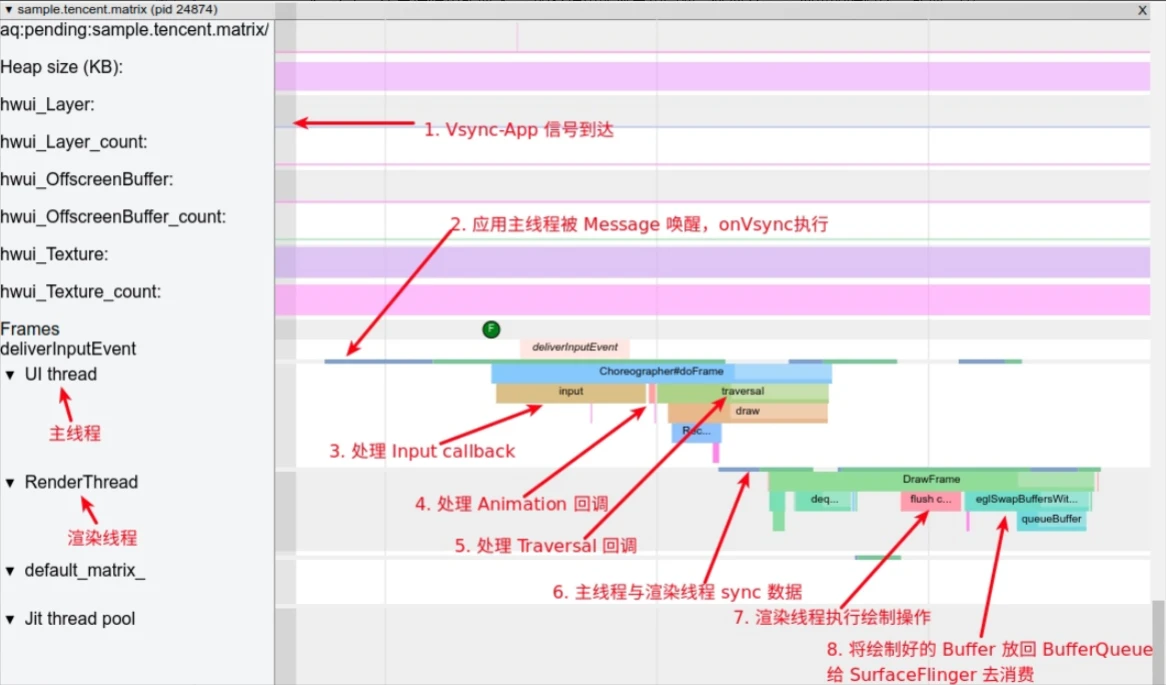
Choreographer coordinates with Vsync to provide a stable Message processing timing for App-level rendering. When Vsync arrives, the system adjusts the Vsync signal period to control the timing of drawing operations for each frame. Vsync typically uses a 16.6ms (60 fps) period to match 60Hz screens. Every 16.6ms, Vsync wakes Choreographer to perform app drawing. If the app renders within this window every cycle, it achieves 60 fps, appearing very smooth.
Choreographer bridges the rendering pipeline:
- Upper side: Receives and processes app update messages and callbacks (Input, Animation, Traversal - measure/layout/draw), handles them collectively when Vsync arrives, detects frame drops, and records callback durations.
- Lower side: Requests and receives Vsync signals (via
FrameDisplayEventReceiver.onVsyncandFrameDisplayEventReceiver.scheduleVsync).
The following image shows Choreographer‘s frame drawing workflow via the Message mechanism when Vsync arrives. Details: Detailed Explanation of Android Rendering Mechanism Based on Choreographer.
System Mechanism - Buffer Flow and TripleBuffer
BufferQueue uses a Producer-Consumer model. Typically, the Consumer creates and owns the BufferQueue data structure, while the Producer exists in a separate process.
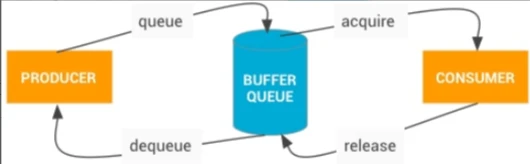
In app rendering, the App is the Producer and SurfaceFlinger is the Consumer:
- App calls
dequeueBuffer()to request a buffer. - App renders (via CPU or GPU) and calls
queueBuffer()to return it. (Gpu-rendered buffers aren’t immediately available until GPU work finishes). - SurfaceFlinger receives a Vsync signal, calls
acquireBuffer()to take the buffer, and performs composition. - SurfaceFlinger calls
releaseBuffer()to return it after composition.
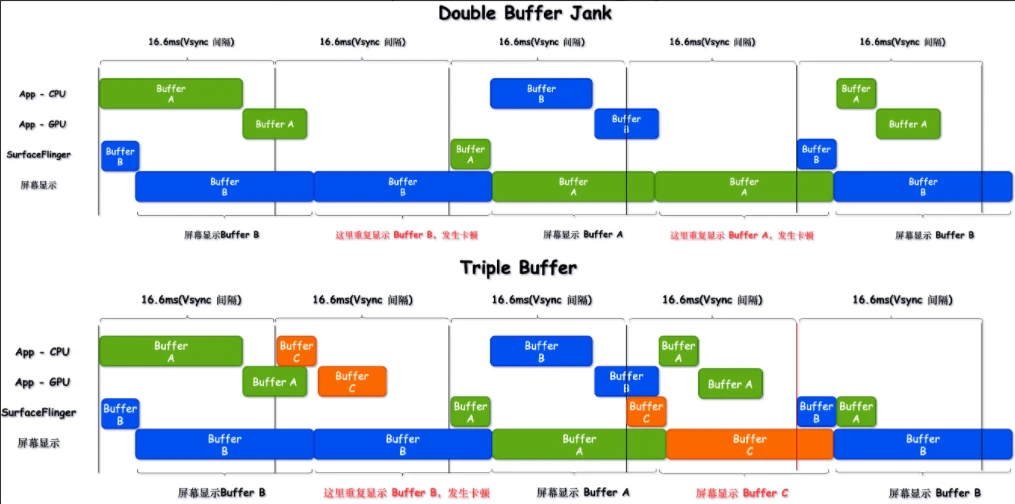
Most current systems use three alternating buffers (Triple Buffering) to prevent jank caused by buffer shortages if one step in the flow takes too long.
Comparison of double vs. triple buffering:
Benefits of Triple Buffering:
- Mitigating Jank: Triple buffering helps reduce frame drop frequency during consecutive main thread timeouts (reducing two drops to one). Main thread timeouts don’t always result in user-visible jank because Triple Buffering can cushion GPU-induced delays.
- Reducing Wait Times: In double buffering, the main thread sometimes waits for SF to release a buffer, delaying its start time since most phones send SF and App Vsync signals simultaneously.
- Lowering GPU and SurfaceFlinger Bottlenecks: High SF load or GPU timeouts easily prevent double-buffered frames from compositing on time. Triple buffering lets buffers enter the queue for GPU rendering earlier, reducing wait times and bottlenecks.
The downside is increased memory usage. Details: Android Systrace Basics - Triple Buffer Explained.
System Mechanism - Input Flow
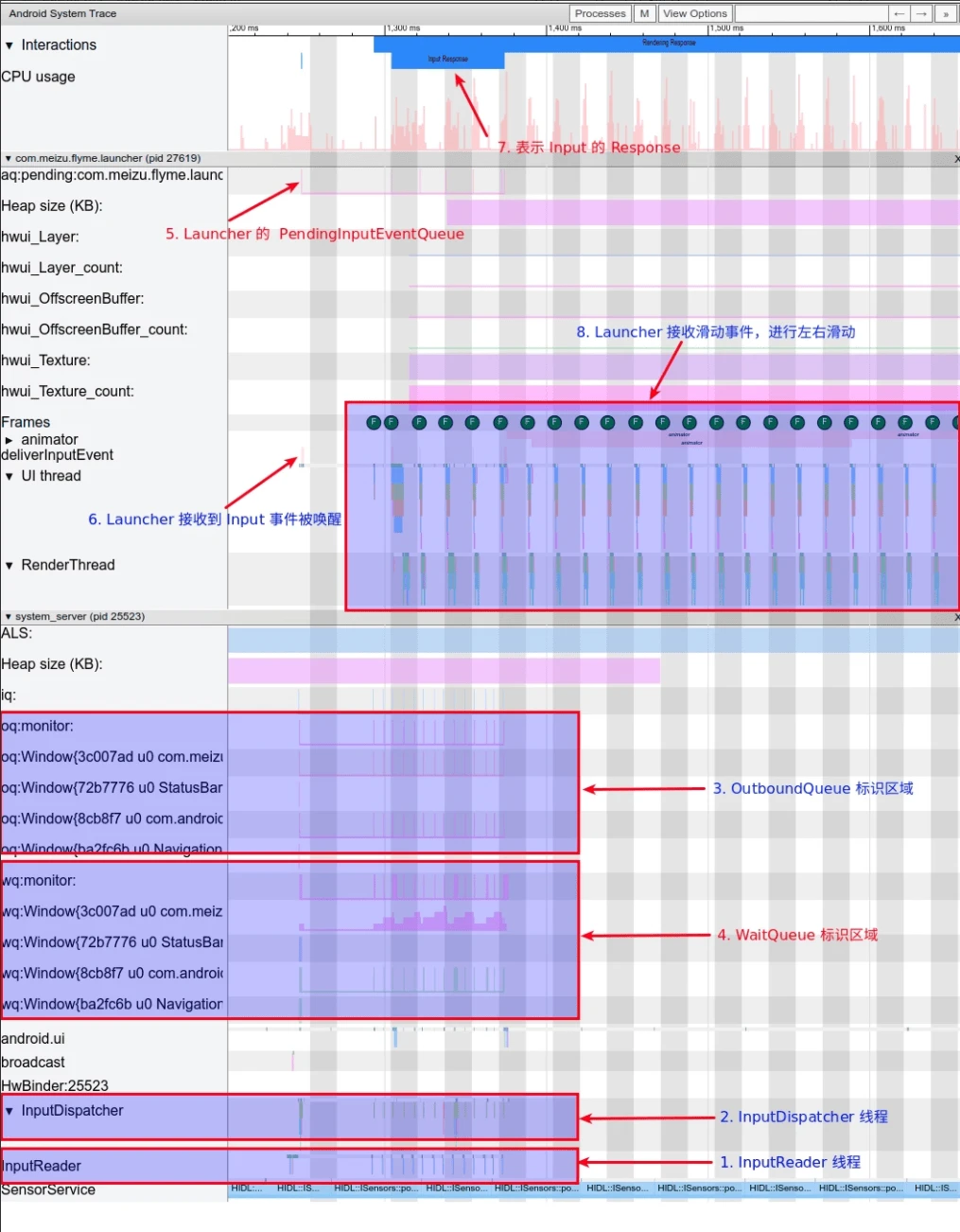
Android is event-driven, and input events (clicks, scrolls, long presses) are handled via InputReader and InputDispatcher. These are two Native threads in SystemServer.
- InputReader reads events from
EventHuband passes them toInputDispatcher. - InputDispatcher wraps and dispatches them to the relevant app connection.
- OutboundQueue holds events about to be sent to an app.
- WaitQueue holds events sent to an app but not yet acknowledged.
- PendingInputEventQueue holds events pending in the app process.
deliverInputEventmarks the App UI Thread being woken by an Input event.InputResponsemarks the processing phase for an Input sequence (Down + Move + Up).- App Input Response: E.g., scrolling then releasing (Fling). The desktop updates along with the finger and continues via Fling after release.
Systrace representation:
Details: Android Systrace Basics - Input Explained.
Series Articles
- Systrace Smoothness in Action 1: Understanding Jank Principles
- Systrace Smoothness in Action 2: Case Analysis - MIUI Launcher Scroll Jank Analysis
- Systrace Smoothness in Action 3: FAQs During Jank Analysis
Attachments
Attachments are on GitHub: https://github.com/Gracker/SystraceForBlog/tree/master/Android_Systrace_Smooth_In_Action
xiaomi_launcher.zip: Systrace for launcher scroll jank (main analysis case).xiaomi_launcher_scroll_all_the_time.zip: Systrace for continuous launcher scrolling.oppo_launcher_scroll.zip: Comparison trace.
About Me && Blog
Below is my personal intro and related links. I look forward to exchanging ideas with fellow professionals. “When three walk together, one can always be my teacher!”
- Blogger Intro: Includes personal WeChat and WeChat group links.
- Blog Content Navigation: A guide for my blog content.
- Curated Excellent Blog Articles - Android Performance Optimization Must-Knows: Welcome to recommend projects/articles.
- Android Performance Optimization Knowledge Planet: Welcome to join and thank you for your support~
One walks faster alone, but a group walks further together.
