

This article introduces Choreographer, a class that App developers may not frequently encounter but is critically important in the Android Framework rendering pipeline. We will cover the background of its introduction, a brief overview, partial source code analysis, its interaction with MessageQueue, its application in APM (Application Performance Monitoring), and some optimization ideas for Choreographer by mobile phone manufacturers.
The introduction of Choreographer is mainly to cooperate with Vsync to provide a stable Message processing timing for upper-layer application rendering. When the Vsync signal arrives, the system controls the timing of each frame’s drawing operation by adjusting the Vsync signal cycle. Currently, the screen refresh rate of mainstream mobile phones has reached 120Hz, which means refreshing once every 8.3ms. The system adjusts the Vsync cycle accordingly to match the screen refresh frequency. When each Vsync cycle arrives, the Vsync signal wakes up the Choreographer to execute the application’s drawing operation. This is the main purpose of introducing Choreographer. Understanding Choreographer can also help application developers deeply understand the operating principle of each frame, and at the same time deepen their understanding of core components such as Message, Handler, Looper, MessageQueue, Input, Animation, Measure, Layout, and Draw. Many APM (Application Performance Monitoring) tools also utilize the combination mechanisms of Choreographer (via FrameCallback), FrameMetrics/gfxinfo framestats (internally backed by FrameInfo), MessageQueue (via IdleHandler), and Looper (via custom MessageLogging) for performance monitoring. After deeply understanding these mechanisms, developers can conduct performance optimization more specifically and form systematic optimization ideas.
Table of Contents
- Perfetto Series Catalog
- The Essence of Main Thread Execution
- Introduction to Choreographer
- Source Code Analysis
- MessageQueue and Choreographer
- APM and Choreographer
- Manufacturer Optimizations
- Reference Materials
- Zhihu Address
- About Me & Blog
This is the fifth article in the Perfetto series, mainly giving a brief introduction to Choreographer in Perfetto.
The purpose of this series is to view the overall operation of the Android system from another perspective through the Perfetto tool, and also to learn about the Framework from a different angle. Maybe you have read many articles about the Framework, but always can’t remember the code, or are not clear about its running process. Perhaps from the graphical perspective of Perfetto, you can understand it more deeply.
Perfetto Series Catalog
- Android Perfetto Series Catalog
- Android Perfetto Series 1: Introduction to Perfetto
- Android Perfetto Series 2: Perfetto Trace Capture
- Android Perfetto Series 3: Familiarizing with Perfetto View
- Android Perfetto Series 4: Opening Large Traces Locally with Command Line
- Android Perfetto Series 5: Android App Choreographer-based Rendering Flow
- Android Perfetto Series 6: Why 120Hz? Advantages and Challenges of High Refresh Rate
- Android Perfetto Series 7: MainThread and RenderThread Interpretation
- Android Perfetto Series 8: Indepth Understanding of Vsync Mechanism and Performance Analysis
- Android Perfetto Series 9: CPU Information Interpretation
- Android Perfetto Series 10: Binder Scheduling and Lock Contention
- Video (Bilibili) - Android Perfetto Basics and Case Sharing
- Video (Bilibili) - Android Perfetto: Trace Graph Types - AOSP, WebView, Flutter + OEM System Optimization
If you haven’t seen the Systrace series yet, here is the portal:
- Systrace Series Catalog: Systematically introduces the use of Systrace, the predecessor of Perfetto, and learns and understands the basic rules of Android performance optimization and Android system operation through Systrace.
- Systrace version of this article: Detailed Explanation of Android Choreographer-based Rendering Mechanism
- Personal Blog: Personal blog, mainly Android-related content, also contains some life and work-related content.
Everyone is welcome to join the WeChat group or Planet on the About Me page to discuss your questions, the parts of Perfetto you most want to see, and discuss all Android development-related content with other group members.
The Essence of Main Thread Execution
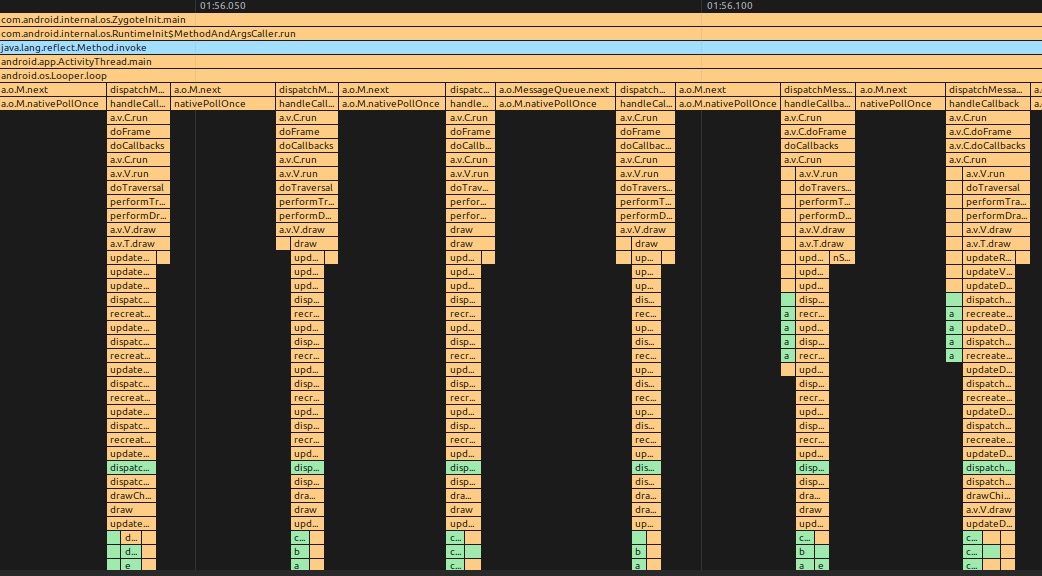
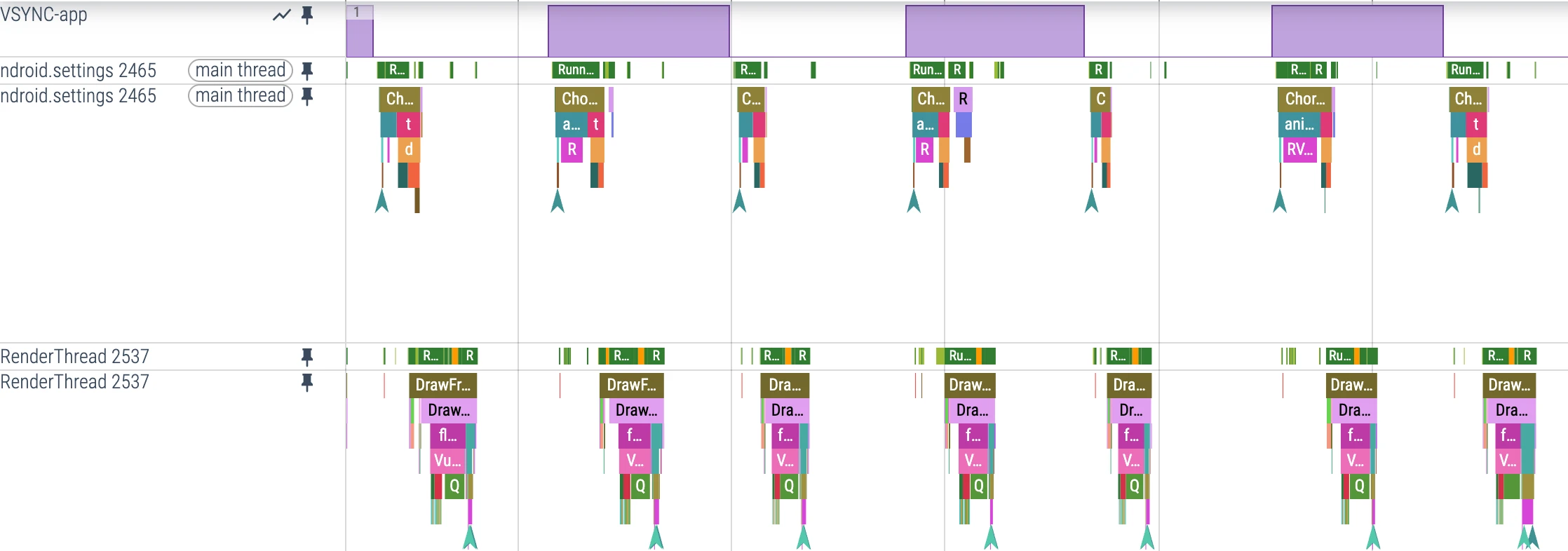
Before discussing Choreographer, let’s first clarify the essence of Android’s main thread operation, which is actually the processing process of Messages. Our various operations, including the rendering operations of each frame, are sent to the MessageQueue of the main thread in the form of Messages. The MessageQueue continues to wait for the next message after processing the current one, as shown in the figure below.
MethodTrace Illustration
Perfetto Illustration
Evolution
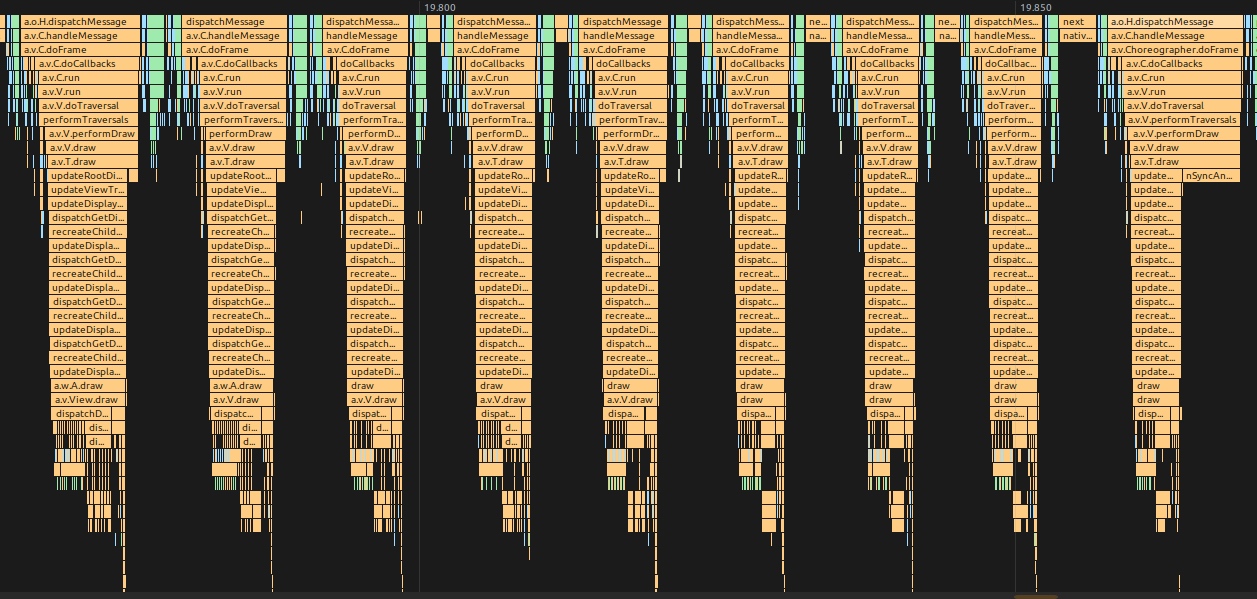
In Android versions before the introduction of Vsync, there was no interval between Messages related to rendering a frame. As soon as the previous frame was drawn, the Message for the next frame began to be processed immediately. The problem with this was that the frame rate was unstable, potentially high or low, as shown below:
MethodTrace Illustration
Trace Illustration (Resource is relatively old, using Systrace illustration)
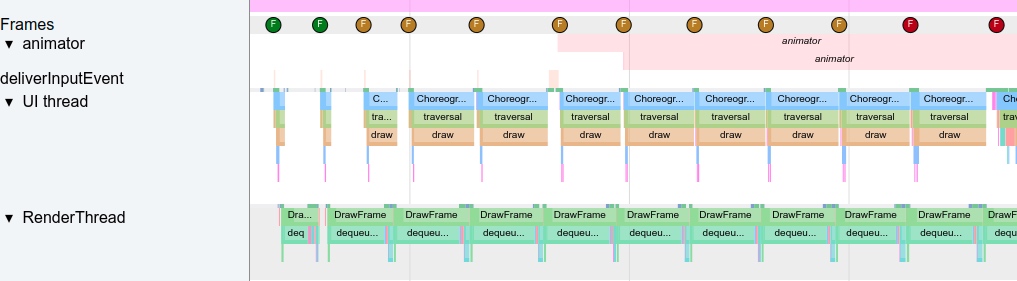
It can be seen that the bottleneck at this time was in dequeueBuffer. Because the screen has a refresh cycle, the speed at which FB consumes the Front Buffer is constant, so the speed at which SF consumes the App Buffer is also constant. Therefore, the App would get stuck at dequeueBuffer. This would lead to unstable acquisition of the App Buffer, easily causing stuttering and dropped frames.
For users, a stable frame rate is a good experience. For example, when playing Honor of Kings, compared to frequent fluctuations between 60 and 40 fps, users feel better when it is stable at 50 fps.
Therefore, in the evolution of Android, the mechanism of Vsync + TripleBuffer + Choreographer was initially introduced. Later, starting from Android R (Android 11), BlastBufferQueue was introduced and then continuously refined, jointly forming the modern Android stable frame rate output mechanism, allowing the software layer and hardware layer to work together at a common frequency.
Introducing Choreographer
The introduction of Choreographer is mainly to cooperate with Vsync to provide a stable Message processing timing for upper-layer application rendering. When the Vsync signal arrives, the system controls the timing of each frame’s drawing operation by adjusting the Vsync signal cycle. Currently, the screen refresh rate of mainstream mobile phones has reached 120Hz, which means refreshing once every 8.3ms. The system adjusts the Vsync cycle accordingly to match the screen refresh frequency. When each Vsync cycle arrives, the Vsync signal wakes up the Choreographer to execute the application’s drawing operation. If the application can complete rendering in each Vsync cycle, the application’s fps will be 120, and the user feels very smooth. This is the main function of introducing Choreographer.
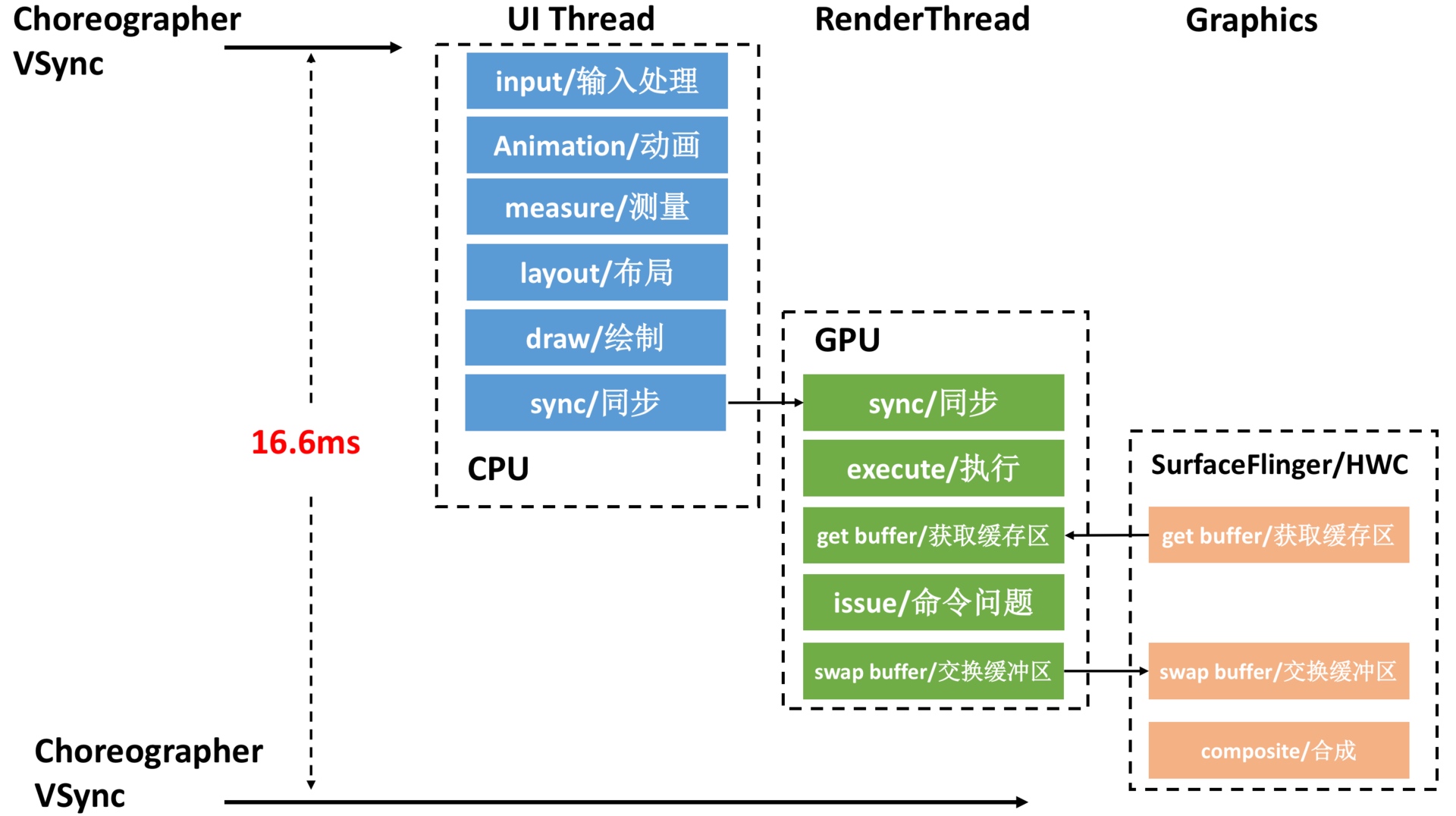
Of course, the refresh rate of mainstream flagship mobile phones has reached 120Hz, and the Vsync cycle has been shortened to 8.3ms. The operations in the above figure must be completed in a shorter time, and the performance requirements are getting higher and higher. For details, please refer to the article New Smooth Experience, 90Hz Rambling (although the article discusses 90Hz, the same principle applies to 120Hz).
Introduction to Choreographer
Choreographer plays a connecting role in the Android rendering pipeline.
- Upstream connection: Responsible for receiving and processing various update messages and callbacks from the App, and processing them uniformly when Vsync arrives. For example, centralized processing of Input (mainly processing of Input events), Animation (animation related), Traversal (including measure, layout, draw, etc. operations), judging stuck frames and dropped frames, recording Callback time consumption, etc.
- Downstream connection: Responsible for requesting and receiving Vsync signals. Receive Vsync event callbacks (via
FrameDisplayEventReceiver.onVsync); Request Vsync (FrameDisplayEventReceiver.scheduleVsync).
From the above, it can be seen that Choreographer plays a key coordinator role in the Android rendering pipeline. Its importance lies in ensuring that Android applications can run at a stable frame rate (60 fps, 90 fps, or 120 fps) through the complete rendering mechanism of Choreographer + SurfaceFlinger + Vsync + BlastBufferQueue, effectively reducing visual discomfort caused by frame rate fluctuations.
Understanding Choreographer can also help application developers deeply understand the operating principle of each frame, and at the same time deepen their understanding of core components such as Message, Handler, Looper, MessageQueue, Input, Animation, Measure, Layout, and Draw. Many APM (Application Performance Monitoring) tools also utilize the combination mechanisms of Choreographer (via FrameCallback), FrameMetrics/gfxinfo framestats (internally backed by FrameInfo), MessageQueue (via IdleHandler), and Looper (via custom MessageLogging) for performance monitoring. After deeply understanding these mechanisms, developers can conduct performance optimization more specifically and form systematic optimization ideas.
In addition, although charts are an effective way to explain processes, this article will rely more on the visual output of Perfetto and MethodTrace tools. Perfetto displays the operating status of the entire system in a timeline manner (from left to right), covering the activities of key components such as CPU, SurfaceFlinger, SystemServer, and application processes. Using Perfetto and MethodTrace can intuitively display key execution processes. Once you are familiar with the system code, Perfetto’s output can be directly mapped to the actual running status of the device. Therefore, in addition to citing a small number of network charts, this article mainly relies on Perfetto to display analysis results.
Choreographer’s Workflow from the Perspective of Perfetto
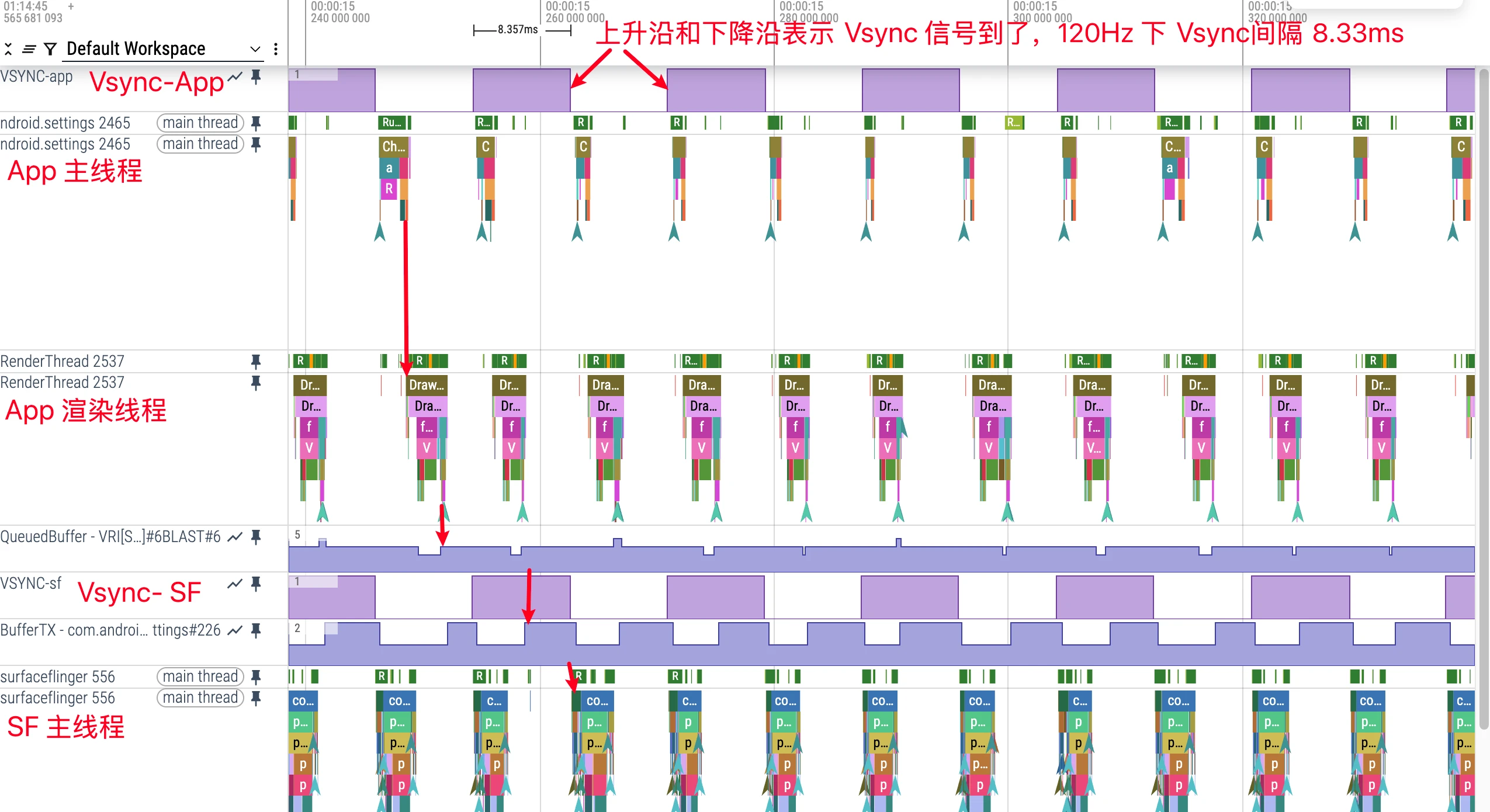
The figure below uses sliding the settings interface as an example. Let’s first look at a complete preview of the settings interface from top to bottom. It can be seen that in Perfetto, from left to right, each green frame represents a frame, representing the picture we can finally see on the phone.
- The interval of each VSYNC-app value in the figure is a Vsync time, corresponding to the refresh rate of the current device, such as 16.6ms at 60Hz and 8.3ms at 120Hz. The rising edge or falling edge is the arrival time of Vsync.
- Processing flow of each frame: Receive Vsync signal callback -> UI Thread –> RenderThread –> SurfaceFlinger
- UI Thread and RenderThread can complete one App frame. In Android 11 and above, the rendered buffer is submitted via the BlastBufferQueue path to SurfaceFlinger for composition, and then we can see the frame on screen.
- It can be seen that the time consumption of each frame of Settings sliding is very short (Ui Thread time consumption + RenderThread time consumption), but due to the existence of Vsync, each frame will wait until Vsync to be processed.
With the overall concept above, let’s zoom in on each frame of the UI Thread to see the position of the Choreographer and how the Choreographer organizes each frame.
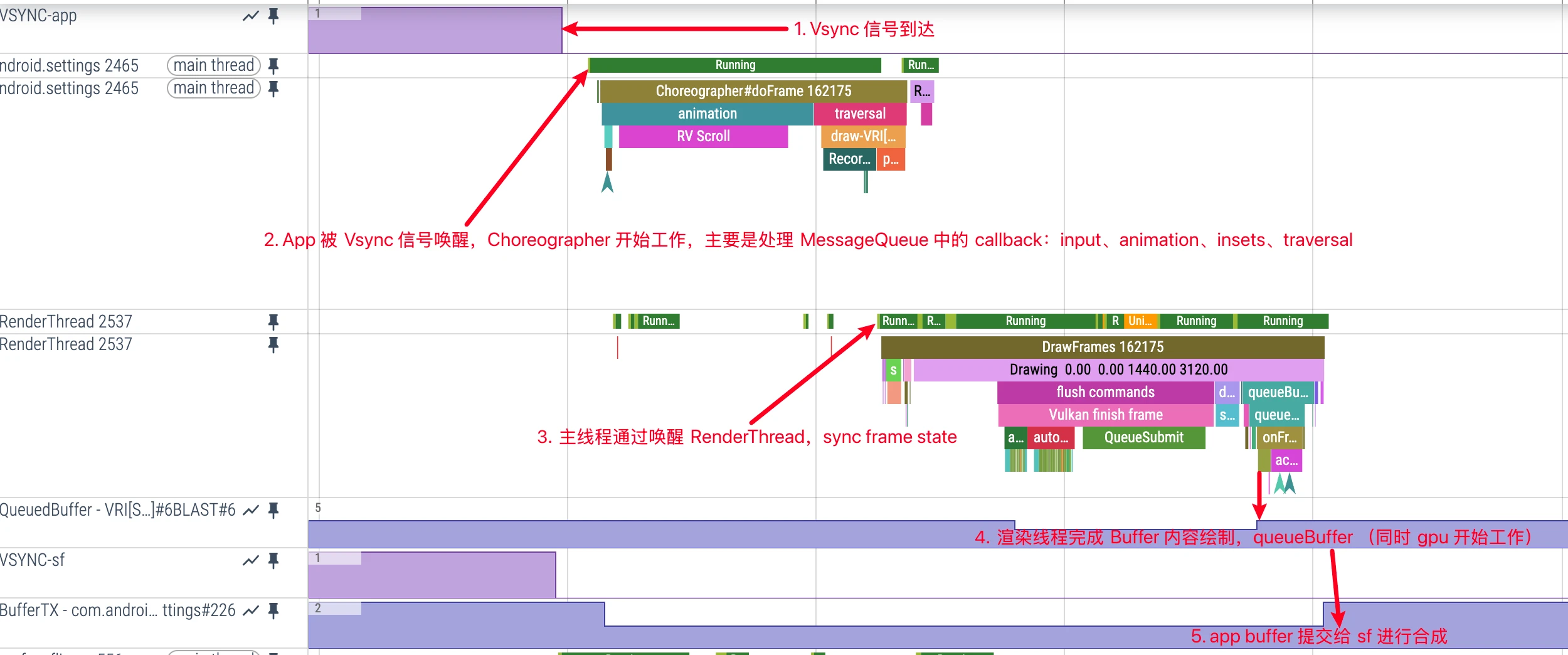
Choreographer’s Workflow
- Choreographer Initialization
- Initialize FrameHandler, bind Looper
- Initialize FrameDisplayEventReceiver, establish communication with SurfaceFlinger for receiving and requesting Vsync
- Initialize CallBackQueues
- SurfaceFlinger’s appEventThread wakes up and sends Vsync, Choreographer callbacks
FrameDisplayEventReceiver.onVsync, entering Choreographer’s main processing functiondoFrame Choreographer.doFramecalculates frame drop logicChoreographer.doFrameprocesses Choreographer’s first callback: inputChoreographer.doFrameprocesses Choreographer’s second callback: animationChoreographer.doFrameprocesses Choreographer’s third callback: insets animationChoreographer.doFrameprocesses Choreographer’s fourth callback: traversal- UIThread and RenderThread synchronize data in traversal-draw
Choreographer.doFrameprocesses Choreographer’s fifth callback: commit- RenderThread processes drawing commands
- In Android 11 and above, RenderThread submits drawing content to SurfaceFlinger through BlastBufferQueue (with implementation details evolving across releases)
- BlastBufferQueue is created and managed by the App side
- Works through producer (BBQ_BufferQueue_Producer) and consumer (BufferQueue_Consumer) models
- The probability and duration of UI-thread waiting are usually reduced, so the next frame can often be prepared earlier (still depends on concrete sync points)
After the first step of initialization is completed, subsequent steps will loop between steps 2-10
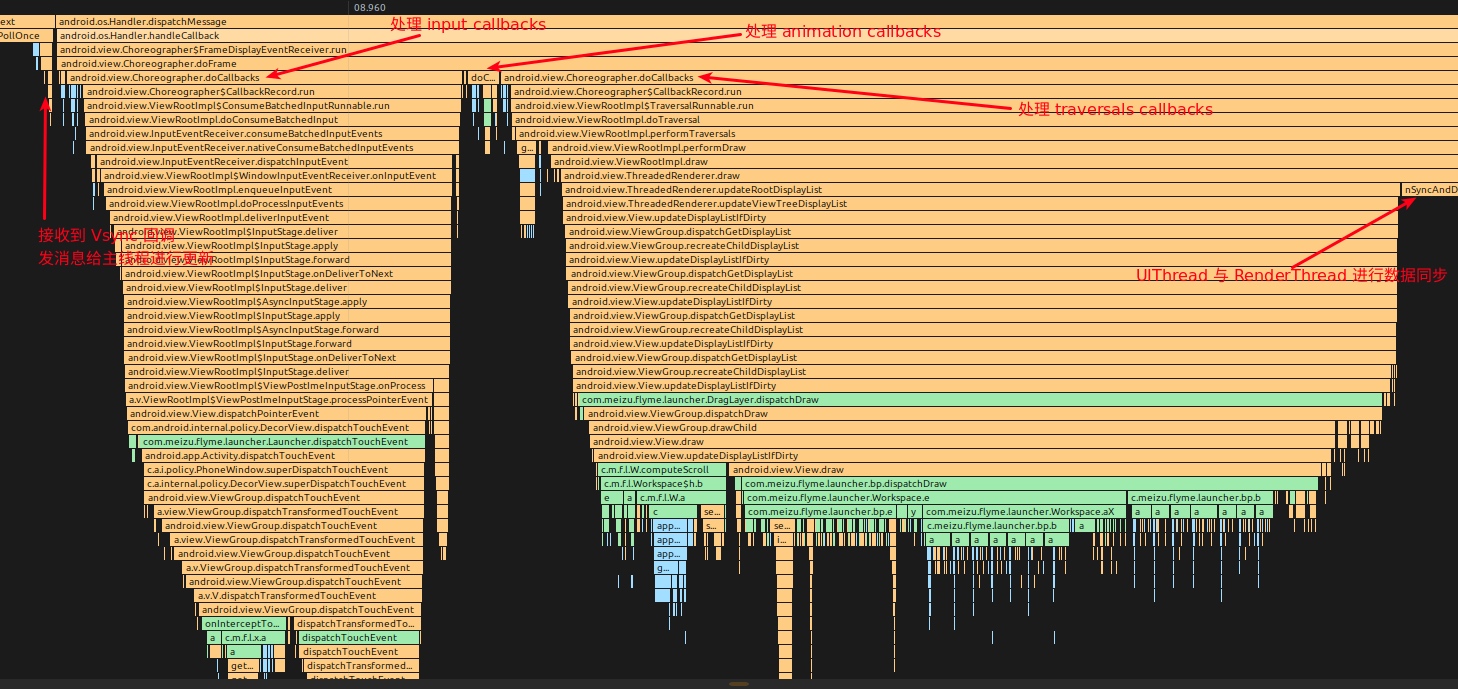
Also attached is the MethodTrace corresponding to this frame (just a preview here, there will be a detailed large picture below)
Interaction between Choreographer, RenderThread and BlastBufferQueue
Starting from Android R (Android 11), the interaction between RenderThread and SurfaceFlinger underwent important changes, with BlastBufferQueue and its subsequent evolution at the core. Let’s see how this mechanism works.
BlastBufferQueue Working Principle
BlastBufferQueue is a BufferQueue variant optimized for UI rendering. It replaces the BufferQueue strictly created by SurfaceFlinger and is instead created and managed by the App side, used for buffer management between App and SurfaceFlinger.
More efficient buffer management
In the traditional BufferQueue, the App needs to get an available buffer throughdequeueBuffer, then render content, and finally submit the buffer to SurfaceFlinger throughqueueBuffer. In this process, if there is no available buffer, the App needs to wait, which leads to blocking.BlastBufferQueue reduces this waiting through smarter buffer management, especially on high refresh rate devices, the effect is more obvious.
Decoupling of RenderThread and UI Thread
In older implementations, the UI thread and the buffer submission path were more tightly coupled, so the main thread was more likely to wait at key synchronization points. After BlastBufferQueue and later refinements, the UI thread can usually finish Java-side work earlier and move to next-frame preparation sooner, reducing main-thread blocking risk (still scenario-dependent).Creation Mechanism
BlastBufferQueue is created during therelayoutWindowprocess ofViewRootImpl:1
2
3
4
5
6// Example code for creating BBQ
if (mBlastBufferQueue == null) {
mBlastBufferQueue = new BLASTBufferQueue(mTag, mSurfaceControl,
mSurfaceSize.x, mSurfaceSize.y,
mWindowAttributes.format);
}Cooperation with Choreographer
Choreographer is still the core that coordinates all this. When the Vsync signal arrives, Choreographer will triggerdoFrameand execute various callbacks, among whichCALLBACK_TRAVERSALwill triggerViewRootImpl‘sperformTraversals(), eventually going to the draw process.In the draw process, through BlastBufferQueue, RenderThread can work more independently, and the UI thread can return earlier to process other tasks.
Below we will look at the specific implementation from the perspective of source code.
Source Code Analysis
Below is a brief look from the source code perspective. The source code only excerpts some important logic, other logic is removed. In addition, the Native part interacting with SurfaceFlinger is not included, which is not the focus of this article. Those interested can follow it themselves. The following source code is based on AOSP mainline (frameworks/base HEAD, verified in 2026-02). Details may vary across Android releases.
Choreographer Initialization
Choreographer Singleton Initialization
1 | // Thread local storage for the choreographer. |
Choreographer Constructor
1 | private Choreographer(Looper looper, int vsyncSource) { |
FrameHandler
1 | private final class FrameHandler extends Handler { |
Choreographer Initialization Chain
During the Activity startup process, after onResume is executed, Activity.makeVisible() is called, and then addView() is called. The calls layer by layer enter the following method:
1 | ActivityThread.handleResumeActivity(IBinder, boolean, boolean, String) (android.app) |
Introduction to FrameDisplayEventReceiver
Vsync registration, application, and reception are all done through the FrameDisplayEventReceiver class, so let’s introduce it simply first. FrameDisplayEventReceiver inherits from DisplayEventReceiver and has three important methods:
onVsync– Vsync signal callbackrun– ExecutedoFramescheduleVsync– Request Vsync signal
1 | private final class FrameDisplayEventReceiver extends DisplayEventReceiver implements Runnable { |
Vsync Registration in Choreographer
From the function call stack below, we can see that Choreographer‘s inner class FrameDisplayEventReceiver.onVsync is responsible for receiving Vsync callbacks and notifying UIThread to process data.
So how does FrameDisplayEventReceiver callback onVsync when the Vsync signal arrives? The answer is that during the initialization of FrameDisplayEventReceiver, it finally listens to the file handle. The corresponding initialization process is as follows:
android/view/Choreographer.java
1 | private Choreographer(Looper looper, int vsyncSource) { |
android/view/Choreographer.java
1 | public FrameDisplayEventReceiver(Looper looper, int vsyncSource) { |
android/view/DisplayEventReceiver.java
1 | public DisplayEventReceiver(Looper looper, int vsyncSource) { |
Simply put, during the initialization of FrameDisplayEventReceiver, Vsync events are passed and requested through BitTube (essentially a socket pair). After SurfaceFlinger receives the Vsync event, it passes this event to DisplayEventDispatcher through BitTube via appEventThread. After DisplayEventDispatcher listens to the Vsync event through the receiver end of BitTube, it callbacks Choreographer.FrameDisplayEventReceiver.onVsync, triggering the start of frame drawing, as shown in the figure below:
DisplayEventReceiver Communication Details with SurfaceFlinger
In the Android system, DisplayEventReceiver calls the nativeInit method via JNI to establish a communication channel with the SurfaceFlinger service. This process involves several key steps:
Create NativeDisplayEventReceiver Object: After calling
nativeInitin the Java layer, JNI creates aNativeDisplayEventReceiverinstance for receiving Vsync signals.Get IDisplayEventConnection: Get
IDisplayEventConnectionviaISurfaceComposerinterface. This is a Binder interface used to communicate with the SurfaceFlinger service.Establish BitTube Connection: BitTube is a communication mechanism based on socket pair, designed for high-frequency, small-data-volume cross-process communication. It creates an efficient communication channel between the App process and the SurfaceFlinger process.
File Descriptor Listening: Listen to the file descriptor of BitTube via
Looper. When a Vsync signal arrives,Looperwill notifyDisplayEventDispatcherto process the event.
The entire communication flow is as follows:
1 | App Process SurfaceFlinger Process |
The advantage of this design is that it avoids using Binder to pass high-frequency Vsync event data, improving performance and real-time performance through direct socket communication, which is crucial for ensuring smooth UI rendering. At the same time, since BitTube uses file descriptors, it can be seamlessly integrated into Android’s Looper mechanism, enabling the entire system to work in an event-driven manner.
Logic of Choreographer Processing a Frame
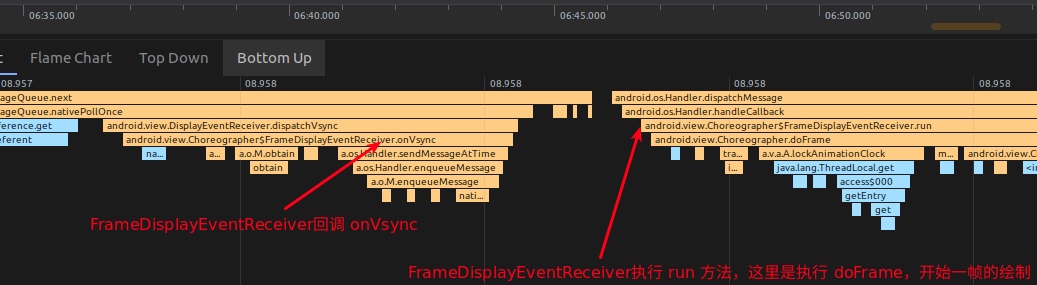
The core of Choreographer’s drawing logic is in the Choreographer.doFrame function. As can be seen from the figure below, FrameDisplayEventReceiver.onVsync posts itself, and its run method directly calls doFrame to start the logic processing of a frame.
android/view/Choreographer.java
1 | public void onVsync(long timestampNanos, long physicalDisplayId, int frame, VsyncEventData eventData) { |
The doFrame function mainly does the following specific things:
- Calculate frame drop logic
- Record frame drawing info
- Execute
CALLBACK_INPUT,CALLBACK_ANIMATION,CALLBACK_INSETS_ANIMATION,CALLBACK_TRAVERSAL,CALLBACK_COMMIT
Recording Frame Drawing Info
FrameInfo in Choreographer is responsible for recording the drawing information of the frame. When doFrame is executed, the drawing time of each key node will be recorded down, which we can see using dumpsys gfxinfo. Of course, Choreographer only records a part, and the rest is recorded in hwui.
From these FrameInfo flags, we can see the recorded content. Later when we look at dumpsys gfxinfo, the data is arranged according to this.
1 |
|
The doFrame function records the time from Vsync time to markPerformTraversalsStart.
1 | void doFrame(long frameTimeNanos, int frame, VsyncEventData eventData) { |
Executing Callbacks
1 | void doFrame(long frameTimeNanos, int frame, VsyncEventData eventData) { |
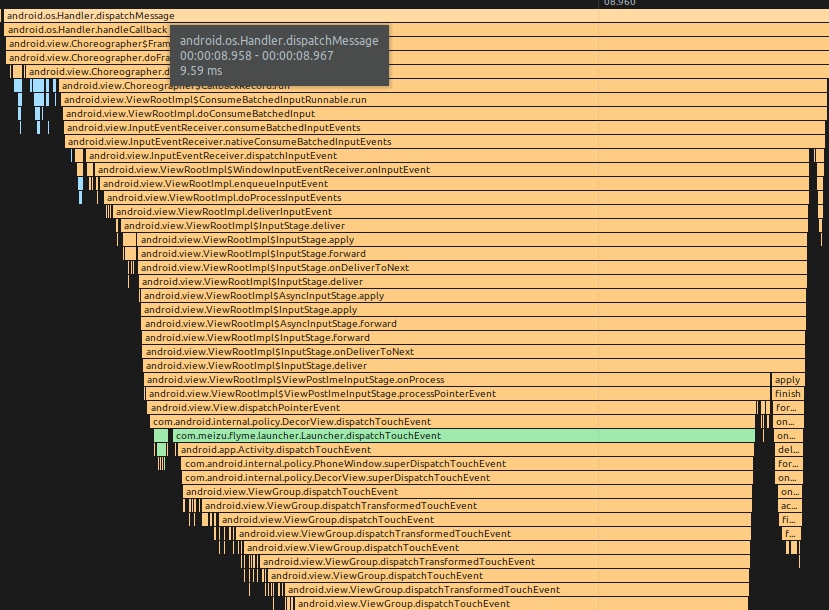
Input Callback Call Stack
input callback generally executes ViewRootImpl.ConsumeBatchedInputRunnable
android/view/ViewRootImpl.java
1 | final class ConsumeBatchedInputRunnable implements Runnable { |
Input events are processed and finally passed to DecorView‘s dispatchTouchEvent, which leads to the familiar Input event dispatching.
Animation Callback Call Stack
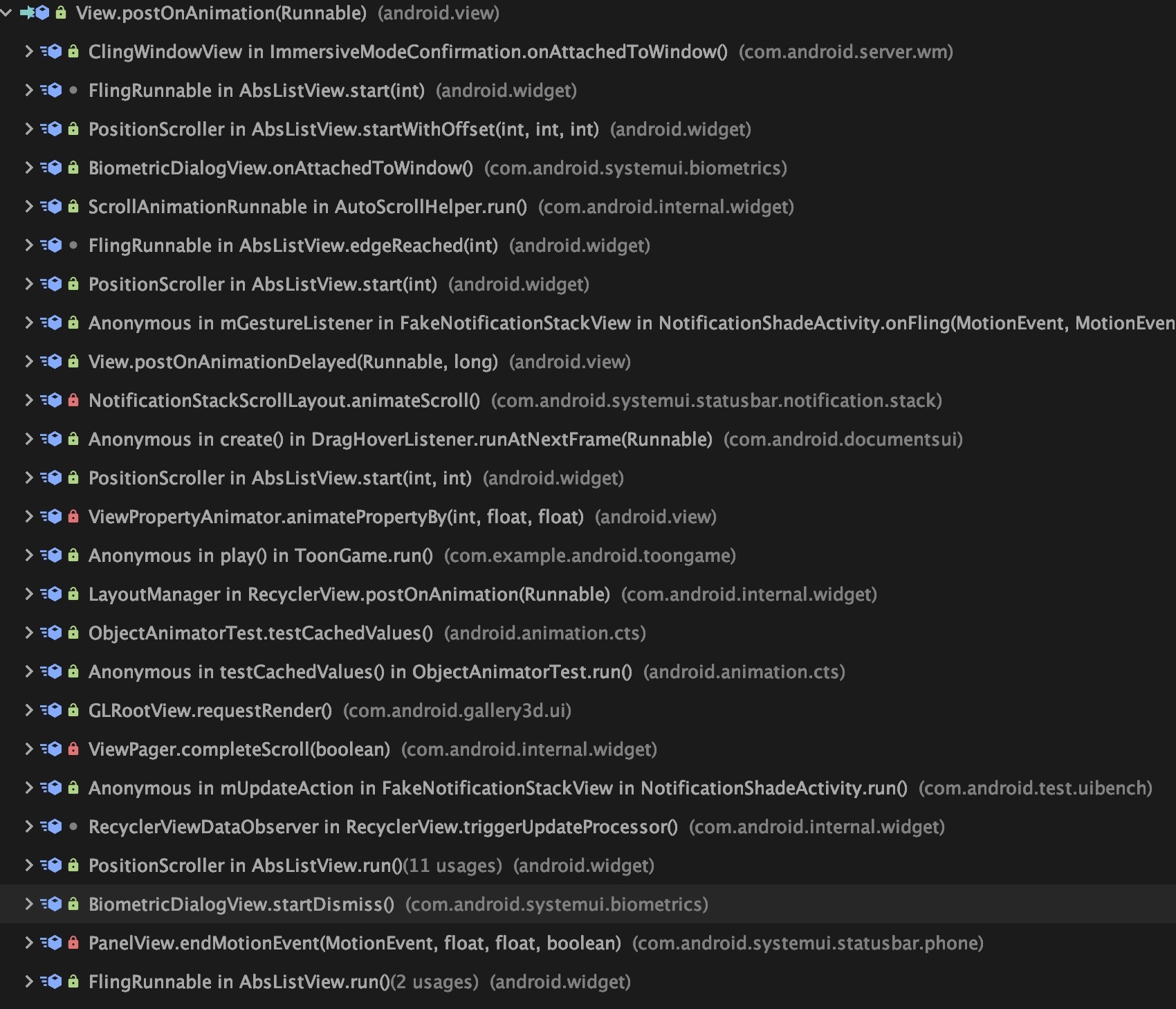
Generally, when we call View.postOnAnimation frequently, CALLBACK_ANIMATION is used.
1 | public void postOnAnimation(Runnable action) { |
So when is View.postOnAnimation generally used? I took a screenshot, you can check it yourself. The most contacted should be operations like startScroll, Fling.
Its call stack depends on what it posts. Below is the fling animation after releasing the hand.
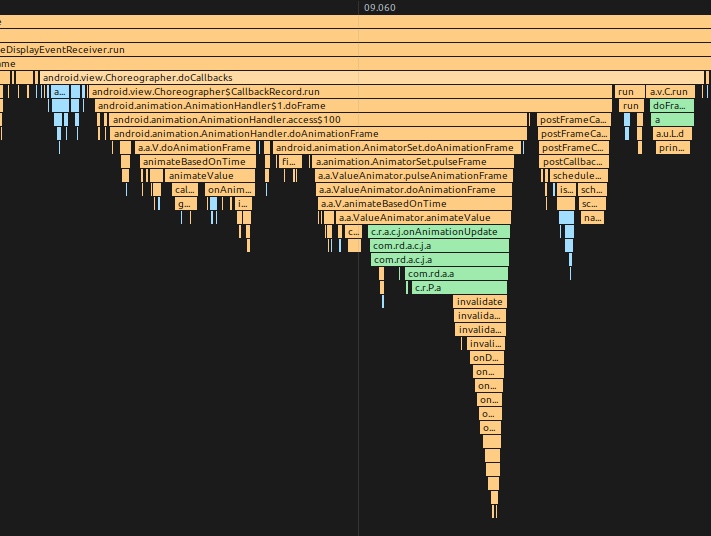
In addition, our Choreographer‘s FrameCallback also uses CALLBACK_ANIMATION.
1 | public void postFrameCallbackDelayed(FrameCallback callback, long delayMillis) { |
Traversal Call Stack
1 | void scheduleTraversals() { |
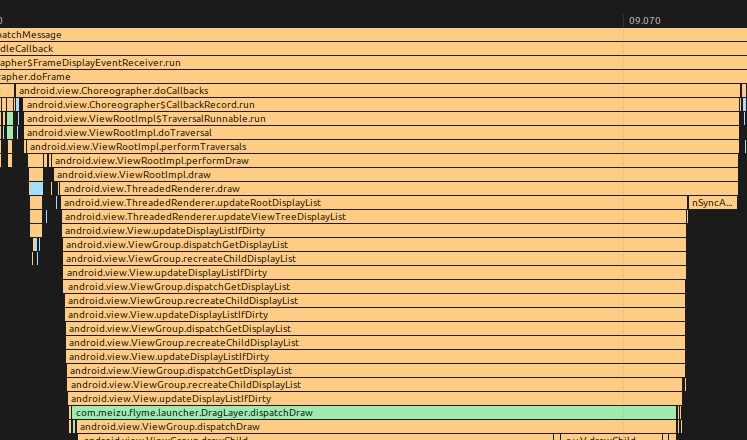
TraceView Example of doTraversal
Next Frame Vsync Request
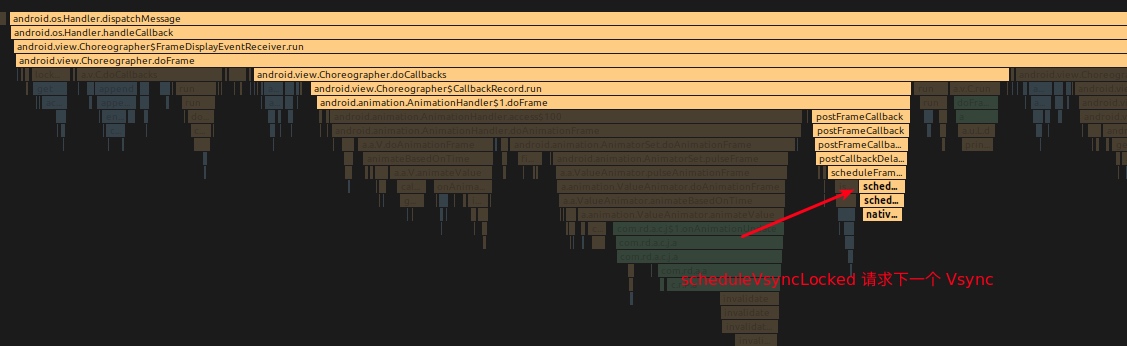
Due to the existence of operations such as animation, sliding, and Fling, we need a continuous and stable frame rate output mechanism. This involves the request logic of Vsync. In continuous operations, such as animation, sliding, and Fling, doFrame of each frame will trigger the application for the next Vsync according to the situation, so that we can obtain continuous Vsync signals.
See the call stack of scheduleTraversals below (scheduleTraversals will trigger Vsync request)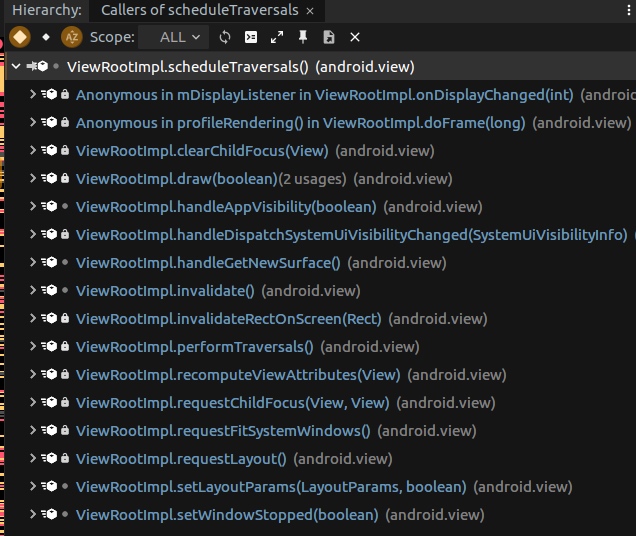
We are familiar with invalidate and requestLayout triggering Vsync signal requests.
Let’s take Animation as an example to see how Animation drives the next Vsync to continuously update the screen.
ObjectAnimator Animation Driving Logic
android/animation/ObjectAnimator.java
1 | public void start() { |
android/animation/ValueAnimator.java
1 | private void start(boolean playBackwards) { |
android/animation/AnimationHandler.java
1 | public void addAnimationFrameCallback(final AnimationFrameCallback callback, long delay) { |
Calling postFrameCallback will go to mChoreographer.postFrameCallback, where the Vsync request logic of Choreographer will be triggered.
android/animation/AnimationHandler.java
1 | public void postFrameCallback(Choreographer.FrameCallback callback) { |
android/view/Choreographer.java
1 | private void postCallbackDelayedInternal(int callbackType, |
Through the Animation.start setting above, the Choreographer.FrameCallback interface is used to request the next Vsync every frame.
TraceView Example of a Frame During Animation
Source Code Summary
Choreographer is designed using a thread singleton mode and is strongly coupled with Looper. Each thread can only has one Choreographer instance, and it must be bound to a valid Looper object because its internal Handler relies on Looper for message dispatching. In applications, it is usually bound to the main thread’s Looper to ensure thread safety of UI operations.
DisplayEventReceiver is an abstract base class, and its JNI implementation creates an
IDisplayEventConnectionobject as a listener for Vsync signals. Through this mechanism, the Vsync interrupt signal sent byAppEventThreadof SurfaceFlinger can be accurately delivered to the Choreographer instance. When the Vsync signal arrives, the system callbacksonVsyncmethod ofDisplayEventReceiver, triggering the rendering process.DisplayEventReceiver provides
scheduleVsyncmethod for requesting Vsync signals. When the application needs to update the UI, it first requests the next Vsync interrupt through this method, and then executes the actual drawing logic in theonVsynccallback, ensuring that rendering is synchronized with the screen refresh.Choreographer defines the
FrameCallbackinterface, and itsdoFramemethod is called every time Vsync arrives. This design is of great significance to the Android animation system, enabling animations to be accurately synchronized with the screen refresh rate, providing a smoother and more power-saving animation experience compared to early self-timing implementations.Choreographer‘s core function is to receive Vsync signals and trigger callback functions registered through
postCallback. The framework defines five types of callbacks, sorted by execution priority:- CALLBACK_INPUT: Handle input events, such as touch, key presses, etc.
- CALLBACK_ANIMATION: Handle various animation calculations and updates
- CALLBACK_INSETS_ANIMATION: Handle system inset animations, such as soft keyboard, status bar animations, etc.
- CALLBACK_TRAVERSAL: Handle measurement, layout, and drawing of the view tree
- CALLBACK_COMMIT: Perform post-draw finishing work, and adjust frame time when needed for better delay/jitter accounting
ListView and RecyclerView‘s Item reuse mechanism (ViewHolder pattern) specific implementation at the framework level will involve
CALLBACK_INPUTandCALLBACK_ANIMATIONstages. When sliding or scrolling quickly, Item initialization, measurement, and drawing may be triggered in the Input callback (such as directly responding to touch events), or may be executed in the Animation callback (such as inertial sliding or automatic scrolling). RecyclerView, through a more efficient reuse mechanism and Prefetch strategy, can intelligently prepare ViewHolder in these two stages, reducing main thread blocking, performing especially well on high refresh rate devices.CALLBACK_INPUT and CALLBACK_ANIMATION will modify various properties of View (such as position, transparency, transformation matrix, etc.) during execution, so they must be executed before
CALLBACK_TRAVERSALto ensure that all state updates can be correctly applied during the measurement, layout, and drawing process of the current frame. This strict execution order guarantees the consistency and predictability of Android UI rendering.
APM and Choreographer
Due to Choreographer’s position in the rendering path, many performance monitoring methods are built around it. Note that FrameInfo itself is an internal Framework structure (@hide); app-side monitoring usually relies on FrameCallback, FrameMetrics, dumpsys gfxinfo framestats, Perfetto, and related tooling.
- Use
doFramecallback ofFrameCallback - Use
FrameMetricsAPI - Use
framestats(internally backed by FrameInfo):adb shell dumpsys gfxinfo <packagename> framestats - Use SurfaceFlinger latency:
adb shell dumpsys SurfaceFlinger --latency - Use SurfaceFlinger PageFlip mechanism:
adb service call SurfaceFlinger 1013(system permission required) - Choreographer’s own dropped-frame calculation logic
- BlockCanary performance monitoring based on Looper
- Perfetto’s monitoring capabilities
- Perfetto is already Android’s mainline tracing infrastructure (Android 10+ largely replaced the old
systrace.pyworkflow) - Perfetto can capture more detailed system performance data, including Choreographer details
- Perfetto UI enables visual analysis of frame rendering
- Perfetto is already Android’s mainline tracing infrastructure (Android 10+ largely replaced the old
Use Perfetto for Advanced Monitoring
Perfetto is Android’s main system-tracing solution. It provides more powerful functionality than legacy Systrace workflows:
Comparison of comprehensive performance data collection
Perfetto can collect multi-dimensional data such as CPU, memory, graphics rendering, system services, etc. at the same timeLower overhead
Using efficient tracking engine, less impact on system performanceBetter Choreographer tracking
Can track Choreographer’s work process in detail, including:- Reception and processing of Vsync signals
- Execution details of
doFramemethod - Execution time of various callbacks
- The collaboration process between UI thread and RenderThread
Tracking BlastBufferQueue-related paths
Can track BlastBufferQueue behavior, helping developers understand buffer management
Use Perfetto to Track Choreographer
1 | # Start recording Perfetto trace (example: 15s with common categories) |
In Perfetto UI, you can find the event named “Choreographer#doFrame”, which shows the processing time and details of each frame. You can also check the collaboration relationship between the UI thread and RenderThread, and the interaction with SurfaceFlinger.
Use framestats (internally backed by FrameInfo) for Monitoring
adb shell dumpsys gfxinfo <packagename> framestats
1 | Window: StatusBar |
Use SurfaceFlinger for Monitoring
Command explanation:
- The unit of data is nanoseconds, and the time starts from the boot time
- Each command will get 128 lines of frame-related data
Data:
- The first line of data indicates the refresh interval
refresh_period - Column 1: This part of the data indicates the time point when the application draws the image
- Column 2: The vertical sync time before SF (software) submits the frame to H/W (hardware) for drawing, that is, the timestamp submitted to hardware after each frame is drawn. This column is the vertical sync timestamp.
- Column 3: The time point when SF submits the frame to H/W, which is regarded as the time point when H/W finishes receiving data from SF, and the time point when drawing is completed.
Frame Drop (Jank) Calculation
Each line can get a value through the following formula, which is a standard we call jankflag. If the jankflag of the current line changes compared to the jankflag of the previous line, it is called a dropped frame.
ceil((C - A) / refresh-period)
Use SurfaceFlinger PageFlip Mechanism for Monitoring
1 | Parcel data = Parcel.obtain(); |
Choreographer’s Own Dropped Frame Calculation Logic
SKIPPED_FRAME_WARNING_LIMIT is 30 by default, controlled by the property debug.choreographer.skipwarning.
1 | if (jitterNanos >= mFrameIntervalNanos) { |
BlockCanary
BlockCanary uses Looper’s message mechanism for performance monitoring. It achieves the purpose of monitoring performance by recording before and after each Message in the MessageQueue.
android/os/Looper.java
1 | public static void loop() { |
MessageQueue and Choreographer
In the Android message mechanism, asynchronous messages have special processing priority. The system can insert a barrier (Barrier) into the message queue through the enqueueBarrier method, so that all synchronous messages after the barrier cannot be executed temporarily until removeBarrier method is called to remove the barrier. Messages marked as asynchronous are not affected by the barrier and can be processed normally.
Messages are synchronous by default. Only by using the setAsynchronous method of Message (this method is a hidden API) can the message be set to asynchronous. When initializing Handler, specific parameters can be passed to specify that all messages sent by this Handler are asynchronous. In this case, the enqueueMessage method of Handler will automatically call the setAsynchronous method of Message.
The core value of asynchronous messages lies in being able to bypass message barriers to proceed execution. If there is no barrier set, asynchronous messages are processed in exactly the same way as synchronous messages. The removeSyncBarrier method can be used to remove the previously set barrier.
An Example of SyncBarrier Used in Choreographer
postSyncBarrier is called when scheduleTraversals.
1 | void scheduleTraversals() { |
removeSyncBarrier is called when doTraversal.
1 | void doTraversal() { |
When Choreographer posts a Message, it sets these messages as Asynchronous, so the priority of these Messages in Choreographer will be relatively high.
1 | Message msg = mHandler.obtainMessage(MSG_DO_SCHEDULE_CALLBACK, action); |
Manufacturer Optimizations
Since system manufacturers can directly modify the source code, they also take advantage of this to do some functions and optimizations. However, due to confidentiality issues, the code will not be put up directly. I can roughly talk about the ideas. Those interested can discuss privately.
Input Event Optimization
Choreographer itself does not have input messages, but after modifying the source code, input messages can be directly given to Choreographer. With these Input messages, Choreographer can do some things, such as responding in advance without waiting for Vsync.
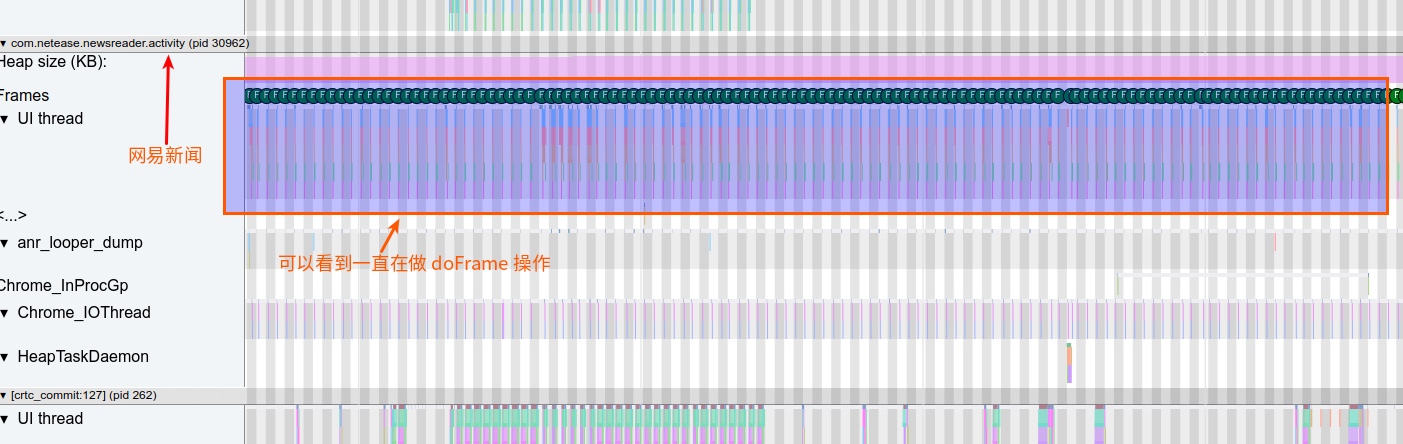
Background Animation Optimization
When an Android application retreats to the background, if it is not terminated by the system, it may still continue to execute various operations. In some cases, the application will continue to call Animation Callback in Choreographer. Even if these animations are invisible to the user, the execution of these Callbacks is completely meaningless, but it will cause high CPU resource usage.
Therefore, system manufacturers will optimize for this situation in Choreographer, restricting background applications that do not meet the conditions from continuing to execute meaningless animation callbacks through a series of strategies, effectively reducing system resource usage.
Frame Drawing Optimization
Like input event optimization, since we have Input event information, in some scenarios we can notify SurfaceFlinger not to wait for Vsync to do composition operations directly.
App Launch Optimization
We said earlier that all operations of the main thread are based on Message. If an operation, a non-important Message, is arranged at the back of the queue, it will affect this operation; by rearranging MessageQueue, when the application starts, important startup Messages are placed in front of the queue to speed up the startup speed.
Animation Callback Front-loading
After the main thread of the previous frame is finished, there is actually a period of idle time before the next Vsync. This period of time can actually be used to prepare for the next frame. Then we can advance the animation callback of the next frame to do it here, which can effectively use the idle time of the CPU and reduce dropped frames.
Frame Interpolation
Like Animation callback front-loading, after the main thread of the previous frame is finished, there is actually a period of idle time before the next Vsync. This period of time can actually be used to prepare for the next frame. It’s just that here we directly generate a new frame: that is, execute doFrame twice in one Vsync. Frame interpolation is equivalent to preparing the data of the next few frames in advance, so that when encountering a truly time-consuming frame, there will be no stuttering.
Frame interpolation implementation is mainly in sliding scenarios, used on sliding components that implement OverScroller, such as ListView, RecyclerView. Because if OverScroller is used, we will know the sliding time and distance when touch up, and we can do tricks (frame interpolation) in the middle, equivalent to drawing the content of the next few VSyncs in one Vsync.
High Refresh Rate Optimization
The high refresh rate (120 Hz) on modern Android devices shortens the Vsync interval from 16.6 ms to 8.3 ms, which brings huge performance and power consumption challenges. How to complete the necessary operations for rendering in one frame is a place that mobile phone manufacturers must think about and optimize:
- Performance performance and optimization of Super App
- Game high frame rate cooperation
- Logic of mutual switching between 120 fps, 90 fps and 60 fps
Reference Materials
- https://www.jianshu.com/p/304f56f5d486
- http://gityuan.com/2017/02/25/choreographer/
- https://developer.android.com/reference/android/view/Choreographer
- https://www.jishuwen.com/d/2Vcc
- https://juejin.im/entry/5c8772eee51d456cda2e8099
- Android Development Expert Class
- Perfetto - System profiling, app tracing, and trace analysis
- Use Perfetto to analyze UI performance
- BufferQueue and Gralloc
- Android 15 Graphics Rendering Optimization
Zhihu Address
Since blog comments are inconvenient, if you want to like or communicate, please move to the Zhihu page of this article
Zhihu - Detailed Explanation of Android Choreographer-based Rendering Mechanism - Perfetto Version
Juejin - Detailed Explanation of Android Choreographer-based Rendering Mechanism - Perfetto Version
About Me & Blog
Below is a personal introduction and related links. I look forward to communicating with you all!
- Blogger Personal Introduction: Contains personal WeChat and WeChat group links.
- Blog Content Navigation: A navigation of personal blog content.
- Excellent Blog Articles Collected and Organized by Individuals - Must-Know for Android Performance Optimization: Welcome everyone to recommend yourself and recommend (WeChat private chat is fine)
- Android Performance Optimization Knowledge Planet: Welcome to join, thanks for support~
One person can go faster, a group of people can go further
