
Android Performance

loading
Performance Considerations in Operating System Design

[!NOTE]
This article was originally written by Yingyun for my Knowledge Planet. Since the Planet has closed, I am publishing this series on OS performance design here.

Yingyun is a veteran performance optimization expert with deep insights into system-level tuning, having worked at several major smartphone manufacturers. He is currently active in our community. If you have any questions or feedback, feel free to join our WeChat group.

1. The Genesis

This starts a new series exploring the various considerations in OS architectural design. In reality, these principles apply to the design of any large-scale software.

These views are my own and carry a subjective perspective. I welcome different viewpoints and hope that through their collision, we can all reach a deeper understanding of the field.
Why is the Weibo Experience Better on Huawei? A Technical Analysis and Reflection

A fellow developer shared a Weibo post (https://weibo.com/1808884742/IApbpEVQr) where blogger @王波粒 noticed a peculiar phenomenon on the Mate 30 Pro. I highly recommend watching the video first.

The video’s description and some of the comments aren’t quite technically accurate. Here’s a summary of what’s actually happening: On Huawei phones, the Weibo app continues to load images smoothly while scrolling the main feed. However, the exact same version of the Weibo client on other phones waits until scrolling completely stops before it begins loading images.

This post looks at this phenomenon from a technical perspective, explores why it happens, and discusses what we can learn from it.

An Incident Caused by a 'Leap' Month - Analysis of Samsung System Reboots

Around 1:30 AM on May 23, 2020, a large number of Samsung phone users in China experienced severe issues including freezes, infinite reboots, and forced entries into Recovery Mode. Improper handling by users led to data loss, and the incident quickly became a trending topic on social media platforms like Zhihu, with service centers overwhelmed.

Social media responses ranged from frustration to anger, with some comparing the incident to the Note 7 battery disaster, “charging-gate,” or “green-screen-gate.” Some predicted Samsung would be forced out of the Chinese market. People lost job offers due to missed calls, others lost valuable data, and some even resorted to smashing their devices in frustration.

As an Android developer, I am not here to pile on Samsung. My goal is to uncover the root cause of this incident and see what we can learn from it. Since it’s a technical failure in the Android system, it’s essential to analyze it from a technical perspective.

Android Developer Learning Path (2020 Edition)

On Medium, @MindOrks published a 2020 Android Developer Learning Path. Given that some readers may have difficulty accessing the original content, I am sharing it here combined with my own 2020 learning plan for your reference.

The original article is quite simple, mostly listing knowledge points without much explanation. I have added brief introductions for each point and included some additional topics based on my own understanding. This is for your reference only.

This article is primarily for Android developers. If you are a beginner, it will help you find a learning path. If you are an experienced developer, it can help you identify gaps in your knowledge. If you have any other suggestions, feel free to leave a message.

Analysis of 'Zombie Animations' in the Android Background

When an Android app moves to the background, it’s not unusual for it to keep performing work as long as the process isn’t killed—that’s just the nature of Android. However, some apps continue to run “zombie animations”—animations that are completely invisible to the user yet consume precious CPU cycles and battery. When users discover this, the result is often a manual kill, an OS-level background restriction, or an outright uninstallation.

Most developers never notice this issue. However, if you use Systrace regularly, you can easily spot it. If you open several apps, return to the home screen, and capture a trace while swiping between launcher pages, you’ll often see background apps still firing animation callbacks.

“Zombie animations” occur when an app, despite being invisible, continues to push CALLBACK_ANIMATION requests to the Choreographer. Every app is different, but the root cause is usually a missing pause or stop call.

How to Calculate App Startup Time in Android?

Someone recently asked on Zhihu: “How to calculate APK startup time?”

“How can I use Python or direct ADB commands to calculate APK startup time? I want to measure the time from clicking the icon to the APK being fully started. For example, in a game, this would be from the icon tap to entering the login screen. Existing methods like adb shell am start -W provide ThisTime and TotalTime, but I’m unsure of the difference and they don’t seem to match visual reality.”

My colleague Guo Qifa and I provided detailed answers. Since Zhihu reach can be limited, I’ve compiled our responses here with his permission as a guide for other developers.

Android App Launch Optimization: Implementation and Principles of DelayLoad (Part 2)

In the previous article, we used the third method to implement DelayLoad. However, the previous article was written relatively simply and only explained how to implement. This article will explain why we need to do this and the principles behind it.

This will involve some relatively important classes in Android, as well as several relatively important functions in Activity lifecycle.

Actually, the principles here are quite simple, but to clarify the implementation process, it’s still a quite interesting thing. It will involve using some tools, adding debug code ourselves, and proceeding step by step. Through this, our understanding of Activity launch will be one layer deeper. I hope that after reading this, everyone will also get some help from it.

Android App Startup Optimization - DelayLoad Implementation and Principles (Part 1)

In Android development, startup speed is a critical metric, and optimization is a vital process. The core philosophy of startup optimization is “doing less” during launch. Typical practices include:

  1. Asynchronous Loading
  2. Delayed Loading (DelayLoad)
  3. Lazy Loading

Most developers who have worked on startup optimization have likely used these. This article dives deep into a specific implementation of DelayLoad and the underlying principles. While the code itself is simple, the mechanics involve Looper, Handler, MessageQueue, VSYNC, and more. I’ll also share some edge cases and my own reflections.

RenderThread Workflow in Android hwui

Preface

This article serves as a set of learning notes documenting the basic workflow of RenderThread in hwui as introduced in Android 5.0. Since these are notes, some details might not be exhaustive. Instead, I aim to walk through the general flow and highlight the key stages of its operation for future reference when debugging.

The image below shows a Systrace capture of the first Draw operation by the RenderThread during an application startup. We can trace the RenderThread workflow by observing the sequence of events in this trace. If you are familiar with the application startup process, you know that the entire interface is only displayed on the phone after the first drawFrame is completed. Before this, the user sees the application’s StartingWindow.

Java 7 HashMap Source Code Analysis

Linked lists and arrays allow elements to be arranged in an order of our choice. However, if you want to find a specific element but have forgotten its position, you must visit every element until you find it. This can consume significant time if the collection is large. A data structure that allows for rapidly finding objects is the hash table.

HashMap is an implementation of the Map interface based on a hash table. This implementation provides all optional mapping operations and permits null values and null keys. (The HashMap class is roughly equivalent to Hashtable, except that it is unsynchronized and permits nulls.) This class makes no guarantees as to the order of the map; in particular, it does not guarantee that the order will remain constant over time.

Android Code Memory Optimization Suggestions - OnTrimMemory

Android Memory Optimization Series:

  1. Android Code Memory Optimization Suggestions - Android (Official)
  2. Android Code Memory Optimization Suggestions - Java (Official)
  3. Android Code Memory Optimization Suggestions - Android Resources
  4. Android Code Memory Optimization Suggestions - OnTrimMemory

The onTrimMemory callback is an API introduced in Android 4.0. It provides hints to developers when system memory is low, allowing them to release resources proactively to avoid being killed by the OS. This ensures the app stays in the background longer and starts faster when the user returns.

This article uses a Q&A format to explain the usage and effectiveness of the onTrimMemory callback across various scenarios. If you want to build high-performance Android apps with great user experiences, don’t miss this.

Android Code Memory Optimization Suggestions - Android (Official)

Android Memory Optimization Series:

  1. Android Code Memory Optimization Suggestions - Android (Official)
  2. Android Code Memory Optimization Suggestions - Java (Official)
  3. Android Code Memory Optimization Suggestions - Android Resources
  4. Android Code Memory Optimization Suggestions - OnTrimMemory

To ensure the Garbage Collector (GC) can properly release memory, it’s crucial to avoid memory leaks (often caused by global or static member variables holding object references) and to release references when they are no longer needed. For most apps, the GC handles the rest: if an object is no longer reachable, its memory is reclaimed.

High-performance software requires proactive memory management throughout the development lifecycle. Android provides several specific guidelines and techniques to help developers achieve excellent memory performance.

Android Code Memory Optimization Suggestions - Java (Official)

Android Memory Optimization Series:

  1. Android Code Memory Optimization Suggestions - Android (Official)
  2. Android Code Memory Optimization Suggestions - Java (Official)
  3. Android Code Memory Optimization Suggestions - Android Resources
  4. Android Code Memory Optimization Suggestions - OnTrimMemory

This article introduces micro-optimization techniques that, when combined, contribute to the overall performance of an app, although they don’t provide massive gains compared to choosing the right algorithms and data structures. You should incorporate these tips into your coding habits to improve efficiency.

This content is based on the Google Official Training for Performance Optimization, specifically focusing on high-performance Android code. I recommend all Android developers read these guidelines and apply these principles in their work.

A Detailed Guide to Java Singleton Pattern

The Singleton pattern, also known as the single-instance pattern, is a widely used software design pattern. When apply this pattern, the class must ensure that only one instance of the singleton object exists. In this article, we will explore the two primary ways to construct a singleton pattern and finally introduce a sophisticated yet concise approach.

Android Memory Optimization (3) - Viewing Original Bitmaps in MAT

This is the final article in our MAT series, detailing how to reconstruct original images from memory snapshots to debug leaks.

  1. Android Memory Optimization (1) - Introduction to MAT
  2. Android Memory Optimization (2) - Advanced MAT Usage
  3. Android Memory Optimization (3) - Viewing Original Bitmaps in MAT

When using MAT to analyze Android memory, you’ll frequently encounter Bitmap and BitmapDrawable$BitmapState objects. In many cases, these Bitmaps consume the majority of the heap. Memory leaks caused by Bitmaps are especially critical and must be handled promptly. When a potential image-related leak is found, seeing the actual image contents can be invaluable for diagnosis.

This article explains how to restore a Bitmap array object in MAT back into a viewable image.

Android Memory Optimization (2) - Advanced MAT Usage

This is the second article in our MAT series, focusing on advanced techniques for analyzing memory issues in Java and Android applications.

  1. Android Memory Optimization (1) - Introduction to MAT
  2. Android Memory Optimization (2) - Advanced MAT Usage
  3. Android Memory Optimization (3) - Viewing Original Bitmaps in MAT

Characteristics of Java Memory Leaks

  • Main features: Reachable but Useless.
  • Useless: Objects created but not released after they are no longer needed.
  • Inefficient: Re-creating new objects for tasks where existing ones could be reused.

Advanced MAT Techniques

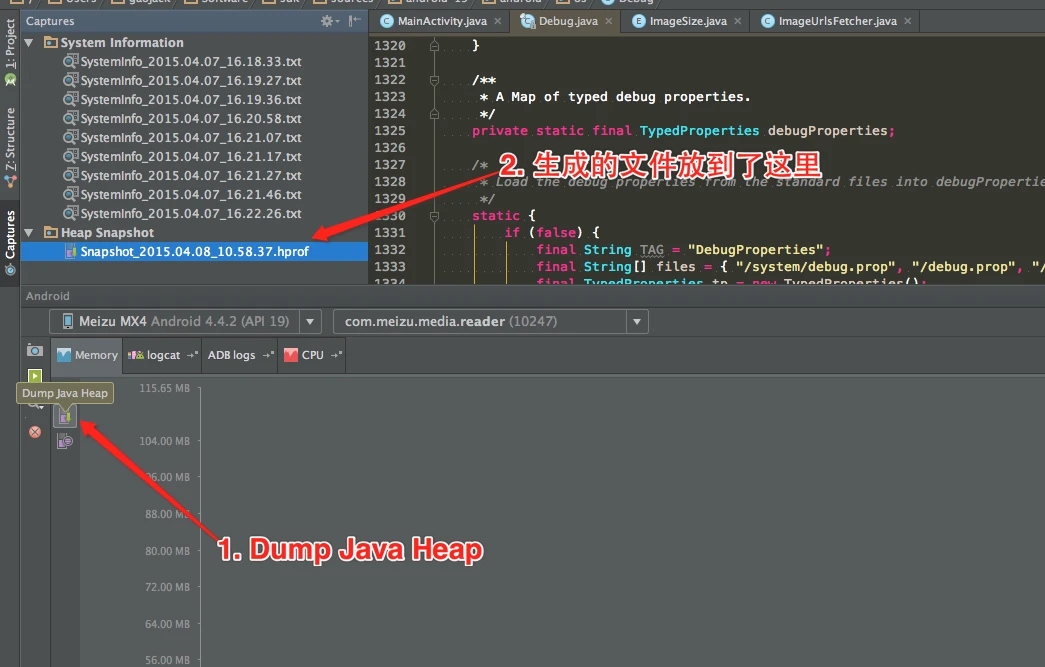
Dumping Memory with Android Studio

Modern versions of Android Studio make capturing heap dumps easy:
Android Studio Memory Profiler

Android Memory Optimization (1) - Getting Started with MAT

This is the first article in the series on using the MAT tool. This series consists of three articles, detailing how to use MAT to analyze memory issues, whether they are Java application memory issues or Android application memory issues:

  1. Android Memory Optimization (1) - Getting Started with MAT
  2. Android Memory Optimization (2) - Advanced MAT Usage
  3. Android Memory Optimization (3) - Opening Original Bitmap Images in MAT

Introduction to MAT

What is MAT?

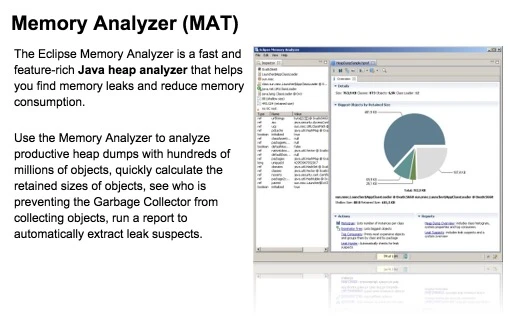
MAT (Memory Analyzer Tool), a memory analysis tool based on Eclipse, is a fast and feature-rich JAVA heap analysis tool. It helps us find memory leaks and reduce memory consumption. Using the memory analysis tool to analyze numerous objects, quickly calculate the size occupied by objects in memory, see who is preventing the garbage collector from reclaiming, and visually view the objects that may cause this result through reports.

image

Of course, MAT also has an independent version that doesn’t rely on Eclipse, but this version requires converting the file generated by DDMS before it can be opened in the standalone version of MAT when debugging Android memory. However, the Android SDK already provides this Tool, so it is also very convenient to use.

Viewing Android Lollipop Source Code with Android Studio

Android Studio

As Google’s “own son,” the Nexus phone series receives special treatment that is obvious to everyone. After Android 5.0 was released, the Nexus 5 was updated to the latest system immediately. Similarly, Android Studio, as Google’s official IDE, is highly valued. I switched from Eclipse to Android Studio right from the start, upgrading from the initial beta versions all the way to the current 1.0 stable version (1.1 was released today, and I’ve already upgraded).

Android Tips: How to Prevent EditText from Automatically Getting Focus

In Android development, using EditText is very common. However, sometimes EditText automatically grabs focus when entering a page, causing the soft keyboard to pop up immediately. While this is convenient in some cases, most of the time we prefer the keyboard to appear only when the user explicitly clicks on the EditText.

Android Tools - Log2File

Log2File is a utility class for Android applications to record logs to a file (such as the SD card).

Usage Scenarios:

  1. Unable to connect to a computer for debugging (e.g., USB port is occupied by USB OTG).
  2. Logs are difficult to capture in real-time.
  3. Bugs appear randomly and are not easily reproducible.
  4. Other scenarios where persistent logging is needed.

0. Introduction

This article was originally published on my CSDN blog: http://blog.csdn.net/grackergao/article/details/18322749. I have now migrated it here. The source code is available on Github: https://github.com/Gracker/Android-Utils/blob/master/Log2File.java.

Ubuntu: Adb Command Cannot Find Device

1. Problem Overview

Recently, while developing for a Nokia project, I encountered the following issue:

When I plugged in a Nokia X, the computer did not respond at all—it wasn’t recognized. My colleague’s Windows machine also failed to detect it. After searching Google for a long time, I finally found a solution. Since I didn’t record it originally and later forgot how to configure it when helping someone else, I decided to document it here for everyone.

2. Solution

If the adb command indicates that no devices are found, please ensure you have already completed these basic steps:

  1. Enable USB Debugging (Settings - Developer Options - USB Debugging). If you don’t see Developer Options, go to “About” and tap the Build Number several times.
  2. Restart Adb with Sudo: Try sudo adb kill-server and sudo adb start-server.

If it still doesn’t work, follow the steps below:

Android Service: Building Your Own Notification Center (1) - Introduction to Accessibility Service

1. Introduction to Accessibility Service

Accessibility services are a feature of the Android framework designed to provide alternative navigation feedback to users on behalf of applications installed on Android devices. An accessibility service can communicate information about the application to the user, such as text-to-speech, or haptic feedback when the user’s finger hovers over an important area of the screen.

This section covers how to create an accessibility service, how to handle information received from applications, and how to provide feedback to the user.