This is the fourth article in the Perfetto series. It explains how to use trace_processor_shell to open large trace files (often exceeding 2GB). In practice, we frequently encounter massive traces that the browser-based ui.perfetto.dev cannot open due to browser memory constraints. To solve this, we use the official trace_processor_shell tool to power the analysis from your local machine.
This is the third article in the Android App ANR series, sharing several ANR case studies. The series includes:
This is the third article in the Android App ANR series, focusing on real-world ANR cases. The series includes:
This is the second article in the Android App ANR series, focusing on ANR analysis methodology and key logs. The series includes:
This is the first article in the Android App ANR series, mainly analyzing the design philosophy of Android ANR from a system perspective. The series directory is as follows:
This is the third article in the Perfetto series. After introducing what Perfetto is and how to capture traces, this article focuses on how to navigate the web interface and interpret the complex information presented after opening a trace.
The previous article Android Perfetto Series 1: Introduction to Perfetto introduced what Perfetto is. This article will provide a brief guide on how to capture Perfetto traces.
This is the first article in the Perfetto series. It provides a brief introduction to the tool, including its history, development, and capabilities.
With Google announcing the deprecation of Systrace in favor of Perfetto, Perfetto has essentially replaced Systrace in my daily workflow. Major manufacturers like OPPO and vivo have also transitioned to Perfetto. Many developers new to Android performance optimization find Perfetto’s complex interface and features overwhelming, which is why I’ve decided to re-present my previous Systrace articles using Perfetto.
[!NOTE]
This article was originally written by Yingyun for my Knowledge Planet. Since the Planet has closed, I am publishing this series on OS performance design here.Yingyun is a veteran performance optimization expert with deep insights into system-level tuning, having worked at several major smartphone manufacturers. He is currently active in our community. If you have any questions or feedback, feel free to join our WeChat group.
1. The Genesis
This starts a new series exploring the various considerations in OS architectural design. In reality, these principles apply to the design of any large-scale software.
These views are my own and carry a subjective perspective. I welcome different viewpoints and hope that through their collision, we can all reach a deeper understanding of the field.
A while ago, a certain App became very popular because it exploited Android system vulnerabilities to gain system permissions and did a lot of things. I wanted to see what these Apps did after gaining system permissions by exploiting system vulnerabilities, hence this article. Due to hasty preparation, some Code was not looked at carefully. Interested students can research it themselves and discuss more. The corresponding articles and Code links are below:
- Deep Blue Insight: The Most “Unpardonable” Vulnerabilities of 2022
- XXX apk embedded privilege escalation code and dynamic delivery dex analysis
- History of Android Deserialization Vulnerability Attack and Defense
Regarding how this App obtained these system permissions, History of Android Deserialization Vulnerability Attack and Defense explains it very clearly, so I won’t repeat it here. I am not a security expert either, but I suggest everyone read this article a few times.
Recently, there was a major buzz around an Android app that exploited a system vulnerability to gain system-level privileges. I wanted to see exactly what an app does once it breaks out of its sandbox and gains that level of control. This led to this article. Due to time constraints, some code wasn’t examined in detail. Interested readers can study it themselves and discuss further. The corresponding articles and code links are below:
- Deep Blue Insight: 2022’s Most “Unforgivable” Vulnerability
- XXX apk Embedded Privilege Escalation Code and Dynamic Dex Delivery Analysis
- History of Android Deserialization Vulnerability Attacks and Defenses
Regarding how this app obtained system permissions, History of Android Deserialization Vulnerability Attacks and Defenses explains it clearly, so I won’t elaborate further. I’m not a security expert, but I recommend reading this article multiple times.
This is the third article in the “Systrace Thread CPU State Analysis Tips” series. It focuses on the Sleep and Uninterruptible Sleep states in Systrace—their causes, troubleshooting, and optimization. These states are major performance inhibitors and are often difficult to diagnose without a systematic approach.
The goal of this series is to use Systrace to view the Android system from a different perspective and to learn the Framework through visualization. While reading Framework source code can be difficult to remember, seeing the flow in Systrace can lead to deeper understanding. You can find the complete Systrace Basics and Action Series here.
This is the second article in the “Systrace Thread CPU State Analysis Tips” series. It analyzes the causes of the “Running” state in Systrace and provides optimization strategies for when Running segments are excessively long.
The goal of this series is to use Systrace to view the Android system from a different perspective and to learn the Framework through visualization. While reading Framework source code can be difficult to remember, seeing the flow in Systrace can lead to deeper understanding. You can find the complete Systrace Basics and Action Series here.
Recently, I read a new book: Building Smooth Android Apps (JD link: https://item.jd.com/10035215362170.html). I bought it because of the title, and after reading it, I felt it was necessary to write an article so that colleagues who haven’t bought it yet can understand what it’s about.
My personal suggestion is: if you are an experienced developer, I don’t recommend buying it. This book doesn’t go into much depth on principles and doesn’t offer a comprehensive overview of Android smoothness. If you are a beginner, it’s decent for broadening your horizons and identifying gaps in your knowledge, but it’s still a bit lacking for a deep understanding of Android smoothness.
I say this because the book doesn’t focus much on performance or smoothness. It lacks deep theoretical parts. Instead, a large portion is dedicated to static code analysis, using Android Studio Profiler, App architecture, app stay-alive techniques, network performance optimization, APK size optimization, app power consumption, etc. These topics are covered briefly and at a shallow level.
Android 12 has been officially released, and the source code is now available on the AOSP website. This article will guide you through the process of downloading and compiling the latest Android 12 code.
Compiling the code locally offers several advantages:
- Direct Debugging: You can flash the build onto a physical device for local debugging and import the code into Android Studio.
- Userdebug Builds: You can compile a
userdebugversion, which allows forrootandremountaccess. This is invaluable for debugging both the system and apps, as it reveals information hidden in standarduserbuilds—useful for competitive analysis and behavioral studies. - Deep Learning: It facilitates a deeper understanding of Android source code by allowing you to enable system-level debug logs, add your own logs, or even modify system workflows.
The release of MIUI 12 brought a long-standing battle between App developers and ROM developers into the public eye, revealing the intricate details of this technical tug-of-war. As the saying goes, “While the demon rises a foot, the path rises ten feet.” ROM developers, with their higher system-level permissions, generally hold the upper hand. App developers, however, are not easily deterred, employing various “black technologies” for background persistence and cross-app wakeups. Even Google has stepped in to mediate, establishing rules to regulate behavior for both parties. This competition is arguably healthy; a total victory by either side would inevitably lead to stagnation or the loss of useful functionality.
However, the victims of this struggle are undoubtedly the consumers. If App developers succeed, phones become cluttered with persistent background processes that hog CPU and memory. Conversely, if ROM developers are too aggressive, the app experience suffer—a pain well-known to many Android developers.
As discussed later in this article, most smartphone manufacturers have developed their own strategies to handle auto-starts and associated starts. Beyond the technical struggle, there’s the issue of privacy. Baidu’s Robin Li once remarked that “Chinese people are more open about privacy and relatively less sensitive. If they can trade privacy for convenience, safety, or efficiency, they are willing to do so in many cases.” Consider the convenience of copying a phrase in WeChat and having Taobao automatically open to the corresponding item. It’s helpful, isn’t it? But do we really want every app peering into our clipboards?
On Medium, @MindOrks published a 2020 Android Developer Learning Path. Given that some readers may have difficulty accessing the original content, I am sharing it here combined with my own 2020 learning plan for your reference.
The original article is quite simple, mostly listing knowledge points without much explanation. I have added brief introductions for each point and included some additional topics based on my own understanding. This is for your reference only.
This article is primarily for Android developers. If you are a beginner, it will help you find a learning path. If you are an experienced developer, it can help you identify gaps in your knowledge. If you have any other suggestions, feel free to leave a message.
This article summarizes major Android app startup optimization strategies available today. If you need to optimize your app’s launch performance, use this as a checklist to identify gaps in your current implementation. Since many solutions depend on specific business requirements, I focus on presenting the options rather than deep-diving into every implementation detail. You can easily find specific technical guides for each method online.
I’ve also included some optimizations performed by system manufacturers. Understanding what happens at the OS level can help you make better decisions, such as requesting whitelisting or integrating manufacturer SDKs.
This article compiles most current Android app startup optimization solutions. If you need optimization guidance, simply reference this article to review others’ approaches and identify gaps. Many solutions require business-specific adjustments, so this article doesn’t detail every method—when you need a particular solution, search online for its specific implementation. This serves as a comprehensive reference.
I’ve also included some system manufacturer optimizations related to startup, though I’ve only listed those I’m aware of. Some manufacturers have proprietary technologies not discussed here. Understanding manufacturer practices may help you—for example, contacting manufacturers for whitelisting or integrating their SDKs.
In the article Android Jank and Frame Drops Due to System Issues, we listed some actual cases of jank caused by system low memory. Since low memory significantly impacts overall device performance, I’m writing a separate article to outline how system low memory affects device performance.
As Android system versions evolve and apps’ codebases expand, Android’s memory requirements continue to grow. However, many devices in the market still have less than 4GB of RAM. These users easily encounter system-wide low memory situations, especially after major system updates or as more apps are installed.
Android low memory leads to performance issues, specifically manifested as slow response and jank. For example: launching an app takes longer than usual; scrolling lists drops more frames; reduced background processes increase cold starts; phones easily overheat. Below, I’ll outline the reasons for these performance issues, debugging methods, and potential optimization measures.
In the Overview of Jank and Frame Drops in Android - System Layer article, we touched upon jank cases caused by low system memory. Since low memory has a significant impact on overall device performance, I’m dedicating this article to exploring those effects in depth.
As Android versions evolve and apps become more feature-heavy, their memory requirements increase. However, many devices with 4GB of RAM or less are still in use. These users are prone to low memory situations, especially after major system updates or as they install more apps.
Low memory triggers performance issues categorized by slow responsiveness and jank. Examples include longer app launch times, more frame drops in scrolling, more frequent cold starts as background processes are killed, and increased device temperature. Below, I’ll outline the causes, debugging methods, and potential optimizations for these issues.
This article was inspired by a real-world bug I encountered. While the issue itself wasn’t particularly “hard,” the analysis process—the tools used, the investigative logic, and some clever tips I learned from a colleague—made it a perfect candidate for a case study.
I’ve used a variety of tools mentioned in my Android Performance Optimization Methodology, including:
- Reproduction Video
- Event Log
- AS Source/Debug
- AS Profiler
- Systrace
- Dumpsys
- Unix
psutility
My goal is to document this process for myself and to share a universal troubleshooting workflow that might help others. If you have your own debugging tips, feel free to join our discussion group!
In the Overview of Jank and Frame Drops in Android - System Layer article, we listed causes of jank originating from the system. In this article, we focus on causes stemming from the App itself. When you encounter lag, before blaming the phone manufacturer, consider if it’s the App’s own inefficiency.
In the Overview of Jank and Frame Drops in Android - Application Layer article, we listed causes of jank originating from the app itself. In this article, we focus on causes stemming from the Android platform. Due to differences in hardware performance, feature implementations, and engineering capabilities among Android OEMs, system quality varies significantly. Here, we’ll categorize performance issues caused by system hardware and software.
Jank issues in Android are taken very seriously by both smartphone manufacturers and app developers. Internal teams, often called “Performance” or “Stability” groups, are typically dedicated to optimizing these experiences.
Currently, excellent third-party performance monitoring tools like Tencent’s Matrix are available. Phone manufacturers also have proprietary solutions. Since they can modify source code and bypass certain permission hurdles, manufacturers can access deeper system data, making analysis more efficient.
This is the second article in the Systrace series, primarily explaining the prerequisites for analyzing Systrace. With these prerequisites, analyzing Systrace will be more effective, allowing you to identify issues faster and more efficiently.
This article introduces how to view thread states in Systrace, how to analyze thread wakeup information, how to interpret data in the information panel, and common shortcuts. By studying this article, you will gain an understanding of process and thread-related information and know how to extract key information from complex Systrace traces.
This is the first article in the Systrace series, primarily providing a brief introduction to Systrace, its basic usage, how to interpret Systrace traces, and how to analyze phenomena in Systrace in conjunction with other tools.
The purpose of this series is to view the overall operation of the Android system from a different perspective using Systrace, while also providing an alternative angle for learning the Framework. Perhaps you’ve read many articles about the Framework but can never remember the code, or you’re unclear about the execution flow. Maybe from Systrace’s graphical perspective, you can gain a deeper understanding.
At the beginning of 2018, I wrote 2017 Best Items Recommendations. Recently, some people asked if I’d do one for 2018. Although 2018 was a tough year, there were still some great things worth recommending to everyone.
Just like in 2017, I’ll share things that I found helpful for work or life. The recommendations include apps, hardware, books, blogs, and columns. I hope they provide value to you in 2019.
Besides the CPU, many users consider RAM size when buying a phone. Different RAM configurations come with different prices—but how much RAM do you actually need? How does Android manage its memory? Average users are often confused: How much RAM does this app use? How much does the system use? How does RAM affect my experience? And how much RAM should my next phone have?
A common question on Zhihu is: “Does the Android system not release memory?”. It’s not that the user doesn’t know the system releases memory, but rather they want to understand the mechanics to optimize their experience. In this article, I’ll address these user concerns. More technical details will be covered in later articles.
I’ve long wanted to write about Android system fluency because it’s the most direct aspect of the user experience. The long-standing criticism that Android “gets laggier over time” still casts a shadow over the platform, and it’s a primary reason many users default to iPhone.
Because Google keeps Android open, different manufacturers produce devices with vastly different hardware, and app quality varies wildly. Consequently, fluency is affected by countless factors. It’s rarely just “the system isn’t optimized.” Often, two devices with the same OS but different SOCs offer completely different experiences.
In this post, I want to discuss the factors affecting Android fluency from several perspectives:
- Hardware
- System
- Applications
- The Optimization Loop
This article records the essential knowledge for Android performance optimization (mainly including outstanding articles, WeChat accounts, blogs, and technical teams), covering all aspects of performance optimization. This post will be continuously updated; personal recommendations are welcome.
2017 has unknowingly passed, and the blog hasn’t been updated for a long time. One reason is that I increasingly feel my knowledge is shallow, fearing I might mislead everyone with technical articles; another reason is that I’m too lazy. Given these two reasons, I decided that this blog’s updates should no longer be limited to technical articles—some meaningful things, thoughts, etc., will also be updated here. On one hand, this is a record for myself; if it can also bring some help to readers along the way, that would naturally be the best (although there aren’t many readers…)
Since 2017 has just passed, I feel it’s necessary to recommend to everyone the things that I think had excellent experiences in 2017 or were very helpful to my work life—perhaps you’ll need them in 2018. The recommended content includes apps, hardware, books, equipment, etc. It should be noted that these are things that brought me great help in 2017, which might not necessarily suit you. Let’s not say too much, let’s get straight to the content!
2017 has passed before we knew it. The blog hasn’t been updated for a while - one reason is that I increasingly realize how shallow my knowledge is and fear that writing about technical topics might mislead readers, and another reason is simply that I’ve been too lazy. Given these two reasons, I’ve decided that blog updates no longer need to be limited to technical articles - things I find meaningful, thoughts, and reflections will also be shared here. On one hand, it serves as my own record, and if it happens to help readers along the way, that would be even better (though there aren’t many readers anyway…).
Since 2017 has just passed, I feel it’s necessary to recommend to everyone the things that I found to be great experiences or very helpful for work and life in 2017 - perhaps you’ll need them in 2018. The recommendations include Apps, hardware, books, equipment, etc. It should be noted that these are things that brought me great help in 2017 - what works for me may not work for you. Without further ado, let’s get into it!
Someone recently asked on Zhihu: “How to calculate APK startup time?”
“How can I use Python or direct ADB commands to calculate APK startup time? I want to measure the time from clicking the icon to the APK being fully started. For example, in a game, this would be from the icon tap to entering the login screen. Existing methods like
adb shell am start -WprovideThisTimeandTotalTime, but I’m unsure of the difference and they don’t seem to match visual reality.”
My colleague Guo Qifa and I provided detailed answers. Since Zhihu reach can be limited, I’ve compiled our responses here with his permission as a guide for other developers.
Android Memory Optimization Series:
- Android Code Memory Optimization Suggestions - Android (Official)
- Android Code Memory Optimization Suggestions - Java (Official)
- Android Code Memory Optimization Suggestions - Android Resources
- Android Code Memory Optimization Suggestions - OnTrimMemory
The onTrimMemory callback is an API introduced in Android 4.0. It provides hints to developers when system memory is low, allowing them to release resources proactively to avoid being killed by the OS. This ensures the app stays in the background longer and starts faster when the user returns.
This article uses a Q&A format to explain the usage and effectiveness of the onTrimMemory callback across various scenarios. If you want to build high-performance Android apps with great user experiences, don’t miss this.
Android Memory Optimization Series:
- Android Code Memory Optimization Suggestions - Android (Official)
- Android Code Memory Optimization Suggestions - Java (Official)
- Android Code Memory Optimization Suggestions - Android Resources
- Android Code Memory Optimization Suggestions - OnTrimMemory
This article focuses on common memory leak scenarios in Android application development. Having a baseline understanding of memory management before writing code leads to much more robust applications. This post starts with resource usage in Android and covers optimizations for Bitmaps, database queries, Nine-Patch assets, overdraw, and more.
Android Memory Optimization Series:
- Android Code Memory Optimization Suggestions - Android (Official)
- Android Code Memory Optimization Suggestions - Java (Official)
- Android Code Memory Optimization Suggestions - Android Resources
- Android Code Memory Optimization Suggestions - OnTrimMemory
To ensure the Garbage Collector (GC) can properly release memory, it’s crucial to avoid memory leaks (often caused by global or static member variables holding object references) and to release references when they are no longer needed. For most apps, the GC handles the rest: if an object is no longer reachable, its memory is reclaimed.
High-performance software requires proactive memory management throughout the development lifecycle. Android provides several specific guidelines and techniques to help developers achieve excellent memory performance.
Android Memory Optimization Series:
- Android Code Memory Optimization Suggestions - Android (Official)
- Android Code Memory Optimization Suggestions - Java (Official)
- Android Code Memory Optimization Suggestions - Android Resources
- Android Code Memory Optimization Suggestions - OnTrimMemory
This article introduces micro-optimization techniques that, when combined, contribute to the overall performance of an app, although they don’t provide massive gains compared to choosing the right algorithms and data structures. You should incorporate these tips into your coding habits to improve efficiency.
This content is based on the Google Official Training for Performance Optimization, specifically focusing on high-performance Android code. I recommend all Android developers read these guidelines and apply these principles in their work.
Series Catalog:
- Overview of Android Performance Patterns
- Android Performance Patterns: Render Performance
- Android Performance Patterns: Understanding Overdraw
- Android Performance Patterns: Understanding VSYNC
- Android Performance Patterns: Profile GPU Rendering
“If you can measure it, you can optimize it” is a common term in the computing world, and for Android’s rendering system, the same thing holds true. In order to optimize your pipeline to be more efficient for rendering, you need a tool to give you feedback on where the current perf problems lie.
In this video, Colt McAnlis walks you through an on-device tool built for this exact reason. “Profile GPU Rendering” will help you understand the stages of the rendering pipeline, see which portions might be taking too long, and decide what to do about it in your application.
Profile GPU Rendering Tool
Rendering performance issues are often the culprits stealing your precious frames. These problems are easy to create but also easy to track with the right tools. Using the Profile GPU Rendering tool, you can see right on your device exactly what is causing your application to stutter or slow down.
Series Catalog:
- Overview of Android Performance Patterns
- Android Performance Patterns: Render Performance
- Android Performance Patterns: Understanding Overdraw
- Android Performance Patterns: Understanding VSYNC
- Android Performance Patterns: Profile GPU Rendering
Unbeknownst to most developers, there’s a simple hardware design that defines everything about how fast your application can draw things to the screen.
You may have heard the term VSYNC - VSYNC stands for vertical synchronization and it’s an event that happens every time your screen starts to refresh the content it wants to show you.
Effectively, VSYNC is the product of two components: Refresh Rate (how fast the hardware can refresh the screen), and Frames Per Second (how fast the GPU can draw images). In this video, Colt McAnlis walks through each of these topics and discusses where VSYNC (and the 16ms rendering barrier) comes from, and why it’s critical to understand if you want a silky smooth application.
Basic Concepts
To develop a high-performance application, you first need to understand how the hardware works. The perceived speed of an app is often misunderstood as a raw hardware processing problem, but the real root is often rendering performance. To improve rendering, you must understand VSYNC.
Series Catalog:
- Overview of Android Performance Patterns
- Android Performance Patterns: Render Performance
- Android Performance Patterns: Understanding Overdraw
- Android Performance Patterns: Understanding VSYNC
- Android Performance Patterns: Profile GPU Rendering
One of the most problematic performance problems on Android is the easiest to create; thankfully, it’s also easy to fix.
OVERDRAW is a term used to describe how many times a pixel has been re-drawn in a single frame of rendering. It’s a troublesome issue, because in most cases, pixels that are overdrawn do not end up contributing to the final rendered image. As such, it amounts to wasted work for your GPU and CPU.
Fixing overdraw has everything to do with using the available on-device tools, like Show GPU Overdraw, and then adjusting your view hierarchy in order to reduce areas where it may be occurring.
What is Overdraw?
At the beginning of the video, the author uses a house painter as an analogy: painting a wall is hard work, and if you have to repaint it because you don’t like the color, the first layer was a waste of effort. Similarly, in your application, any work that doesn’t end up on the final screen is wasted. When you try to balance high performance with perfect design, you often run into a common performance issue: Overdraw!
Overdraw represents a situation where a single pixel on the screen is painted more than once within a single frame. As shown in the image below, imagine a stack of overlapping cards. The active card is on top, while the inactive ones are buried beneath. This means the effort spent rendering those buried cards is wasted because they are invisible to the user. We are wasting GPU time rendering things that don’t contribute to the final image.
Series Catalog:
- Overview of Android Performance Patterns
- Android Performance Patterns: Render Performance
- Android Performance Patterns: Understanding Overdraw
- Android Performance Patterns: Understanding VSYNC
- Android Performance Patterns: Profile GPU Rendering
Rendering performance is all about how fast you can draw your activity, and get it updated on the screen. Success here means your users feeling like your application is smooth and responsive, which means that you’ve got to get all your logic completed, and all your rendering done in 16ms or less, each and every frame. But that might be a bit more difficult than you think.
In this video, Colt McAnlis takes a look at what “rendering performance” means to developers, alongside some of the most common pitfalls that are ran into; and let’s not forget the important stuff: the tools that help you track down, and fix these issues before they become large problems.
Android Rendering Knowledge
When you think you’ve developed a world-changing app, your users might not agree. They might think your app is slow and laggy, failing to achieve the smoothness they expect, let alone changing the world. Recycle bin, here it comes! Wait! My app is perfectly smooth on my Nexus 5? How can you say it’s slow? If you know anything about Android fragmentation, you’d know that many low-end phones don’t have the powerful processor and GPU of a Nexus 5, nor do they have an unpolluted stock system.
If a large number of users complain that your app is laggy, don’t just blame their hardware. Sometimes the problem lies within the app itself, meaning your Android app has serious rendering performance issues. Only by understanding the root cause can you solve the problem effectively. Thus, knowing how Android rendering works is essential for any Android developer.
Series Catalog:
- Overview of Android Performance Patterns
- Android Performance Patterns: Render Performance
- Android Performance Patterns: Understanding Overdraw
- Android Performance Patterns: Understanding VSYNC
- Android Performance Patterns: Profile GPU Rendering
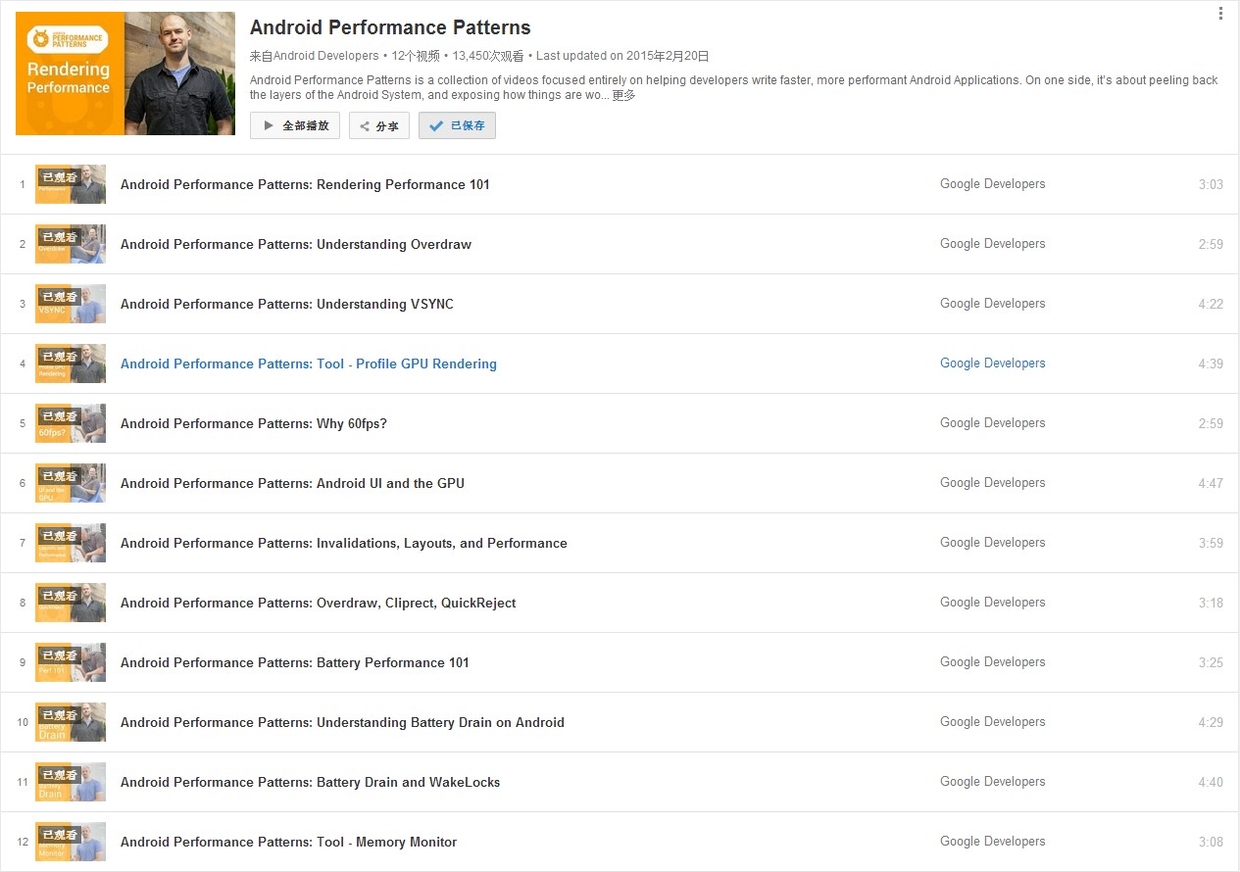
On January 6, 2015, Google officially released a series of short videos about Android performance optimization titled Android Performance Patterns. This series is available on YouTube.

Official Introduction:
Android Performance Patterns is a collection of videos focused entirely on helping developers write faster, more performant Android Applications. On one side, it’s about peeling back the layers of the Android System, and exposing how things are working under the hood. On the other side, it’s about teaching you how the tools work, and what to look for in order to extract the right perf out of your app.
But at the end of the day, Android Performance Patterns is all about giving you the right resources at the right time to help make the fastest, smoothest, most awesome experience for your users. And that’s the whole point, right?
In short, it’s a series of videos explaining Android performance. These videos are very short, typically between 3 to 5 minutes. The speakers talk very fast, which was quite a challenge for non-native listeners before subtitles were available. The good news is that these videos now have full subtitles.
While the videos are short, they are packed with information. A single sentence mentioned by the speaker might require hours of research to understand the underlying principle or how to use a specific debugging tool. This means the series doesn’t directly teach you “how to optimize your app” step-by-step; rather, it tells you what you need to know about Android performance so that you know which tools to use, what steps to take, and what goals to aim for.
This is the final article in our MAT series, detailing how to reconstruct original images from memory snapshots to debug leaks.
- Android Memory Optimization (1) - Introduction to MAT
- Android Memory Optimization (2) - Advanced MAT Usage
- Android Memory Optimization (3) - Viewing Original Bitmaps in MAT
When using MAT to analyze Android memory, you’ll frequently encounter Bitmap and BitmapDrawable$BitmapState objects. In many cases, these Bitmaps consume the majority of the heap. Memory leaks caused by Bitmaps are especially critical and must be handled promptly. When a potential image-related leak is found, seeing the actual image contents can be invaluable for diagnosis.
This article explains how to restore a Bitmap array object in MAT back into a viewable image.
This is the second article in our MAT series, focusing on advanced techniques for analyzing memory issues in Java and Android applications.
- Android Memory Optimization (1) - Introduction to MAT
- Android Memory Optimization (2) - Advanced MAT Usage
- Android Memory Optimization (3) - Viewing Original Bitmaps in MAT
Characteristics of Java Memory Leaks
- Main features: Reachable but Useless.
- Useless: Objects created but not released after they are no longer needed.
- Inefficient: Re-creating new objects for tasks where existing ones could be reused.
Advanced MAT Techniques
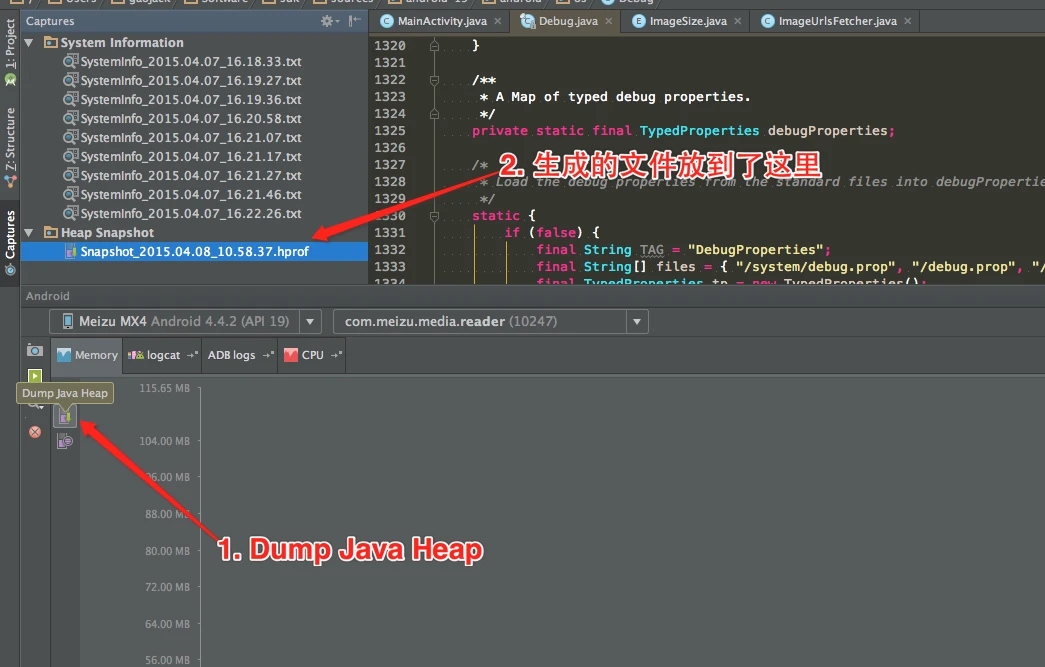
Dumping Memory with Android Studio
Modern versions of Android Studio make capturing heap dumps easy:
This is the first article in the series on using the MAT tool. This series consists of three articles, detailing how to use MAT to analyze memory issues, whether they are Java application memory issues or Android application memory issues:
- Android Memory Optimization (1) - Getting Started with MAT
- Android Memory Optimization (2) - Advanced MAT Usage
- Android Memory Optimization (3) - Opening Original Bitmap Images in MAT
Introduction to MAT
What is MAT?
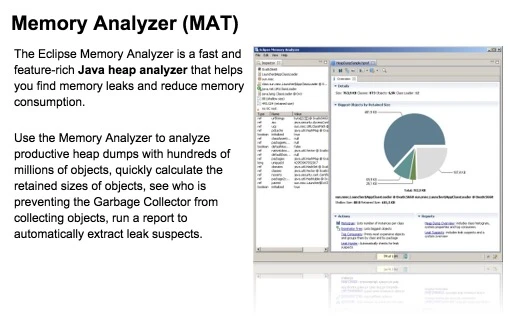
MAT (Memory Analyzer Tool), a memory analysis tool based on Eclipse, is a fast and feature-rich JAVA heap analysis tool. It helps us find memory leaks and reduce memory consumption. Using the memory analysis tool to analyze numerous objects, quickly calculate the size occupied by objects in memory, see who is preventing the garbage collector from reclaiming, and visually view the objects that may cause this result through reports.

Of course, MAT also has an independent version that doesn’t rely on Eclipse, but this version requires converting the file generated by DDMS before it can be opened in the standalone version of MAT when debugging Android memory. However, the Android SDK already provides this Tool, so it is also very convenient to use.
Introduction
This article is a translation of Android Performance Case Study Follow-up by the renowned Romain Guy. It explores several techniques, methodologies, and tools for Android performance optimization.
Translation
Two years ago, I published Android Performance Case Study to help Android developers understand the tools and techniques needed to identify, track, and optimize performance bottlenecks.
That article used the Twitter client Falcon Pro as a case study. Its developer, Joaquim Vergès, was kind enough to let me use his app as an example and quickly addressed the issues I found. Fast forward to recently: Joaquim was building Falcon Pro 3 from scratch. Before its release, he contacted me about a scrolling performance issue. Once again, I had to analyze it without access to the source code.
Here’s the fourth round-up of Android tips I’ve been posting.
It’s been a while since my last blog update. After joining a new company, I’ve been quite busy and haven’t been able to update the blog as frequently as before. However, the VPN I set up on this VPS is used daily and performs quite well. Recently, I’ve been focusing on Android performance-related topics, specifically Android performance optimization. I’ve realized how little I actually know about this area, so I’m starting from the application layer and working my way down, learning step by step. This series will document my learnings and summaries related to performance optimization.
First, let’s discuss GPU overdraw, which is often the most direct aspect developers encounter. This topic will be divided into two parts: Part 1 will cover the basic principles of GPU overdraw and provide optimization suggestions, while Part 2 will use practical examples to demonstrate general steps for optimizing GPU overdraw.
What is GPU Overdraw?
GPU Overdraw Concept: GPU overdraw occurs when a single pixel on the screen is drawn multiple times (more than once). For example, if a TextView has a background, the pixels displaying the text are drawn at least twice - once for the background and once for the text. GPU overdraw inevitably impacts performance to some extent. Device memory bandwidth is limited, and when overdraw causes an application to require more bandwidth than what’s available, performance degrades. Bandwidth limitations vary across different devices.
It’s been a while since my last update. After joining a new company, things have been busy, but I’ve been spending a lot of time researching Android performance. I’ve realized there’s so much I still don’t know, so I’m starting from the application level and working my way down. This series will document my learnings on Android performance optimization.
First, we’ll discuss GPU Overdraw, which is often the most direct point of contact for developers. This topic is split into two parts: Part 1 covers the theory and optimization suggestions, and Part 2 will walk through a practical optimization example.
What is Overdraw?
GPU Overdraw refers to the system drawing more than one layer on a single pixel during a frame. For example, if a TextView has a background color, the pixels displaying the text are drawn twice: once for the background and once for the characters. Overdraw inevitably impacts performance because memory bandwidth is finite. When overdraw exceeds the available bandwidth, the frame rate drops. Bandwidth limits vary significantly across different devices.
Here’s the second round-up of Android tips I’ve been posting.
With my recent project I’ve been posting one Android class/method a day. People have been asking for an archive of these links, so every couple weeks I’m going to round them up here. I’ll also be adding a bit of color commentary, but still the goal is for this not to be a ton of work for me. :)