

SmartPerfetto is now fully open source. Open the repository and you can see the runnable mainline project as it exists today: the Perfetto UI fork, the agentv3 backend, MCP tools, YAML Skills, scene strategies, scripts, and documentation. There is no private core module kept outside the repository, and this is not just a thin demo shell.
The project comes from a very concrete daily workflow: you have a trace in hand, Perfetto has already exposed the facts, but moving from facts to judgment still means jumping through tables, writing SQL, matching threads, checking FrameTimeline, finding the Binder peer, and then returning to the timeline to confirm everything again. SmartPerfetto tries to turn those repeated actions into tools, so performance engineers can spend more time on judgment.
It is still in development. I am releasing it now because trace analysis grows from real samples: real devices, real vendor differences, real product traces, and real PRs all change how Skills and strategies should be written. Waiting until every capability is stable before publishing it one way would miss the stage where samples matter most.
If you often open Perfetto to inspect scrolling jank, startup, ANR, Binder, CPU scheduling, or rendering pipelines, SmartPerfetto provides a Perfetto UI with an AI Assistant. After loading a trace, you ask questions in natural language. The backend queries trace_processor_shell, invokes YAML Skills, organizes evidence, and streams conclusions plus data tables back into the browser.
Project links:
- Main repository: https://github.com/Gracker/SmartPerfetto
- Perfetto UI fork: https://github.com/Gracker/perfetto
For normal trial use, you only need the main repository. Gracker/perfetto is the frontend fork used by the perfetto/ submodule. It mainly matters to developers who want to modify the AI Assistant plugin UI.
The previous two technical articles are better for readers who want the engineering details:
- From Trace to Insight: Harness Engineering in SmartPerfetto AI Agent: the architecture of the SmartPerfetto AI Agent and the Harness Engineering process.
- SmartPerfetto Architecture Q&A: 8 In-Depth Technical Questions: Q&A around the Agent, Workflow, and YAML Skills.
Those two articles go deep into the internal architecture. Once the source is public, readers usually care more about what is actually in the repository, whether it can run, and which parts are not stable yet. This article focuses on the open-source release itself: what is open, what works today, how the internal pieces are divided, how to run it locally, and where collaboration is most useful.
What Is Open Source
SmartPerfetto open sources the full engineering stack from UI to analysis rules. It keeps Perfetto’s timeline, SQL, and trace visualization capabilities, adds an AI Assistant panel inside the UI, and uses a TypeScript backend for Agent orchestration, MCP tool calls, Skill execution, report generation, and SSE streaming output.
The repository contains these parts:
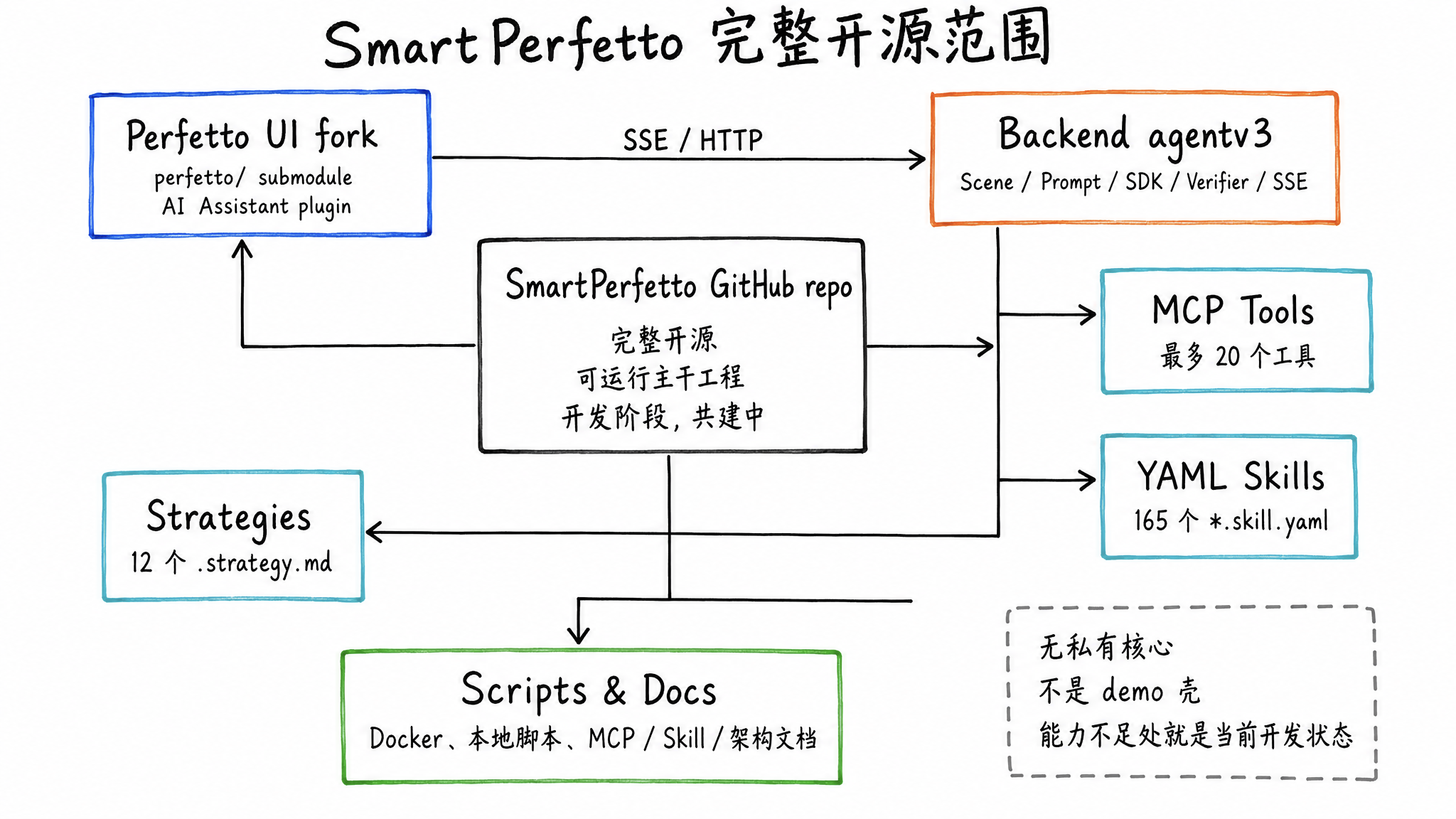
- Perfetto UI plugin and prebuilt frontend: the
perfetto/submodule integratescom.smartperfetto.AIAssistant, and the repository also includes the prebuiltfrontend/artifacts. Normal trial use does not require rebuilding Perfetto UI. - Backend Agent runtime: scene routing, Prompt building, MCP Server, Verifier, Artifact Store, and SSE Bridge under
backend/src/agentv3/. - YAML Skill system: there are currently 165
*.skill.yamlfiles underbackend/skills/, covering scrolling, startup, ANR, memory, CPU, GPU, Binder, rendering pipelines, and more. - Scene strategies: 12
.strategy.mdfiles underbackend/strategies/, used to inject different analysis steps and output constraints for different questions. - Engineering scripts and documentation: Docker Hub Compose, source-build Compose,
start.sh, frontend plugin development scripts, MCP tool references, Skill guides, technical architecture docs, and rendering pipeline references.
This release opens the whole project. If a capability is not good enough yet, that is the real state of the development-stage system. There is no separate private core implementation outside the repository. The UI, backend runtime, and Skill system are already usable, while public APIs and internal protocols will continue to evolve.
Why Open Source Now
Perfetto trace analysis depends heavily on samples. Different Android versions, vendors, rendering frameworks, and business scenarios can make the same kind of jank appear in different data shapes. One person or one team cannot cover all of those branches.
During SmartPerfetto development, the same pattern appeared repeatedly: SQL can find facts, but facts do not automatically become conclusions. Many analysis mistakes look like the model is “not smart enough,” but the real cause is often that a Skill missed a branch, a table was not covered, there were too few trace samples, or a strategy assumed a specific device behavior.
Open sourcing now is about putting three things into the open and letting them be tested by real traces:
- Runnable tools: readers can load their own traces locally and verify how the AI Assistant handles real data.
- Reviewable rules: YAML Skills, scene strategies, and MCP tools are all in the repository, so the SQL and strategy behind a conclusion can be inspected, modified, and reused.
- Accumulated samples: complex performance problems need trace samples and regression tests that accumulate over time, and an open-source repository is a better place to preserve those cases.
For Android performance engineers, a trace that reproduces a problem, a more accurate Perfetto SQL query, a more reliable Skill branch, or a review that points out a wrong attribution is often more useful than a large block of feature code.
That is also the meaning of open sourcing during development: SmartPerfetto does not need to wait until every analysis path is mature before accepting outside feedback. The earlier it meets real devices, real vendor differences, and real product traces, the easier it is to add the right Skills, strategies, and regression samples.
What Problems It Targets
Perfetto’s data is powerful, but analyzing a trace is not easy. A trace that is tens or hundreds of MB can contain millions of events. Threads, slices, counters, FrameTimeline, Binder, CPU frequency, and SurfaceFlinger composition state are scattered across different tables and tracks.
The most exhausting part is usually the middle of the investigation: after seeing a frame exceed the budget, you still need to decide whether the cause is main-thread queuing, a busy RenderThread, a slow GPU, SurfaceFlinger composition blocking, or an earlier Binder, scheduling, or IO delay.
SmartPerfetto gives repeated data collection and initial judgment to the tool system, while leaving attribution that needs experience to the Agent and the engineer together.
It is suited for problems such as:
- Scrolling jank: identify janky frames, VSync budget overruns, App/SF/GPU responsibility, and main-thread or RenderThread state.
- Startup performance: split cold start, warm start, lifecycle phases, main-thread time, Binder, class loading, GC, and IO.
- ANR: locate main-thread blocking, Binder peer, lock waits, scheduling delay, and system load.
- Interaction latency: break down time from input event to frame production and then to display.
- Memory and GC: observe GC pause, memory pressure, LMK, dmabuf, and system memory state.
- Rendering pipelines: identify Standard View, Compose, Flutter, WebView, SurfaceView, TextureView, game, Vulkan, and related paths.
It does not replace performance engineers. Trace capture quality, business context, device differences, and reproduction conditions still require human judgment. SmartPerfetto is closer to an analysis assistant that can reliably run SQL, organize tables, and check missing items according to strategies.
Runtime Screenshots
At runtime, the AI Assistant can appear as a floating window inside Perfetto UI, and it can also work together with the timeline, scene markers, and analysis reports. After users load a trace, they can ask questions, inspect tool calls, expand evidence, and review conclusions in the same interface.
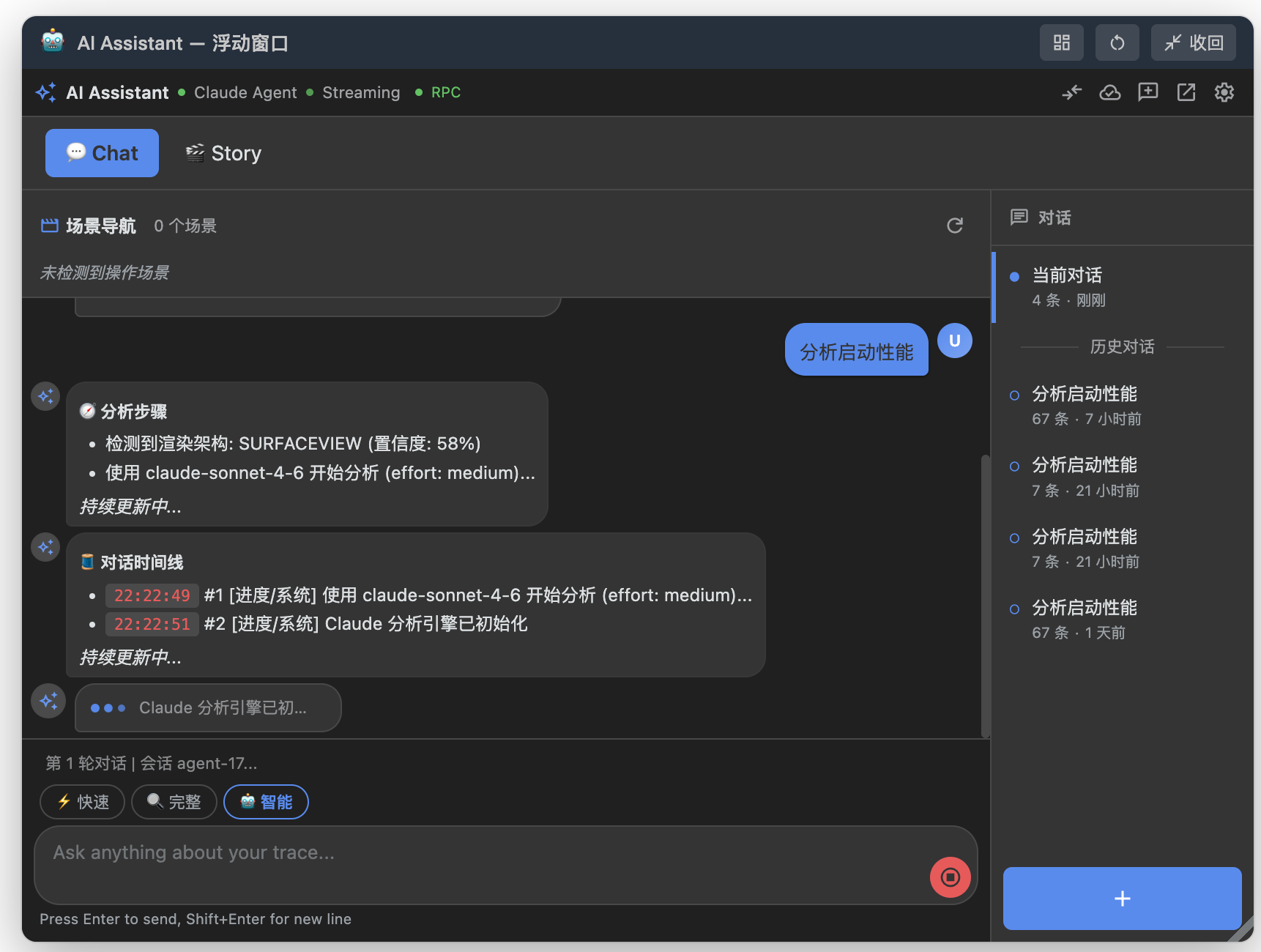
The floating window is useful when you want to ask follow-up questions without leaving the Perfetto timeline. It keeps the current conversation, scene entries, session history, and input box together, so you can watch the trace while deciding the next analysis direction.
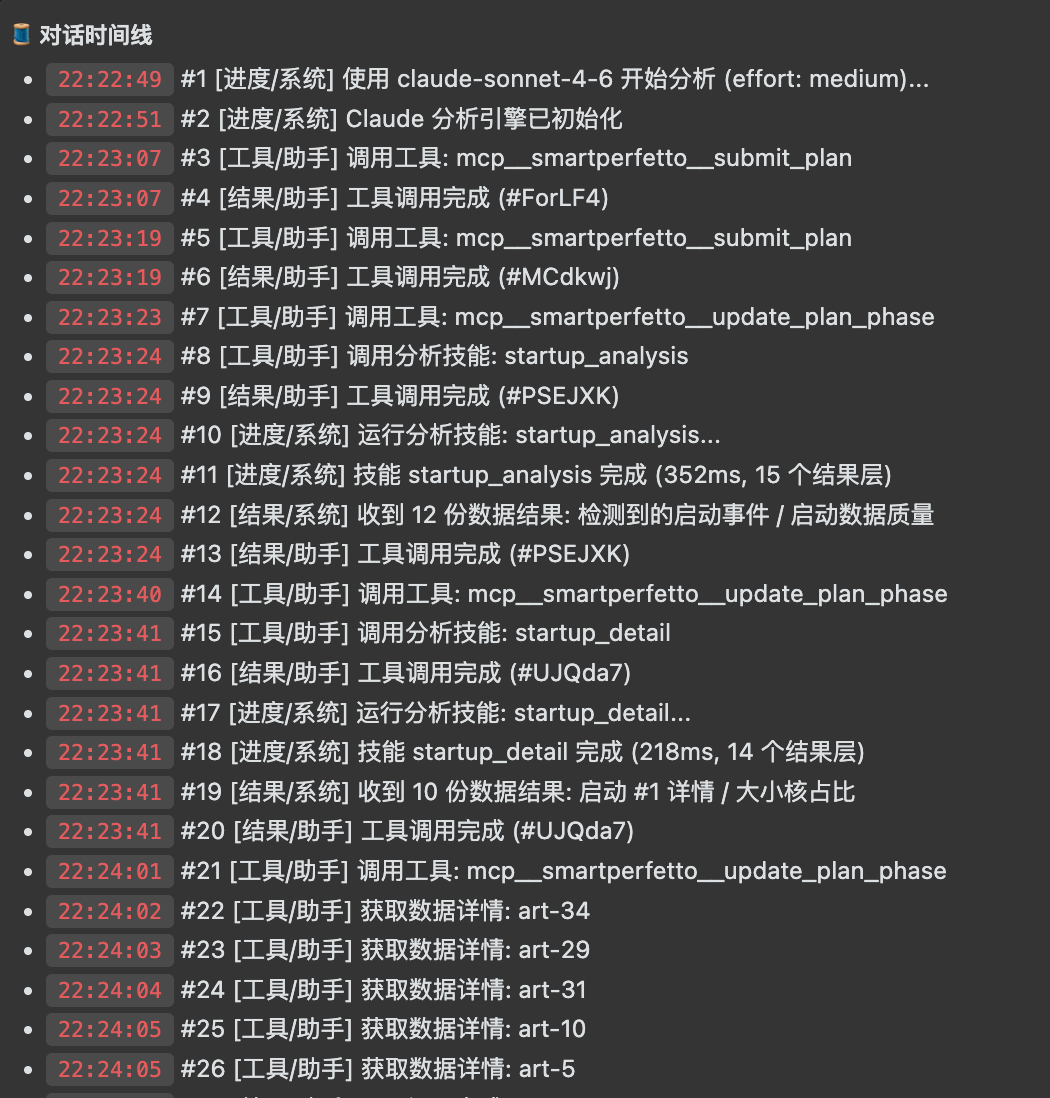
The conversation timeline records Agent initialization, plan submission, Skill calls, SQL queries, and data-detail fetches. You can review the intermediate actions, not just the final conclusion.
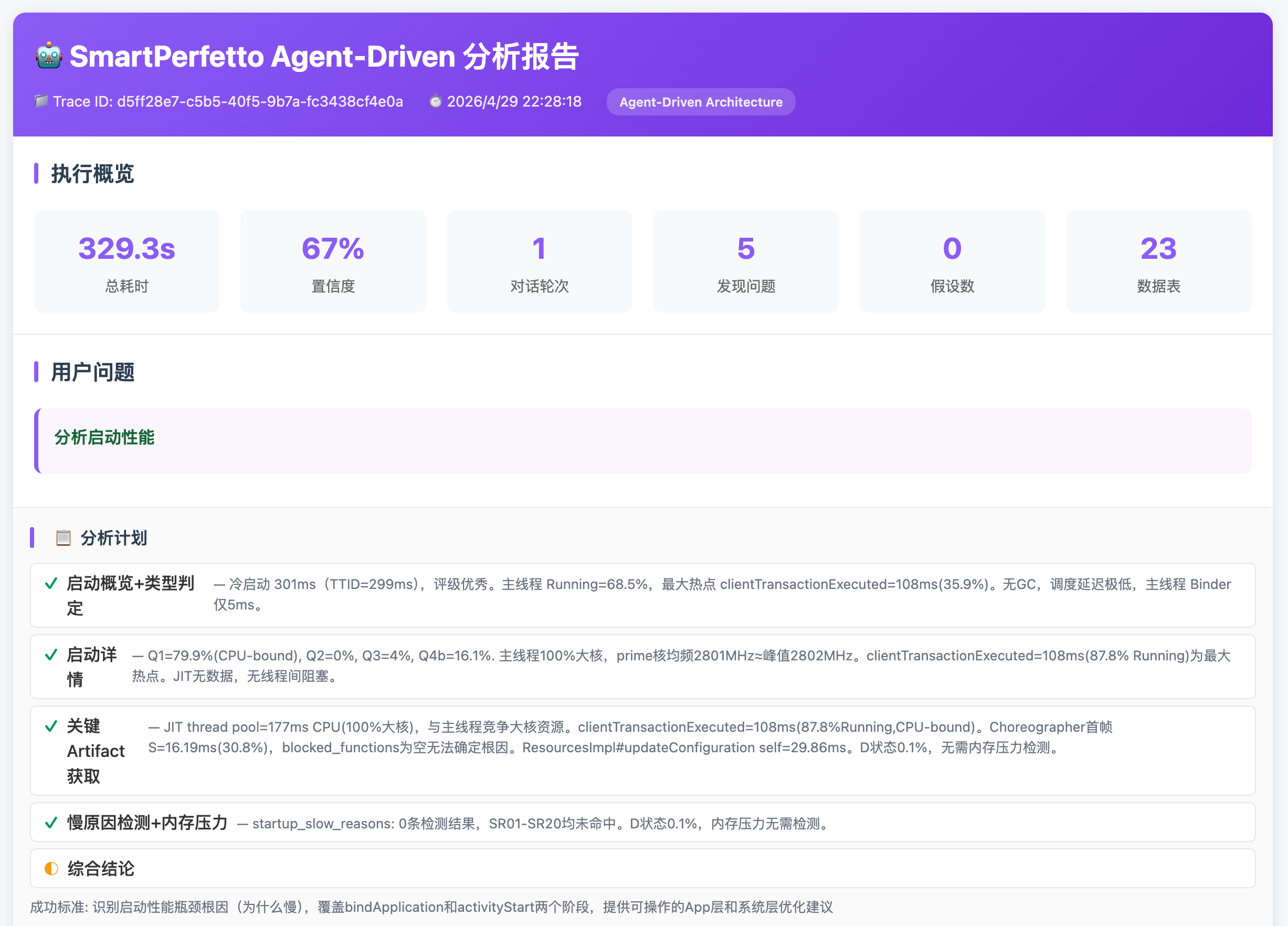
The analysis report puts startup events, data quality, phase durations, suspicious slices, and recommendations into one result, making it easier to move from a natural-language conclusion back to concrete evidence.
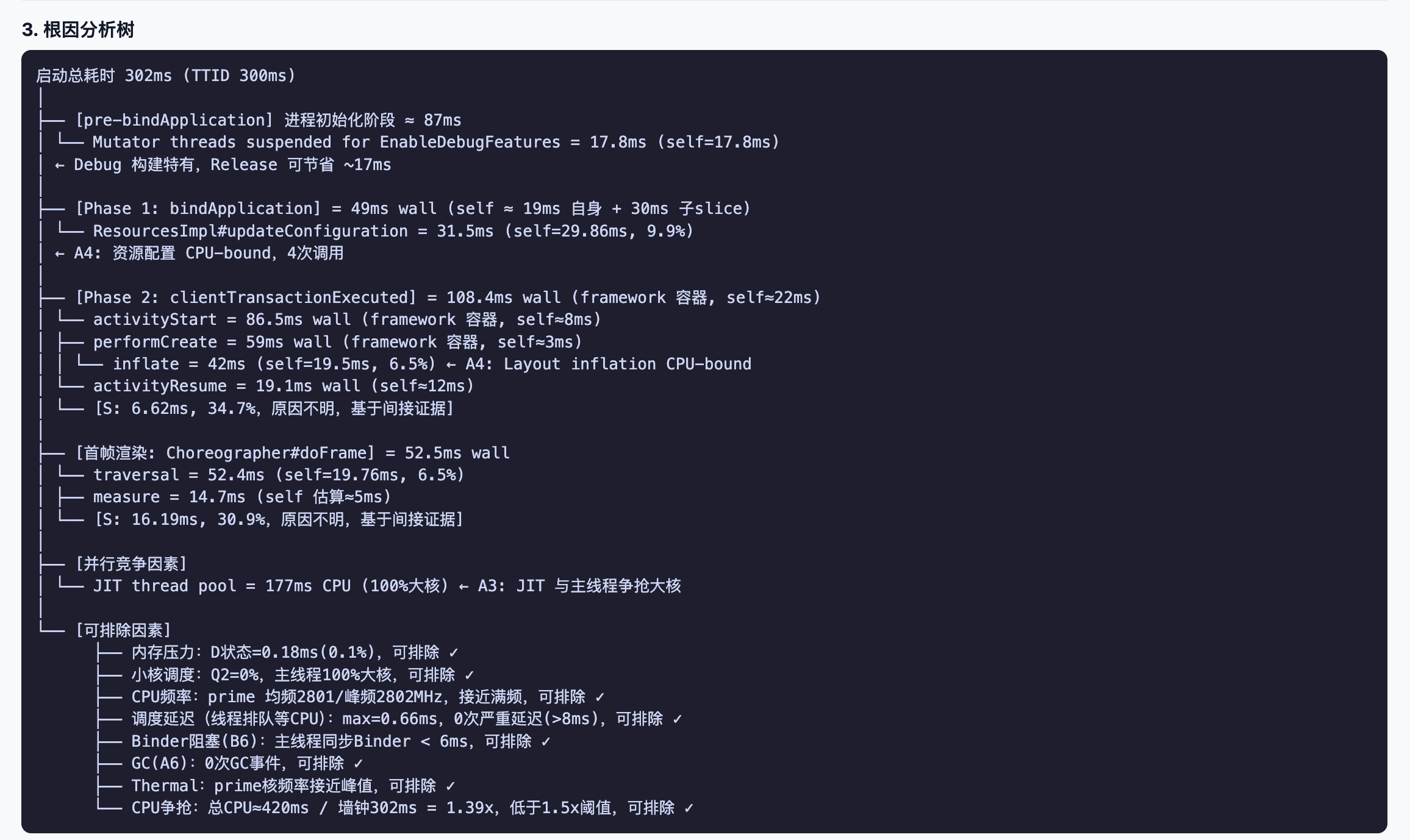
Root-cause analysis tries to tie each judgment back to threads, timestamps, SQL results, and trace slices. Engineers still need to review it with business context, but they do not have to start from a blank SQL page.
Overall Architecture
The main SmartPerfetto architecture has three layers: the frontend is still Perfetto UI, the backend orchestrates the Agent and tools, and data queries are handled by Perfetto’s official trace_processor_shell.
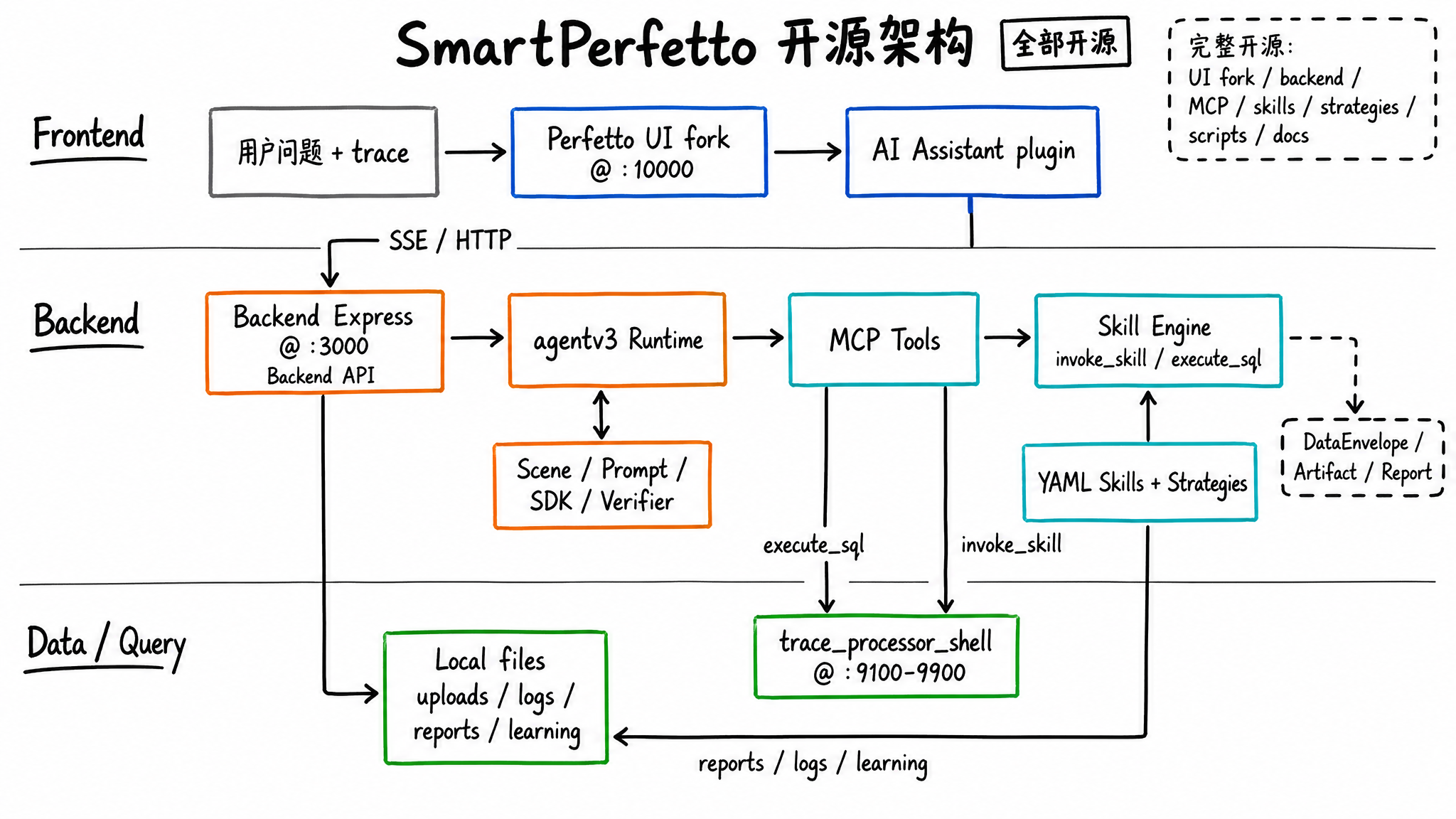
Several boundaries in this architecture are important:
- The frontend does not analyze traces directly. It loads traces, displays the timeline, sends questions, receives SSE events, and renders results.
- The backend
agentv3is the main runtime. It handles scene recognition, Prompt assembly, MCP tool registration, Verifier checks, and report generation. trace_processor_shellremains the data query engine. All performance numbers come from SQL or deterministic calculations inside Skills.- YAML Skills package common analysis flows into reusable units, so the Agent does not need to write complex SQL from scratch every time.
The design judgment is straightforward: large models are good at understanding questions, choosing directions, and organizing causal relationships. Databases and Skills are good at querying, aggregating, paginating, formatting, and repeating execution.
Skill: Turning Performance Experience into Executable Analysis Units
SmartPerfetto does not put all analysis logic into TypeScript, and it does not let the large model freely compose SQL. A large amount of domain logic lives in YAML Skills.
A Skill can declare input parameters, required tables, SQL, display columns, layered output, conditional branches, iterators, and parallel steps. The Agent only needs to call:
1 | invoke_skill("scrolling_analysis", { process_name: "com.example.app" }) |
The backend Skill Engine executes the corresponding SQL and composite steps, then wraps the result into a DataEnvelope that the frontend can render. This has three benefits:
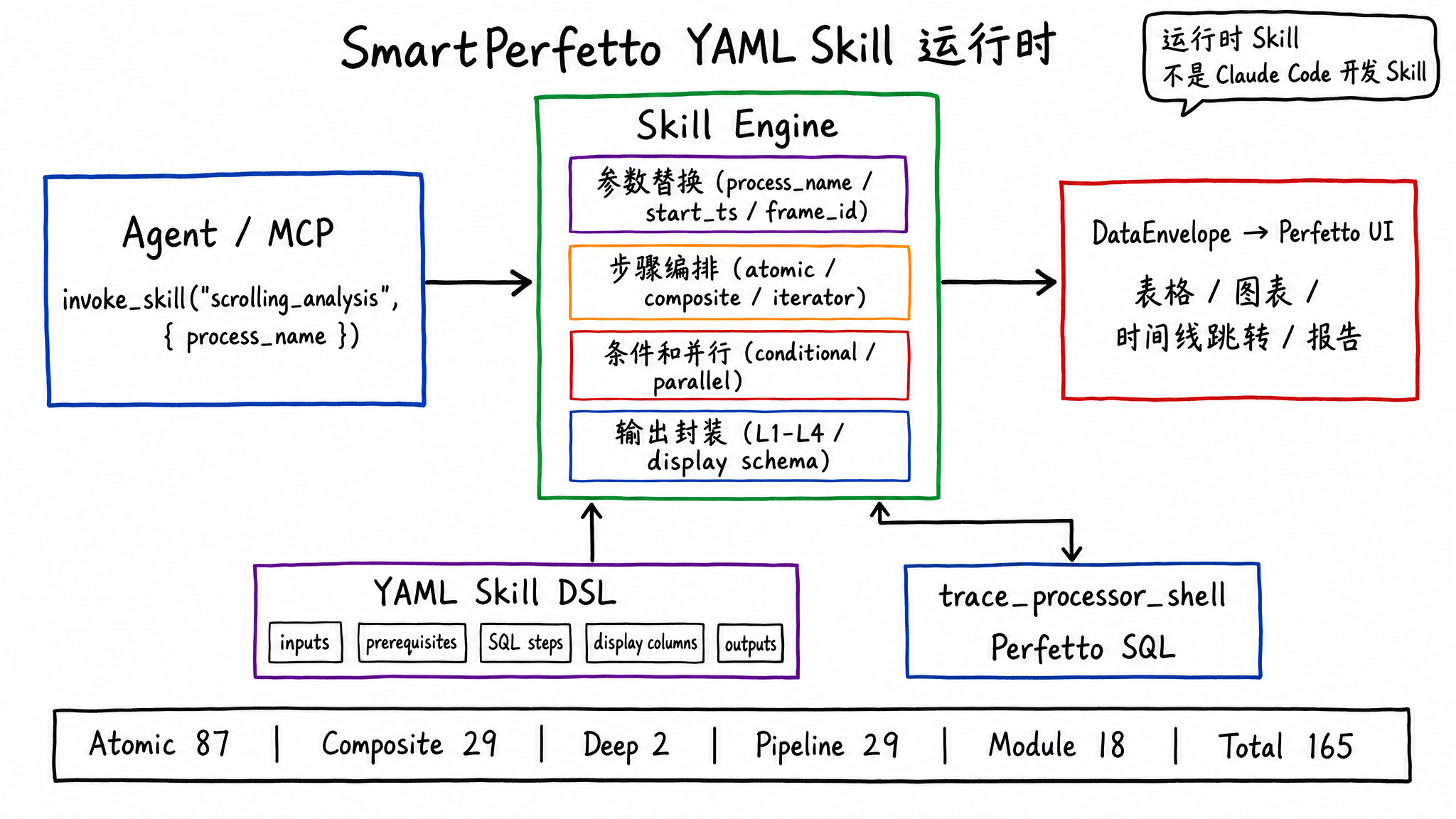
- Repeatable results: with the same trace and the same parameters, the Skill’s calculation path is stable.
- Renderable output: column names, data types, timestamp jumps, and duration formatting are declared in the Skill.
- Lower contribution cost: performance engineers who know Perfetto SQL can modify YAML and SQL without first understanding the whole backend codebase.
Current Skill distribution:
| Type | Count | Location | Purpose |
|---|---|---|---|
| Atomic | 87 | backend/skills/atomic/ |
Single SQL queries, such as CPU frequency, Binder, GC, and FrameTimeline |
| Composite | 29 | backend/skills/composite/ |
Multi-step analyses, such as scrolling_analysis, startup_analysis, and anr_analysis |
| Deep | 2 | backend/skills/deep/ |
Deep analysis such as call stacks and CPU profiling |
| Pipeline | 29 | backend/skills/pipelines/ |
Rendering pipeline detection and teaching content |
| Module | 18 | backend/skills/modules/ |
Layered expert modules for app, framework, kernel, and hardware |
This Skill system is part of the SmartPerfetto runtime, and it should be separated from development-tool Skills. Claude Code Skills help developers build SmartPerfetto. SmartPerfetto YAML Skills help users analyze traces. Their names are similar, but their runtime location, inputs, outputs, and goals are different.
MCP: Letting the Agent Touch Traces Only Through Tools
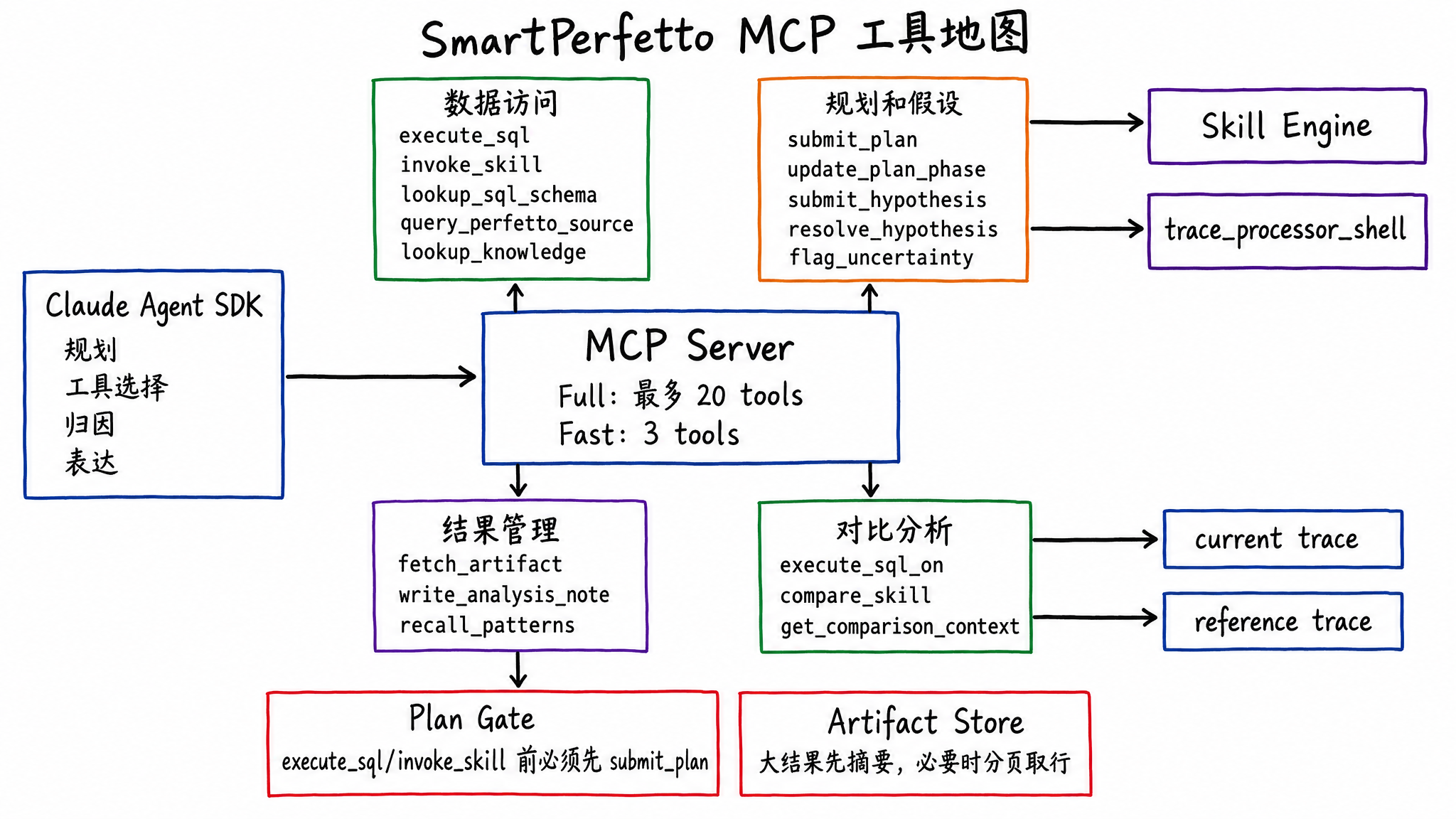
SmartPerfetto exposes tools to the Agent through MCP (Model Context Protocol). Full mode exposes up to 20 tools, while Fast mode keeps only 3 lightweight tools.
Common tools fall into several categories:
- Data access:
execute_sql,invoke_skill,list_skills,lookup_sql_schema,query_perfetto_source,list_stdlib_modules,lookup_knowledge, anddetect_architecture. - Planning and hypotheses:
submit_plan,update_plan_phase,revise_plan,submit_hypothesis,resolve_hypothesis, andflag_uncertainty. - Result management:
fetch_artifact,write_analysis_note, andrecall_patterns. - Comparative analysis:
execute_sql_on,compare_skill, andget_comparison_context.
execute_sql and invoke_skill are plan-gated. The Agent must submit an analysis plan before it can query data. This gate is not meant to freeze the workflow. It requires the Agent to state the phases, goals, and expected tools before acting, and the Verifier later checks whether key actions are missing.
Tool results are also compressed and layered. Large results go into the Artifact Store. The Agent first receives a summary, then fetches rows by page when needed. This avoids dumping hundreds of thousands of tokens from one Skill output into the context.
From Question to Conclusion
When the user enters “analyze scrolling jank,” SmartPerfetto does not send the trace directly to the large model. The trace file does not enter the prompt. The Agent only sees structured results returned by tools.
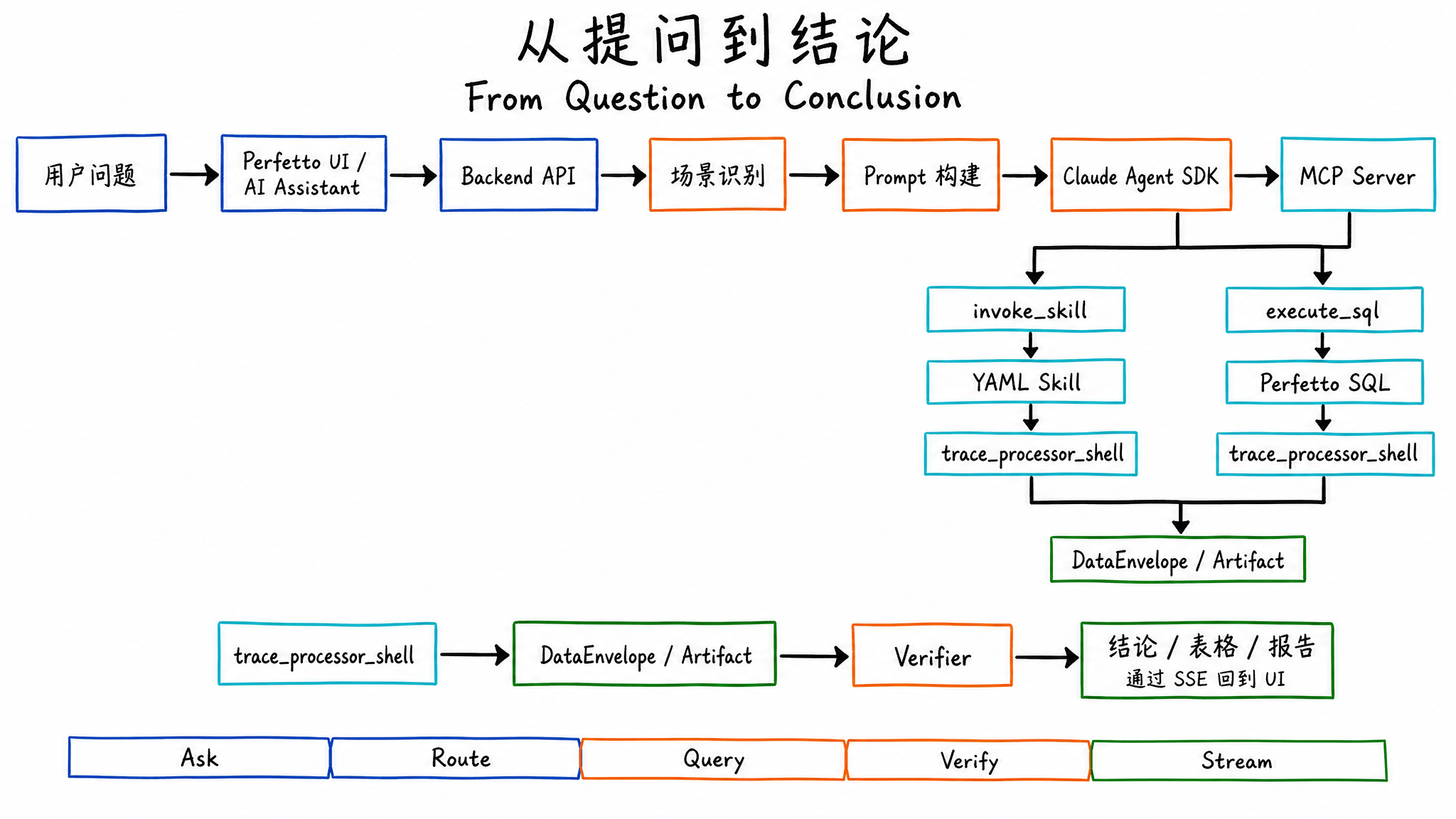
A scrolling jank analysis usually goes through these steps:
- The frontend sends the question, traceId, and analysis mode to the backend.
- The backend classifies the scene, such as
scrolling,startup,anr,memory,pipeline, orgeneral. - Prompt Builder injects the corresponding
.strategy.md, architecture template, output format, and required knowledge. - The Agent submits a plan first, then invokes MCP tools.
- The preferred path is
invoke_skillfor predefined analysis. If a Skill does not cover the case, the Agent useslookup_sql_schemaandexecute_sqlto add queries. - Skill and SQL results return as DataEnvelopes, Artifacts, tables, or summaries.
- Verifier checks evidence support, hypothesis state, scene coverage, and common missing items.
- The backend pushes progress, tool results, answer tokens, conclusions, and the final report through SSE.
The final user experience includes a natural-language conclusion, tables, timestamp jumps, a report URL, and a session that can continue with follow-up questions.
How to Run It
If you want to try it with your own trace, start with the shortest path. The repository already includes a prebuilt Perfetto UI, so normal trial use does not require initializing the perfetto/ submodule or preparing a local C++ build environment.
1 | git clone https://github.com/Gracker/SmartPerfetto.git |
The default development environment is currently organized around macOS. Windows users should use Docker Desktop with the WSL2 backend. If you want to run source scripts, WSL2 is also recommended instead of a native Windows shell. Ubuntu and other Linux distributions still need more testing. If you hit issues, include environment details in your Issue or PR.
If you only want to run the tool first, the recommended path is the Docker Hub image. This only requires Docker Desktop/Engine and an LLM API key. You do not need Node.js. The image already includes the backend, prebuilt frontend, and a pinned trace_processor_shell:
1 | cp backend/.env.example .env |
After startup, open http://localhost:10000, load a .pftrace or .perfetto-trace file, and then open the AI Assistant panel. The backend health check is http://localhost:3000/health. Uploaded files and logs are stored in Docker volumes, so they remain after container restart.
To stop the containers:
1 | docker compose -f docker-compose.hub.yml down |
You only need the source-build path when testing Dockerfile changes or building local code that has not been published to the image:
1 | cp backend/.env.example backend/.env |
The source-build path still uses the prebuilt frontend/ artifacts in the repository. It does not rebuild the perfetto/ submodule.
For local source checkout startup, use ./start.sh. This script uses the prebuilt frontend/ artifacts in the repository and downloads a pinned trace_processor_shell when needed:
1 | cp backend/.env.example backend/.env |
You only need to initialize the Perfetto submodule and use the frontend development script when modifying the AI Assistant plugin UI, such as ai_panel.ts or styles.scss:
1 | git submodule update --init --recursive |
Both local scripts start two services:
- Frontend:
http://localhost:10000 - Backend:
http://localhost:3000
For daily backend, Skill, strategy, or normal documentation changes, prefer ./start.sh. Switch to ./scripts/start-dev.sh only when modifying the Perfetto plugin UI.
Model integration currently focuses on Anthropic direct access or Anthropic Messages-compatible proxies. Third-party models need an adapter layer and stable support for streaming and tool/function calling. If a model can only chat and cannot reliably call tools, SmartPerfetto’s SQL queries and Skill calls cannot complete properly.
Where to Contribute
If this project becomes reliable later, the most valuable inputs will be reproducible traces, runnable SQL, Skills that explain failure causes, and regression samples that keep accumulating.
Good starting points:
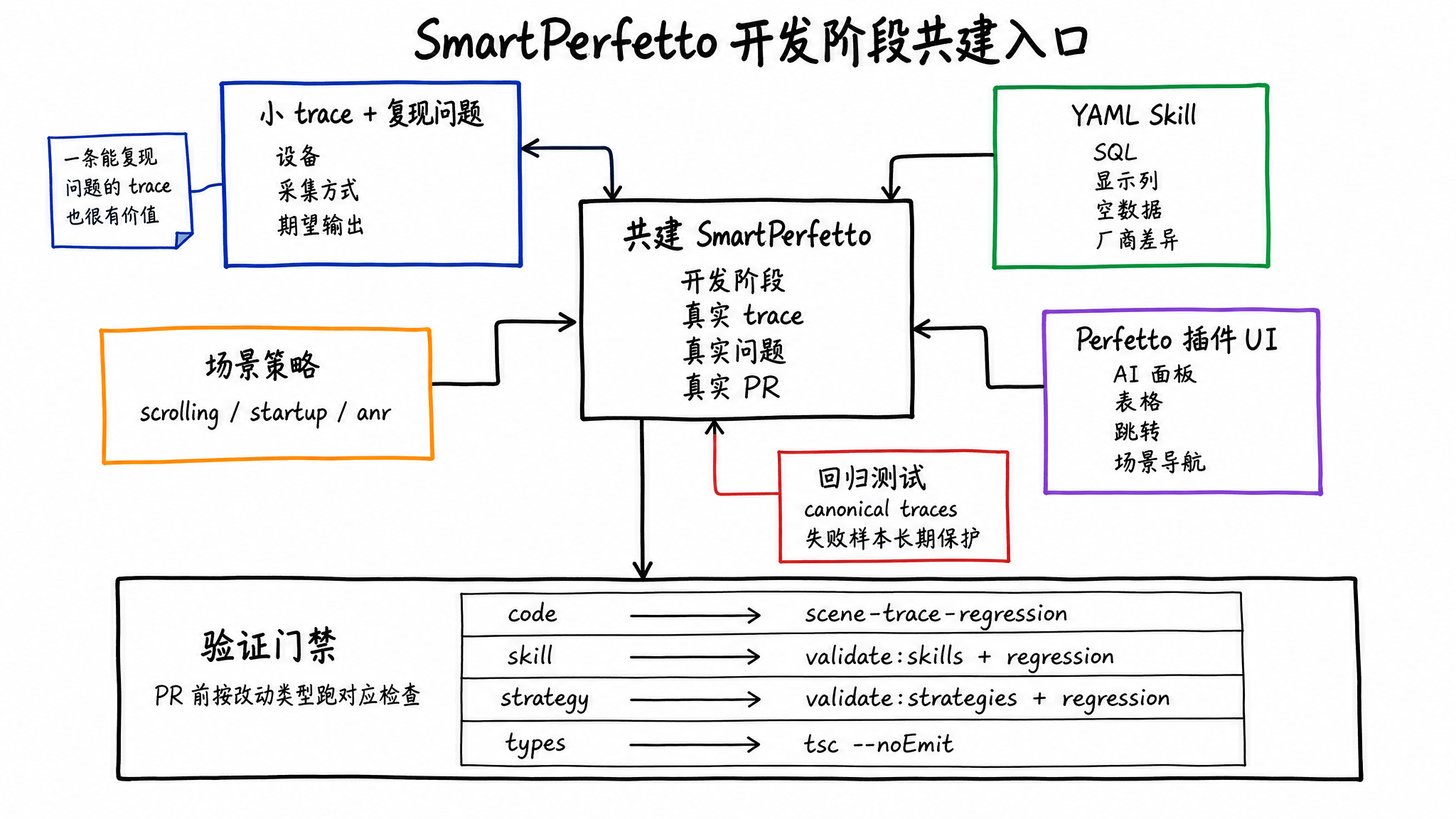
- Provide small traces and reproducible problems: a trace that demonstrates the problem is easier to turn into a test and a Skill than an abstract description.
- Improve YAML Skills: add SQL, display columns, empty-data hints, vendor differences, and edge cases.
- Improve scene strategies: make
scrolling,startup,anr, and other strategies cover more common analysis steps. - Fix the Perfetto plugin UI: the AI panel, tables, charts, jumps, and scene navigation all live in the frontend plugin.
- Add regression tests: the project already has 6 canonical trace regression gates, and new failure samples can become long-term protection.
The project changes quickly during development. Before contributing, sync the main SmartPerfetto repository. If you modify the AI Assistant plugin UI, also sync the perfetto/ submodule. When you find a bug, an improvement opportunity, or have already fixed something in your fork, prefer opening an Issue or PR with the reproduction trace, expected output, and test results.
If you want to participate in Skill, Agent, or frontend development over the long term, you can use the contact information in the README to discuss collaboration. Include your GitHub account and email so it is easier to add you to core development collaboration later.
Before submitting a PR, run the checks that match your change type:
1 | cd backend |
Different PRs need different checks. Code changes should at least run scene trace regression. Skill changes should run validate:skills plus regression. Strategy and template changes should run validate:strategies plus regression. Type or build issues should add npx tsc --noEmit.
License and Current Boundaries
SmartPerfetto core code uses AGPL-3.0-or-later. The perfetto/ submodule is a fork of Google Perfetto and continues to use Apache-2.0. Before internal enterprise modification, external service deployment, or commercial integration, you should carefully understand the obligations of AGPL. If you need commercial licensing without AGPL obligations, use the contact information in the README.
Open sourcing the full project does not mean every analysis path is complete. Several runtime boundaries remain:
- It is best suited for Android 12+ traces that include FrameTimeline data.
- The model needs stable support for streaming and tool/function calling.
- Third-party model compatibility still needs more real testing. For now, Anthropic direct access or a stable Anthropic-compatible proxy is recommended first.
- When trace capture misses required fields, many conclusions can only degrade into missing-data explanations.
- Agent output still needs engineer review, especially for vendor customization, non-standard rendering paths, and complex cross-process waits.
After open sourcing, SmartPerfetto puts repeatable trace queries, scene steps, data presentation, and quality checks into the repository. Performance analysis will not become a single prompt. Complex problems still need Perfetto, SQL, trace evidence, and engineering experience.
SmartPerfetto aims to turn that experience into engineering artifacts that can be modified, reviewed, reused, and protected by regression tests.
Discussion Group
If you are trying SmartPerfetto, want to report bugs, discuss trace analysis results, submit PRs, or help build Skill, Agent, and frontend capabilities, scan the code to join the discussion group:

If the group QR code is full or expired, add me on WeChat at 553000664 and include SmartPerfetto in the note. I will invite you to the group.