

The previous update ended with v1.1.1 on July 17, 2026. By then, SmartPerfetto already had a dual-trace workspace, Quick Mode, private analysis context, a unified Agent runtime architecture, and dedicated Camera, Heap, and GPU analysis capabilities.
Over the next five weeks, from July 18 through August 21, the repository advanced to v1.7.0. New features continued to land, but much of the work shifted toward knowledge provenance, distribution quality, access isolation, result completeness, and reversible improvement.
SmartPerfetto is moving from “complete one analysis” toward “complete analyses reliably and traceably across more environments.”
This post uses the publicly released v1.7.0 source as its endpoint and reviews the major capabilities added after v1.1.1.
Project and previous post:
- SmartPerfetto: https://github.com/Gracker/SmartPerfetto
- Previous post: SmartPerfetto 2026-06-04 to 2026-07-17 Six-Week Update
Five Weeks of Changes at a Glance
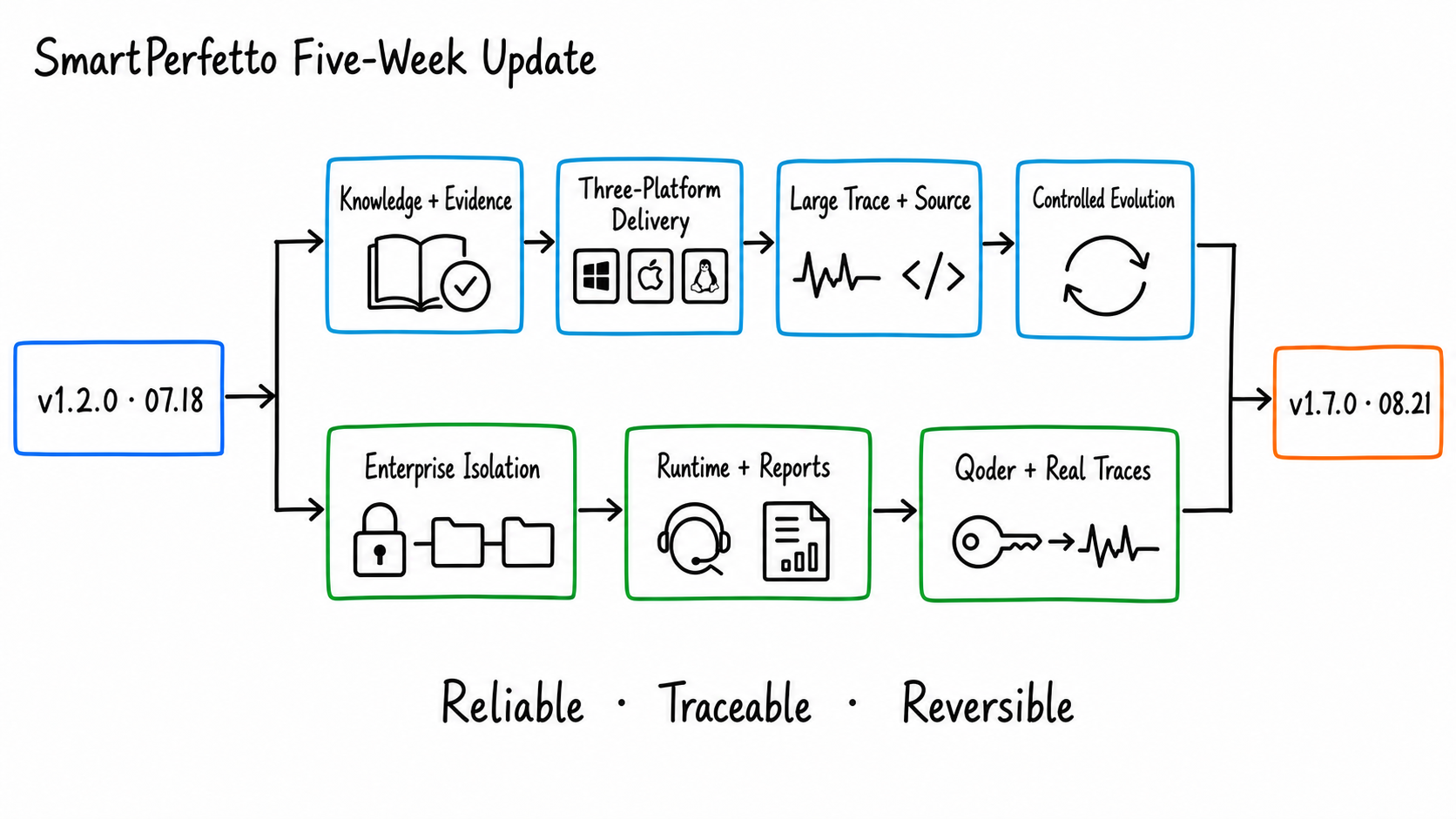
| Item | Result |
|---|---|
| Date range | 2026-07-18 to 2026-08-21 |
| Version range | v1.2.0 to v1.7.0 |
| Major release lines | Six: v1.2, v1.3, v1.4, v1.5, v1.6, and v1.7 |
| Commit count | 122 feature, fix, release, and merge commits |
| Portable targets | Windows x64, macOS arm64, and Linux x64 |
| Existing local model-regression evidence | v1.6.0 completed 7 scenarios across 3 runtimes, for 21 paths |
The five-week roadmap can be grouped into seven tracks:
- Android Internals moved from maintainer-local material into a signed Knowledge Pack shipped with every distribution.
- Windows, macOS, and Linux portable packages gained update guidance, signing, notarization, migration rules, and target-native acceptance.
- The dual-trace workspace began supporting large files, while Code-Aware Analysis mapped Trace evidence back to local source code.
- Self-Evolution established a controlled path from feedback and replay evaluation to human application and rollback.
- Enterprise OIDC, workspace isolation, and private-analysis projection were added progressively.
- Provider/runtime execution and final reports adopted stricter timeout, identity, and quality gates.
- v1.7.0 added Qoder BYOK routing and completed publication review for six real Trace fixtures.
1. Android Internals Became a Versioned, Shippable Knowledge Pack
v1.2.0 introduced the Android Internals Knowledge Pack.
System background knowledge had previously depended more heavily on maintainer-local directories or a private Wiki. npm, Docker, source, and portable distributions now carry the same signed, version-pinned offline snapshot.
Users no longer need to know a maintainer’s directory structure or have access to a private repository to use controlled Android system-background retrieval.
The design preserves several important boundaries:
- The Knowledge Pack has its own version and content fingerprint. A session pins the version it starts with.
- Updates are checked through a TUF stable channel. If verification fails, SmartPerfetto keeps using the last known-good version.
- The model receives only budget-bounded snippets after secret redaction.
- Reports retain source, version, fingerprint, and snippet hash. Logs and SSE events do not project the source text.
- A knowledge hit can explain system background, but the root cause in the current Trace must still be established through SQL, a Skill, or other Trace evidence.
Android Skills also gained stronger analysis safeguards. SQL guardrails reject more dangerous or insufficiently grounded query patterns, while public Skill classification and regression coverage continued to expand.
Knowledge can help an Agent form better hypotheses. It cannot replace facts from the current Trace.
Teams that own a private Android Internals checkout can still register it as a private knowledge source. Doing so requires an explicit path allowlist, rights acknowledgement, consent to send material to the Provider, and the source ID selected for the current request.
The public Pack and private knowledge source are separate paths. Neither weakens the permissions of the other.
2. Analysis Output Converged on Completeness, Persistence, and Verifiability
In late July, SmartPerfetto completed a systematic localization pass across analysis surfaces. Skill titles, teaching content, critical-path states, and analysis output now follow the selected language instead of mixing localized text with internal English status labels.
Report saving also gained path and lifecycle constraints. A completed result, HTML report, snapshot, and comparison appendix each retain their own identity, preventing a restored session, continued question, or exited Perfetto branch from attaching output to the wrong result.
v1.6.0 then hardened final-report completion:
- The current/reference identity of a dual-trace run participates in final-result quality checks.
- Missing comparison appendices, evidence citations, or required sections are fed back into the same report continuation.
- Continuation corrects only missing material instead of asking the model to rewrite an already completed report.
- Normalization and UI projection preserve the complete final report rather than replacing a long report with an intermediate summary.
These changes are easy to miss in a feature list, but they determine whether an analysis can be used in team workflows. A report is ready to save, compare, or attach to an issue only when its identity, evidence, and conclusions still correspond.
3. Portable Packages Became Platform-Specific Deliverables
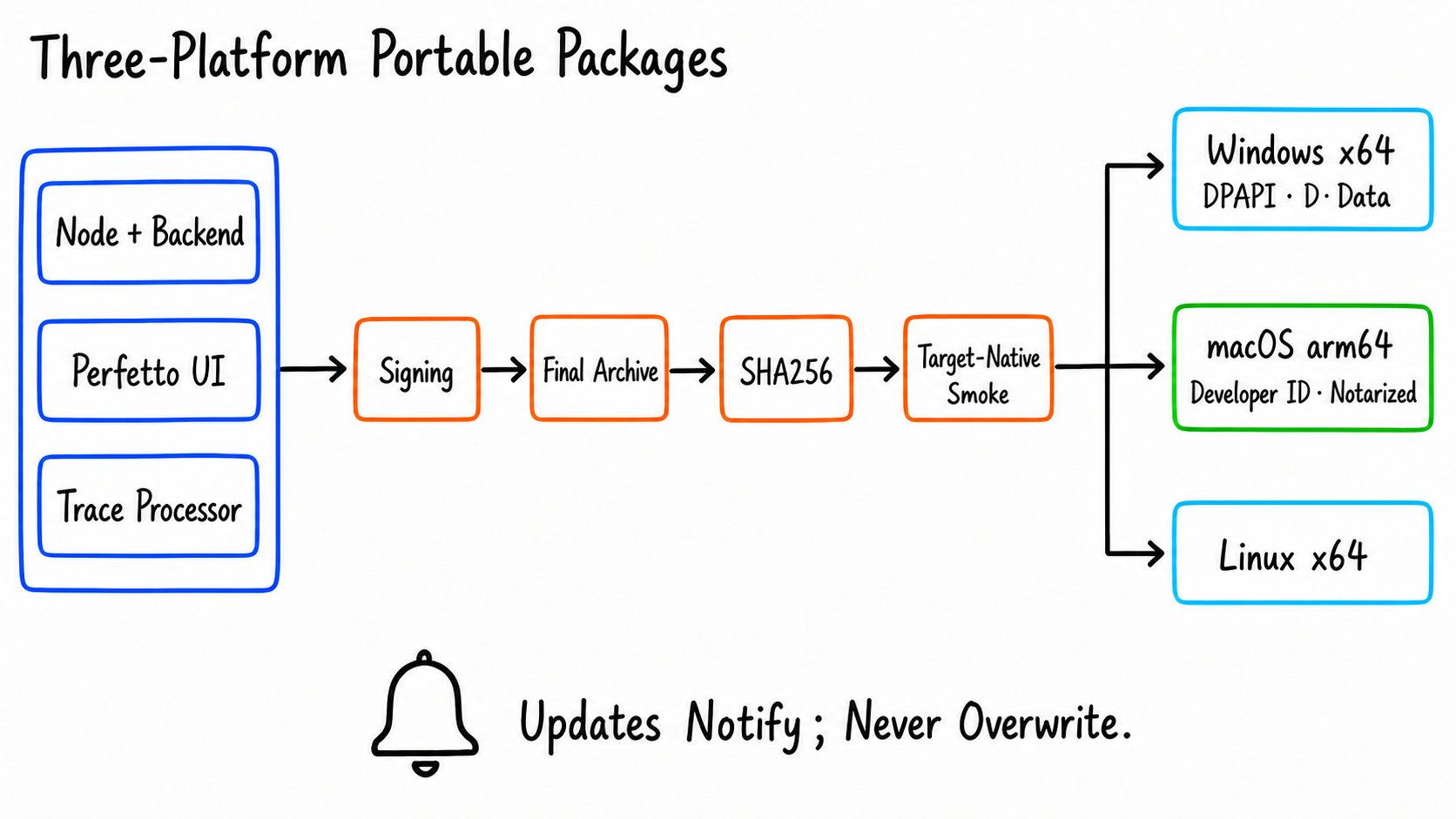
From v1.2.x through v1.7.0, the Windows x64, macOS arm64, and Linux x64 portable packages went through several rounds of hardening. Each archive contains the Node runtime, backend, committed Perfetto UI, and a pinned trace_processor_shell; users can start SmartPerfetto after extraction.
This period added or completed the following capabilities:
- The Web UI and
smp update checkreport the current build, detected distribution, latest version, and matching update action. - Update checks are notifications only. They do not overwrite directories, modify source checkouts, restart containers, or migrate user data automatically.
- The macOS package signs every Mach-O binary, uses Developer ID notarization and stapling, and declares the supported minimum OS version.
- Windows startup, health probes, process cleanup, and DPAPI credential loading are verified natively on a Windows runner.
- Windows prefers a safe data location on a writable
D:drive and preserves conservative migration and conflict rules for an existing data directory. - Launch URLs use an explicit IPv4 loopback address to avoid machine-specific
localhostresolution differences.
There was also a public failure along the way: the v1.2.3 macOS asset exposed final-signature and deployment-target problems.
Later releases brought the signing set, target OS, immutable asset, digest, and target-native smoke into one release process. The release page now provides SHA256 digests, and acceptance checks the exact uploaded archive rather than a similar artifact from a temporary directory.
4. Large Traces, Current Perfetto, and Local Source Code Formed One Workflow
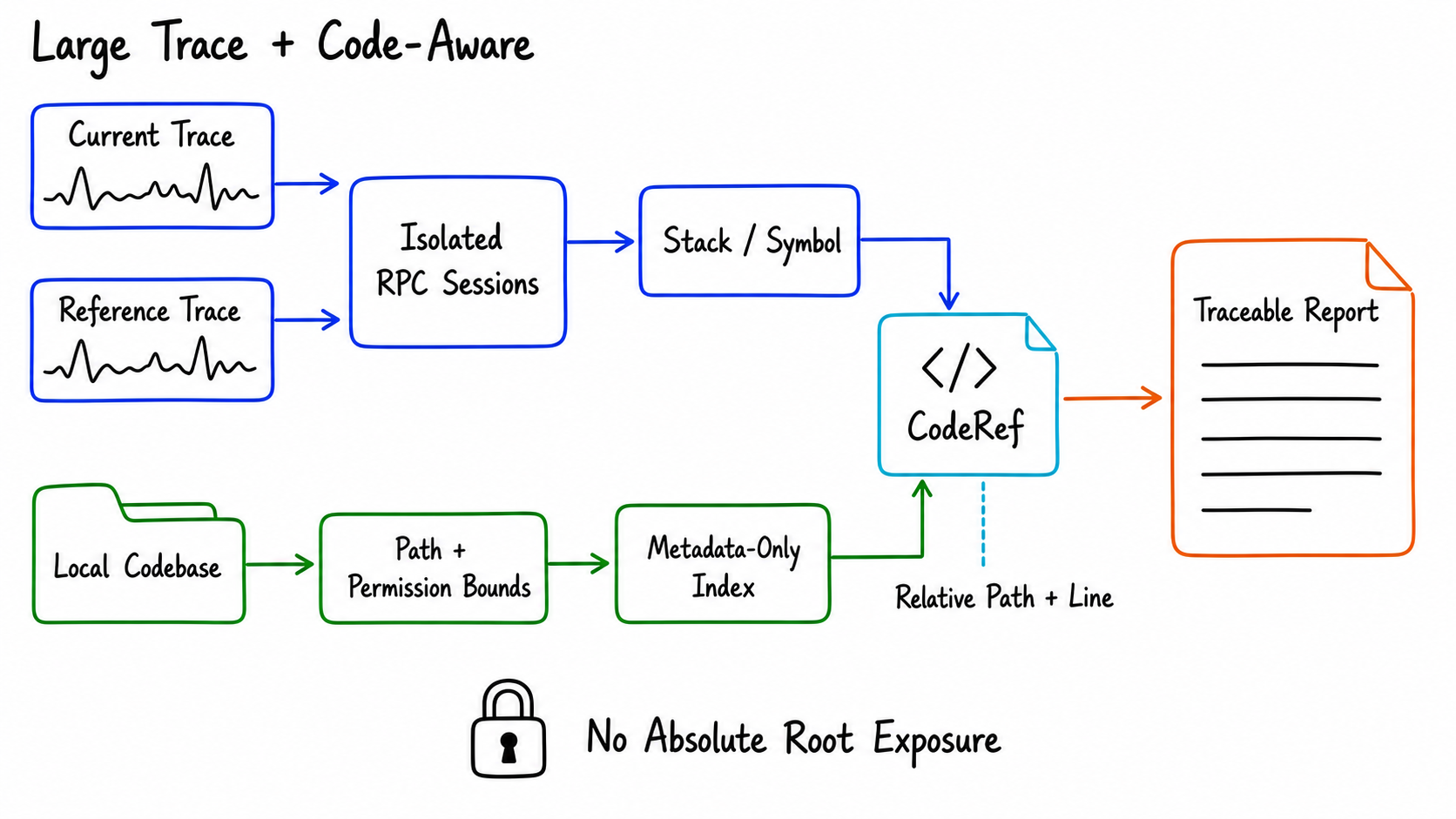
v1.3.0 addressed the main bottleneck when the dual-trace workspace opened large files. A historical Trace no longer has to be copied in full into a second browser pane; the backend creates an isolated Trace Processor RPC session for it.
Startup deadlines scale with file size, processor leases protect active viewers, and a runtime supervisor reclaims abandoned processes.
The same release added a native directory picker. Source and portable runs can open the system folder picker under loopback conditions, so users do not have to enter long absolute paths into a Web page.
v1.5.x expanded directory selection into Code-Aware Analysis:
- Register local App, AOSP, kernel, or OEM SDK source trees.
- Use call stacks, native frames, kernel symbols, and indexes for metadata-only lookup.
- Represent source locations in reports as
CodeRefvalues containing relative paths, line numbers, and symbols, without exposing the absolute local root. - Read source text only through a controlled excerpt endpoint bounded by path, file type, size, line-count, and redaction rules.
- Leave the original trace-only analysis path unchanged when no codebase is selected for the session.
The same period also synchronized newer Perfetto frontend capabilities. The browser can use Trace Doctor, unified Stack Samples/flamegraphs, Video Frames, Pixel input-lifecycle and CUJ views, while local WASM can process zstd traces, strace -ttt, and multi-statement SQL.
Those browser capabilities remain separate from backend AI and Skills. The backend continues to use the native Trace Processor pinned in the distribution.
5. Self-Evolution Made Feedback Reviewable and Reversible
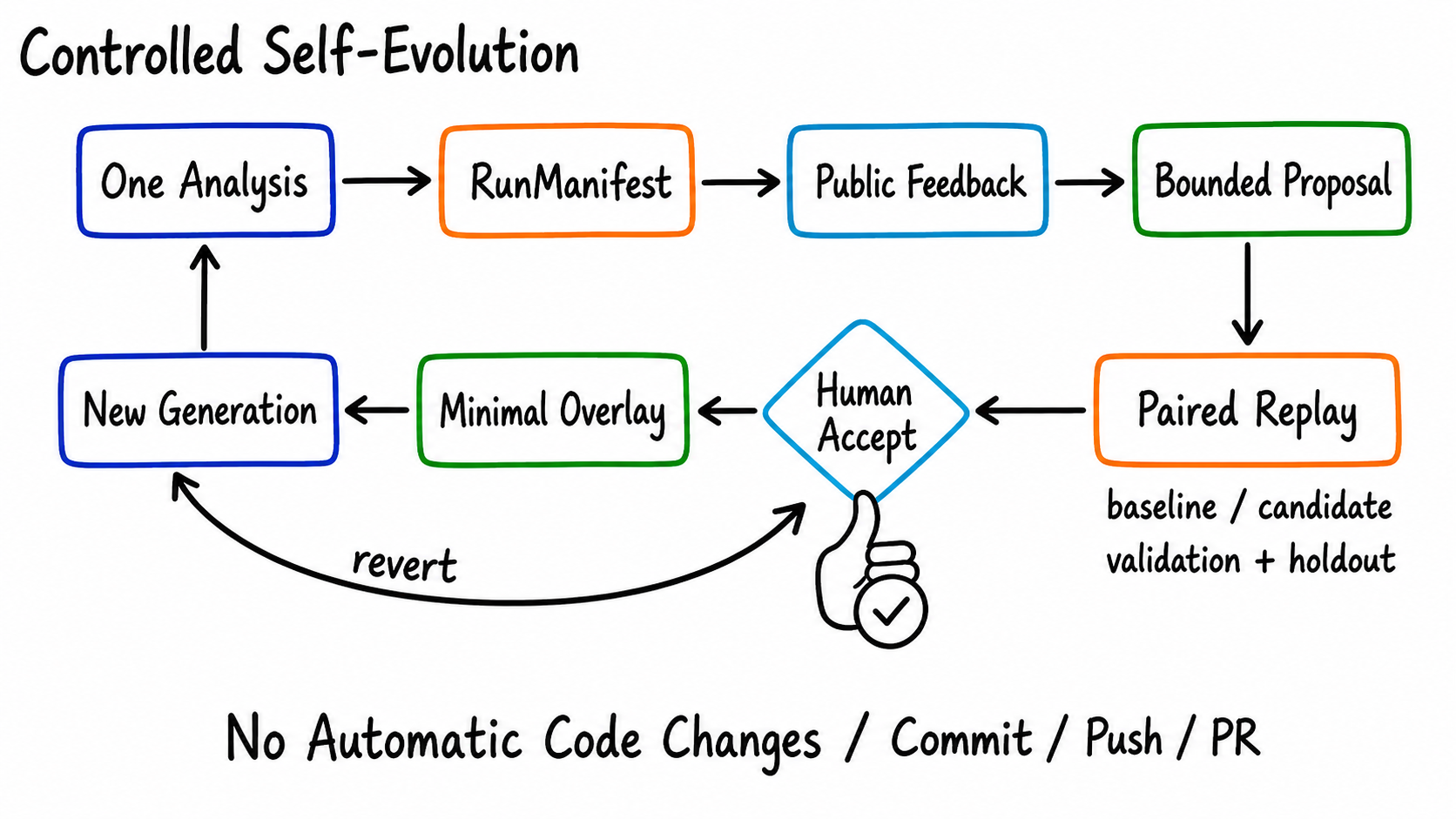
Self-Evolution, added around v1.4.0, is intended for maintainers and workspace administrators and remains disabled by default.
Its purpose is to move effective feedback into a reviewable improvement process:
- Every analysis produces an immutable RunManifest that pins the runtime, Provider, strategy, and overlay generation.
- Public and private feedback are stored separately. Only effective public feedback can enter explicit curation.
- The system creates a bounded proposal and replays baseline and candidate behavior against fixed validation and holdout cases.
- Even after the proposal passes its gates, a person must accept it before the minimal overlay can be applied.
- New analyses pin one overlay generation. Startup and upgrades reconcile it, and an operator can revert it at any time.
The process never commits, pushes, creates a PR, or rewrites TypeScript automatically. If permissions, external persistence, or evaluation gates are missing, it fails closed; ordinary analysis remains unchanged when the feature is disabled.
M10 added a separate path for ordinary users: Agent-assisted GitHub feedback. After an analysis finishes, a dedicated Agent can decide whether the result is suitable for public feedback, identify likely ownership, and explain which additional materials would help.
It produces only a GitHub draft for user review. Private and code-aware analyses cannot enter the public-feedback path, while security findings are routed to a private advisory.
6. Enterprise Login, Providers, and Runtimes Gained Clearer Boundaries
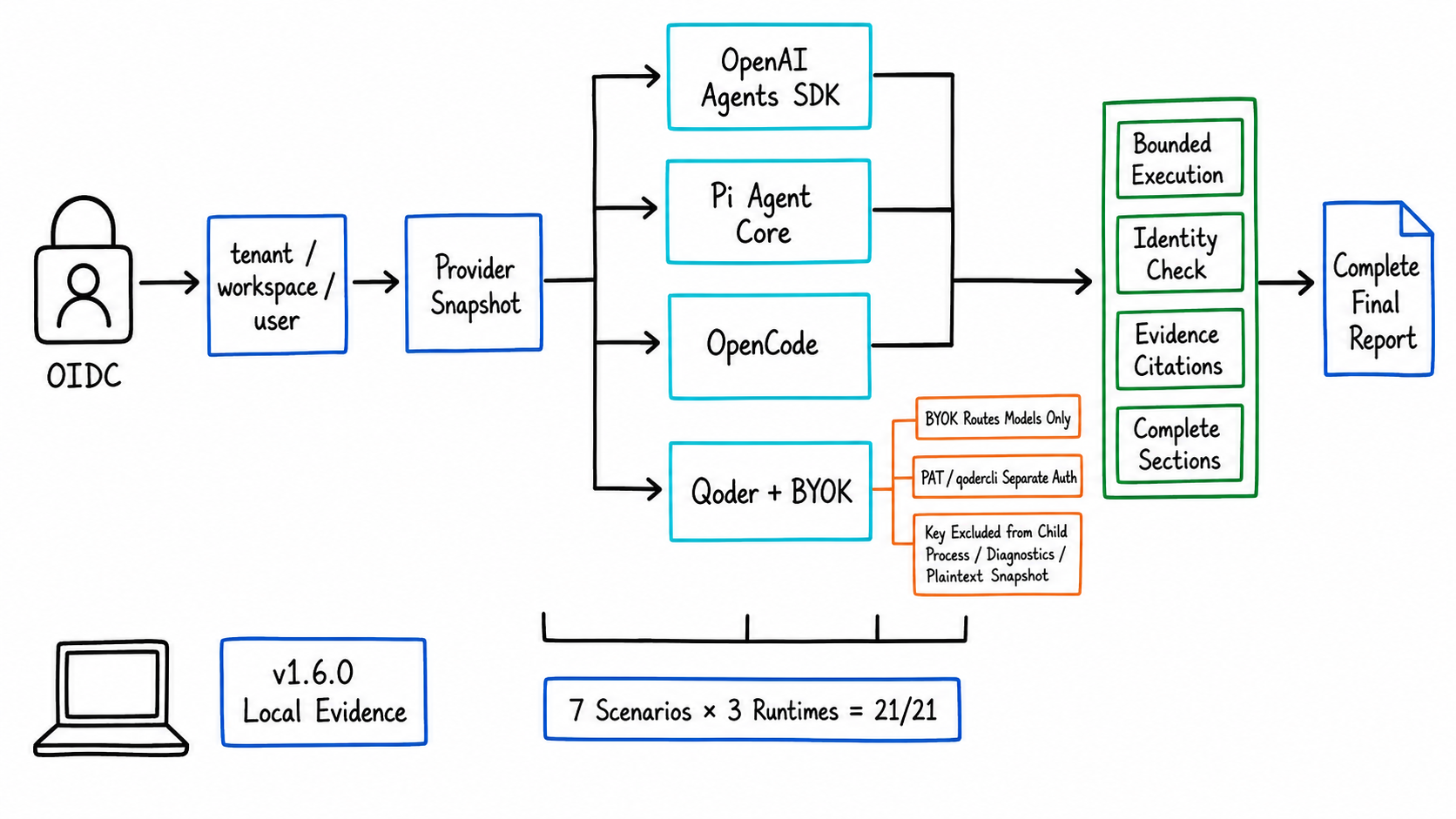
For shared deployments, v1.4.0 completed the enterprise OIDC login flow. Login, callback, session, and logout paths use explicit cookie and state validation; Traces, analysis results, and settings are scoped to the tenant, workspace, and user.
Later fixes added page-scoped analysis so different pages or workspaces in the same browser cannot reuse the wrong analysis context.
Agent runtimes continued to evolve. July added an optional production path for the Qoder Agent SDK, and v1.6.0 migrated Pi Agent Core to a provider-explicit runtime.
The active Provider Manager profile becomes a snapshot when an analysis starts. Credential sources and environment injection remain isolated, so an in-progress analysis cannot silently switch to another Provider.
v1.7.0 added BYOK model routing to Qoder. Through resolveModel, a Qoder request can use a user-supplied model Provider such as DeepSeek, with separate primary and light models.
Qoder PAT or a local qodercli login still authenticates Qoder itself. The BYOK key is excluded from the SDK child-process environment, diagnostics, and plaintext snapshots; only its secret fingerprint participates in Provider pinning and resume checks.
Incomplete configuration fails at startup instead of falling back to an unpinned model path.
Long-running analyses gained bounded execution and stream-timeout finalization. Final output from OpenAI Agents SDK, Pi Agent Core, and OpenCode passes through the same report-identity and quality gates.
Before v1.6.0 shipped, a local DeepSeek environment ran seven scenarios across three runtimes, covering 21 paths. The remote DeepSeek E2E workflow was removed so local credentials and external-service availability would not become part of public CI.
v1.7.0 fixed two more finalization paths: DeepSeek reasoning models now retain reasoning_content across OpenAI-compatible multi-turn tool calls, and Pi final correction receives semantic quality failures—including comparison-identity defects—before producing the terminal report.
7. Six Real Trace Fixtures Completed Publication Review
SmartPerfetto regression testing uses more than constructed data. The repository maintains six real Trace fixtures: two Android scrolling traces, two Android startup traces, and Flutter scrolling traces for both SurfaceView and TextureView paths.
v1.7.0 records explicit AGPL-3.0-or-later licensing, owner-approved publication consent, privacy review, and sanitization review for all six fixtures.
Their case.json files and Trace/catalog.json record publication status, while the legacy-exception list shrank as those reviews were completed.
This work does not change the Trace-analysis algorithm. It defines the material boundary a real case must satisfy before joining the public regression corpus. Future Skill, runtime, and report-quality regressions can reuse these Traces while preserving their provenance, license, and privacy record.
Current Feature Map
After these five weeks, SmartPerfetto’s user-facing surface can be grouped into 15 areas:
| Feature area | Main entry point | Change in this period |
|---|---|---|
| AI Assistant in Perfetto UI | AI panel | Localized states, report completion, and authenticated-layout hardening |
| Common performance scenarios | fast/full/auto | Stronger Android Skills analysis safeguards |
| Selection and contextual follow-up | area/track selection | Existing capability retained |
| SQL, Skills, and evidence | result tables and claim/evidence output | Clearer boundary between knowledge and Trace evidence |
| HTML reports | report entry point | Completeness, Mermaid, and safe-saving hardening |
| Live dual-trace comparison | compare_arrows |
Large-trace RPC and retained result identity |
| Multi-trace result comparison | fact_check |
Stronger comparison appendices and result identity |
| Android Internals knowledge | built-in Pack and private sources | Signed offline Pack and TUF updates |
| Code-Aware Analysis | Codebases and CLI | Native directory picker and CodeRef output |
| Providers and runtimes | Providers and runtime selector | Qoder BYOK, provider-explicit Pi, and DeepSeek/Pi finalization fixes |
| Self-Evolution | Evolution console | Controlled proposals, evaluation, apply, and revert |
| Agent-assisted feedback | completed-result action | GitHub draft triage workflow |
| API, CLI, and MCP | smp and workspace API |
Expanded batch, capture, and update entry points |
| Real Trace corpus | Trace/catalog.json |
Six fixtures completed license, consent, privacy, and sanitization review |
| Distribution | Docker, portable, and source | Continued three-platform release and update acceptance hardening |
Release Timeline
| Date | Version | Highlights |
|---|---|---|
| 07-18 | v1.2.0 | Signed Android Internals Knowledge Pack entered every release distribution |
| 07-18 to 07-28 | v1.2.x | Localized analysis surfaces, Android Skills safeguards, Qoder runtime, update notifications, and three-platform release governance |
| 07-28 | v1.3.0 | Large-trace dual windows, isolated Trace Processor RPC, and native directory picker |
| 08-03 | v1.4.0 | Self-Evolution, Agent-assisted feedback, enterprise OIDC, Perfetto frontend sync, and runtime recovery |
| 08-07 to 08-12 | v1.5.x | Code-Aware Analysis, source-aware reports, Mermaid hardening, and Windows DPAPI fixes |
| 08-14 | v1.6.0 | Provider-explicit Pi, D: data policy, dual-trace identity, and final-report quality gates |
| 08-21 | v1.7.0 | Qoder BYOK, DeepSeek/Pi finalization fixes, and publication review for six real Trace fixtures |
How to Try It
Portable Packages
Windows, macOS, and Linux users can open the Latest Release, download the asset for their platform, and verify its SHA256 digest.
On Windows, extract the archive and run SmartPerfetto.exe. On macOS, open SmartPerfetto.app. On Linux, extract the archive and run ./SmartPerfetto.
Docker
1 | git clone https://github.com/Gracker/SmartPerfetto.git |
Open http://localhost:10000, load a .pftrace or .perfetto-trace file, then save, test, and activate one model configuration in AI Assistant’s Provider settings.
Run from Source
1 | git clone https://github.com/Gracker/SmartPerfetto.git |
Ordinary use does not require initializing the Perfetto submodule. Dev mode is needed only when changing the AI Assistant frontend plugin.
Feedback and Discussion
- GitHub Issues: https://github.com/Gracker/SmartPerfetto/issues
- Discussions: https://github.com/Gracker/SmartPerfetto/discussions
- Latest release: https://github.com/Gracker/SmartPerfetto/releases/latest
You can also join the SmartPerfetto discussion group:

Future work will continue adding real Traces from more Android versions, validation evidence, and local regression coverage across runtimes. SmartPerfetto’s goal remains the same: an analysis should produce an answer and leave behind evidence that can be reviewed, saved, and improved.