

This post reviews every major SmartPerfetto change since the previous three-week update (2026-06-04, v1.0.28), through 2026-07-17 (v1.1.1). By the end, you will understand the problem each feature solved over these six weeks, where its boundaries lie, and the full feature map of the current release. Project repository: github.com/Gracker/SmartPerfetto.
1. Overview of Changes (2026-06-04 to 2026-07-17)
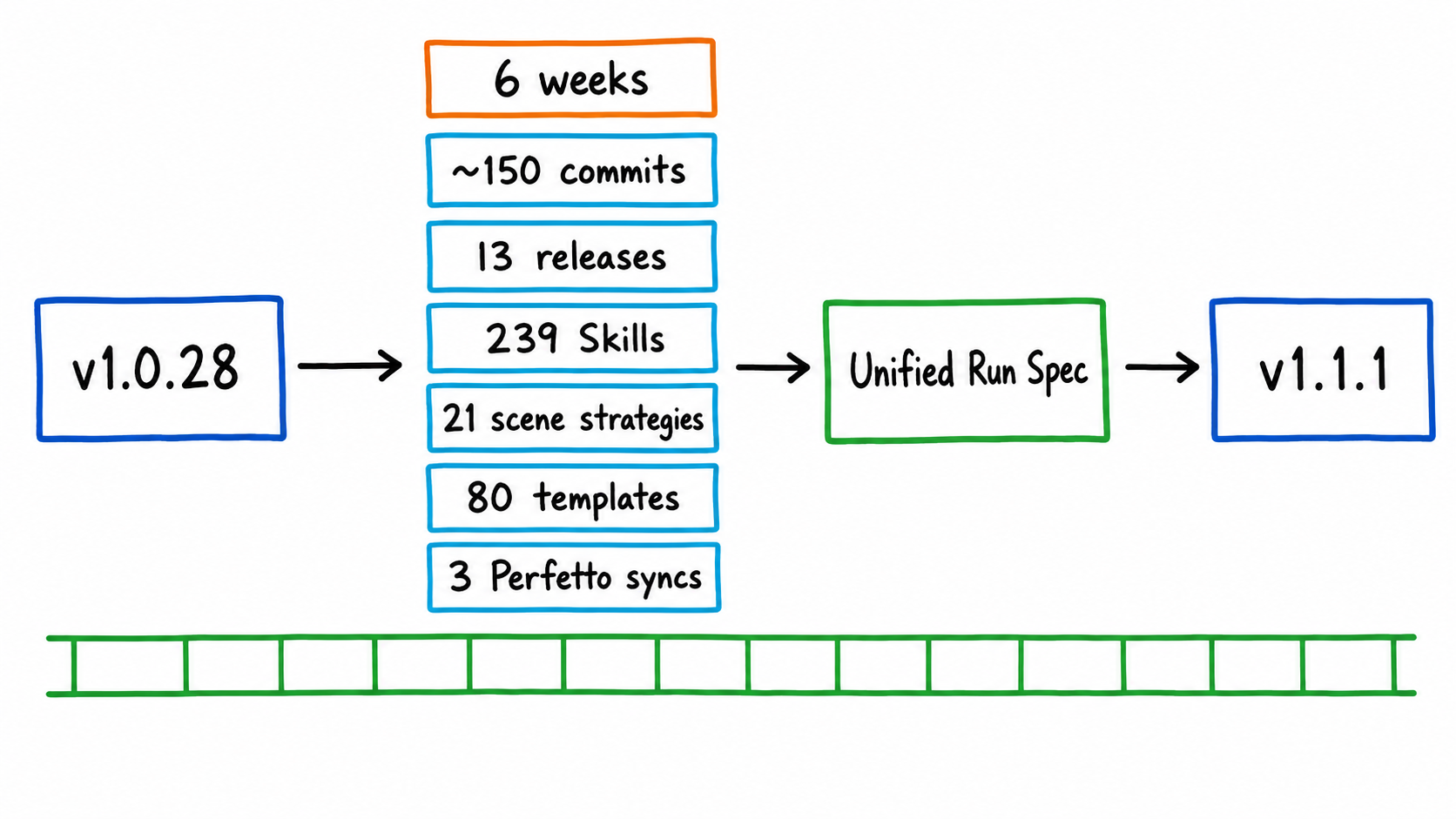
Over these six weeks, approximately 150 commits were merged (excluding merge commits), spanning 13 releases (v1.0.29 → v1.1.1). If the main theme of the previous post was “getting all four Agent runtimes working,” this period focused on converging those four runtimes on one shared contract, while continuing to expand the analysis experience, scene knowledge, and public ecosystem.
First, here are several quantifiable changes, calculated with the repository’s documented counting commands:
| Metric | 2026-06-04 (v1.0.28) | 2026-07-17 (v1.1.1) |
|---|---|---|
Skill YAML (*.skill.yaml) |
226 | 239 |
Scene strategies (*.strategy.md) |
20 | 21 |
Strategy/prompt templates (*.template.md) |
— | 80 |
| Perfetto upstream syncs | — | Three syncs during this period: v56.0 → v57.1 → v57.2 |
| Agent runtimes | 4 parallel implementations | 4, sharing a unified run specification |
The sections below follow their impact on everyday analysis workflows, from largest to smallest. We will start with features that changed how SmartPerfetto is used—the dual-trace workspace and Quick Mode—then move to features that raised its capability ceiling, including private analysis context and runtime unification, before covering scenes, knowledge, the ecosystem, and engineering delivery.
2. Dual-Trace Analysis Workspace
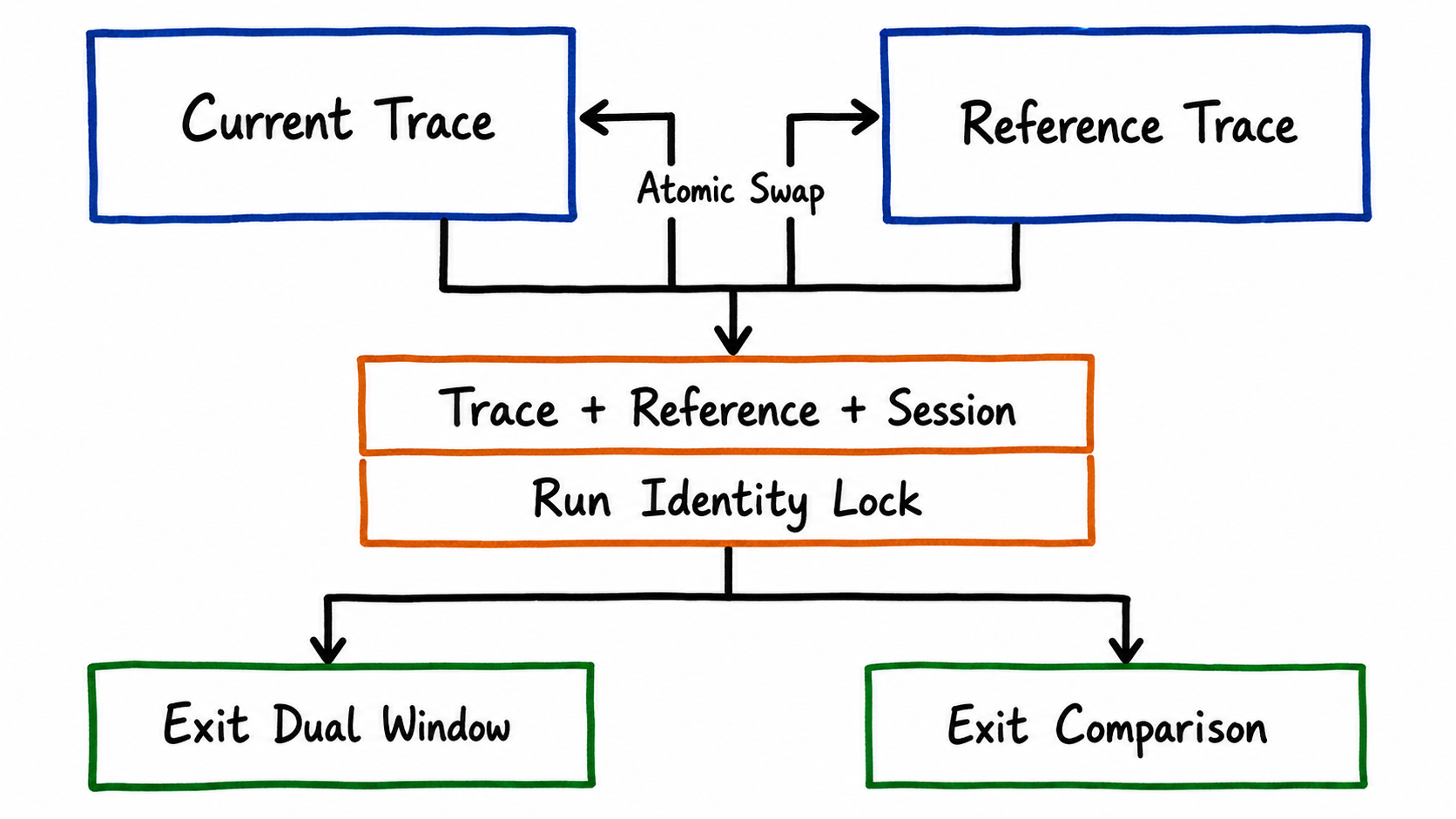
Comparison is at the heart of performance optimization: before versus after a change, your product versus a competitor, or regression analysis after a system upgrade. SmartPerfetto already allowed an AI session to attach a reference trace, but the UI exposed only one timeline window. The most natural workflow—viewing two traces side by side—was not possible. The dual-window workspace, shipped on July 10–11 (v1.0.39), filled that gap.
The interaction path is deliberately short:
- Enter with one click: A direct “Open Dual Window” button sits at the top of the AI Panel. Clicking it immediately opens two windows: one showing the current trace and the other initially empty. Select a reference trace from the workspace history without first going through the trace picker.
- Atomic window identity swap: Both windows have trace selectors, so users can freely decide which window displays the current trace and which displays the reference trace. If a historical trace is selected in the current window, the current trace moves atomically to the other window. The workspace never shows the same trace in both windows or enters an intermediate state with no current trace.
- Run identity protection: During analysis, the “current trace + reference trace + Agent session” form a single run identity. Switching traces, exiting comparison mode, changing Providers, or changing workspaces is rejected while the run is active. Only an explicit Stop invokes the backend cancellation protocol. Layout changes, maximization, dragging, and collapsing the AI Panel affect presentation state only: they neither destroy the iframe nor transfer ownership of the streaming connection. This rule ensures that moving a window midway through an analysis cannot destroy an in-progress run.
- Separate exit semantics: Exiting dual-window mode closes only the visual workspace; the reference trace and AI comparison context remain available. Exiting comparison mode additionally clears the reference trace, comparison context, and comparison session.
At the contract level, the smp compare CLI command and the frontend dual-window workspace use the same backend comparison identity, evidence package, and report section. There is no private path that could cause CLI and web comparison results to diverge. The product boundary is equally explicit: comparison always means “the current trace + one reference trace from workspace history.” Comparing any two arbitrary historical traces is not supported; that belongs to the domain of comparing multiple analysis results through snapshot comparison.
For the full interaction model, including its state machine and boundary conditions, see docs/architecture/dual-trace-workspace.md in the repository.
3. Quick Mode: Evidence-Backed Direct Answers and Analysis Receipts
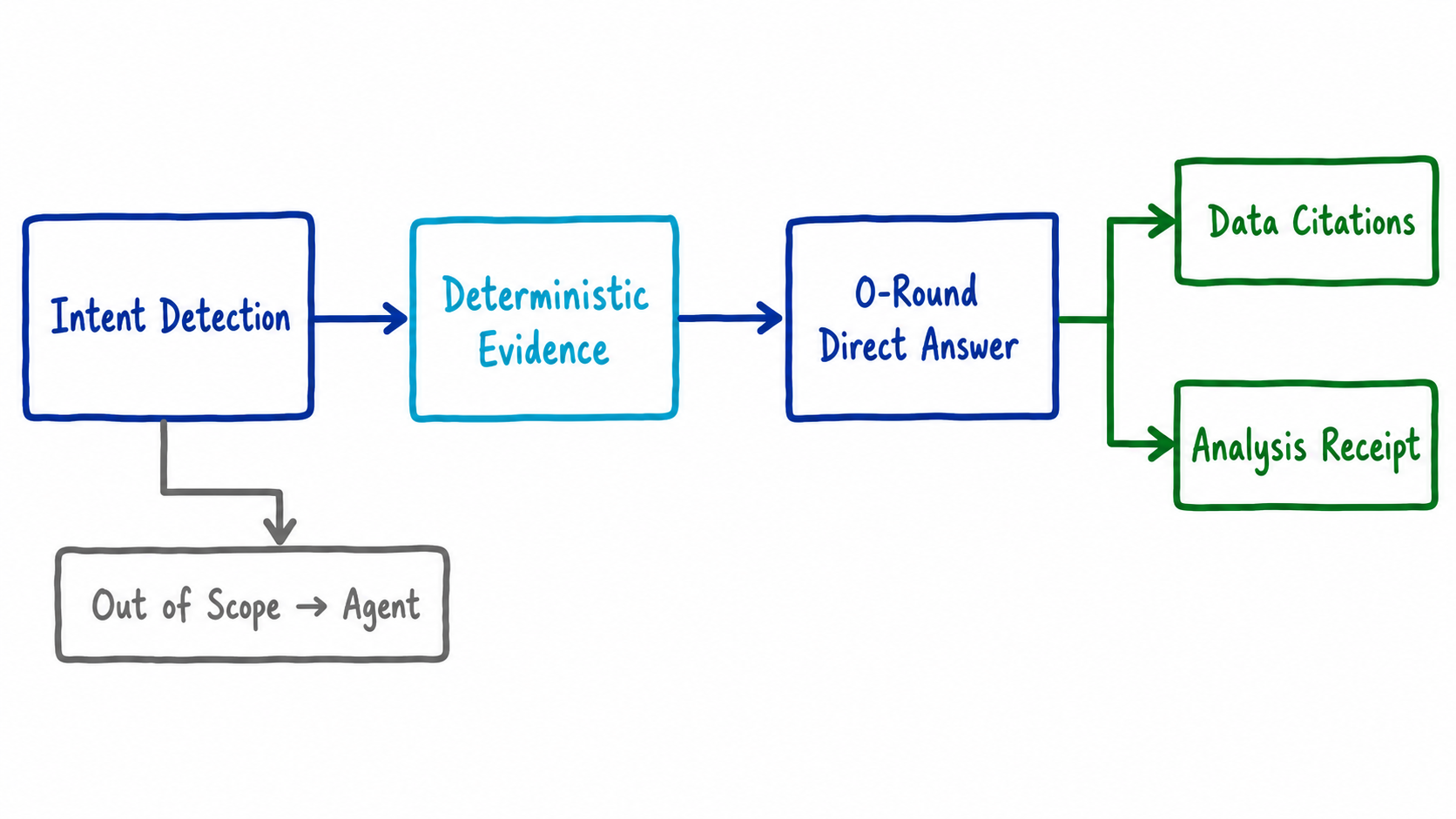
Many everyday questions ask for straightforward facts: “What is the frame rate?”, “Which app is in the foreground?”, or “How severe is the jank?” Sending these questions through a full Agent loop—planning, multiple tool calls, and verification—is both slow and token-intensive. Over these six weeks, the fast path was rebuilt as a genuine evidence-backed direct-answer product. Analysis receipts became a product surface on June 29, the four runtimes were aligned on July 3, and v1.0.38 followed.
The flow has three steps:
- Intent recognition: A local classifier identifies direct-answer intents, including trace facts such as frame count, duration, processes, and threads; the foreground app; and an initial scrolling-smoothness assessment. It also handles mixed intents. For example, “What is the frame rate? Is it smooth overall?” matches both trace-fact and scrolling-assessment intents and combines the evidence for both in one answer.
- Deterministic evidence collection: The backend executes the corresponding SQL/Skill directly to collect evidence, bypassing the model’s tool-call loop.
- Direct-answer assembly: SmartPerfetto assembles the answer directly from evidence tables, adds sentence-level data citations, and returns it after zero model conversation turns. An analysis receipt at the end records which evidence was used and the state of the quality gates.
End-to-end validation covered nine cases against the real DeepSeek API: identity questions, compound facts, global frame count plus jank, initial scrolling assessment, foreground app, the presence of CPU frequency data, questions in English, and more. Eight cases used zero actual model conversation turns, and every case passed claim-by-claim verification.
Two engineering details are worth calling out:
- Consistent behavior across all four runtimes. Direct-answer intent derivation, evidence assembly, and the contract governing the number of conclusions converged on shared modules across Claude, OpenAI, Pi Agent Core, and OpenCode. The Claude path had previously assembled these by hand and silently dropped scrolling evidence for mixed intents, diverging from the other three runtimes. The alignment eliminated this class of drift structurally. Contract values such as the maximum number of conclusions are now injected as template variables from a single source of truth.
- No false activation. Direct answers cover only questions that deterministic evidence can resolve. Questions outside that scope, such as the open-ended request “Give me a quick analysis,” fall back to the normal Agent path instead of being forced into the direct-answer framework and receiving an incomplete answer.
4. Private Analysis Context: Local Source Code + the Android Internals Knowledge Base
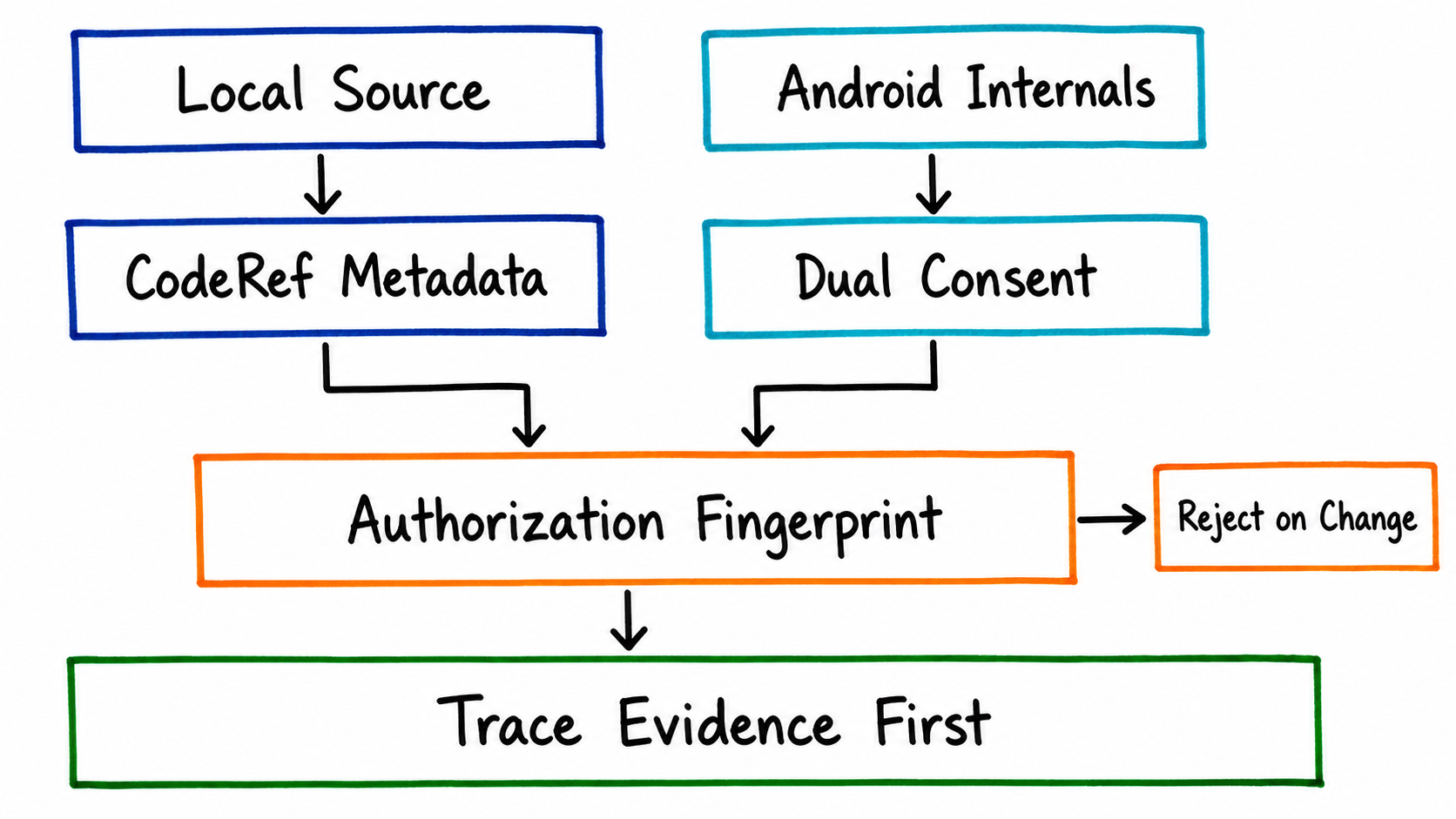
A trace can show you where performance degrades, but explaining why often requires returning to source code and system internals. Over these six weeks, SmartPerfetto integrated two types of private context into the analysis pipeline and unified their authorization model in v1.1.0. This was the main reason for the version jump from 1.0 to 1.1.
Local source code (Code-Aware). After a local codebase is registered with SmartPerfetto, AI analysis can map trace behavior to specific classes and functions. The privacy boundary is intentionally strict: the model sees CodeRef metadata—chunk ID, relative path, line range, and symbol name—not raw source text. Raw text is available only through an access-controlled endpoint for the user to inspect. metadata_only and provider_send are separate consent levels; the former guarantees that source snippets are never sent to the model provider. SmartPerfetto also supports patch proposals on top of this model. The AI can propose changes only against source context it has already looked up, and a patch must pass git apply --check before it can be returned with “verified” status.
External Android Internals knowledge base (July 14). A local checkout of android-internals-wiki can be registered as a versioned external knowledge source. The retrieval pipeline enforces the following constraints:
- Paths are denied by default. Only Markdown files under an environment-variable allowlist can be previewed and indexed.
- Registration requires confirmation of content rights (
rightsAcknowledged). Sending content to the model provider requires separate, revocable privacy consent (sendToProvider). Once revoked, new indexing and retrieval requests are rejected immediately. - Only strictly parsed, finalized articles enter retrieval. Drafts and articles awaiting review appear only in the audit trail.
- The model receives only budget-controlled, redacted matching excerpts. Logs and streaming events expose metadata projections only.
- Wiki matches provide system background but cannot replace evidence from the current trace. Diagnostic conclusions must still cite actual SQL/Skill query results.
Combined semantics (v1.1.0). Source code and the knowledge base have independent authorization lists; either can be used alone or both can be combined. Whenever any private context is present, fast/auto mode is forced to resolve to full mode, where the necessary tools and evidence gates are available. Tenant, workspace, user, authorization list, index generation, content fingerprint, and consent state all contribute to a single authorization fingerprint. If any of these changes at a tool-call or run boundary, execution is rejected immediately—fail closed—rather than silently falling back to a different analysis mode. The practical effect is important: after consent is revoked, an index is rebuilt, or permissions change, there is no window in which stale authorization remains active in an existing session.
5. Unifying the Agent Runtime Architecture
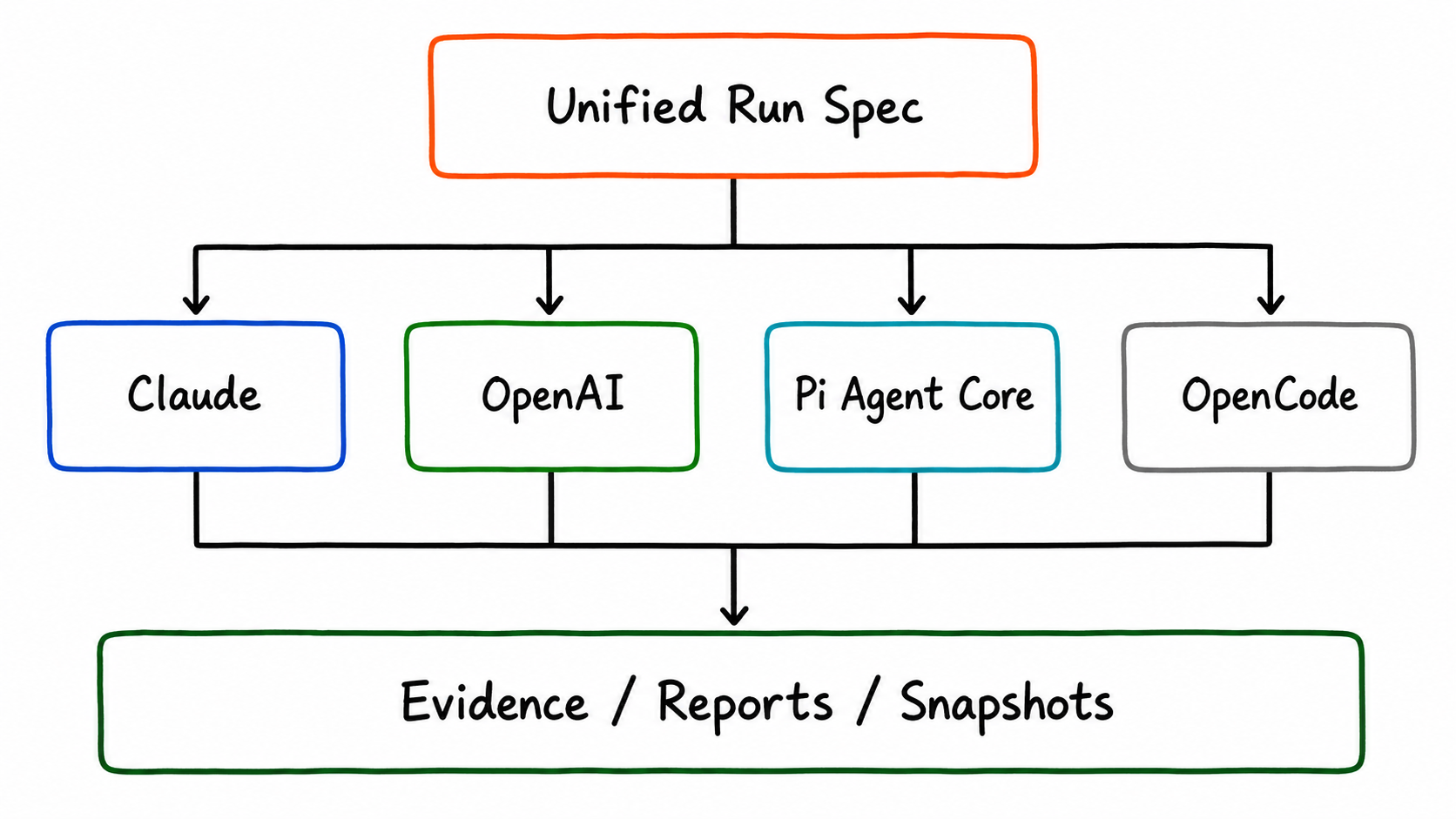
This was the largest body of code changed during the six-week period, delivered in two stages.
The early-June refactoring (around v1.0.32, across more than twenty refactoring commits):
- The four runtimes moved into independent engine directories, while shared logic—including diagnostics, hypothesis projection, and runtime descriptors—moved into a common layer.
- Cancellation semantics were extended all the way down to the SQL tool layer. When a user clicks Stop, an in-progress query is actually canceled instead of being allowed to finish before its result is discarded.
- The two third-party runtimes, Pi Agent Core and OpenCode, regained resumability for opaque session state, allowing a restored session to continue with its previous context.
- Provider snapshots are bound to the runtime environment. Restoring a session cannot silently switch models merely because the user has changed the active Provider.
- The verifier’s misdiagnosis-pattern library is loaded from strategy files, so adding a new pattern no longer requires a TypeScript change.
The v1.1.0 consolidation on July 17: All four runtimes now consume the same Provider-independent run specification and comparison-context builder. This structurally eliminates a typical class of bug in which an analysis option takes effect on the Claude path but is silently ignored on the OpenAI path, because options are now parsed in one place. The release also introduced reproducible Perfetto UI prebuild artifacts and a backend regression CI gate (backend-agent-regression-gate in GitHub Actions).
Before v1.1.0 shipped, the project completed two rounds of independent review: a weekly review on July 15 and a clean-room review on July 16, with reports stored under docs/reviews/ in the repository. The release proceeded only after confirming there were no known P0/P1 blockers. v1.1.1, released the same day, fixed more than ten remaining findings from those reviews, including source-reference locatability checks, OpenAI tool-output normalization, verifier evidence-label parsing, and restored scrolling-metric semantics.
6. Token Cost Optimization
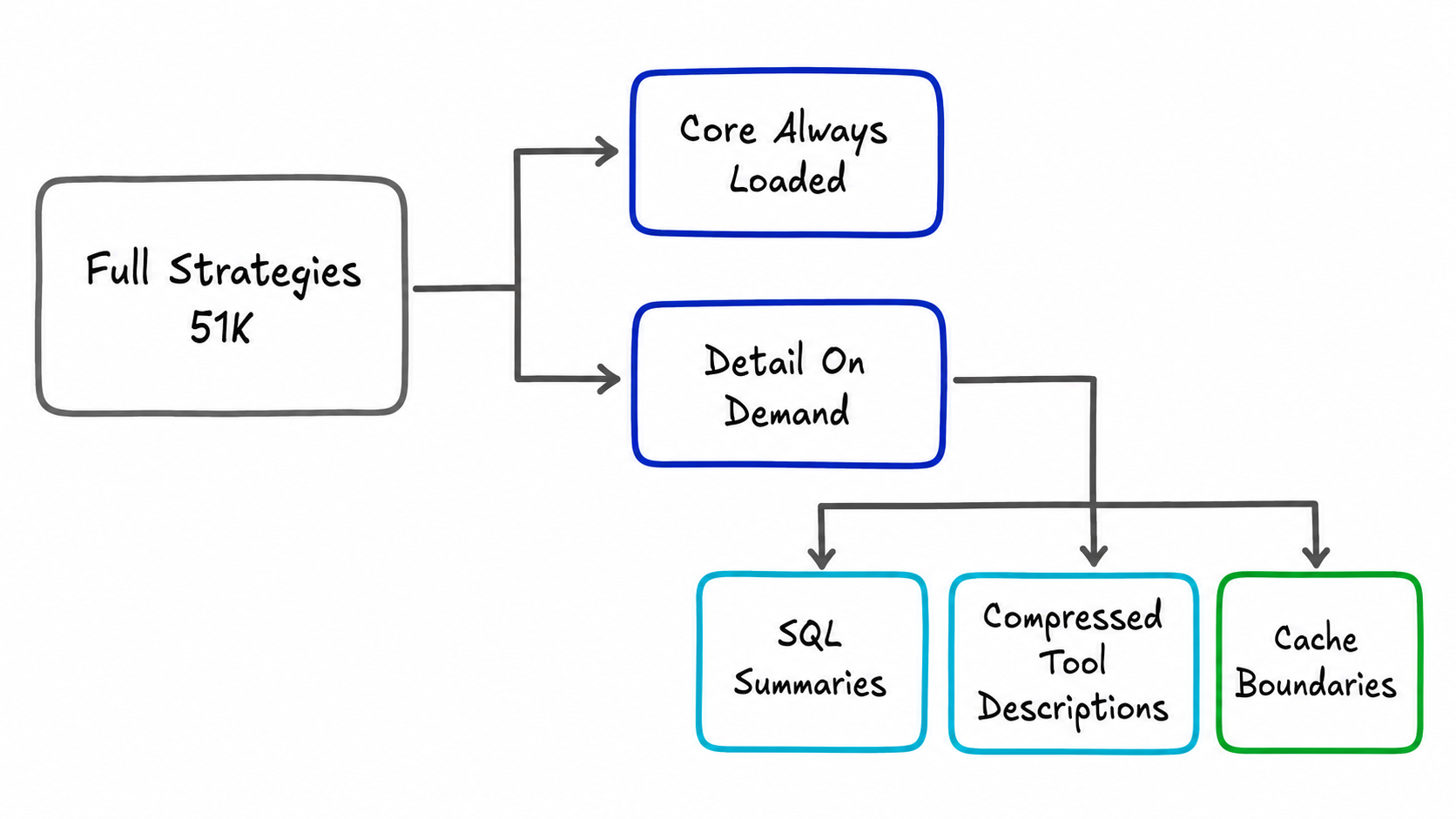
In mid-June, we identified the largest source of token consumption in full mode: the methodology section of the system prompt embedded the entire scene strategy—approximately 51K tokens for the launch scene—and the existing prompt-budget mechanism trimmed only supporting sections, never this one. In effect, every full analysis was paying for an entire “textbook on launch analysis.” A complete optimization package landed on June 18–19 in v1.0.35:
- Strategy split: Scene strategies are divided into core and detail layers. The core remains in the prompt and is limited to a few thousand tokens; detail is delivered on demand as the analysis advances through its stages. Quality requirements moved into expected tool-call lists in plan templates and into the verifier, ensuring that a shorter prompt does not produce a shallower analysis.
- Regression baselines using real token counts: New token-baseline tests load the actual strategy files and cover the worst-case combination—scene + architecture + completeness + selection + comparison + source awareness all enabled at once—to prevent future changes from silently inflating prompt size again. The previous unit tests mocked the strategy loader and could not detect size regressions.
- Automatic summarization of large SQL results: SQL outputs above a threshold are summarized automatically, while the raw data becomes a paginated artifact reference without breaking provenance.
- Compressed tool descriptions and cache boundaries: MCP tool descriptions were compressed across all four runtimes. Prompt-cache boundaries were added to the runtimes and are now selected according to capability flags declared by Provider adapters, rather than hardcoded Provider names.
The benefit depends on Provider capabilities. For Providers without prompt caching—OpenAI-compatible endpoints, Pi, and OpenCode—the optimization directly reduces the cost of every request. For Providers with caching, it primarily lowers cache-creation cost and context-window pressure.
7. Expanded Scene Coverage: Camera, Heap, and GPU
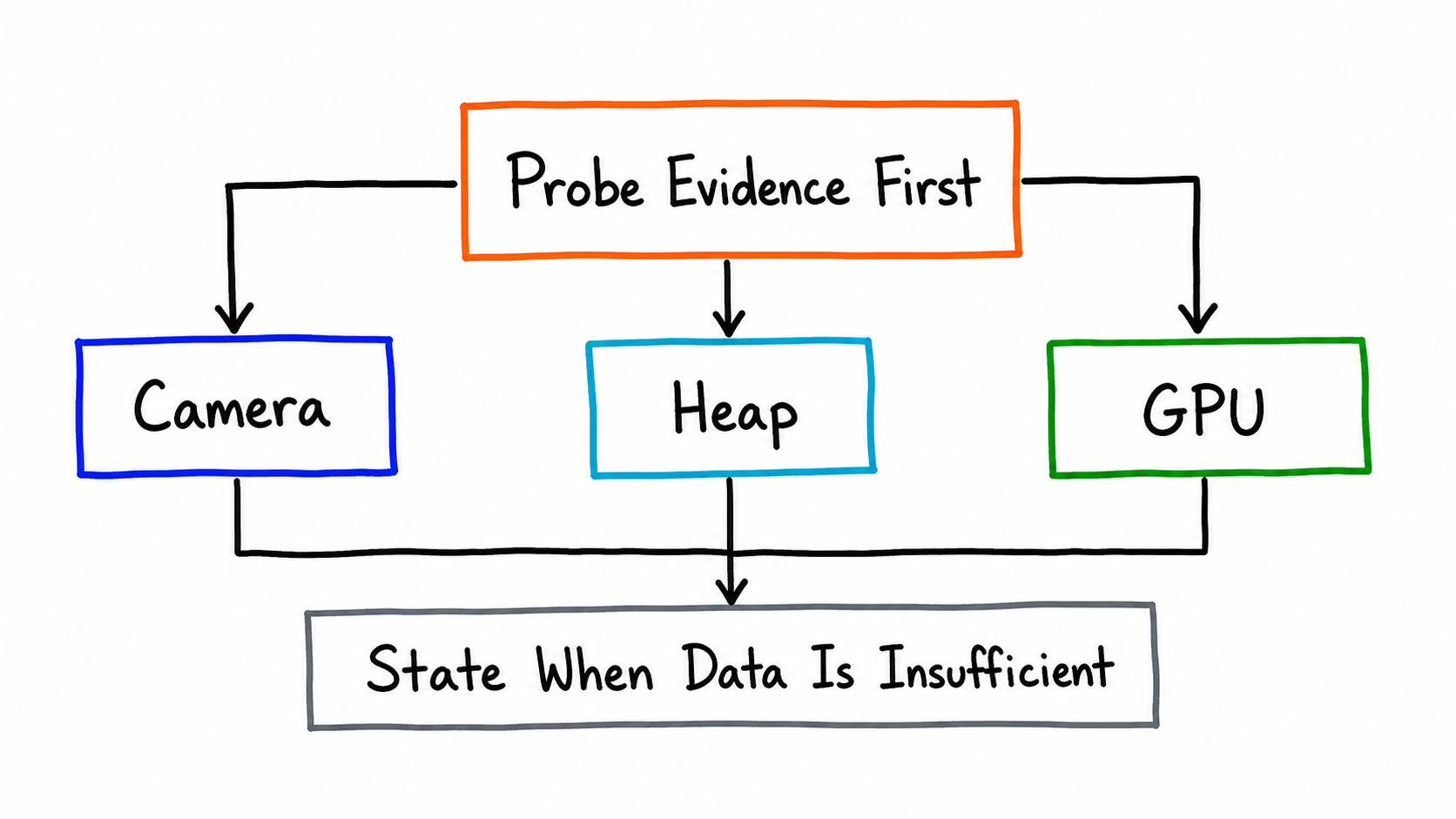
All three new scenes follow the same principle: evidence first; when data is insufficient, say so explicitly instead of inventing a conclusion.
- Camera analysis (July 12): SmartPerfetto added an evidence-oriented camera capture preset, available directly through
smp capture, along with a camera-trace evidence Skill. The key design is conditional tracepoint availability. Tracepoints for different stages of the camera pipeline vary significantly across vendors and platform versions. The Skill first probes the current trace to determine which evidence sources exist, reaches conclusions only for stages backed by data, and explicitly marks data-starved stages as unavailable instead of forcing them through a template. - Heap dominator-path analysis (July 14): A new deterministic Skill clusters and extracts heap dominator paths. It extracts dominator paths from the managed heap graph, groups isomorphic paths into clusters, and answers, “Which reference chains are retaining this memory?” Batch trace runs automatically aggregate heap paths across traces and present the cross-trace distribution of memory clusters in the batch report, backed by regression cases using real heap-graph traces.
- GPU compute evidence (July 14): A vendor-neutral GPU compute evidence Skill that does not depend on proprietary counters from any specific GPU vendor, backed by real-trace regression coverage.
- Existing-scene hardening (early June): Memory-analysis evidence handling was hardened, and the evidence semantics for thread blocked reasons were corrected. The latter fixed incorrect attribution in the “blocked reason” field.
8. RFC-0025: Eight AI Workflow Surfaces
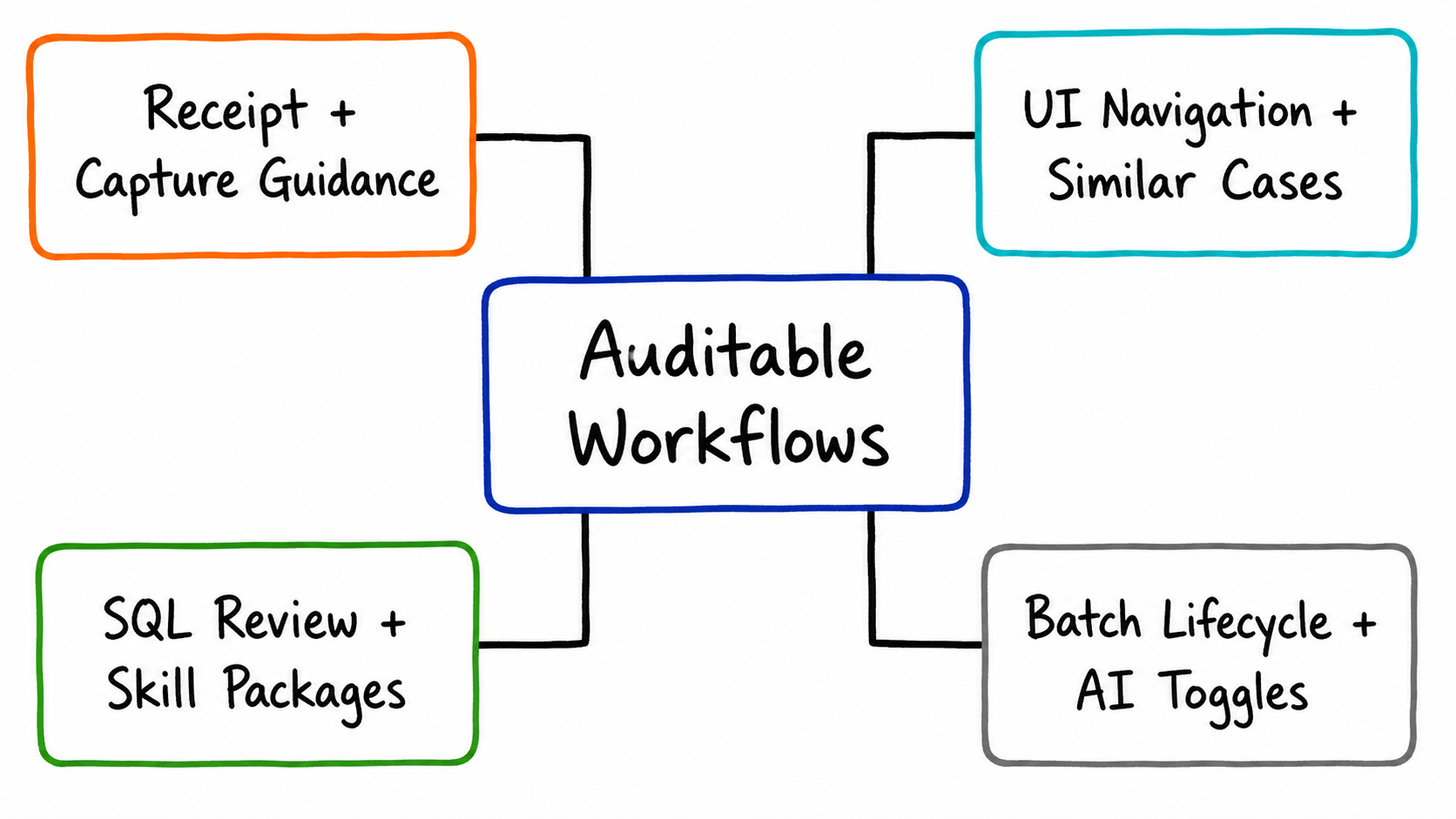
Eight capabilities defined by RFC-0025 were merged on July 7. The goal was to extend AI analysis from a question-and-answer interaction into auditable, batch-oriented, collaborative workflows. Design and implementation documents live under docs/architecture/perfetto-ai-rfc-0025/ in the repository. Before integration, each capability went through a complete independent review, and every P1 finding was fixed.
| # | Capability | Description |
|---|---|---|
| 1 | Analysis receipts and evidence audits | Every analysis produces a structured receipt covering tool calls, evidence coverage, and quality-gate status, answering “What did this analysis do, and what evidence supports it?” |
| 2 | Capture-configuration recommendations | When analysis finds an evidence gap, it generates recommendations for the next trace capture: “Which data sources should I enable next time to verify this conclusion?” |
| 3 | UI navigation recommendation protocol | The AI emits structured timeline navigation recommendations—a timestamp or range—that users can click to apply; the AI never manipulates the UI directly |
| 4 | Similar-case retrieval for snapshots | MVP retrieval of similar cases across completed analysis snapshots, allowing a new investigation to check for comparable historical cases first |
| 5 | SQL query review layer | Reviews a query intermediate representation (IR) and rejects obviously invalid query shapes before execution |
| 6 | External Skill package extensions | Distribution and installation for external Skill packages with a hash-verification chain, allowing teams to maintain their own private Skill packages |
| 7 | Batch trace lifecycle | Batch submission, concurrency control, progress tracking, and result aggregation; the heap-cluster aggregation report described earlier runs on this pipeline |
| 8 | AI capability controls and disclosure | Enterprise environments can disable AI entirely or turn off individual capabilities; failed capability-policy validation is rejected immediately (fail closed) |
9. Knowledge Foundation: Android 17 Rendering Pipelines and the Trace Case Corpus
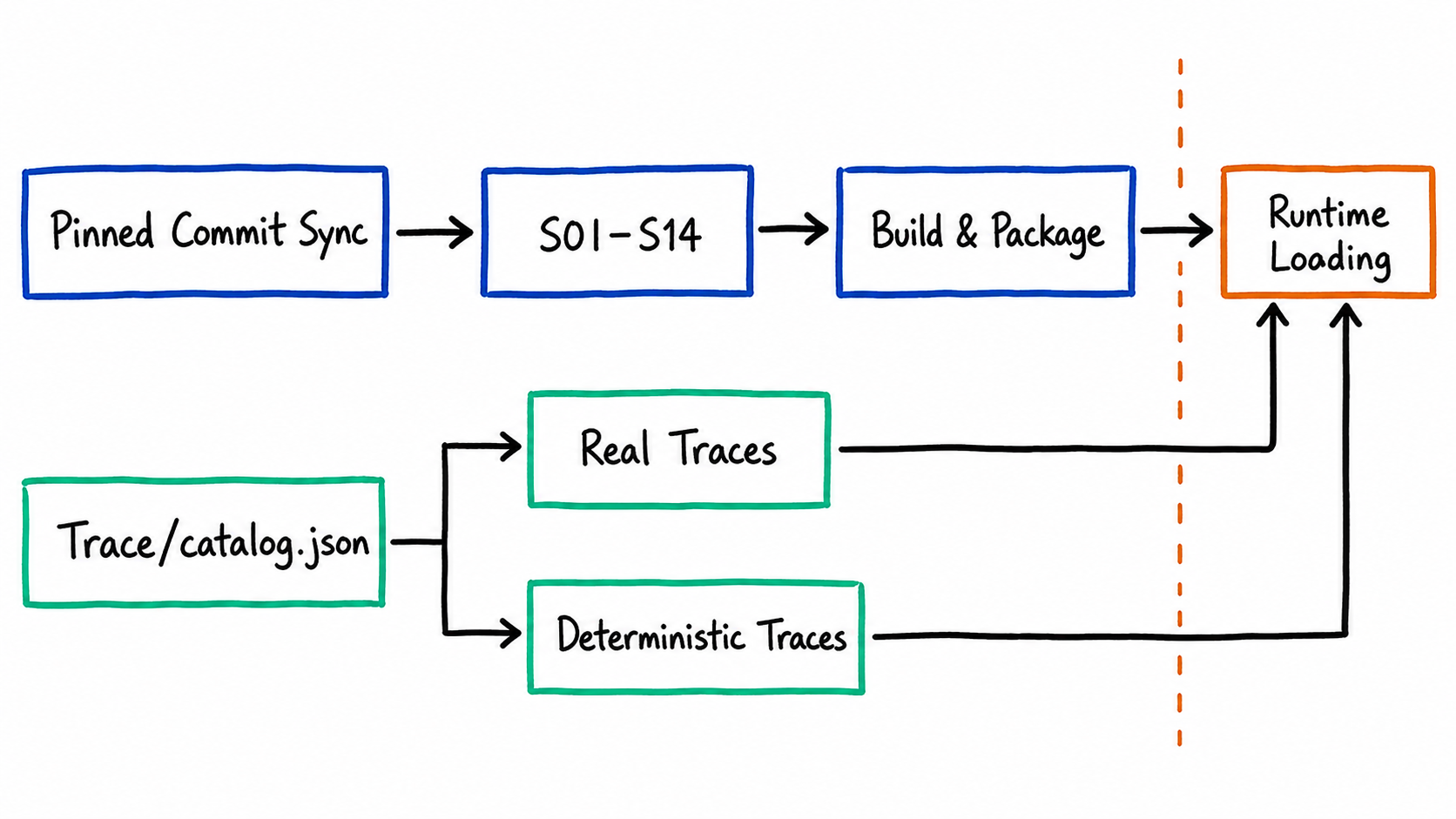
- Android 17 rendering-pipeline knowledge sync (July 13): The authoritative S01–S14 content under
docs/rendering_pipelines/is now synchronized from a source repository pinned to a specific commit (npm run sync:rendering-pipelines). Manual edits are prohibited, preventing the knowledge base from drifting from its source. These are not ordinary documentation files: rendering-pipeline detection, teaching mode, and some Skills read them directly at runtime throughdoc_path. They are therefore bundled into every distribution format, including the Docker image, whose previously missing copy was fixed as part of this work. - Trace case corpus (July 13–14): SmartPerfetto introduced the
Trace/catalog.jsoncorpus catalog contract and migrated all real traces into a directory-structured corpus. It also introduced deterministically constructed traces: scenarios such as binder I/O blocking, GPU load, and framework pipelines are represented as reproducibly generated synthetic traces, each with a file of expected conclusions. Scene regression coverage expanded from “six fixed traces” to “catalog-driven corpus regression.” Adding a new scene now requires only registering its case in the catalog, without changing the regression framework.
10. The Case Knowledge Platform and Self-Evolution V1
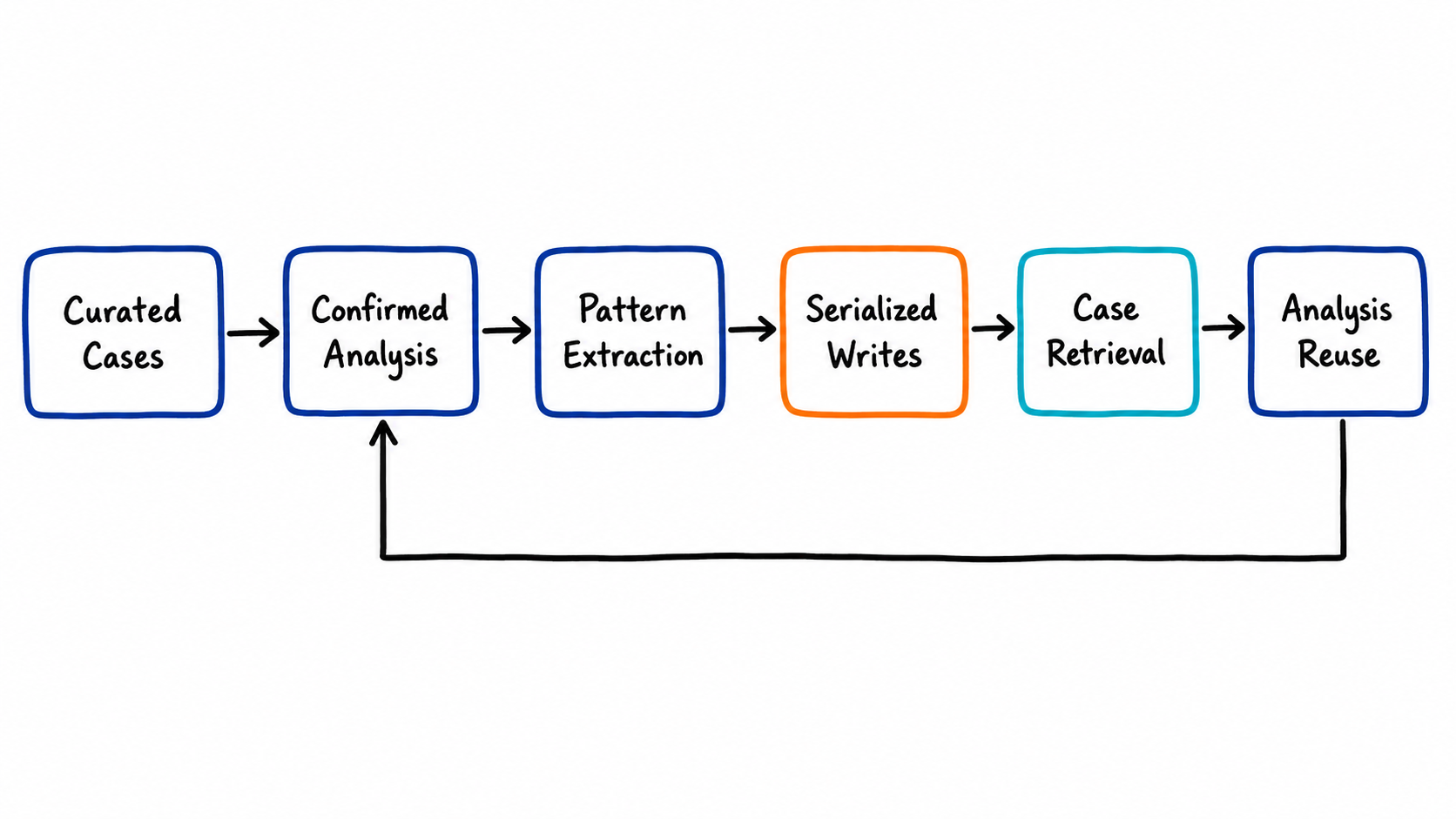
The first version of the Case Knowledge platform landed on June 20–22 (v1.0.36/37), with the goal of making analysis experience persistent and reusable:
- Curated case ingestion: Typical performance-problem cases can be organized into structured knowledge and retrieved for citation during analysis.
- Self-Evolution V1: Patterns confirmed during analysis can be captured as reusable knowledge entries. Hardening this pipeline accounted for most of the work: a research report and multiple rounds of independent review drove fixes for 14 gaps, including automatic confirmation scans for patterns, serialized writes to pattern storage so concurrent analyses cannot overwrite one another, and SQL-result persistence.
- Runtime memory-layer hardening: SmartPerfetto now records previously silent state such as Provider continuity breaks and CLI fallback sources. When something goes wrong, users can reconstruct which model was actually used and which fallback path the run took.
11. Ecosystem: Eight Repositories Form a Complete Path
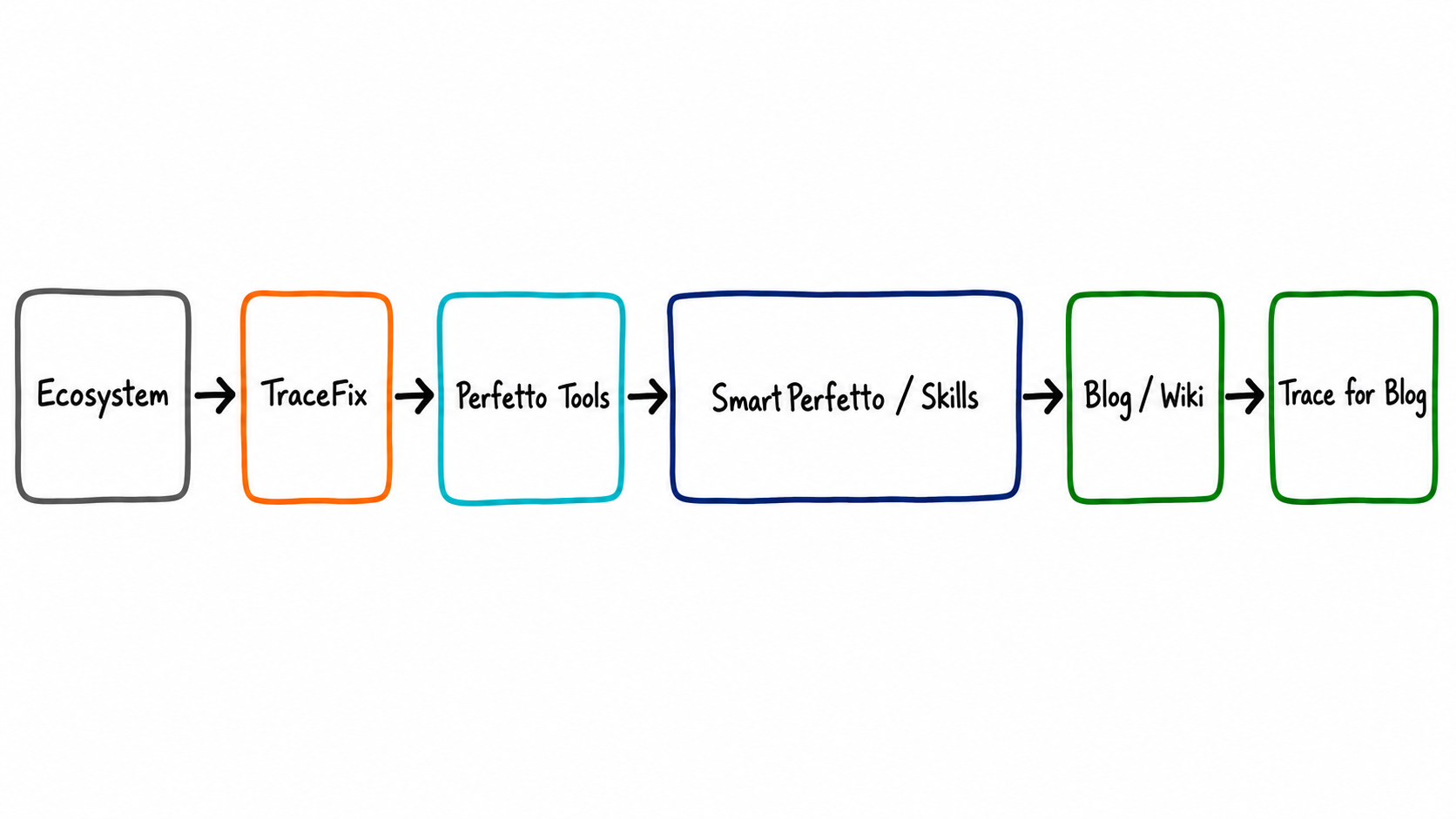
SmartPerfetto is no longer an isolated project. Launched on July 14, the Android Performance Ecosystem connects eight repositories across instrumentation, capture, analysis, knowledge, and reproduction into a complete Android performance analysis path:
| Stage | Project | Role | Link |
|---|---|---|---|
| Navigation | Android Performance Ecosystem | Unified project map, handoff metadata, README navigation blocks, and drift checks | GitHub |
| Instrumentation | TraceFix | Injects app-side android.os.Trace sections at compile time so method execution is visible in traces |
GitHub |
| Capture and measurement | Perfetto Tools | Captures reproducible Perfetto traces and collects FPS or Simpleperf measurements | GitHub |
| Analysis | SmartPerfetto | AI-assisted Web UI, CLI, reports, sessions, comparison, and evidence workflows | GitHub |
| Agent analysis | Perfetto Skills | Portable Android/Linux/Chromium Perfetto analysis Skills for direct use by Agents such as Codex, Claude Code, and OpenCode | GitHub |
| Learning | Android Performance Blog | Articles, system internals, and case studies | AndroidPerformance.com |
| System knowledge | Android Internal Wiki | An alpha-stage Android system knowledge base covering App, Framework, Native, and Kernel mechanisms | Coming soon |
| Reproduction | Trace for Blog (SystraceForBlog) | Perfetto/Systrace case files used in articles for hands-on reproduction | GitHub |
The relationship between SmartPerfetto and Perfetto-Skills deserves a closer look. The two repositories evolve independently but share a portable analysis contract:
- Public Skill export system (July 11-12):
backend/skills/public-export.yamlexplicitly classifies every runtime asset. Portable workflows, SQL, methodology, and pipeline knowledge enter the public projection, while product-specific Provider, session, and streaming semantics remain in SmartPerfetto.npm run verify:public-skillsverifies the exported result. - Bidirectional impact review gate:
npm run check:perfetto-skills-impactidentifies every commit that touches a shared contract—including Skills, strategies, evidence contracts, SQL services, pipeline knowledge, and export policies—and requires the author to explicitly record a coordination decision: sync required, sync not required, or deferred with a handoff link. Contract drift no longer depends on human memory. - Perfetto upstream syncs: This period included three upstream syncs (v56.0 → v57.1 → v57.2). Each followed the repository’s sync rules for merging the fork, refreshing the UI prebuild, and running scene regressions.
12. Engineering and Usability
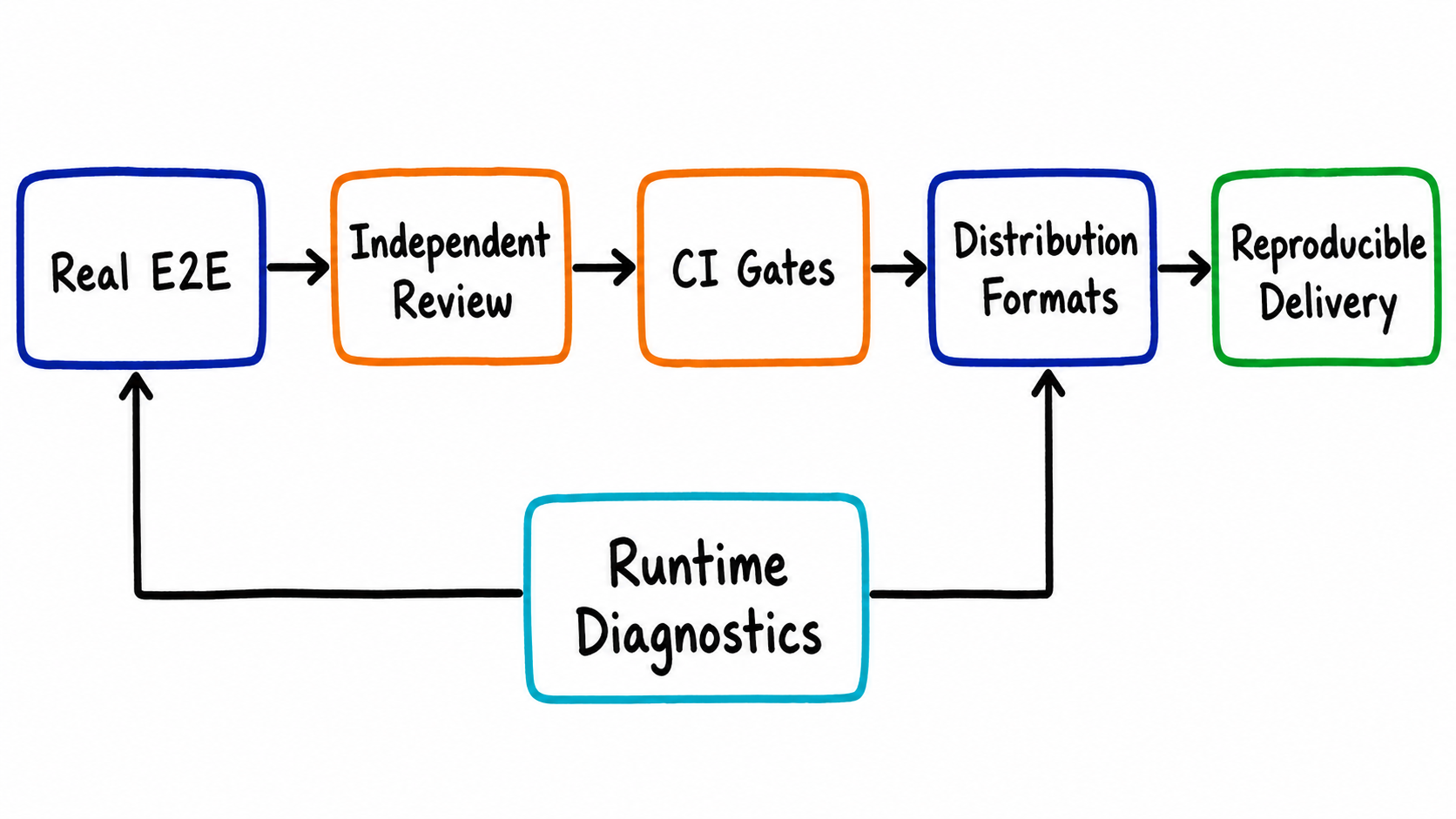
- Real-path DeepSeek end-to-end verification: Agent SSE end-to-end tests now use the real DeepSeek API by default (
npm run verify:e2e:deepseek*), with a manually triggered GitHub Actions workflow also available. Only a real Provider path can expose behavioral differences in tool-call formats and streaming chunks. - Institutionalized review: Weekly architecture reviews are paired with clean-room reviews before releases, with reports committed under
docs/reviews/. Quick Mode, RFC-0025, and v1.1.0 all had independent review records before these major features shipped. - Usability fixes: Portable packages exclude runtime data (v1.0.33); macOS signing resources are staged correctly (v1.0.37); the launcher has a port fallback; Bedrock model IDs are normalized across regions; the OpenCode runtime is linked correctly inside Docker; and Agent turn budgets have been adjusted.
- Dependency maintenance: Core dependencies—including the Claude Agent SDK, OpenAI Agents, Pi Agent Core, and OpenCode SDK—have been upgraded continuously.
13. The Complete SmartPerfetto Feature Map
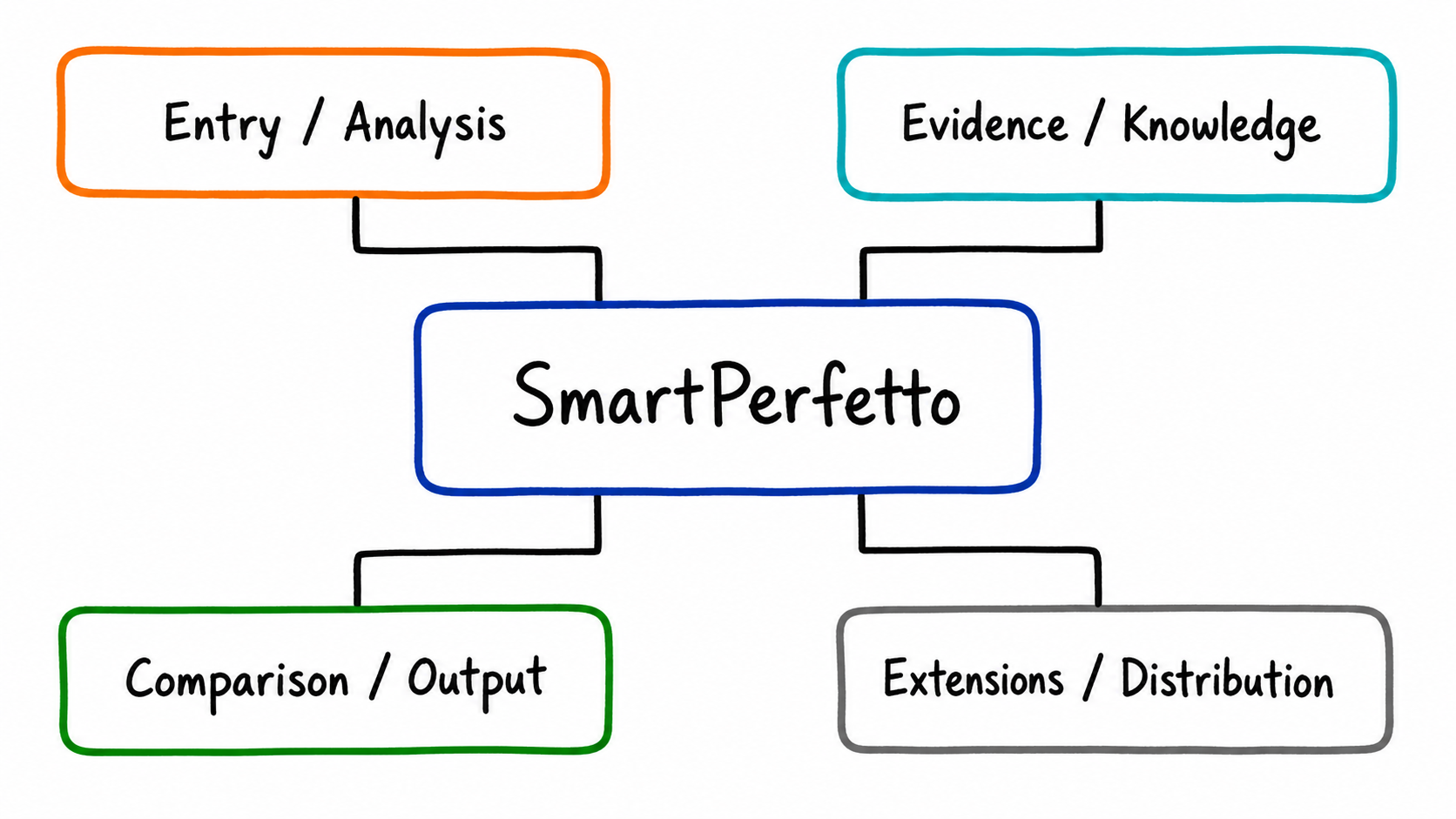
As of v1.1.1, SmartPerfetto’s complete feature map is organized into eight layers: “entry points → analysis → evidence and quality → knowledge → comparison and code awareness → output → extensibility and governance → distribution.”
| Layer | Feature | Description |
|---|---|---|
| Entry points | Perfetto UI AI Assistant | The forked Perfetto UI includes a built-in AI panel/sidebar/floating window, placing timeline inspection and AI analysis on the same screen |
| Smart Mode | Reconstructs the scene timeline of a mixed trace, then lets users drill into all scenes or an individual one (startup/scroll/click/navigation/ANR, and more) | |
| Selection-based quick questions | Select a timeline region or slice and ask questions against that selected context | |
| Dual-trace comparison workspace | Loads the current and historical traces side by side, allowing AI to compare them in real time within the same session | |
| CLI | smp run / ask / repl / capture / compare / report / query / skill / doctor, including Android capture presets and automatic post-capture analysis |
|
| HTTP + SSE API | /api/agent/v1/*, /api/traces/*, and /api/reports/* for integrations and the frontend |
|
| Batch analysis | Batch submission, concurrency control, and result aggregation, including aggregate reports for heap clusters | |
| Analysis | Three analysis modes | fast (lightweight direct answers) / full (complete planning + verification) / auto (semantic routing) |
| Quick Mode evidence-backed direct answer | Zero-round direct answers from deterministic evidence collection, with sentence-level data citations and an analysis receipt | |
| Scene strategies | 21 Markdown scene strategies (including the final report contract), with scene classification driven by frontmatter | |
| YAML Skill engine | 239 deterministic Skills (atomic/composite/deep/modules/pipelines/comparison), with L1-L4 tiered results | |
| Rendering pipeline detection and guidance | Covers View, Compose, Flutter, WebView, game, and other pipeline types, with authoritative Android 17 knowledge (S01-S14) available to the runtime | |
| Four Agent runtimes | claude-agent-sdk / openai-agents-sdk / pi-agent-core / opencode, with a unified run specification, MCP tool registry, and plan evidence log | |
| Provider management | Manages multiple Provider profiles in the UI, with runtime switching, session-level binding, and environment isolation | |
| Evidence and quality | DataEnvelope structured results | A self-describing table/chart contract rendered by the frontend from its schema and consumed by reports, snapshots, and the CLI |
| Evidence contracts and conclusion validation | Conclusions must be backed by Skill/SQL evidence; deterministic conclusions are validated individually, with process and thread identity resolution | |
| Report contract gates | Strategy frontmatter declares required report sections, and completeness is checked programmatically | |
| Validator and misdiagnosis pattern library | An independent validation pass in full mode, with misdiagnosis patterns loaded from strategy files | |
| SQL query review | An intermediate-representation review layer that blocks obviously incorrect queries before execution | |
| Knowledge | Perfetto SQL/stdlib index | Schema and standard-library symbol indexes plus knowledge-query tools, regenerated with each upstream sync |
| Case Knowledge and self-evolution | Curated case ingestion plus automatic pattern extraction from confirmed analyses (V1) | |
| Android Internals external knowledge base | Registers a local wiki checkout as a versioned knowledge source, with dual consent, metadata projection, and fail-closed enforcement | |
| Trace case corpus | A Trace/catalog.json catalog contract for scene regressions across real and deterministically constructed traces |
|
| Comparison and code awareness | Raw trace comparison | The dual-window workspace plus CLI smp compare, using the same backend comparison identity and evidence bundle |
| Comparison across analysis results | Compares the user’s completed snapshots across traces, windows, and workspaces | |
| Similar-case retrieval | Retrieves similar cases across analysis snapshots (MVP) | |
| Code-Aware source analysis | Registers local codebases and resolves symbols; the model sees only CodeRef metadata, while source text is visible only through permission-controlled endpoints; patch suggestions are validated with git apply --check |
|
| Output | Real-time SSE projection | Streams progress, conclusions, and UI navigation suggestions while keeping chat readable instead of burying it in raw SQL |
| HTML reports | Complete reports that preserve evidence, conclusion validation, identity resolution, and appendix details | |
| Analysis result snapshots | Persistent snapshots for later comparison, similar-case retrieval, and reinspection | |
| CLI Turn Artifacts | Session and report files under ~/.smartperfetto/ for scripted consumption |
|
| Extensibility and governance | External Skill packages | Skill package distribution and installation with a hash-verification chain |
| Capture configuration suggestions | Derives trace capture configuration suggestions from gaps in an analysis | |
| UI navigation suggestions | Structured navigation suggestions from AI that execute only after user confirmation | |
| AI capability controls and disclosure | Disables AI globally or per capability, with fail-closed enforcement when policy validation fails | |
| Public Skill export | Explicitly classified exports to the public Perfetto-Skills repository, guarded by a bidirectional impact review gate | |
| Distribution | Docker Hub | docker compose -f docker-compose.hub.yml up -d, with no host installation of Node.js required |
| Portable packages | Windows/macOS/Linux packages bundling Node.js 24 and a pinned trace processor | |
| npm CLI | npm install -g @gracker/smartperfetto, exposing the smp / smartperfetto commands |
|
| Source | ./start.sh, using the committed prebuilt UI without building the Perfetto submodule |
14. Release Timeline
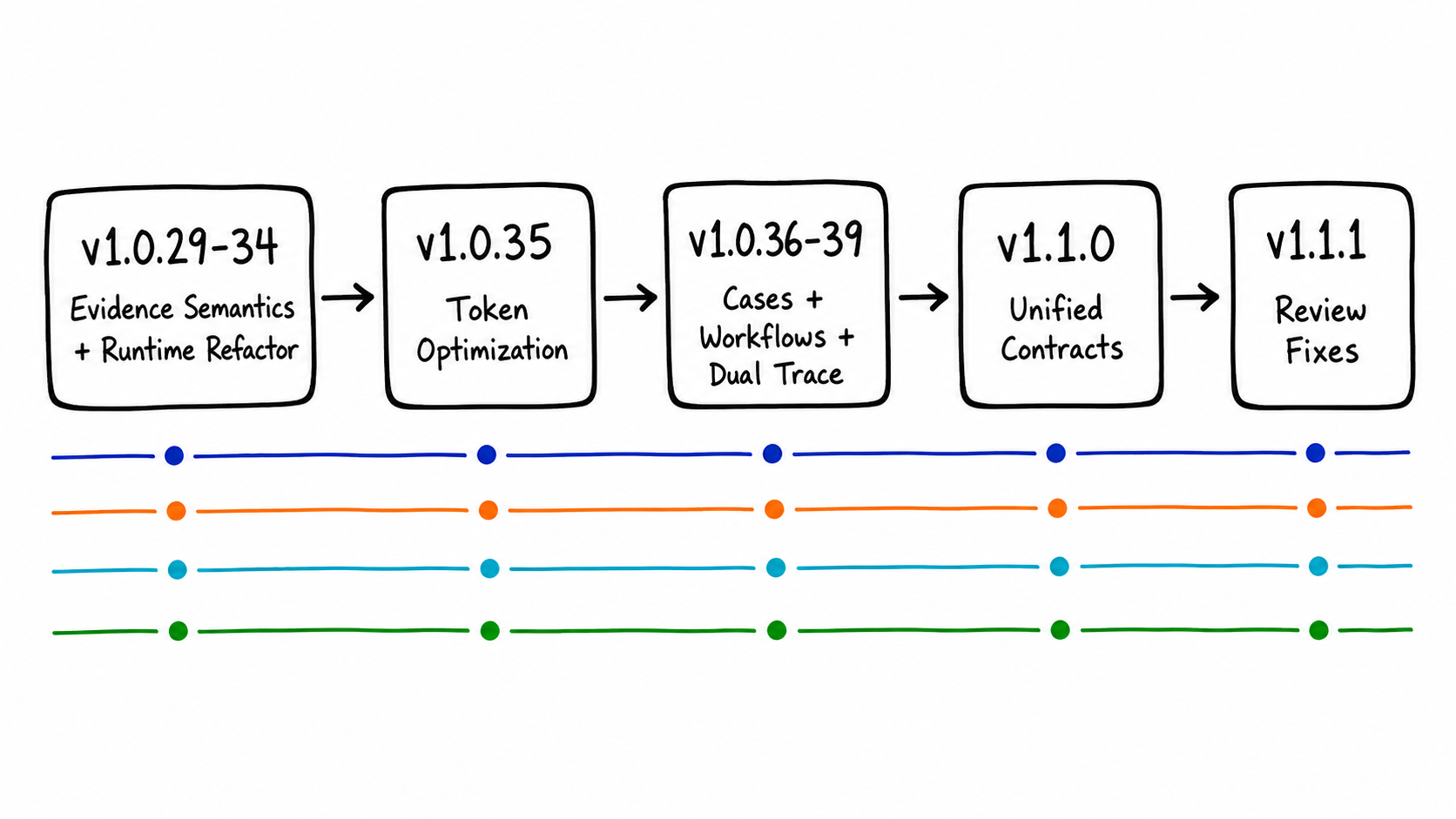
| Version | Date | Highlights |
|---|---|---|
| v1.0.29 | 2026-06-05 | Stronger evidence for memory analysis and corrected evidence semantics for thread blocking reasons |
| v1.0.30 | 2026-06-06 | Perfetto upstream sync to v56.0 |
| v1.0.31 | 2026-06-06 | Agent end-to-end verification moved to the real DeepSeek path |
| v1.0.32 | 2026-06-07 | Runtime engines organized into directories, end-to-end cancellation semantics, state continuation for third-party runtimes, and a validator misdiagnosis pattern library |
| v1.0.33 | 2026-06-07 | Runtime data excluded from portable packages |
| v1.0.34 | 2026-06-17 | DeepSeek trace analysis alignment and turn-budget adjustments |
| v1.0.35 | 2026-06-19 | Token optimizations shipped: strategy core/detail split, SQL summaries, compressed tool descriptions, and cache boundaries |
| v1.0.36 | 2026-06-22 | Case Knowledge platform + self-evolution V1 + memory-layer fixes |
| v1.0.37 | 2026-06-22 | Fixed signing resources for macOS portable packages |
| v1.0.38 | 2026-07-04 | Productized Quick Mode direct answers and analysis receipts, refreshed Provider presets, and Perfetto v57.1 |
| v1.0.39 | 2026-07-11 | RFC-0025’s eight AI workflow surfaces and the dual-trace workspace |
| v1.1.0 | 2026-07-17 | Unified analysis context and runtime architecture, private-context authorization fingerprints, Camera/Heap/GPU scenes, Android 17 rendering knowledge, trace corpus, public Skill export, regression-gate CI, and Perfetto v57.2 |
| v1.1.1 | 2026-07-17 | Review-driven fixes for source-reference locatability, validator evidence binding, restored scroll-metric semantics, and more |
15. Try It and Send Feedback
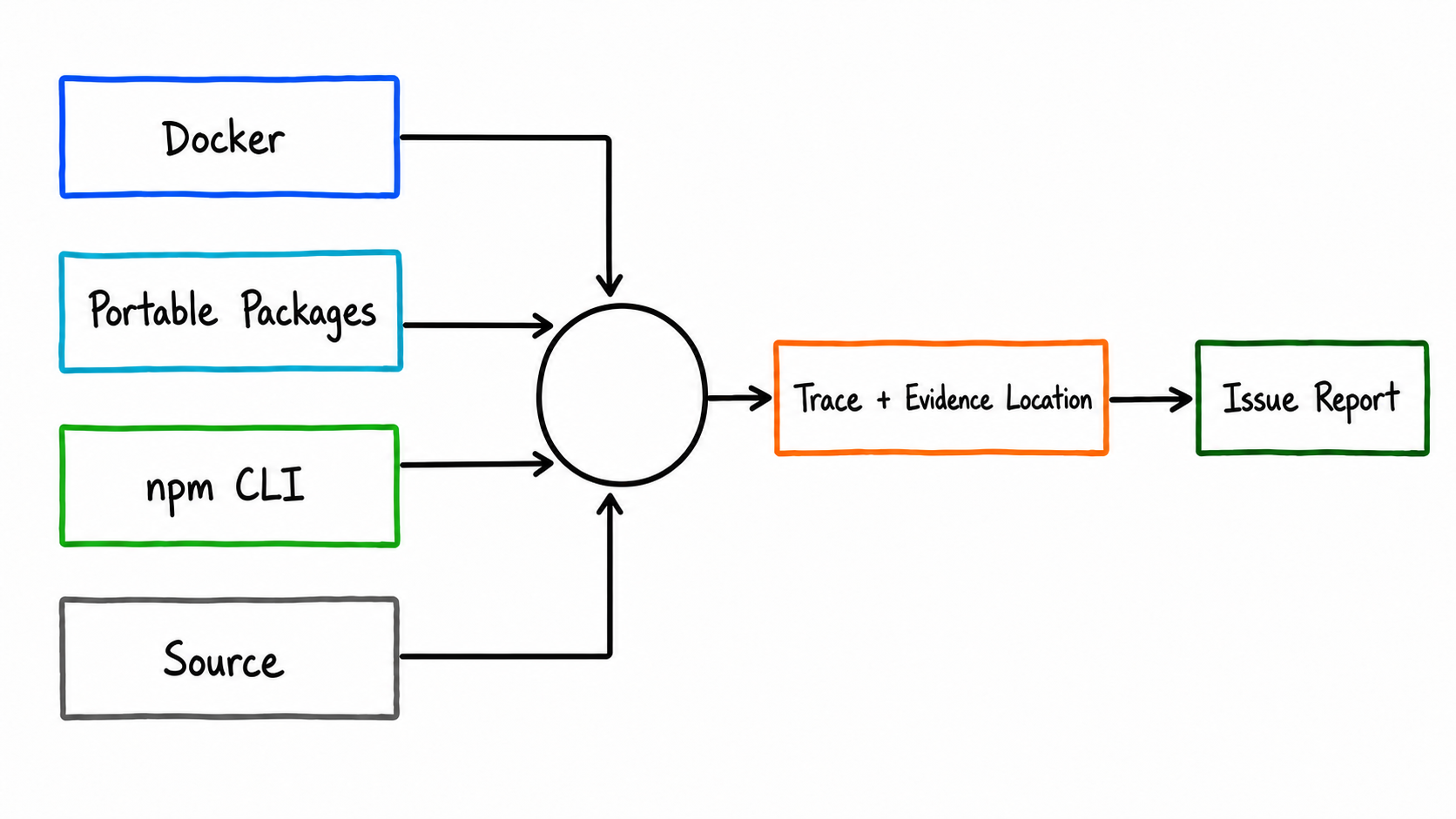
Choose the distribution format that fits your use case (see the repository README and docs/getting-started/quick-start.md for details):
- For the fastest trial: Use the Docker Hub image with
docker compose -f docker-compose.hub.yml up -d; no host installation of Node.js is required. - If you do not want Docker: Use a GitHub Release portable package for Windows, macOS, or Linux; it includes every runtime.
- For terminal and scripting workflows: Run
npm install -g @gracker/smartperfetto; Node.js 24 is required on the host. - If you want to modify the code: Check out the source and run
./start.sh; use./scripts/start-dev.shfor plugin UI development.
When reporting a bug, please include as much of the following as possible: a reproducible trace, the exact evidence location (timestamp/process/thread), and the difference between the expected and actual analysis conclusions. Issues that include a trace receive the highest priority.
SmartPerfetto Discussion Group
Scan the QR code to join the SmartPerfetto discussion group for trace analysis, bug reports, and collaboration:

If the group QR code is full or expired, add me on WeChat at 553000664 and include SmartPerfetto in the note. I will invite you to the group.