

SmartPerfetto v1.15.1 is a patch release for v1.15, adding native SQLite installation diagnostics, isolated test data and stronger npm consumer installation checks. It retains the per-turn source and document selection, answer delivery and verification introduced in v1.15.
Upgrading from v1.14 also brings process-instance isolation, presentation cadence, heap-dump growth and CPU cluster load corrections. The built-in Android Internals Wiki Pack and several retired APIs have been removed, so existing integrations should check the migration notes.
Project: Gracker/SmartPerfetto.

v1.15.1: check SQLite after installation and isolate test data
smp doctor --format json now includes sqlite_native: it opens an isolated in-memory SQLite database, executes SELECT 1 and closes the connection. Missing native bindings, query failures and close failures are errors, even with AI disabled. This probe does not read the user’s persisted session database. Successful --version and --help commands do not establish that the native database works.
The public npm installation smoke now performs real operations. In a separate consumer project, it explicitly approves reviewed dependency versions, checks doctor’s SQLite result and executes a real SQL query against a trace fixture pinned to an immutable revision. The publisher’s allowScripts does not authorize scripts for that consumer. If npm reports blocked or skipped dependency scripts, review them before approving the required packages for your installation context. See the CLI installation guide and npm install policy. The behavior depends on the npm version and configuration; a version number alone does not establish that scripts were blocked.
The affected tests use their own temporary databases and data directories. Agent route integration fixtures configure database, Provider, log and scene artifact paths before importing runtime modules, then finish owned sessions, streams and stores before removing temporary directories. These fixtures no longer depend on the default user database, and log cleanup stays within their fixture directories.
Select context beside the composer
The source and knowledge selection controls now sit beside the input field. Open the context popover to select codebases and documents for the current turn. The management view handles directory registration, scope changes and optional indexes.
Source lookup works on demand without waiting for a complete project index. Search prioritizes declarations and trace sites; the model can also discover files and read around a line before binding a finding to its source location. Source depth offers automatic, quick-location and full-analysis options to control the lookup budget.
Lookup budgets and provider-send authorization have separate roles. The source scope, file types and permission to send content must be disclosed and confirmed. Authorization is checked again before each model dispatch. Document knowledge bases require their own provider-send consent. A larger reading budget does not expand the granted scope.
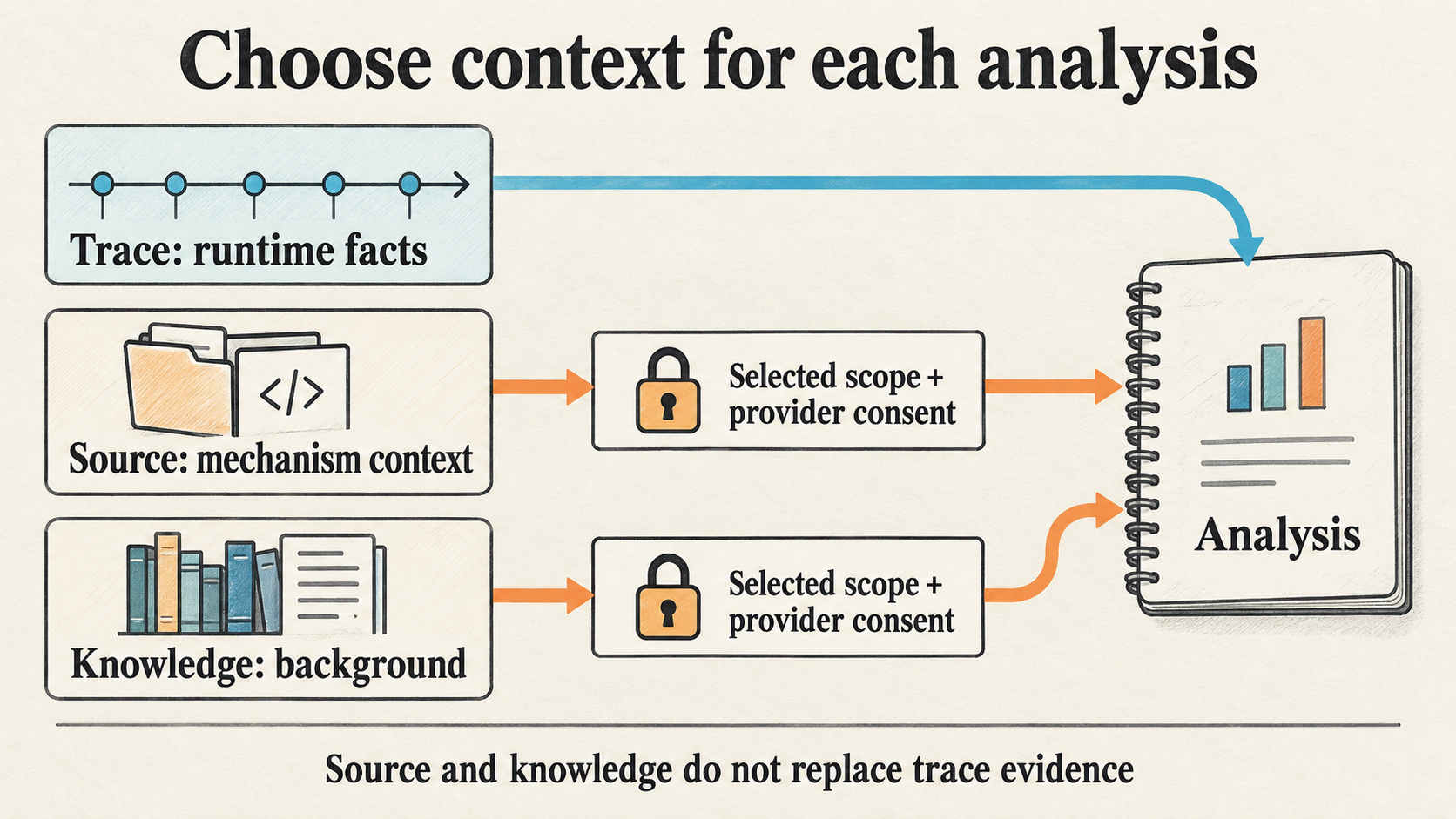
Trace supplies runtime facts, source explains implementation, and knowledge supplies background. The arrows show input roles, not a proof of causality.
For example, when a trace shows a main-thread wait, source can locate the corresponding implementation and documents can explain the system mechanism. Establishing who caused the wait and whether it delayed the selected scenario still requires scheduling, relationship and time-range evidence from that trace.
Use document folders as knowledge bases
You can now register an ordinary document folder and let the model search and read sections from selected knowledge bases. Web and CLI management cover registration, indexing, consent and deletion.
The Android Internals Wiki is now an ordinary document knowledge base. Register a document directory you have permission to use, then select it per turn. Installable packages no longer include the old signed Knowledge Pack, and smp knowledge-pack has been removed. Background references already saved in sessions and reports remain available.
The smp knowledge consent <id> --enable|--disable command added in v1.15 changes provider-send consent for an existing knowledge base. Web shows a confirmation before enabling consent. In the CLI, --enable grants consent and the successful response explains transmission, storage and provider retention. Actual document use is recorded separately.
Read the answer while verification completes
Runtimes that support answer streaming display a temporary draft while the model writes. Once the body is ready, the same message displays the finished answer, with a pending cue if semantic review is required. The terminal event supplies the final delivery status.
Drafts are live-only and are never saved as history. HTML reports, CLI artifacts and analysis snapshots continue to retain final conclusions, declarations and provenance for later inspection and comparison.
When a turn selects enabled source code or document knowledge, its reports and analysis snapshots are readable only by their creator and cannot be switched to workspace sharing. Text sent to an AI service remains subject to that service’s configuration and retention rules.
Stop behavior depends on the delivery stage. Before an answer has been delivered, stop cancels the run. Once the body is available and review is still running, the first stop ends only the review and retains an unverified result. A second Web stop enters the bounded force-stop path. In CLI text output, the first Ctrl-C after delivery also stops only review, but the second aborts the turn without saving it. A review stop that does not commit before the watchdog expires is also not saved. JSON and NDJSON do not emit drafts, and their first Ctrl-C aborts the turn.
Since v1.15, final delivery state is owned by the shared product finalizer across all five runtimes. Engines record native completion and select any bounded declaration repair or missing-body continuation. Final verification checks declarations against evidence and the answer body. Provider failures, timeouts, cancellation and verification failures keep distinct states.
Read presentation cadence alongside frame duration
Scrolling overviews now place presentation cadence beside frame duration. FrameTimeline markers, Buffer Stuffing, adjacent presentation intervals and doFrame start intervals retain their separate meanings.
This helps with high-refresh scenarios. A large population of Buffer Stuffing tags still requires checking whether presentation is regular and whether Missed or Dropped evidence is mixed in. When presentation observations are missing, the result states that they were not measured; doFrame start cadence does not become an on-screen presentation interval.
Click-response analysis distinguishes physical input, application delivery and monitor copies. Frame associations inferred from nearby timestamps remain candidates and are not counted as confirmed presentation responses.
Process isolation and CPU load corrections
Click-response, CPU and startup detail Skills support explicit process-instance scope using UPID, the process-instance identifier inside a trace. When an application restarts, evidence from its older instance cannot automatically be assigned to the new one, even if the package name is unchanged.
SQL regressions probe isolation from same-package processes, other processes and restarted instances. They check whether rows depend on the selected UPID, beyond checking that the query executes successfully.
Release review for v1.15 found two CPU cluster load errors. The denominator previously excluded suspend while clipped Running spans still used wall-clock duration, allowing a regression fixture to report 200% load. Both sides now use monotonic time. If any conversion is unavailable, both sides fall back to wall-clock time together. A fully suspended window reports zero awake time, zero active cores and no load percentage.
The other error affected multi-machine traces: CPU 0 on two machines cannot be counted as one core. Unresolved machine identity or ambiguous CPU metadata now produces an explicit unavailable reason and null metrics. A single machine with unknown capacity remains measurable. The fix does not clamp invalid percentages to 100%.
Heap-dump analysis also covers first-to-last class growth, reachable instances and dominated size. Framework process state, wakelock, standby, freezer and lock-holder intervals retain explicit data and capability limits.
Check retired entry points before upgrading
| Previous entry or configuration | Behavior since v1.15 |
|---|---|
Built-in Wiki Pack and smp knowledge-pack |
Register an ordinary document knowledge base and select it per turn |
/api/perfetto-sql/*, /api/template-analysis/*, /api/sql/* |
Return 410; follow the response’s migration information to a Skill or workspace Agent route. Some entries have no direct successor; check the new request contract |
/api/perfetto/* |
Removed, returning 404; use the Trace API for upload and loading |
Custom Skill ai_summary, ai_decision and ai_assist |
Model-calling Skill steps are unsupported and rejected by validation |
| Old Claude verifier timeout and verification toggle | Removed; the shared delivery flow owns final verification |
Source deployments also close an access-control gap. In development mode, the old /uploads static route could serve files without API authentication or ownership checks to someone who knew the trace ID. That route is removed; trace downloads use the protected Trace API. Default Docker and portable configurations use production mode and were not exposed through this route.
The source entry point remains ./start.sh, which consumes the committed frontend prebuild. The npm CLI requires Node.js 24; portable packages bundle their runtime. Existing data directories and Provider settings follow their respective migration rules.
Download and interpret verification results
Use the v1.15.1 release page for Windows x64, macOS arm64 and Linux x64 portable packages. Terminal users can install the exact version:
1 | npm install -g @gracker/smartperfetto@1.15.1 |
Project tests exercise deterministic execution, SQL semantics, identity isolation and delivery contracts. Real-provider results require separate inspection. In long startup reports, a model can still produce body values that differ from its declarations or make undeclared assertions. Verification marks such answers as partial or unverified. This also occurred in the current DeepSeek run; the answer body and the failure reasons are retained.
The current OpenCode startup run also returned a declaration without a usable answer body, which finalization rejected. The saved evidence does not establish which part of its body continuation failed, so no software regression has been confirmed. The OpenAI scrolling run did not pass declared-fact acceptance either. These runs do not establish successful real-provider long-report acceptance across all runtimes.
For complete changes and migration details, see the Changelog, usage guide and code-aware analysis guide.